
agents-from-scratch
https://github.com/fanqingsong/agents-from-scratch
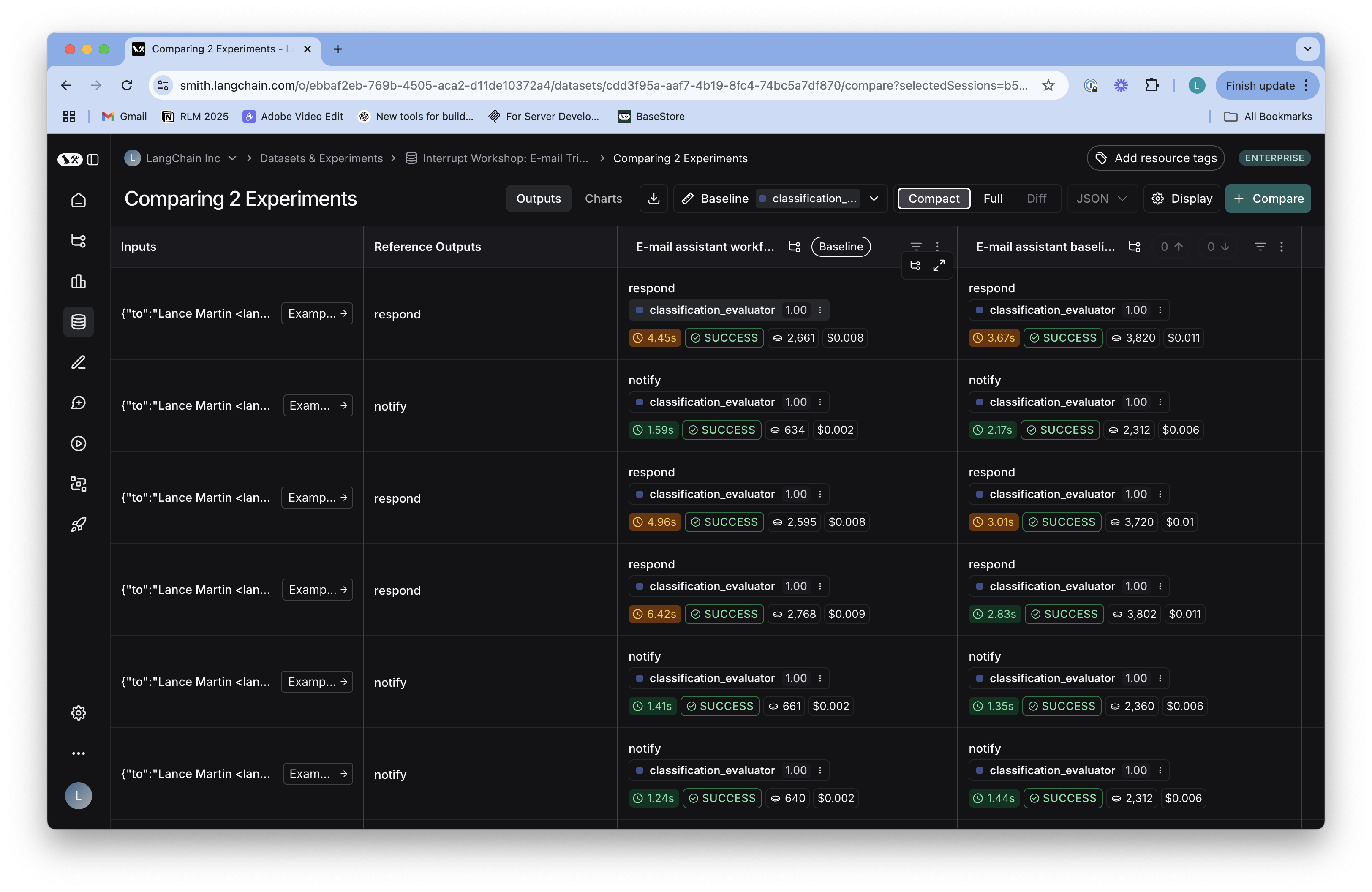
The repo is a guide to building agents from scratch. It builds up to an "ambient" agent that can manage your email with connection to the Gmail API. It's grouped into 4 sections, each with a notebook and accompanying code in the src/email_assistant directory. These section build from the basics of agents, to agent evaluation, to human-in-the-loop, and finally to memory. These all come together in an agent that you can deploy, and the principles can be applied to other agents across a wide range of tasks.
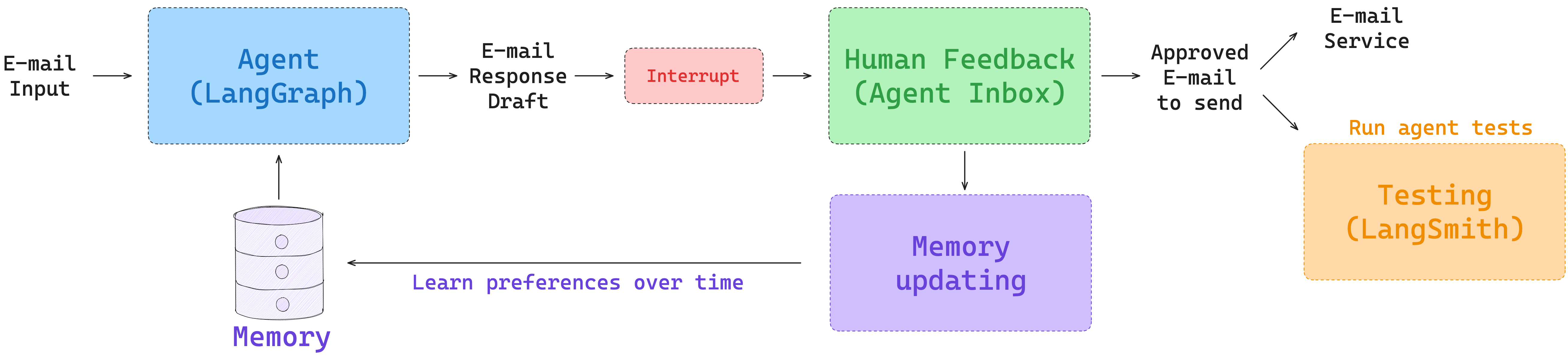
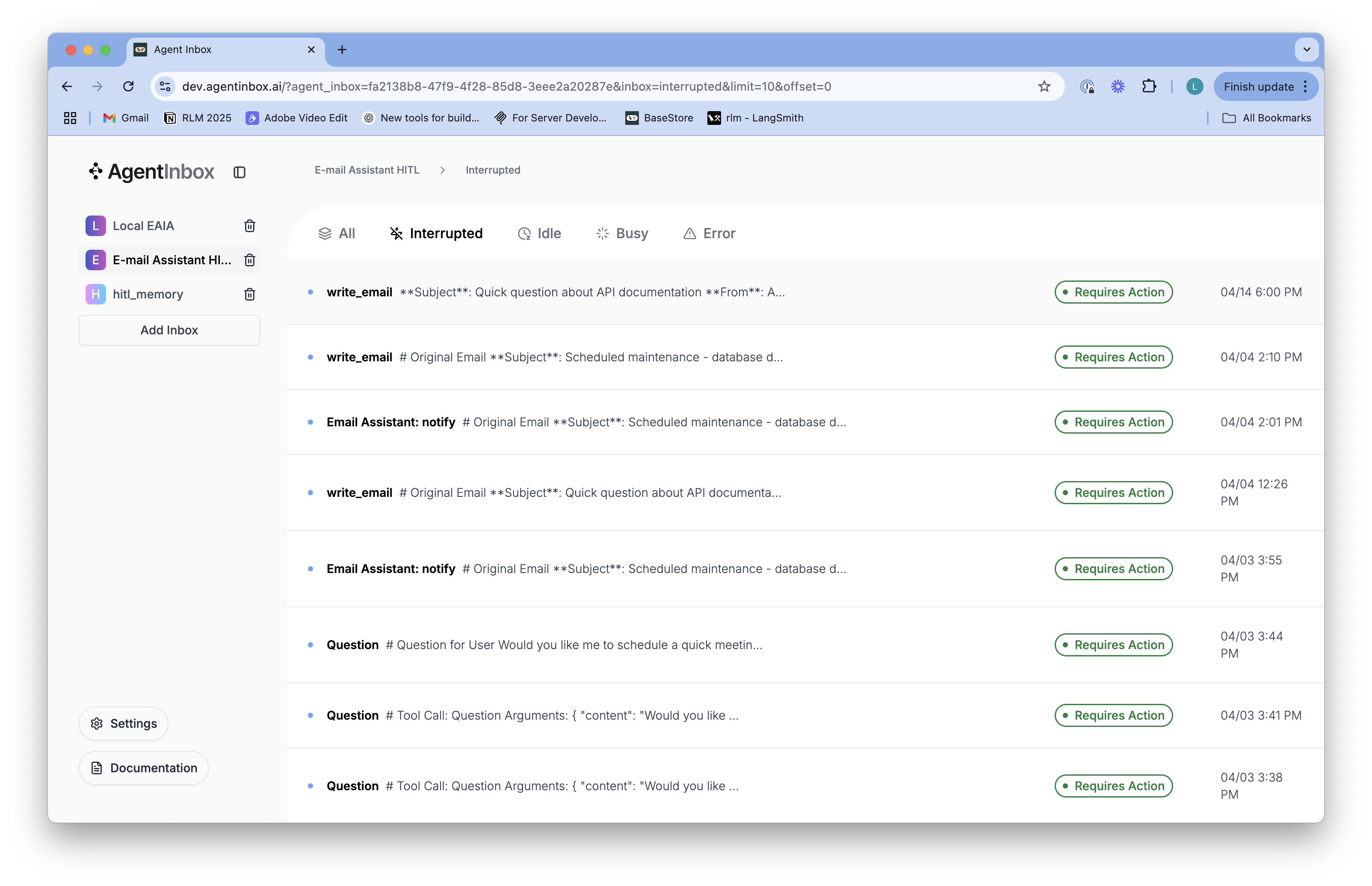
HITL
https://langchain-ai.github.io/langgraph/how-tos/human_in_the_loop/add-human-in-the-loop/#pause-using-interrupt
from langgraph.types import interrupt, Commanddef human_node(state: State):value = interrupt( {"text_to_revise": state["some_text"] })return {"some_text": value }graph = graph_builder.compile(checkpointer=checkpointer) # Run the graph until the interrupt is hit.
config = {"configurable": {"thread_id": "some_id"}}
result = graph.invoke({"some_text": "original text"}, config=config)
print(result['__interrupt__'])
# > [
# >    Interrupt(
# >       value={'text_to_revise': 'original text'},
# >       resumable=True,
# >       ns=['human_node:6ce9e64f-edef-fe5d-f7dc-511fa9526960']
# >    )
# > ]print(graph.invoke(Command(resume="Edited text"), config=config))
# > {'some_text': 'Edited text'}
https://docs.langchain.com/oss/python/langgraph/interrupts#full-example
Common patterns
The key thing that interrupts unlock is the ability to pause execution and wait for external input. This is useful for a variety of use cases, including:
- Approval workflows: Pause before executing critical actions (API calls, database changes, financial transactions)
- Review and edit: Let humans review and modify LLM outputs or tool calls before continuing
- Interrupting tool calls: Pause before executing tool calls to review and edit the tool call before execution
- Validating human input: Pause before proceeding to the next step to validate human input
import sqlite3
from typing import Literal, Optional, TypedDictfrom langgraph.checkpoint.memory import MemorySaver
from langgraph.graph import StateGraph, START, END
from langgraph.types import Command, interruptclass ApprovalState(TypedDict):action_details: strstatus: Optional[Literal["pending", "approved", "rejected"]]def approval_node(state: ApprovalState) -> Command[Literal["proceed", "cancel"]]:# Expose details so the caller can render them in a UIdecision = interrupt({"question": "Approve this action?","details": state["action_details"],})# Route to the appropriate node after resumereturn Command(goto="proceed" if decision else "cancel")def proceed_node(state: ApprovalState):return {"status": "approved"}def cancel_node(state: ApprovalState):return {"status": "rejected"}builder = StateGraph(ApprovalState)
builder.add_node("approval", approval_node)
builder.add_node("proceed", proceed_node)
builder.add_node("cancel", cancel_node)
builder.add_edge(START, "approval")
builder.add_edge("approval", "proceed")
builder.add_edge("approval", "cancel")
builder.add_edge("proceed", END)
builder.add_edge("cancel", END)# Use a more durable checkpointer in production
checkpointer = MemorySaver()
graph = builder.compile(checkpointer=checkpointer)config = {"configurable": {"thread_id": "approval-123"}}
initial = graph.invoke({"action_details": "Transfer $500", "status": "pending"},config=config,
)
print(initial["__interrupt__"])  # -> [Interrupt(value={'question': ..., 'details': ...})]# Resume with the decision; True routes to proceed, False to cancel
resumed = graph.invoke(Command(resume=True), config=config)
print(resumed["status"])  # -> "approved"
use-subgraphs
https://docs.langchain.com/oss/python/langgraph/use-subgraphs
When adding subgraphs, you need to define how the parent graph and the subgraph communicate:
- Invoke a graph from a node — subgraphs are called from inside a node in the parent graph
- Add a graph as a node — a subgraph is added directly as a node in the parent and shares state keys with the parent
from typing_extensions import TypedDict
from langgraph.graph.state import StateGraph, STARTclass SubgraphState(TypedDict):bar: str# Subgraphdef subgraph_node_1(state: SubgraphState):return {"bar": "hi! " + state["bar"]}subgraph_builder = StateGraph(SubgraphState)
subgraph_builder.add_node(subgraph_node_1)
subgraph_builder.add_edge(START, "subgraph_node_1")
subgraph = subgraph_builder.compile()# Parent graphclass State(TypedDict):foo: strdef call_subgraph(state: State):# Transform the state to the subgraph statesubgraph_output = subgraph.invoke({"bar": state["foo"]})  # Transform response back to the parent statereturn {"foo": subgraph_output["bar"]}builder = StateGraph(State)
builder.add_node("node_1", call_subgraph)
builder.add_edge(START, "node_1")
graph = builder.compile()
from typing_extensions import TypedDict
from langgraph.graph.state import StateGraph, STARTclass State(TypedDict):foo: str# Subgraphdef subgraph_node_1(state: State):return {"foo": "hi! " + state["foo"]}subgraph_builder = StateGraph(State)
subgraph_builder.add_node(subgraph_node_1)
subgraph_builder.add_edge(START, "subgraph_node_1")
subgraph = subgraph_builder.compile()# Parent graph

builder = StateGraph(State)
builder.add_node("node_1", subgraph)
builder.add_edge(START, "node_1")
graph = builder.compile()


![[C++]内存管理:串顺序存储的内存回收](http://pic.xiahunao.cn/yaotu/[C++]内存管理:串顺序存储的内存回收)

:ArkUI 首页仪表盘搭建)