
介绍
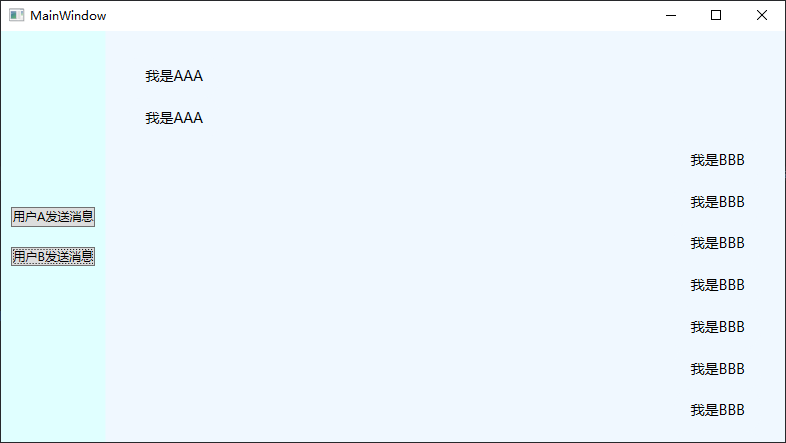
为了突出重点,本文只介绍具体的实现方法。不去过多美化控件样式了。总体实现效果大概如下图所示。双方的消息会分别显示在两侧,然后消息框会随着消息的出现自动下拉。
实现方法
大体思路是,通过编写自定义控件重写ListBox的GetContainerForItemOverride方法,根据Items中不同的消息类型创建不同的容器,将消息分别显示在两侧。
样式编写
-
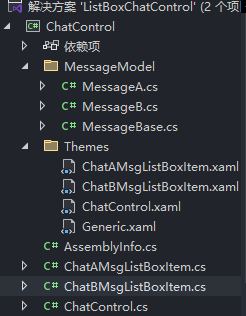
首先在WPF项目中创建一个自定义控件库,在这里面定义ListBox,以及不同消息的Container的样式。项目结构如下。(添加的MessageModel是在
GetContainerForItemOverride会用到的消息类型。)
-
创建自定义控件后,在Themes中创建对应的资源字典文件,其中编写对应控件的样式。由于过程很简单,我就直接给出这4个资源字典的内容。
ChatAMsgListBoxItem
<ResourceDictionaryxmlns="http://schemas.microsoft.com/winfx/2006/xaml/presentation"xmlns:x="http://schemas.microsoft.com/winfx/2006/xaml"xmlns:units="clr-namespace:ChatControl"><Style TargetType="units:ChatAMsgListBoxItem"><Setter Property="Template"><Setter.Value><ControlTemplate TargetType="units:ChatAMsgListBoxItem"><StackPanel MaxWidth="400" HorizontalAlignment="Left"><Borderx:Name="MessageBorder"Padding="16,12,16,12"Background="AliceBlue"CornerRadius="16,16,16,4"><TextBlockx:Name="MessageText"FontSize="14"Foreground="Black"Text="{Binding Msg}"TextWrapping="Wrap" /></Border></StackPanel></ControlTemplate></Setter.Value></Setter></Style>
</ResourceDictionary>
ChatBMsgListBoxItem
<ResourceDictionaryxmlns="http://schemas.microsoft.com/winfx/2006/xaml/presentation"xmlns:x="http://schemas.microsoft.com/winfx/2006/xaml"xmlns:units="clr-namespace:ChatControl"><Style TargetType="units:ChatBMsgListBoxItem"><Setter Property="Template"><Setter.Value><ControlTemplate TargetType="units:ChatBMsgListBoxItem"><!--  让这个Container在 ItemsPanel中靠右对齐  --><StackPanel MaxWidth="400" HorizontalAlignment="Right"><Borderx:Name="MessageBorder"Padding="16,12,16,12"Background="AliceBlue"CornerRadius="16,16,16,4"><TextBlockx:Name="MessageText"FontSize="14"Foreground="Black"Text="{Binding Msg}"TextWrapping="Wrap" /></Border></StackPanel></ControlTemplate></Setter.Value></Setter></Style>
</ResourceDictionary>
ChatControl
<ResourceDictionaryxmlns="http://schemas.microsoft.com/winfx/2006/xaml/presentation"xmlns:x="http://schemas.microsoft.com/winfx/2006/xaml"xmlns:units="clr-namespace:ChatControl"><Style TargetType="units:ChatControl"><Setter Property="Background" Value="Transparent" /><Setter Property="Template"><Setter.Value><ControlTemplate TargetType="units:ChatControl"><ScrollViewer Grid.Row="1" Background="AliceBlue" HorizontalScrollBarVisibility="Hidden" VerticalScrollBarVisibility="Hidden"><ItemsPresenter Margin="24" /></ScrollViewer></ControlTemplate></Setter.Value></Setter></Style>
</ResourceDictionary>
Generic
<ResourceDictionaryxmlns="http://schemas.microsoft.com/winfx/2006/xaml/presentation"xmlns:x="http://schemas.microsoft.com/winfx/2006/xaml"xmlns:local="clr-namespace:ChatControl"><ResourceDictionary.MergedDictionaries><ResourceDictionary Source="/ChatControl;component/Themes/ChatControl.xaml" /><ResourceDictionary Source="/ChatControl;component/Themes/ChatAMsgListBoxItem.xaml" /><ResourceDictionary Source="/ChatControl;component/Themes/ChatBMsgListBoxItem.xaml" /></ResourceDictionary.MergedDictionaries></ResourceDictionary>最后一定要把资源字典文件添加到Generic.xaml文件中,才能正确显示我们在当前项目中编写的自定义控件。
- 在ChatControl控件中重写,我们之前说的方法,并为其添加一个自动下滑的行为事件。这是我认为这种实现方法下最困难的一步,ListBox中的Items为ItemCollection类型,虽然其实现了INotifyCollectionChanged接口,但它是显示实现的,我们必须将其转换为INotifyCollectionChanged类型,才能订阅CollectionChanged事件,实现自动下滑。
点击查看代码
using ListBoxChatControl.MessageModel;
using System.Collections.Specialized;
using System.Net.Mail;
using System.Text;
using System.Windows;
using System.Windows.Controls;
using System.Windows.Data;
using System.Windows.Documents;
using System.Windows.Input;
using System.Windows.Media;
using System.Windows.Media.Imaging;
using System.Windows.Navigation;
using System.Windows.Shapes;namespace ChatControl
{public class ChatControl : ListBox{private int _currentItemIndex;public ChatControl(){DefaultStyleKeyProperty.OverrideMetadata(typeof(ChatControl), new FrameworkPropertyMetadata(typeof(ChatControl)));_currentItemIndex = -1;ListBoxAutoScrollBehavior.SetAutoScroll(this,true);}protected override DependencyObject GetContainerForItemOverride(){if (Items.Count > 0){var currentItem = Items[Items.Count - 1];if (currentItem is MessageA){return new ChatAMsgListBoxItem();}else if (currentItem is MessageB){return new ChatBMsgListBoxItem();}}return base.GetContainerForItemOverride();}protected override void OnItemsChanged(NotifyCollectionChangedEventArgs e){base.OnItemsChanged(e);_currentItemIndex = -1;}}public static class ListBoxAutoScrollBehavior{public static readonly DependencyProperty AutoScrollProperty =DependencyProperty.RegisterAttached("AutoScroll",typeof(bool),typeof(ListBoxAutoScrollBehavior),new PropertyMetadata(false, OnAutoScrollChanged));public static bool GetAutoScroll(DependencyObject obj) =>(bool)obj.GetValue(AutoScrollProperty);public static void SetAutoScroll(DependencyObject obj, bool value) =>obj.SetValue(AutoScrollProperty, value);private static void OnAutoScrollChanged(DependencyObject d, DependencyPropertyChangedEventArgs e){if (d is ListBox listBox){if ((bool)e.NewValue){var items = listBox.Items;var ic = items as INotifyCollectionChanged;if (ic != null){//ItemCollection 显示实现INotifyCollectionChanged接口 只有转换为INotifyCollectionChanged接口才能订阅这个事件ic.CollectionChanged += (sender, args) =>{if (args.Action == NotifyCollectionChangedAction.Add){if (listBox.Items.Count > 0){listBox.ScrollIntoView(listBox.Items[listBox.Items.Count - 1]);}}};}}}}}
}
- 在前端使用我们的自定义控件。
点击查看代码
<Windowx:Class="ListBoxChatControl.MainWindow"xmlns="http://schemas.microsoft.com/winfx/2006/xaml/presentation"xmlns:x="http://schemas.microsoft.com/winfx/2006/xaml"xmlns:d="http://schemas.microsoft.com/expression/blend/2008"xmlns:local="clr-namespace:ListBoxChatControl"xmlns:mc="http://schemas.openxmlformats.org/markup-compatibility/2006"xmlns:units="clr-namespace:ChatControl;assembly=ChatControl"Title="MainWindow"Width="800"Height="450"mc:Ignorable="d"><Window.DataContext><local:MainViewModel /></Window.DataContext><Window.Resources><ResourceDictionary><ResourceDictionary.MergedDictionaries /><Style TargetType="ListBoxItem"><Setter Property="Template"><Setter.Value><ControlTemplate TargetType="ListBoxItem"><Border><ContentPresenter /></Border></ControlTemplate></Setter.Value></Setter></Style></ResourceDictionary></Window.Resources><Grid Background="LightCyan"><Grid.ColumnDefinitions><ColumnDefinition Width="auto" /><ColumnDefinition Width="*" /></Grid.ColumnDefinitions><StackPanelGrid.Column="0"VerticalAlignment="Center"Orientation="Vertical"><ButtonMargin="10"Command="{Binding SendAMessageCommand}"Content="用户A发送消息" /><ButtonMargin="10"Command="{Binding SendBMessageCommand}"Content="用户B发送消息" /></StackPanel><units:ChatControlGrid.Column="1"ItemsSource="{Binding MsgList}"/></Grid>
</Window>


![[C++]内存管理:串顺序存储的内存回收](http://pic.xiahunao.cn/yaotu/[C++]内存管理:串顺序存储的内存回收)

:ArkUI 首页仪表盘搭建)