
1,安装python环境和编辑器软件

2,打开编辑器

3,安装打包插件:
pip install pyinstaller
import tkinter
import webbrowser# python + pycharm
class VIPVideoApp:def __init__(self, root):self.root = rootself.root.title('VIP追剧神器')self.root.geometry('480x200')self.create_widgets()def create_widgets(self):# 提示标签label_movie_link = tkinter.Label(self.root, text='输入视频网址:')label_movie_link.place(x=20, y=30, width=100, height=30)# 输入框self.entry_movie_link = tkinter.Entry(self.root)self.entry_movie_link.place(x=125, y=30, width=260, height=30)# 清空按钮button_movie_link = tkinter.Button(self.root, text='清空', command=self.empty)button_movie_link.place(x=400, y=30, width=50, height=30)# 按钮控件button_movie1 = tkinter.Button(self.root, text='爱奇艺', command=self.open_iqy)button_movie1.place(x=25, y=80, width=80, height=40)button_movie2 = tkinter.Button(self.root, text='腾讯视频', command=self.open_tx)button_movie2.place(x=125, y=80, width=80, height=40)button_movie3 = tkinter.Button(self.root, text='优酷视频', command=self.open_yq)button_movie3.place(x=225, y=80, width=80, height=40)button_movie = tkinter.Button(self.root, text='播放VIP视频', command=self.play_video)button_movie.place(x=325, y=80, width=125, height=40)# 提示标签text = '提示:本案例仅供学习使用,不可作为他用。'lab_remind = tkinter.Label(self.root, text=text, fg='red', font=('Arial', 15, 'bold'))lab_remind.place(x=50, y=150, width=400, height=30)# 设置窗口大小
        self.root.resizable()def open_iqy(self):webbrowser.open('https://www.iqiyi.com')def open_tx(self):webbrowser.open('https://v.qq.com')def open_yq(self):webbrowser.open('https://www.youku.com/')def play_video(self):video = self.entry_movie_link.get()webbrowser.open('https://jx.xmflv.cc/?url=' + video)def empty(self):self.entry_movie_link.delete(0, 'end')if __name__ == '__main__':root = tkinter.Tk()app = VIPVideoApp(root)root.mainloop()
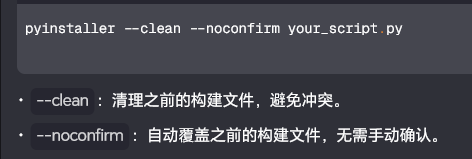
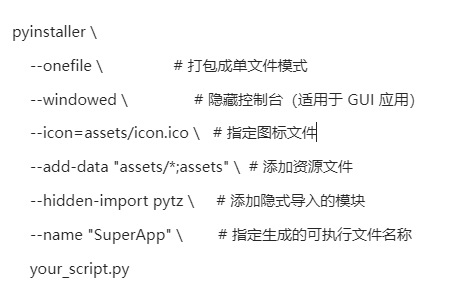
4,打包命令
pyinstaller --clean --noconfirm your_script.py
pyinstaller --onefile --windowed --name "SuperApp" VIPMovie/VIPmovie.py
5,Demo 效果预览


![[C++]内存管理:串顺序存储的内存回收](http://pic.xiahunao.cn/yaotu/[C++]内存管理:串顺序存储的内存回收)

:ArkUI 首页仪表盘搭建)