
硬件: ESP-WROOM-32E
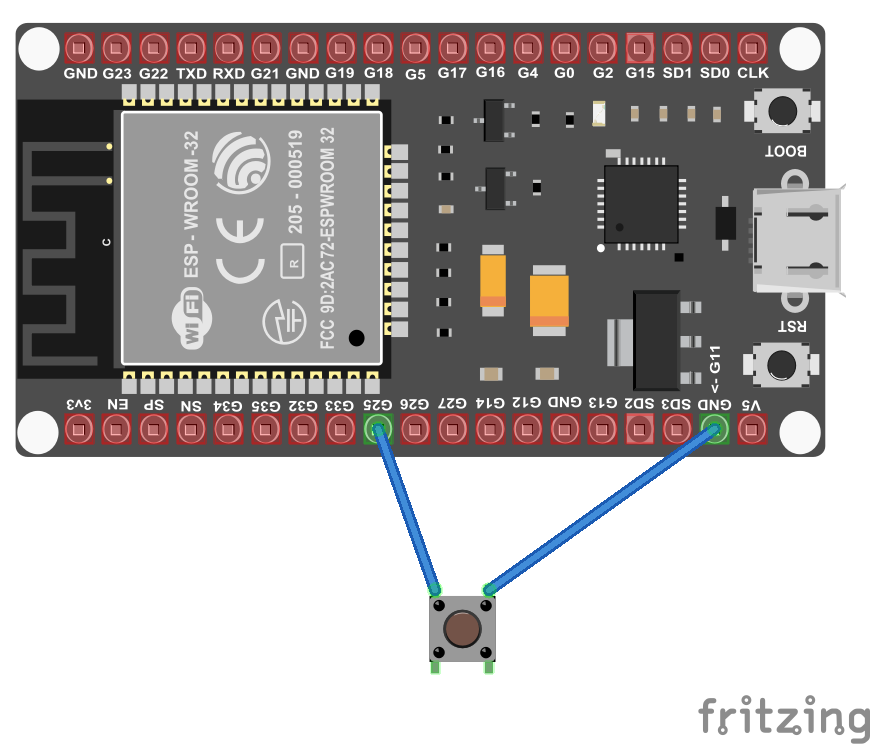
1.闪灯
public class Program{public static void Main(){//单闪GpioPin led = new GpioController().OpenPin(15, PinMode.Output);led.Write(PinValue.Low);while (true){led.Toggle();Thread.Sleep(125);led.Toggle();Thread.Sleep(125);led.Toggle();Thread.Sleep(125);led.Toggle();Thread.Sleep(525);}Thread.Sleep(Timeout.Infinite);}}
2.闪自带蓝灯
  public class Program{public static void Main(){//闪蓝光GpioPin led = new GpioController().OpenPin(2, PinMode.Output);while (true){// Turn on the LED
      led.Write(PinValue.High);Thread.Sleep(500);// Turn off the LED
      led.Write(PinValue.Low);Thread.Sleep(500);}Thread.Sleep(Timeout.Infinite);}}
3.按钮控制灯光
public class Program{public static void Main(){//按钮控制灯光Debug.WriteLine("Hello from nanoFramework!");var gpio = new GpioController();// Setup the GPIO pin to 2 as it is the embedded led in the ESP32// Open the pin in output mode// If your board has another pin, change here. If you are using an external led, change here as well.GpioPin led = gpio.OpenPin(15, PinMode.Output);// Initialize a new button with the corresponding button pin// You can adjust the pin number based on the pin you are using// As for the simple button sample, it is using pull up by defaultGpioButton button = new GpioButton(buttonPin: 13);Debug.WriteLine("Button is initialized, starting to read state");// Enable or disable holding or doublepress eventsbutton.IsDoublePressEnabled = true;button.IsHoldingEnabled = true;// Write to debug if the button is downbutton.ButtonDown += (sender, e) =>{Debug.WriteLine($"buttondown IsPressed={button.IsPressed}");led.Write(PinValue.High);};// Write to debug if the button is upbutton.ButtonUp += (sender, e) =>{Debug.WriteLine($"buttonup IsPressed={button.IsPressed}");led.Write(PinValue.Low);};// Write to debug if the button is pressedbutton.Press += (sender, e) =>{Debug.WriteLine($"Press");};// Write to debug if the button is double pressedbutton.DoublePress += (sender, e) =>{Debug.WriteLine($"Double press");};// Write to debug if the button is held and releasedbutton.Holding += (sender, e) =>{switch (e.HoldingState){case ButtonHoldingState.Started:Debug.WriteLine($"Holding Started");break;case ButtonHoldingState.Completed:Debug.WriteLine($"Holding Completed");break;}};Thread.Sleep(Timeout.Infinite);}}


)


![[C++]内存管理:串顺序存储的内存回收](http://pic.xiahunao.cn/yaotu/[C++]内存管理:串顺序存储的内存回收)

:ArkUI 首页仪表盘搭建)