
一、引言
1.1 简介
JavaScript一种解释性脚本语言,是一种动态类型、弱类型、基于原型继承的语言,内置支持类型。
它的解释器被称为JavaScript引擎,作为浏览器的一部分,广泛用于客户端的脚本语言,用来给HTML网页增加动态功能。
1.2 组成部分
ECMAScript语法。
文档对象模型(DOM Document Object Model)。
浏览器对象模型(BOM Browser Object Model)。
1.3 发展史
它是由Netscape公司的Brendan Eich用10天设计出来一门脚本语言,JavaScript是甲骨文公司的注册商标。完整的JavaScript实现包含三个部分:ECMAScript,文档对象模型,浏览器对象模型。
Netscape在最初将其脚本语言命名为LiveScript,后来Netscape在与Sun合作之后将其改名为JavaScript。JavaScript最初受Java启发而开始设计的,目的之一就是“看上去像Java”,因此语法上有类似之处,一些名称和命名规范也借自Java。但JavaScript的主要设计原则源自Self和Scheme。JavaScript与Java名称上的近似,是当时Netscape为了营销考虑与Sun微系统达成协议的结果。为了取得技术优势,微软推出了JScript来迎战JavaScript的脚本语言。
两者都属于ECMAScript的实现,为了互用性,ECAM(欧洲计算机制造商协会)创建了ECMA-262标准(ECMAScript)。ECMAScript最新版本是2015发布的 ECMAScript6(ES6)。
1.4 环境搭建
使用HBuilder进行页面开发
新建工程:文件->新建->Web项目

创建一个< script >< /script >标签
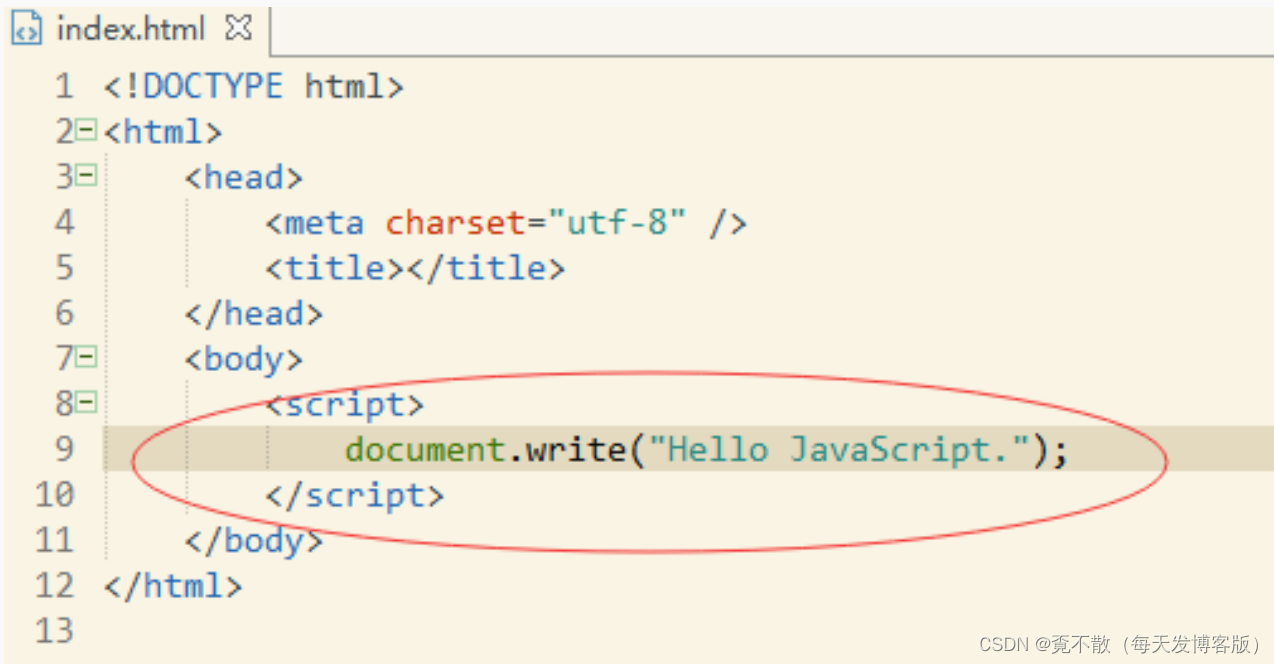
运行效果:

还可以使用外部引用的形式:把原本的JavaScript代码写到一个文件里,之后再引用过来。
<html><body><script src="js/my.js"></script></body>
</html>
二、基本语法
使用 document.write() 写入 HTML 输出。
使用 console.log() 写入浏览器控制台。
2.1 变量声明
在JavaScript中,任何变量都用var关键字来声明,var是variable的缩写。
var是声明关键字,a是变量名,语句以分号结尾。
这里值得注意的是,JavaScript中的关键字,不可以作为变量名。就像在Java中你不可以写"int int=1;"一样。
var a; JavaScript的部分关键字:
abstract、else、instanceof、super、boolean、enum、int、switch、break、export、
interface、synchronized、byte、extends、let、this、case、false、long、throw、catch、
final、native、throws、char、finally、new、transient、class、float、null、true、
const、for、package、try、continue、function、private、typeof、debugger、goto、
protected、var、default、if、public、void、delete、implements、return、volatile、
do、import、short、while、double、in、static、with。
2.2 基本类型
变量的基本类型又有Number、String、Boolean、Undefined、Null五种。
来声明一个数字Number类型,如下:
var a=1;
来声明一个字符串String类型。
你可以使用:
var a="1"; 来声明一个布尔Boolean类型。
你可以使用:
var a=false; 在Java中,当一个变量未被初始化的时候,Java中是null或者基本数据类型的默认值。
在JavaScript中,当一个变量未被初始化的时候,它的值为undefined。
下面是演示undefined的情况:(当一个引用不存在时,它为Null。这个现象我们在之后的引用类型时再详细探讨)
var a;
document.write(a);
2.3 引用类型
在Java中需要类定义,然后再实例对象:
public class Student{public int id;public String name;public int age;
}
public class Test{public static void main(String [] args){Student student=new Student();student.id=1;student.name="张三";student.age=18;}
}
在JavaScript中对象可以直接写出来:
var student={id:1,name:"张三",age:18};
document.write(student.id);
document.write(student.name);
document.write(student.age);
事实上,student被赋值为了一个JSON,JSON就是我们在Java基础阶段学过的,全称是JavaScript Object Notation,叫做JavaScript对象标记,也就是说,在JavaScript中,JSON是用于标记一个对象的。
2.4 数组类型
数组就是和我们之前理解的数组概念一致,而在JavaScript中成为Array类型。
我们说JSON可以标记一个对象,那么它同样可以标记一个数组,就是Java基础时我们学过的JSONArray。
var a=[1,2,3,4]; 上述代码,我们说a是一个数组,在a中角标为0的元素是1。可以说这很简单。
接下来我们来尝试把之前的JSON放入数组中:
//我是注释
/*我也是注释*/
var students = [{id: 1,name: "张三",age: 18},{id: 2,name: "李四",age: 18},{id: 3,name: "王五",age: 19}
];
document.write(students[0].id);
document.write(students[0].name);
document.write(students[0].age);
document.write("<br>");//这个是html的换行的意思
document.write(students[1].id);
document.write(students[1].name);
document.write(students[1].age);
document.write("<br>");
document.write(students[2].id);
document.write(students[2].name);
document.write(students[2].age);
运行结果
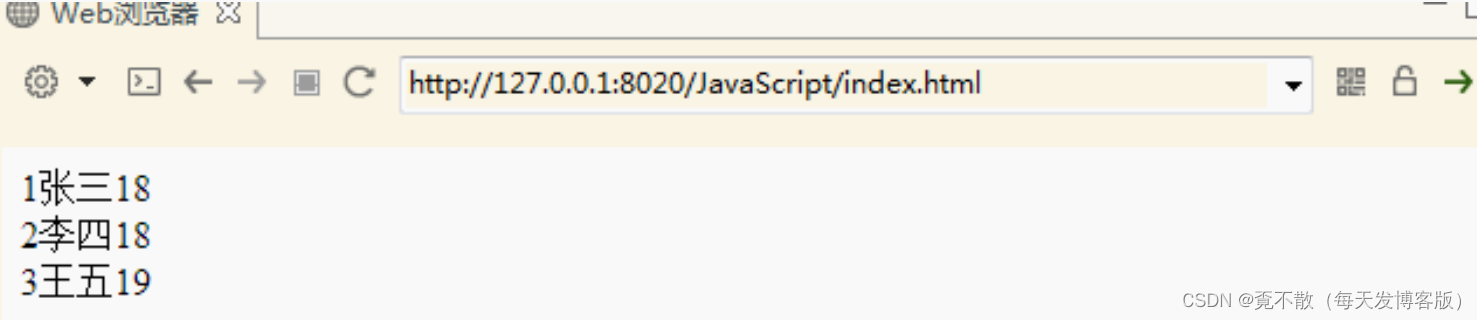
我们看到,访问students这个数组,第0个,第1个,第2个元素,都可以。
2.5 运算符
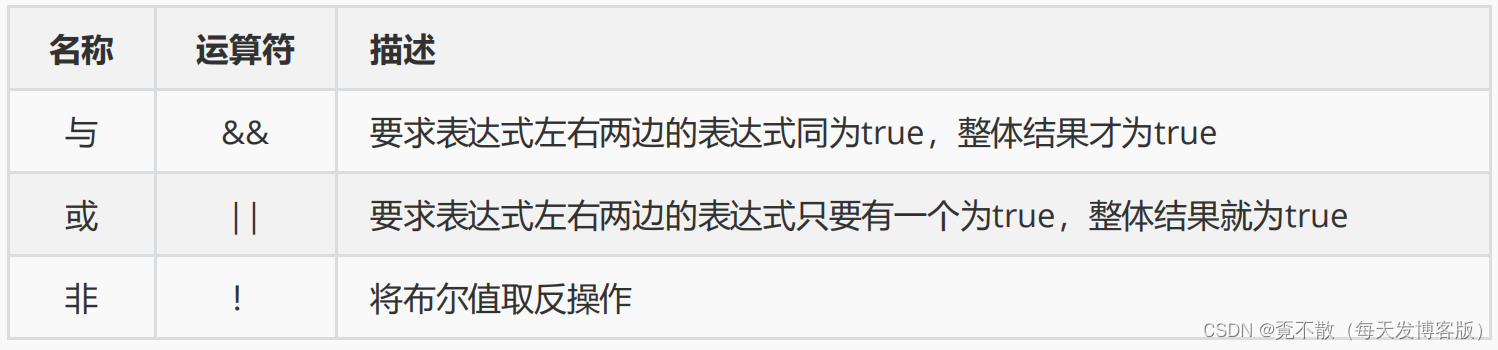
逻辑运算
var a=false;
var b=true;
//非的逻辑
//!a->true;
//!b->false;
//与的逻辑
//a&&a->false;
//a&&b->false;
//b&&a->false;
//b&&b->true;
//或的逻辑
//a||a->false;
//a||b->true;
//b||a->true;
//b||b->true;
关系运算

var a=1;
var b=2;
//a==a->true
//a==b->false
//a<b->false
//a<=b->false
//a>b->true
//a>=b->true
//a!=b->true
//a===b->false
//这里三个等于“===”和两个等于“==”区别:
//前者相当于比较两个引用,后者相当于比较两个值。
//当比较两个值得时候,不考虑数据类型。
//也就是说1=="1"是true的。
单目运算:自增自减

var a=1;
a++;//自增
a--;//自减
++a;//自增
--a;//自减
//上述规则和Java一样。
双目运算符
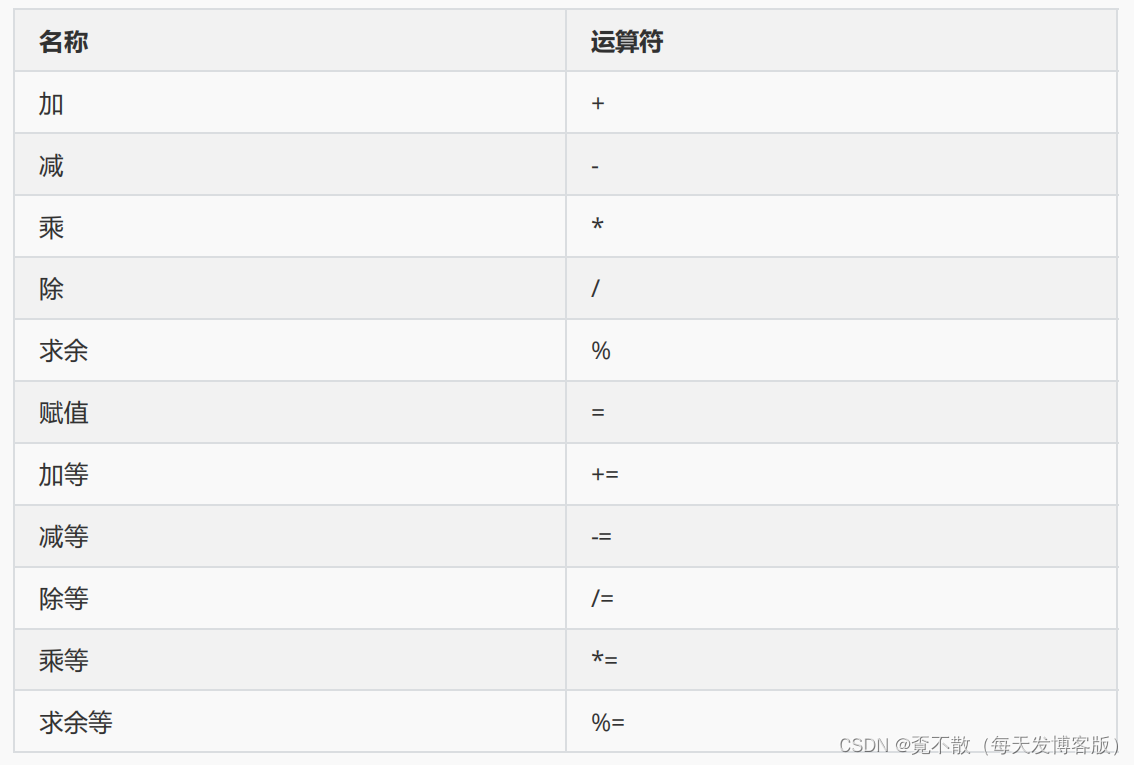
var a=1;
var b=2;
a+b;//相加
a-b;//相减
a*b;//相乘
a/b;//相除
a%b;//求余
a=b;//赋值
a+=b;//相加后赋值
a-=b;//相减后赋值
a/=b;//相除后赋值
a*=b;//相乘后赋值
a%=b;//求余后赋值
//上述规则和Java一样。
三目运算符: ?:
var kk=100;
document.write(kk>100?true:false);
2.6 条件分支结构
if-else分支
var a=1;
var b=1;
if(a==b){document.write("相等");
}else{document.write("不相等");
}
//很明显,运行结果是相等
//这就是if-else的结构,和Java语言是一样的。
switch分支
var a=2;
switch(a){case 1:document.write("值为1");break;case 2:document.write("值为2");break;case 3:document.write("值为3");break;default:document.write("值不是3也不是2也不是1");
}
2.7 循环结构
for循环
var a=0;
for(var i=1;i<=100;i++){a+=i;
}
document.write(a);
//上述代码是对1~100求和。
while循环
var a=0;
var i=1;
while(i<=100){a+=i;i++;
}
document.write(a);
//上述代码是对1~100求和。
do-while循环
var a=0;
var i=1;
do{a+=i;i++;
}while(i<=100);
document.write(a);
//上述代码是对1~100求和。
break与continue关键字
break用于结束循环。
continue用于结束本次循环。
2.8 函数
函数是对象
函数定义:用function关键字来声明,后面是方法名字,参数列表里不写var。整个方法不写返回值类型。
function functionName(parameters){//执行的代码
}
方法的定义与调用举例:
function add(a,b){return a+b;
}
var c=1;
var d=2;
var e=add(1,2);
document.write(e);
//上述代码运行结果是3
//这里定义了一个add方法,参数是两个,与Java不同,参数的数据类型并没有。
//因为就算是写,全都是var,为了保证语法的简洁性,全写var索性就设计成全都不用写了。
//返回值也是同样的道理,区别是,如果你写了返回值,那么有返回值,如果没写return,就没有返回值。
var myFunction = function (a, b) {return a * b};
var x = myFunction(4, 3);//自调用匿名函数
(function () {var x = "Hello!!"; //我会调用我自己
})();// ES6 箭头函数
const x = (x, y) => x * y;
const x = (x, y) => { return x * y };2.9 弹窗函数
alert弹框:这是一个只能点击确定按钮的弹窗。
alert方法没有返回值,也就是说如果用一个变量去接受返回值,将会得到undefined。无论你点击“确定”还是右上角的那个“X“关闭。
alert("你好");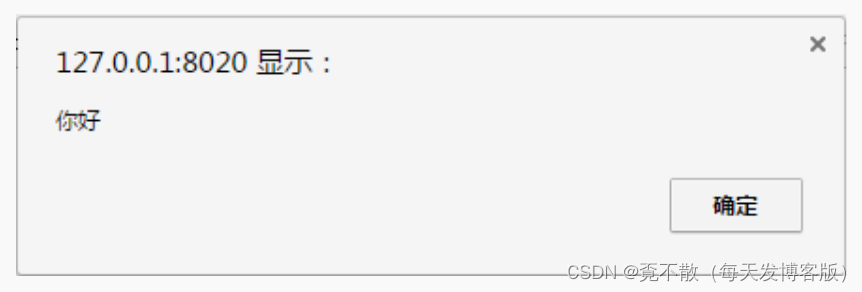
confirm弹框:这是一个你可以点击确定或者取消的弹窗
confirm方法与alert不同,他的返回值是boolean,当你点击“确定”时,返回true,无论你点击“取消”还是右上角的那个“X“关闭,都返回false。
confirm("你好"); 运行结果:

prompt弹框:这是一个你可以输入文本内容的弹窗。
第一个参数是提示信息,第二个参数是用户输入的默认值。
当你点击确定的时候,返回用户输入的内容。当你点击取消或者关闭的时候,返回null。
prompt("你爱学习吗?","爱");
2.10 其他函数
/*
数组操作
join() 转换并连接数组中的所有元素为一个字符串
length
reverse()将数组元素顺序颠倒
sort()将数组元素重新排序日期函数
getDate 返回日期的"日"部分,值为1~31
getDay 返回星期几,值为0~6,
getHouse ,值为0~23
getMinutes 值为0~59
getMonth 值为0~11
getSeconds 值为0~59
getTime 返回系统时间
getYear 返回值以1900年为基数,例如1999年为99。
parse 返回从1970年1月1日零时整算起的毫秒数(当地时间)。字符串
lastIndexOf
length
substring
toLowerCase
toUpperCase
trimisNaN():判断参数里面的数据是不是一个非数值。
parseInt() 强制数据类型成整数
parseFloat() 强制数据类型转换小数
eval;运行字符串里面的js;或者计算字符串里面的内容
eval("x=1;y=2;document.write(x+y)" ) ; document.write(eval("2*2"))
*/
2.11 对象
日期对象
var today = new Date()
var d1 = new Date("October 13, 1975 11:13:00")
var d2 = new Date(79,5,24)
var d3 = new Date(79,5,24,11,33,0)//赋值
myDate.setFullYear(2010,0,14);
myDate.setDate(myDate.getDate()+5);//比较
var x=new Date();
x.setFullYear(2100,0,14);
var today = new Date();
if (x>today)
{alert("今天是2100年1月14日之前");
}
else
{alert("今天是2100年1月14日之后");
}
Math对象
Math.E
Math.PI
Math.SQRT2
Math.SQRT1_2
Math.LN2
Math.LN10
Math.LOG2E
Math.LOG10E
Math.round(4.7)//四舍五入
Math.random()//0-1随机数
三、DOM
3.1 概述
通过 HTML DOM,可访问 JavaScript HTML 文档的所有元素。
当网页被加载时,浏览器会创建页面的文档对象模型(Document Object Model)。
HTML DOM 模型被构造为对象的树:
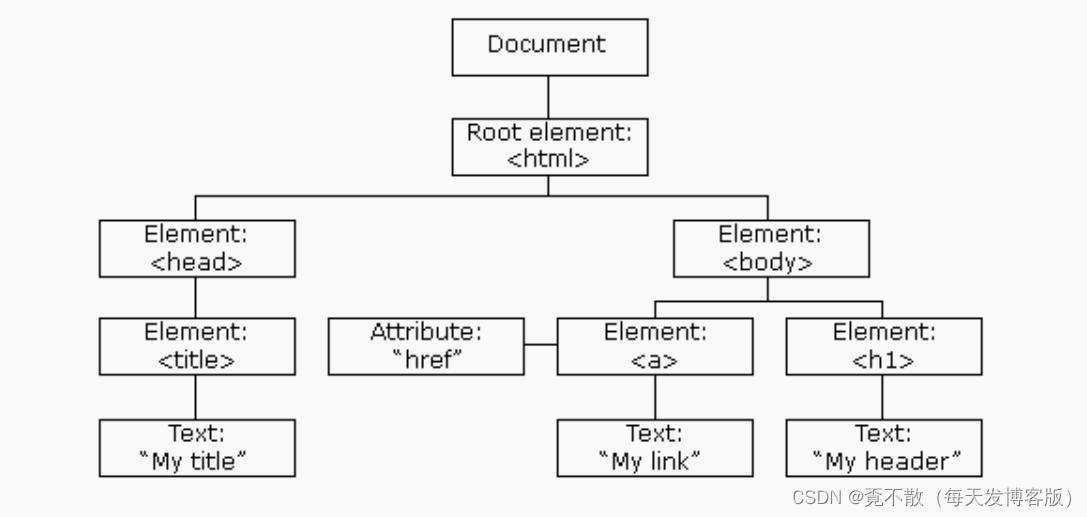
通过可编程的对象模型,JavaScript 获得了足够的能力来创建动态的 HTML。
JavaScript 能够改变页面中的所有 HTML 元素。
JavaScript 能够改变页面中的所有 HTML 属性。
JavaScript 能够改变页面中的所有 CSS 样式。
JavaScript 能够对页面中的所有事件做出反应。
3.2 查找元素
通常,通过 JavaScript,您需要操作 HTML 元素。
为了做到这件事情,您必须首先找到该元素。有三种方法来做这件事:
通过 id 找到 HTML 元素
在 DOM 中查找 HTML 元素的最简单的方法,是通过使用元素的 id。
方法:document.getElementById("id属性值");
如果找到该元素,则该方法将以对象(在 x 中)的形式返回该元素。
如果未找到该元素,则 x 将包含 null。
通过标签名找到 HTML 元素
方法:getElementsByTagName("合法的元素名");。
通过类名找到HTML 元素
方法:getElementsByClassName("class属性的值")。
3.3 改变HTML
改变HTML输出流:document.write() 可用于直接向 HTML 输出流写内容。
<!DOCTYPE html>
<html>
<body>
<script>
document.write("Hello world,I'm JavaScript");
</script>
</body>
</html>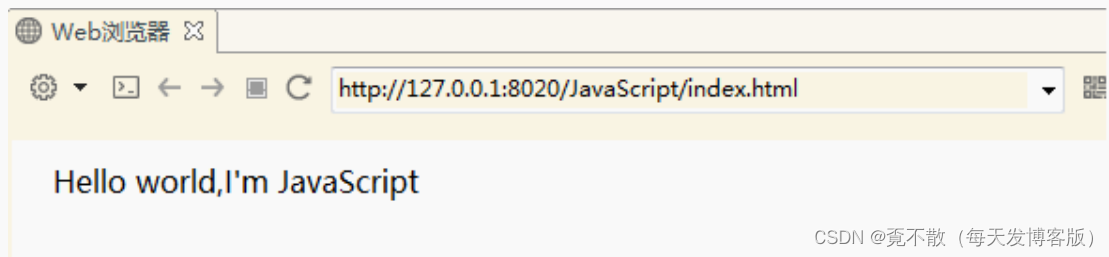
改变HTML内容:使用 innerHTML 属性。
<html>
<body>
<p id="p1">Hello World!</p>
<script>
document.getElementById("p1").innerHTML="abcd";
</script>
</body>
</html>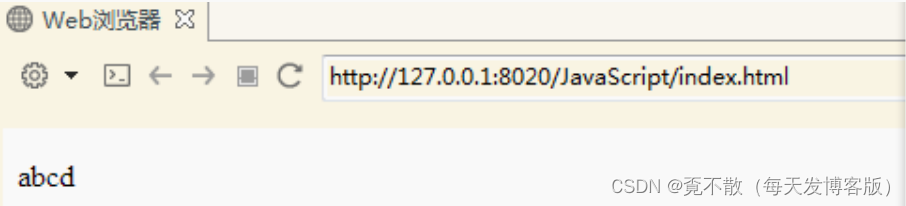
改变HTML属性:document.getElementById(id).attribute=新属性值。
将attribute替换成真实的属性名。
<!DOCTYPE html>
<html><body><img id="image" src="1.gif"><script>document.getElementById("image").src="2.jpg";</script></body>
</html>
3.4 CSS变化
对象.style.property=新样式。
将property替换成真实的css属性名。
<!DOCTYPE html>
<html><head><meta charset="utf-8"></head><body><p id="p1">Hello World!</p><p id="p2">Hello World!</p><script>document.getElementById("p2").style.color="blue";document.getElementById("p2").style.fontFamily="Arial";document.getElementById("p2").style.fontSize="larger";</script><p>以上段落通过脚本修改。</p></body>
</html>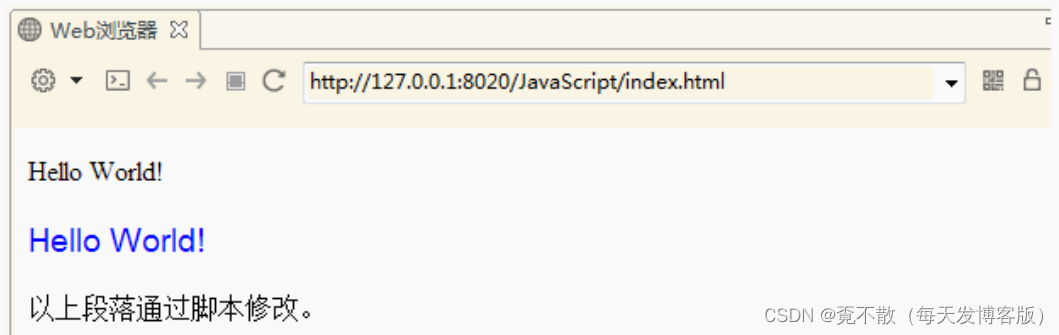
3.5 DOM事件
事件

HTML DOM 允许我们通过触发事件来执行代码。·
比如以下事件:
元素被点击。
页面加载完成。
输入框被修改。
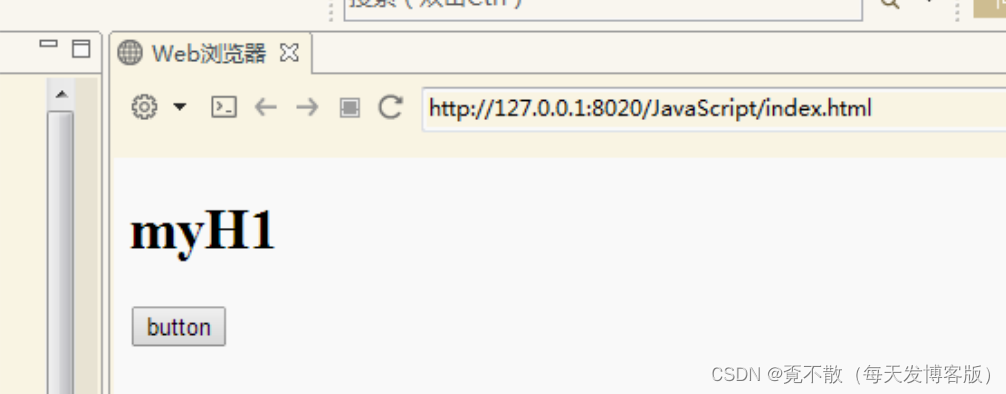
本例改变了 id="id1" 的 HTML 元素的样式,当用户点击按钮时
<!DOCTYPE html>
<html><body><h1 id="id1">myH1</h1><button type="button"onclick="document.getElementById('id1').style.color='red'">button</button></body>
</html>
点击前
点击后
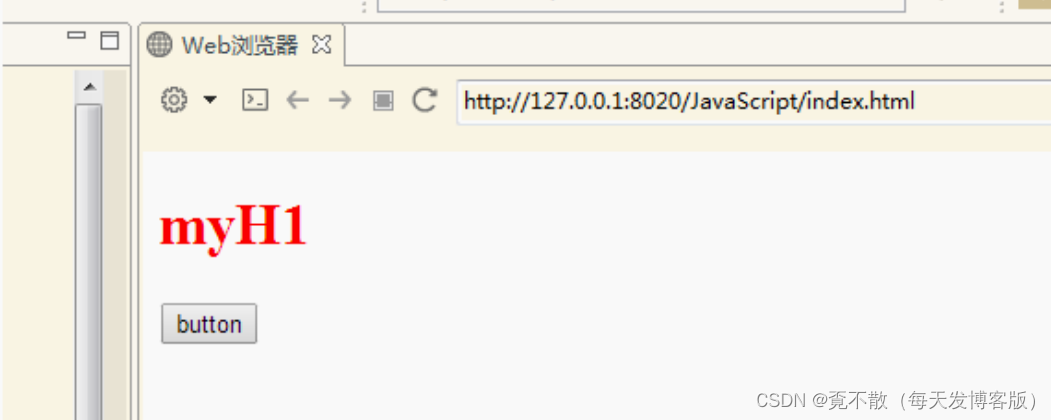
HTML DOM 使 JavaScript 有能力对 HTML 事件做出反应。
在本例中,当用户在 h1 元素上点击时,会改变其内容:
<!DOCTYPE html>
<html><body><h1 onclick="this.innerHTML='Ooops!'">点击文本!</h1></body>
</html>
本例从事件处理器调用一个函数:
<!DOCTYPE html>
<html><head><script>function changetext(id){id.innerHTML="Ooops!";}</script></head><body><h1 onclick="changetext(this)">点击文本!</h1></body>
</html>
如需向 HTML 元素分配 事件,您可以使用事件属性。
<button onclick="displayDate()">点这里</button> HTML DOM 允许您使用 JavaScript 来向 HTML 元素分配事件:
<script>document.getElementById("myBtn").onclick=function(){displayDate()};
</script>
3.6 EventListener
addEventListener() 方法
在用户点击按钮时触发监听事件。
document.getElementById("myBtn").addEventListener("click", displayDate); addEventListener() 方法用于向指定元素添加事件句柄。
addEventListener() 方法添加的事件句柄不会覆盖已存在的事件句柄。
你可以向一个元素添加多个事件句柄。
你可以向同个元素添加多个同类型的事件句柄,如:两个 "click" 事件。
你可以向任何 DOM 对象添加事件监听,不仅仅是 HTML 元素。如: window 对象。
addEventListener() 方法可以更简单的控制事件(冒泡与捕获)。
当你使用 addEventListener() 方法时, JavaScript 从 HTML 标记中分离开来,可读性更强,在没有控制HTML标记时也可以添加事件监听。
你可以使用 removeEventListener() 方法来移除事件的监听。
element.addEventListener(event, function, useCapture);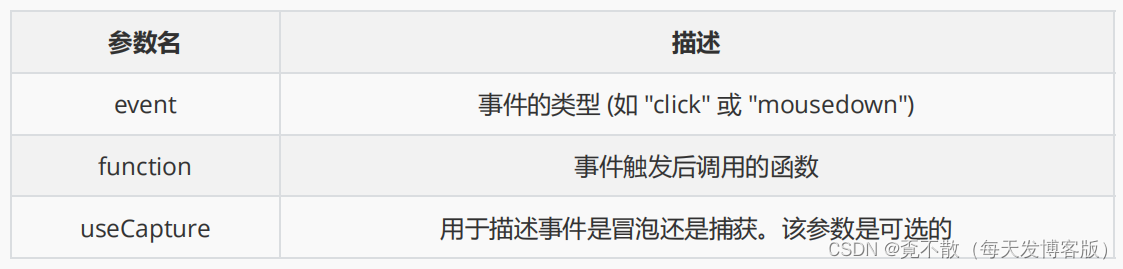
当用户点击元素时弹出 "Hello World!" :
element.addEventListener("click", myFunction);
function myFunction() {alert ("Hello World!");
}
addEventListener() 方法允许向同个元素添加多个事件,且不会覆盖已存在的事件:
element.addEventListener("click", myFunction);
element.addEventListener("click", mySecondFunction);
你可以向同个元素添加不同类型的事件:
element.addEventListener("mouseover", myFunction);
element.addEventListener("click", mySecondFunction);
element.addEventListener("mouseout", myThirdFunction);
addEventListener() 方法允许你在 HTML DOM 对象添加事件监听, HTML DOM 对象如:HTML 元素, HTML 文档, window 对象。或者其他支出的事件对象如: xmlHttpRequest 对象。
当用户重置窗口大小时添加事件监听:
window.addEventListener("resize", function(){document.getElementById("demo").innerHTML = sometext;
});
事件传递有两种方式:冒泡与捕获。
事件传递定义了元素事件触发的顺序。 如果你将 p 元素插入到 div元素中,用户点击p 元素,哪个元素的 "click" 事件先被触发呢?
在 *冒泡 *中,内部元素的事件会先被触发,然后再触发外部元素,即:p 元素的点击事件先触发,然后会触发 div 元素的点击事件。
在 *捕获 *中,外部元素的事件会先被触发,然后才会触发内部元素的事件,即:div 元素的点击事件先触发 ,然后再触发 p元素的点击事件。
addEventListener() 方法可以指定 "useCapture" 参数来设置传递类型:
addEventListener(event, function, useCapture); 默认值为 false, 即冒泡传递,当值为 true 时, 事件使用捕获传递。
document.getElementById("myDiv").addEventListener("click", myFunction, true); removeEventListener() 方法移除由 addEventListener() 方法添加的事件句柄:
element.removeEventListener("mousemove", myFunction);3.7 操作元素
如需向 HTML DOM 添加新元素,您必须首先创建该元素(元素节点),然后向一个已存在的元素追加该元素。
创建元素:document.createElement()
追加元素:appendChild()
<div id="div1">
<p id="p1">这是一个段落。</p>
<p id="p2">这是另一个段落。</p>
</div><script>
var para=document.createElement("p");
var node=document.createTextNode("这是一个新段落。");
para.appendChild(node);var element=document.getElementById("div1");
element.appendChild(para);
</script>
删除已有的 HTML 元素。
使用方法:removeChild()
<div id="div1"><p id="p1">这是一个段落。</p><p id="p2">这是另一个段落。</p>
</div><script>var parent=document.getElementById("div1");var child=document.getElementById("p1");parent.removeChild(child);
</script>
四、BOM
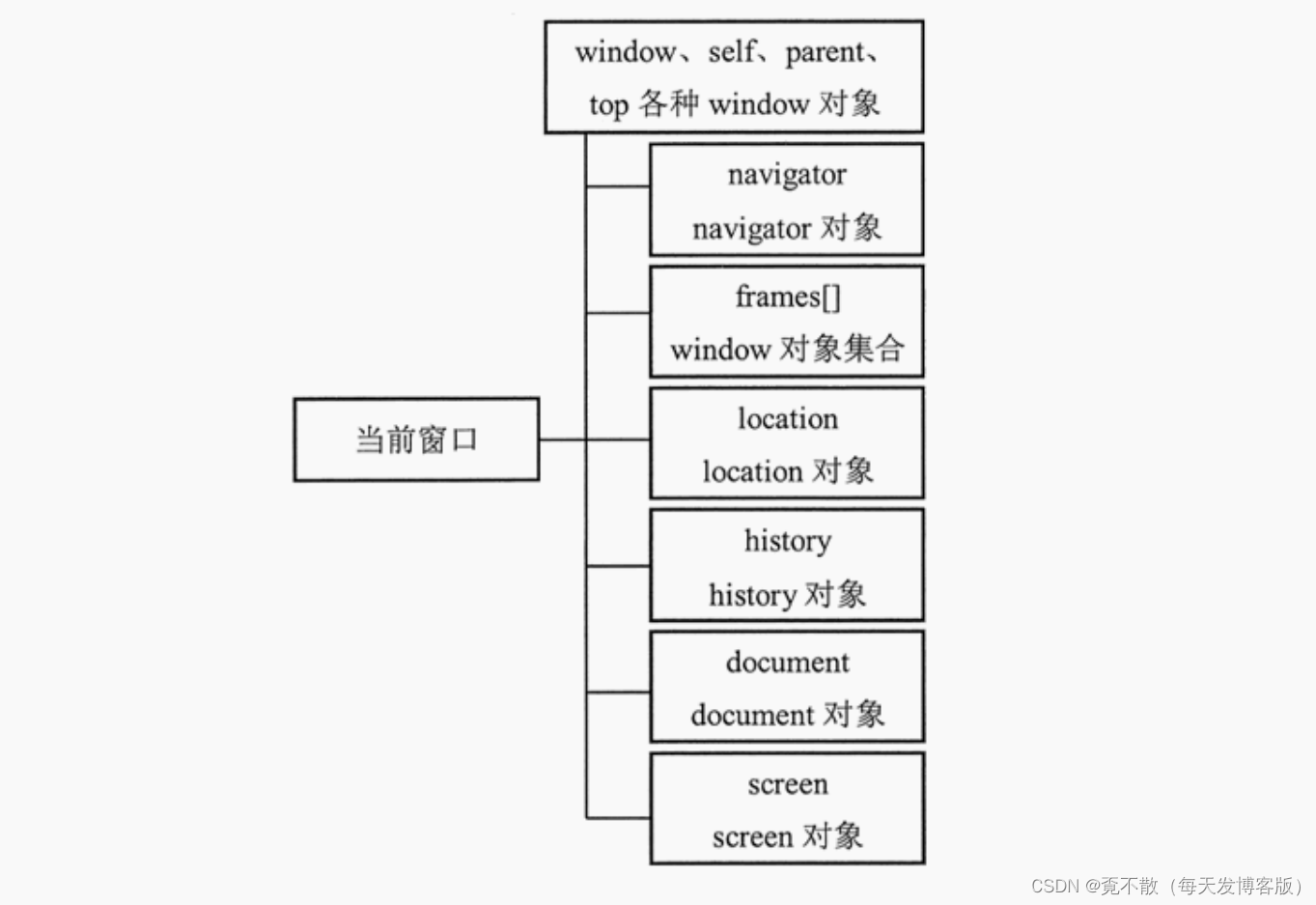
浏览器对象模型 (BOM-Browser Object Model) 使 JavaScript 有能力与浏览器"对话"。
由于现代浏览器已经(几乎)实现了 JavaScript 交互性方面的相同方法和属性,因此常被认为是 BOM 的方法和属性。
window:客户端 JavaScript 顶层对象。每当 或 标签出现时,window 对象就会被自动创建。
navigator:包含客户端有关浏览器信息。
screen:包含客户端屏幕的信息。
history:包含浏览器窗口访问过的 URL 信息。
location:包含当前网页文档的 URL 信息。
document:包含整个 HTML 文档,可被用来访问文档内容及其所有页面元素。
4.1 window
所有浏览器都支持 window 对象。它表示浏览器窗口。
所有 JavaScript 全局对象、函数以及变量均自动成为 window 对象的成员。
全局变量是 window 对象的属性。
全局函数是 window 对象的方法。
甚至 HTML DOM 的 document 也是 window 对象的属性之一:
window的尺寸
对于Internet Explorer、Chrome、Firefox、Opera 以及 Safari:
window.innerHeight - 浏览器窗口的内部高度(包括滚动条)
window.innerWidth - 浏览器窗口的内部宽度(包括滚动条)
对于 Internet Explorer 8、7、6、5:
document.documentElement.clientHeight
document.documentElement.clientWidth
或者
- document.body.clientHeight
- document.body.clientWidth
var
w=window.innerWidth||document.documentElement.clientWidth||document.body.clientW
idth;
var
h=window.innerHeight||document.documentElement.clientHeight||document.body.clien
tHeight; Window Screen
可用宽度:screen.availWidth 属性返回访问者屏幕的宽度,以像素计,减去界面特性,比如窗口任务栏。
可用高度:screen.availHeight 属性返回访问者屏幕的高度,以像素计,减去界面特性,比如窗口任务栏。
document.write("可用宽度: " + screen.availWidth);
document.write("可用高度: " + screen.availHeight);
Window Location
window.location 对象用于获得当前页面的地址 (URL),并把浏览器重定向到新的页面。
window.location 对象在编写时可不使用 window 这个前缀。 一些例子:
location.hostname 返回 web 主机的域名。
location.pathname 返回当前页面的路径和文件名。
location.port 返回 web 主机的端口 (80 或 443)。
location.protocol 返回所使用的 web 协议(http:// 或 https://)。
location.href 属性返回当前页面的 URL。
location.assign() 方法加载新的文档。
<html><head><script>function newDoc(){window.location.assign("http://www.baidu.com/")}</script></head><body><input type="button" value="Load new document" onclick="newDoc()"></body>
</html>
Window History
window.history 对象包含浏览器的历史。
window.history 对象在编写时可不使用 window 这个前缀。
history.back()
history.forward()
一些方法示例如下:
history.back() - 与在浏览器点击后退按钮相同。
<html><head><script>function goBack(){window.history.back()}</script></head><body><input type="button" value="Back" onclick="goBack()"></body>
</html>
history.forward() - 与在浏览器中点击按钮向前相同。
<html><head><script>function goForward(){window.history.forward()}</script></head><body><input type="button" value="Forward" onclick="goForward()"></body>
</html>
Window Navigator
window.navigator 对象在编写时可不使用 window 这个前缀。
<div id="example"></div>
<script>txt = "<p>浏览器代号: " + navigator.appCodeName + "</p>";txt+= "<p>浏览器名称: " + navigator.appName + "</p>";txt+= "<p>浏览器版本: " + navigator.appVersion + "</p>";txt+= "<p>启用Cookies: " + navigator.cookieEnabled + "</p>";txt+= "<p>硬件平台: " + navigator.platform + "</p>";txt+= "<p>用户代理: " + navigator.userAgent + "</p>";txt+= "<p>用户代理语言: " + navigator.systemLanguage + "</p>";document.getElementById("example").innerHTML=txt;
</script>
/*
window.open (URL, name, features, replace)
URL:可选字符串,声明在新窗口中显示网页文档的 URL。如果省略,或者为空,则新窗口就不会显示
任何文档。
name:可选字符串,声明新窗口的名称。这个名称可以用作标记 <a> 和 <form> 的 target 目标值
。如果该参数指定了一个已经存在的窗口,那么 open() 方法就不再创建一个新窗口,而只是返回对指
定窗口的引用,在这种情况下,features 参数将被忽略。
features:可选字符串,声明了新窗口要显示的标准浏览器的特征,具体说明如下表所示。如果省略
该参数,新窗口将具有所有标准特征。
replace:可选的布尔值。规定了装载到窗口的 URL 是在窗口的浏览历史中创建一个新条目,还是替
换浏览历史中的当前条目。
window 的 close()
*/4.2 JavaScript定时器
定义定时器:
setInterval('调用函数',毫秒时间):每间隔固定毫秒值就执行一次函数。
setTimeout('调用函数',毫秒时间):在固定时间之后执行一次调用函数。
关闭定时器:
clearInterval(定时器名称)
clearTimeout(定时器名称)
<script>//获取这个divvar one = document.getElementById("one");//左右移动var left=10;var moveleft=10;//移动的步长//上下移动var topy = 10;var movetop = 10;var colorsize = [1,2,3,4,5,6,7,8,9,0,'A','B','C','D','E','F'];function getColor(){var str="#";for(var i = 0 ; i < 6 ; i++){var index = parseInt(Math.random() * colorsize.length * 20) % 16;str += colorsize[index];}return str;}setInterval(getColor,500);function move(){one.style.backgroundColor = getColor();if(left > window.innerWidth - one.offsetWidth - 10 || left < 0){moveleft = -1 * moveleft; //如果我们到了最右边,需要向左移动;取反}if(topy > window.innerHeight - one.offsetHeight - 10 || topy < 0){movetop = -1 * movetop;}//左右移动left += moveleft;one.style.left = left+"px";//上下移动topy += movetop;one.style.top = topy+"px";}//间隔30毫秒,就移动一下var t = setInterval(move,50);
</script>)


![[C++]内存管理:串顺序存储的内存回收](http://pic.xiahunao.cn/yaotu/[C++]内存管理:串顺序存储的内存回收)

:ArkUI 首页仪表盘搭建)