字符串的indexOf和数组的indexOf用法一致!
arr.indexOf(item) 该方法返回某个元素在数组中的位置。若没检索到,则返回 -1。
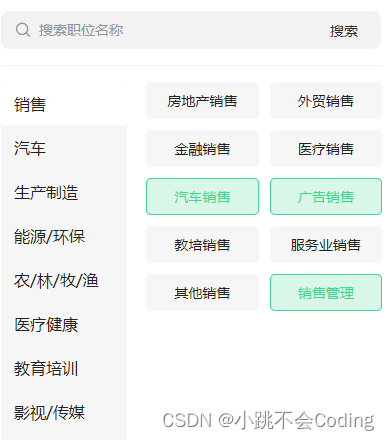
关键代码:( 通过: class绑定)
: class= "selectList.indexOf(sub.type) !== -1 ? 'right_item right_item_active':'right_item'"
< view class= "right" > < ! -- 通过(selectList. indexOf ( sub. type) != = - 1 )来判断选中的数组里,是否有该元素。点击时,如果有,会移除;如果没有,会添加上 -- > < view : class= "selectList.indexOf(sub.type) !== -1 ? 'right_item right_item_active':'right_item'" v- for = "(sub,index) in leftList[tabindex].children" : key= "index" @click= "rightBtn(sub,index)" > { { sub. type } } < / view> < / view> rightBtn ( sub, index) { console. log ( sub, index) this. rightindex = index; if ( this. selectList. includes ( sub. type) ) { this. selectList = this. selectList. filter ( ( item) = > { return item != sub. type; } ) ; } else { this. selectList. push ( sub. type) ; this. selectList = [ . . . new Set ( this. selectList) ] ; if ( this. selectList. length > 3 ) { uni. showToast ( { title: "最多选3个" , icon: "none" } ) ; this. selectList. splice ( 3 , this. selectList. length - 3 ) ; } } } ,

)


![[C++]内存管理:串顺序存储的内存回收](http://pic.xiahunao.cn/yaotu/[C++]内存管理:串顺序存储的内存回收)

:ArkUI 首页仪表盘搭建)