C# Solidworks二次开发:选择管理器相关的API介绍

今天在讲述主要内容之前,先说一个不太相关的问题。
我之前在其他文章中看到有一些朋友在问为什么获取到的点位数据需要乘以1000进行单位转换,其实原因是这样的,在所有使用的API中如果没有特殊说明,所有的长度单位都是米,角度单位都是弧度,顺手解答一下那位朋友的疑问。
下面开始今天文章的主题:
1、介绍第一个和选择管理器相关的API:GetSelectedObjectCount2 Method (ISelectionMgr)

这个API的解释为:获取所选对象的数目。
2、第二个API为:GetSelectedObject6 Method (ISelectionMgr)

这个API的解释为:获取选择对象,这个我平时用的非常多。
下面是使用的例子:
public void Main(){ModelDoc2 swModel = default(ModelDoc2);ModelDocExtension swModelDocExt = default(ModelDocExtension);FeatureManager swFeatureManager = default(FeatureManager);MidSurface3 swMidSurfaceFeature = default(MidSurface3);Feature swFeature = default(Feature);SelectionMgr swSelectionMgr = default(SelectionMgr);Face2 swFace = default(Face2);bool status = false;int errors = 0;int warnings = 0;string fileName = null;int count = 0;object[] faces = null;int i = 0;fileName = "C:\\Users\\Public\\Documents\\SOLIDWORKS\\SOLIDWORKS 2018\\samples\\tutorial\\api\\box.sldprt";swModel = (ModelDoc2)swApp.OpenDoc6(fileName, (int)swDocumentTypes_e.swDocPART, (int)swOpenDocOptions_e.swOpenDocOptions_Silent, "", ref errors, ref warnings);swModelDocExt = (ModelDocExtension)swModel.Extension;status = swModelDocExt.SelectByID2("", "FACE", -0.0533080255641494, 0.0299999999999727, 0.0131069871973182, true, 0, null, 0);status = swModelDocExt.SelectByID2("", "FACE", -0.0370905424398416, 0, 0.0289438729892595, true, 0, null, 0);swFeatureManager = (FeatureManager)swModel.FeatureManager;swFeatureManager.InsertMidSurface(null, null, 0.0, false);status = swModelDocExt.SelectByID2("Surface-MidSurface1", "REFSURFACE", 0, 0, 0, false, 0, null, 0);swSelectionMgr = (SelectionMgr)swModel.SelectionManager;swFeature = (Feature)swSelectionMgr.GetSelectedObject6(1, -1);swMidSurfaceFeature = (MidSurface3)swFeature.GetSpecificFeature2();count = swMidSurfaceFeature.GetFaceCount();Debug.Print("Number of faces for midsurface feature: " + count);faces = (object[])swMidSurfaceFeature.GetFaces();for (i = faces.GetLowerBound(0); i <= faces.GetUpperBound(0); i++){swFace = (Face2)faces[i];Debug.Print("Area of face " + i + " of midsurface feature: " + swFace.GetArea());}}/// <summary>/// The SldWorks swApp variable is pre-assigned for you./// </summary>public SldWorks swApp;
3、第三个API为:GetSelectedObjectType3 Method (ISelectionMgr)
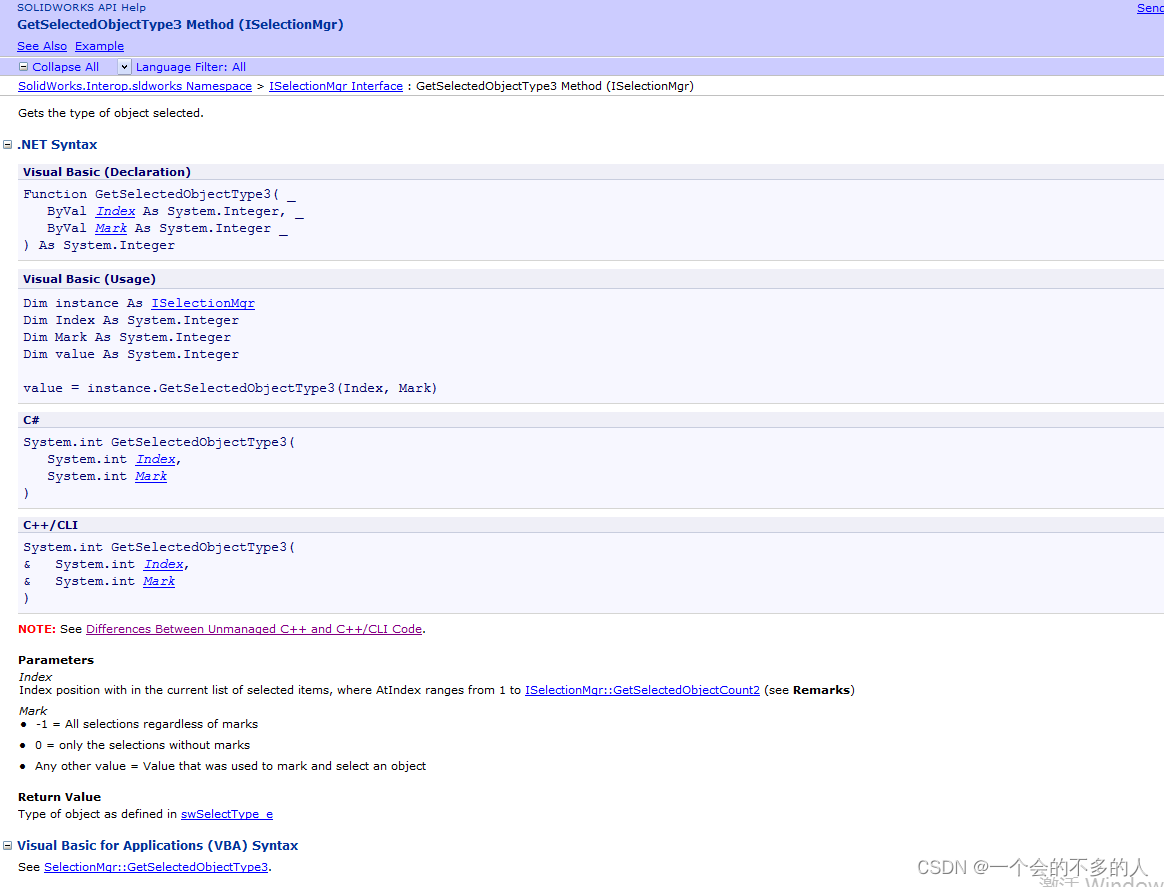
这个API的解释为:获取选择对象的类型。
下面介绍一个使用的例子:
public void Main()
{
ModelDoc2 swModel = default(ModelDoc2);
bool boolstatus = false;
SelectionMgr SelMgr = default(SelectionMgr);
TableAnnotation theTableAnnotation = default(TableAnnotation);
int SelObjType = 0;
int TableAnnotationType = 0;
swModel = (ModelDoc2)swApp.ActiveDoc;
SelMgr = (SelectionMgr)swModel.SelectionManager;
SelObjType = SelMgr.GetSelectedObjectType3(1, -1);
if (SelObjType != (int)swSelectType_e.swSelANNOTATIONTABLES)
{
MessageBox.Show("Select a BOM table in the drawing before running this example.");
return;
}
theTableAnnotation = (TableAnnotation)SelMgr.GetSelectedObject6(1, -1);
TableAnnotationType = theTableAnnotation.Type;
if (TableAnnotationType != (int)swTableAnnotationType_e.swTableAnnotation_BillOfMaterials)
{
MessageBox.Show("Select a BOM table in the drawing before running this example.");
return;
}
Debug.Print("Table before inserting a column...");
// Display table before inserting a column
DisplayTableColumnProps(theTableAnnotation);
// Insert new column
boolstatus = theTableAnnotation.InsertColumn2((int)swTableItemInsertPosition_e.swTableItemInsertPosition_Last, 0, "New Column", (int)swInsertTableColumnWidthStyle_e.swInsertColumn_DefaultWidth);
boolstatus = theTableAnnotation.SetColumnType2(theTableAnnotation.ColumnCount - 1, (int)swTableColumnTypes_e.swBomTableColumnType_PartNumber, true);
Debug.Print(" ");
Debug.Print("Table after inserting a column...");
// Display table after inserting a column
DisplayTableColumnProps(theTableAnnotation);
}
public void DisplayTableColumnProps(TableAnnotation theTableAnnotation)
{
int ColCount = 0;
int i = 0;
string iString = null;
int ColType = 0;
string ColTypeString = null;
string ColTitle = null;
Debug.Print("Col# " + "Type " + "Title");
ColCount = theTableAnnotation.ColumnCount;
for (i = 0; i <= ColCount - 1; i++)
{
ColType = theTableAnnotation.GetColumnType2(i, true);
ColTypeString = System.Convert.ToString(ColType);
ColTitle = theTableAnnotation.GetColumnTitle2(i, true);
iString = System.Convert.ToString(i);
Debug.Print(iString + " " + ColTypeString + " " + ColTitle);
}
}
/// <summary>
/// The SldWorks swApp variable is pre-assigned for you.
/// </summary>
public SldWorks swApp;
今天介绍的这三个API都是选择管理器相关的API,还是比较常用的。
本篇文章就介绍这些,我们下篇文章再见。