
WPF 和 Avalonia 开发者的 html css 前端指南 ComboBox 篇
WPF 和 Avalonia 中的 ComboBox 直接对应了
select和option元素的组合
就好像ul和li的组合一样。
一、ComboBox 在 WPF 和 Avalonia 中的实现
在 WPF 和 Avalonia 中,你可以使用 ComboBox 和 ComboBoxItem
组合来实现下拉列表的选择控件。
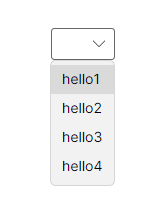
<ComboBox HorizontalAlignment="Center" VerticalAlignment="Center"><ComboBoxItem Content="hello1" /><ComboBoxItem Content="hello2" /><ComboBoxItem Content="hello3" /><ComboBoxItem Content="hello4" />
</ComboBox>
二 ComboBox 在 html css 中的等效实现
你可以使用 select 和 option 类似的效果。
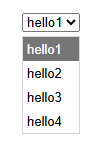
对应的代码如下:
<template><select><option>hello1</option><option>hello2</option><option>hello3</option><option>hello4</option></select>
</template><style lang="css" scoped>.container {overflow-y: auto;overflow-x: auto;width: 200px;height: 200px;}.container-content {width: 400px;height: 400px;background: aqua;}
</style>
三、总结
| WPF 和 Avalonia | html css |
|---|---|
| ComboBox | select |
| ComboBoxItem | option |