peertalk Usbmux 资料收集与整理

Usbmux - The iPhone Wiki
Usbmux
During normal operations, iTunes communicates with the iPhone using something called “usbmux” – this is a system for multiplexing several “connections” over one USB pipe. Conceptually, it provides a TCP-like system – processes on the host machine open up connections to specific, numbered ports on the mobile device. (This resemblance is more than superficial – on the mobile device, usbmuxd actually makes TCP connections to localhost using the port number you give it.)
On the Mac, this is handled by /System/Library/PrivateFrameworks/MobileDevice.framework/Resources/usbmuxd, a daemon that is started by launchd (see /System/Library/LaunchDaemons/ com.apple.usbmuxd.plist). It creates a listening UNIX Domain Socket at /var/run/usbmuxd. usbmuxd then watches for iPhone connections via USB; when it detects an iPhone running in normal mode (as opposed to recovery mode), it will connect to it and then start relaying requests that it receives via /var/run/usbmuxd – this is to say, usbmuxd is the only thing that actually speaks USB to the iPhone. This means that third-party applications which wish to talk to the iPhone must either do so through usbmuxd, or usbmuxd must be replaced
对 usbmuxd 的一点研究 · Farlanki
USBMuxd
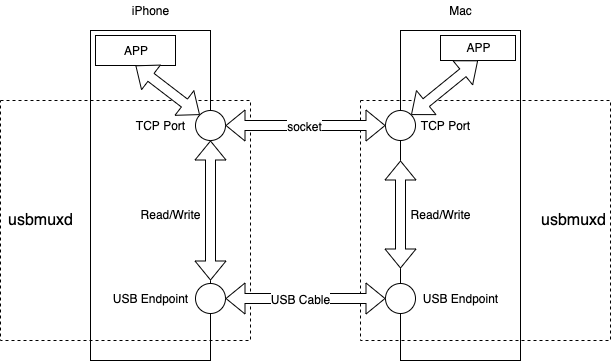
当 iTunes 和 iPhone 连接时,它们之间会通过 USBMux 进行连接。USBMux 用于在 USB 协议上实现多路 TCP 连接。USBMuxd 能够实现 USB-TCP 协议的转换,将 USB 的端口映射到本机的 TCP 端(基于 Unix Domain Socket),将 USB 通信抽象为 TCP 通信。苹果的 iTunes , XCode 都使用了这个服务。
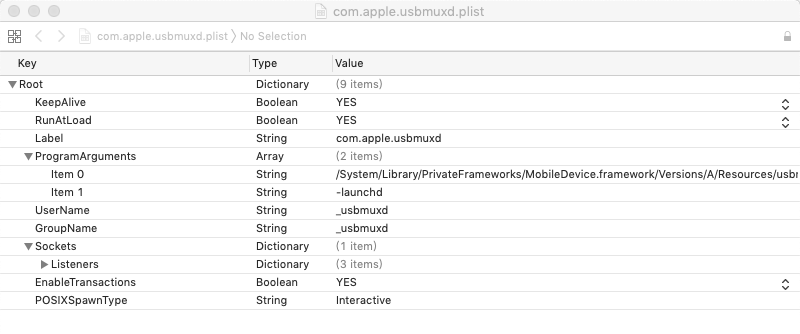
根据 iphonewiki.com 所说的,USBMuxd 程序存放在 Mac 系统下的 /System/Library/PrivateFrameworks/MobileDevice.framework/Resources路径中。并且由 plist 文件 /System/Library/LaunchDaemons/com.apple.usbmuxd.plist 可知,USBMuxd 是一个开机启动的服务。
由于 iOS 系统也具有 USBMuxd 服务,所以 iPhone 和 Mac 就能通过 USB 进行 TCP 通信。更进一步的是,只要实现了 USBMuxd,非 OSX 系统也能与iPhone 系统进行通信,例如 Windows 和 Linux。
github 上也存在一个名为 USBMuxd 的项目,这是一个跨平台的开源项目,实现了 usbmux 的功能,支持 MAC/Linux/Windows 平台。
usbmuxd连接流程
以下是Mac应用程序、App与 USBMuxd 的连接流程和数据收发流程。
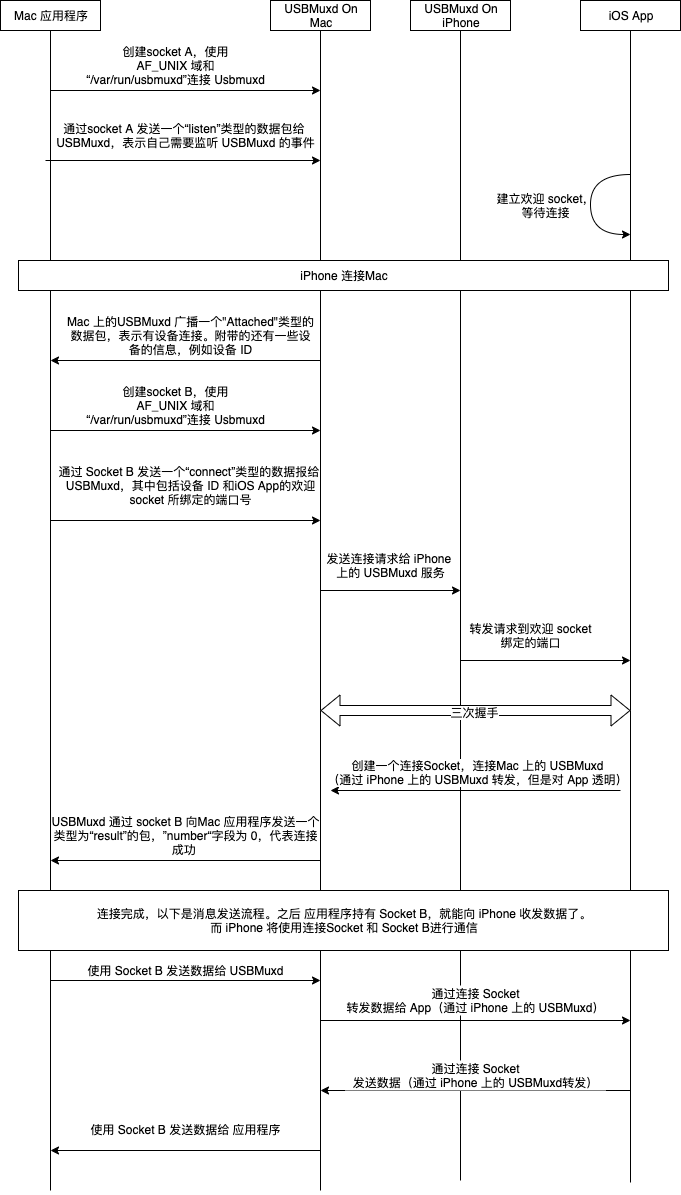
有几个地方是需要留意的:
- 应用程序需要创建两个 Socket , 一个用于监听 USBMuxd 广播包,以便应用程序得知 iOS 设备的连接与断连;另一个 Socket 用于在得知 iOS 设备连接后请求连接,如果 iOS 设备同意连接,后续的数据传输将通过这个 Socket 进行。
- App 也需要创建两个 Socket,一个为欢迎 Socket,另一个为连接 Socket,这和普通的服务器端套接字流程一样。对于App,USBMuxd 服务是透明的。
- USBMuxd 的广播包使用自己的一套协议,需要按照该协议生成数据包来和 USBMuxd 进行数据传输。
- 当应用程序与 iOS 设备连接后,应用程序和 iOS 进行数据传输的协议由我们自己决定。
GitHub - libimobiledevice/libusbmuxd: A client library to multiplex connections from and to iOS devicesA client library to multiplex connections from and to iOS devices - GitHub - libimobiledevice/libusbmuxd: A client library to multiplex connections from and to iOS devices https://github.com/libimobiledevice/libusbmuxd
。。。
GitHub - libimobiledevice-win32/libimobiledevice-vs: Visual Studio solution to build all of libimobiledevice at onceVisual Studio solution to build all of libimobiledevice at once - GitHub - libimobiledevice-win32/libimobiledevice-vs: Visual Studio solution to build all of libimobiledevice at oncehttps://github.com/libimobiledevice-win32/libimobiledevice-vs
。。。
使用usbmuxd服务,通过USB连接与PC端、Mac端实现通信,Peertalk的使用 - 简书一、usbmuxd 介绍 usbmuxd 是苹果的一个服务,这个服务主要用于在USB协议上实现多路TCP连接,将USB通信抽象为TCP通信。苹果的iTunes、Xcode,都...https://www.jianshu.com/p/eba133891ec6
usbmuxd 是苹果的一个服务,这个服务主要用于在USB协议上实现多路TCP连接,将USB通信抽象为TCP通信。苹果的iTunes、Xcode,都直接或间接地用到了这个服务。
iTunes使用 usbmux 与 iphone 通信, 它提供了一个USB - TCP的转换服务, 这个服务在Mac端是由/System/Library/PrivateFrameworks/MobileDevice.framework/Resources/usbmuxd提供的, 当然, 开机自动启动。
它创建了一个Unix Domain Socket 在 /var/run/usbmuxd. usbmuxd服务程序监控iPhone在USB口上的连接, 当它监控到iPhone以用户模式连接到USB, (相对的是recovery模式), usbmuxd服务程序就会连接到这个/var/run/usbmuxd的TCP端口, 并开始成为一个USB - TCP 请求转发器
那么,如果想编写个第三方程序与iphone进行通信,实现类似iTunes的功能, 你的程序可以通过usbmuxd! 建立一个TCP连接到/var/run/usbmuxd端口, 根据协议发送对应的请求包, usbmuxd服务会将请求转发到USB的iPhone上。
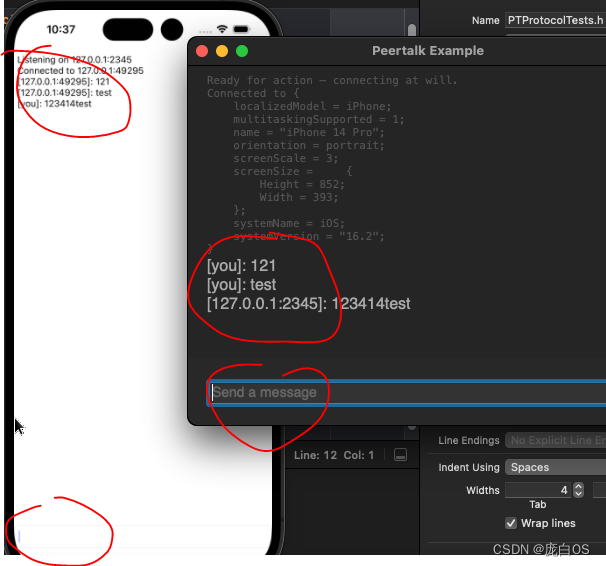
peertalk,一个基于usbmuxd服务的开源代码,可以实现 iPhone 与 Mac 通信。
libimobiledevice,在可以PC端提供usbmuxd服务,实现 iPhone 与 windows 通信。
二、Peertalk 的使用:iPhone 与 Mac 通信
iOS 端
1、创建 channel,监听指定端口
// 创建 channelPTChannel *channel = [PTChannel channelWithDelegate:self];// 监听指定端口,PTExampleProtocolIPv4PortNumber自定义端口号[channel listenOnPort:PTExampleProtocolIPv4PortNumber IPv4Address:INADDR_LOOPBACK callback:^(NSError *error) {if (error) { // 创建监听失败} else { // 创建监听成功 }}];
2、实现 Channel 的代理方法
@protocol PTChannelDelegate <NSObject>@required
// 收到信息
- (void)ioFrameChannel:(PTChannel*)channel didReceiveFrameOfType:(uint32_t)type tag:(uint32_t)tag payload:(PTData*)payload;@optional
// 收到消息调用,如回复NO,则忽略这条消息
- (BOOL)ioFrameChannel:(PTChannel*)channel shouldAcceptFrameOfType:(uint32_t)type tag:(uint32_t)tag payloadSize:(uint32_t)payloadSize;// 出错回调
- (void)ioFrameChannel:(PTChannel*)channel didEndWithError:(NSError*)error;// 连接成功回调
- (void)ioFrameChannel:(PTChannel*)channel didAcceptConnection:(PTChannel*)otherChannel fromAddress:(PTAddress*)address;@end
3、连接成功后,会发送设备信息
Mac 端
1、监听USB设备的连接/断开
// 开始监听设备的连接与断开
- (void)startListeningForDevices {NSNotificationCenter *nc = [NSNotificationCenter defaultCenter];// 监听设备连接[nc addObserverForName:PTUSBDeviceDidAttachNotification object:PTUSBHub.sharedHub queue:nil usingBlock:^(NSNotification *note) {NSNumber *deviceID = [note.userInfo objectForKey:@"DeviceID"];dispatch_async(notConnectedQueue_, ^{if (!connectingToDeviceID_ || ![deviceID isEqualToNumber:connectingToDeviceID_]) {// 断开现有连接[self disconnectFromCurrentChannel];connectingToDeviceID_ = deviceID;connectedDeviceProperties_ = [note.userInfo objectForKey:@"Properties"];// 重新连接[self enqueueConnectToUSBDevice];}});}];// 监听设备断开[nc addObserverForName:PTUSBDeviceDidDetachNotification object:PTUSBHub.sharedHub queue:nil usingBlock:^(NSNotification *note) {NSNumber *deviceID = [note.userInfo objectForKey:@"DeviceID"];if ([connectingToDeviceID_ isEqualToNumber:deviceID]) {connectedDeviceProperties_ = nil;connectingToDeviceID_ = nil;if (connectedChannel_) { // 关闭连接通道[connectedChannel_ close];}}}];
}
2、连接设备
// 连接设备
- (void)connectToLocalIPv4Port {// 创建通道,设置代理PTChannel *channel = [PTChannel channelWithDelegate:self];channel.userInfo = [NSString stringWithFormat:@"127.0.0.1:%d", PTExampleProtocolIPv4PortNumber];// 连接指定端口地址,与iOS端设置保持一致[channel connectToPort:PTExampleProtocolIPv4PortNumber IPv4Address:INADDR_LOOPBACK callback:^(NSError *error, PTAddress *address) {if (error) { // 连接失败} else { // 连接成功}}];
}
3、连接成功会,会收发送 ping、pong 心跳数据
三、libimobiledevice、Peertalk 的使用:iPhone 与 windows 通信
1、实现原理
windows端 通过 libimobiledevice 运行 usbmuxd 的多路复用守护进程,该进程的作用是建立本地端口和远程端口的转发,实现usb到tcp的转换服务
2、安装服务
windows端首先要安装苹果公司提供的相关服务,才能实现通信功能。服务名称为:AppleApplicationSupport和AppleMobileDeviceSupport
3、规定协议
首先指定 ip地址和端口,端口号建议大些,以免与苹果系统应用端口重复。如:127.0.0.1:62345。PC端可以通过端口转发实现。
定义相同结构体数据,以便数据的加密、解析。PC端可和Peertalk定义的协议保持一致。如:
// 数据头结构体
typedef struct _PTFrame {uint32_t version;     // 对应版本uint32_t type;        // 数据类型uint32_t tag;         // tag标记uint32_t payloadSize; // 数据大小
} PTFrame;// 数据类型
enum {PTExampleFrameTypeDeviceInfo = 100,  // 设备信息PTExampleFrameTypeTextMessage = 101, // 文本数据PTExampleFrameTypePing = 102,        // PingPTExampleFrameTypePong = 103,        // Pong
};
4、联调测试
定好协议后,指定相同ip地址和端口,进行测试。如连接失败,可尝试更换端口号重试。先调试连接,然后再收发数据,最后进行数据处理。
peertalk
目录
Usbmux
USBMuxd
usbmuxd连接流程
二、Peertalk 的使用:iPhone 与 Mac 通信
iOS 端
Mac 端
三、libimobiledevice、Peertalk 的使用:iPhone 与 windows 通信
1、实现原理
2、安装服务
3、规定协议
4、联调测试
peertalk 实验
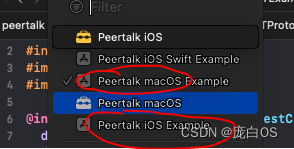
macos example & ios example