1.本window设置样式
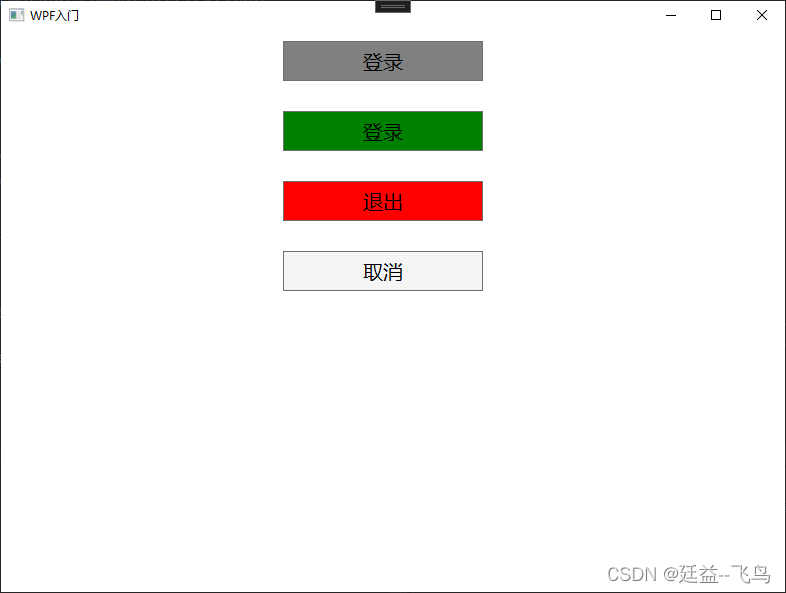
<Window x:Class="WPF_Study.MainWindow"xmlns="http://schemas.microsoft.com/winfx/2006/xaml/presentation"xmlns:x="http://schemas.microsoft.com/winfx/2006/xaml"xmlns:d="http://schemas.microsoft.com/expression/blend/2008"xmlns:mc="http://schemas.openxmlformats.org/markup-compatibility/2006"xmlns:local="clr-namespace:WPF_Study"mc:Ignorable="d"Title="WPF入门" Height="600" Width="800"><Window.Resources><Style TargetType="Button"><Setter Property="Background" Value="WhiteSmoke"/><Setter Property="FontSize" Value="20"/><Setter Property="Height" Value="40"/><Setter Property="Width" Value="200"/><Setter Property="Margin" Value="0,10, 20, 20"/></Style><Style x:Key="LoginStyle" TargetType="Button" BasedOn="{StaticResource {x:Type Button}}"><Setter Property="Background" Value="Green"/></Style><Style x:Key="QuitStyle" TargetType="Button" BasedOn="{StaticResource {x:Type Button}}"><Setter Property="Background" Value="Red"/></Style></Window.Resources><Grid><StackPanel><Button Content="登录" Background="Gray" FontSize="20" Width="200" Height="40"/><Button Style="{StaticResource LoginStyle}" Content="登录"/><Button Style="{StaticResource QuitStyle}"><Button.Content>退出</Button.Content><Button.FontSize>20</Button.FontSize></Button><Button Content="取消"/></StackPanel></Grid>
</Window>
2.全局样式设置
1.创建样式文件(BaseButtonStyle.xaml)
<ResourceDictionary xmlns="http://schemas.microsoft.com/winfx/2006/xaml/presentation"xmlns:x="http://schemas.microsoft.com/winfx/2006/xaml"><Style TargetType="Button"><Setter Property="Background" Value="WhiteSmoke"/><Setter Property="FontSize" Value="20"/><Setter Property="Height" Value="40"/><Setter Property="Width" Value="200"/><Setter Property="Margin" Value="0,10, 20, 20"/></Style><Style x:Key="LoginStyle" TargetType="Button" BasedOn="{StaticResource {x:Type Button}}"><Setter Property="Background" Value="Green"/></Style><Style x:Key="QuitStyle" TargetType="Button" BasedOn="{StaticResource {x:Type Button}}"><Setter Property="Background" Value="Red"/></Style>
</ResourceDictionary>
2.设置全局样式(修改App.xaml)
<Application x:Class="WPF_Study.App"xmlns="http://schemas.microsoft.com/winfx/2006/xaml/presentation"xmlns:x="http://schemas.microsoft.com/winfx/2006/xaml"xmlns:local="clr-namespace:WPF_Study"StartupUri="MainWindow.xaml"><Application.Resources><ResourceDictionary><ResourceDictionary.MergedDictionaries><ResourceDictionary Source="/BaseButtonStyle.xaml"/></ResourceDictionary.MergedDictionaries></ResourceDictionary> </Application.Resources>
</Application>
3.设置选择样式
<Window x:Class="WPF_Study.StyleWindow"xmlns="http://schemas.microsoft.com/winfx/2006/xaml/presentation"xmlns:x="http://schemas.microsoft.com/winfx/2006/xaml"xmlns:d="http://schemas.microsoft.com/expression/blend/2008"xmlns:mc="http://schemas.openxmlformats.org/markup-compatibility/2006"xmlns:local="clr-namespace:WPF_Study"mc:Ignorable="d"Title="StyleWindow" Height="450" Width="800"><Grid><StackPanel><Button Content="登录" Background="Gray" FontSize="20" Width="200" Height="40"/><Button Style="{StaticResource LoginStyle}" Content="登录"/><Button Style="{StaticResource QuitStyle}"><Button.Content>退出</Button.Content><Button.FontSize>20</Button.FontSize></Button><Button Content="取消"/></StackPanel></Grid>
</Window>
