vue基础

目录
- 1.主要内容
- 1)父组件
- 2)子组件
- 2.效果图
1.主要内容
1.模板插值{{}}
2.v-model变量双向绑定
3.v-show:DOM元素的显示与隐藏
4.v-if:DOM元素的渲染与不渲染
5.v-for循环、class样式绑定、style绑定、click绑定
6.子父组件传参props、$emit、$refs:
1)父组件
<template><div style="margin: 15px"><div class="item"><div style="margin-bottom: 20px">1、 当前用户名:{{ userName }},当前时间:{{ date }}</div><el-row><el-button @click="getUserName(true)">调用后台接口</el-button><el-button type="primary">主要按钮</el-button><el-button type="success">成功按钮</el-button><el-button type="info">信息按钮</el-button><el-button type="warning">警告按钮</el-button><el-button type="danger">危险按钮</el-button></el-row></div><!-- v-model --><div class="item">2、 v-model:<el-input style="width: 200px" v-model="inputVal"></el-input><span>{{ inputVal }}</span></div><!-- v-show  --><div class="item">3、<el-button size="small" type="primary" @click="showVal = !showVal">v-show</el-button><span v-show="showVal">这里是v-show</span></div><!--v-if --><div class="item">4、<el-buttonsize="small"style="width: 70px"type="warning"@click="ifVal = !ifVal">v-if</el-button><span v-if="ifVal">这里是v-if</span></div><!-- v-for class style --><div class="item"><div>5、v-for循环、class样式绑定、style绑定、click绑定</div><ul><liv-for="(item, index) in forData"@click="itemClick(item)":key="index":class="{ red: item.key == 'tj' }":style="{ color: item.key == 'cq' ? '#44bf07' : '' }">{{ item.name }}</li></ul></div><!-- 子父组件传参 --><div class="item"><div style="padding-bottom: 15px">6、子父组件传参props、$emit、$refs:</div><div style="color: green">这里是当前父组件index.vue的内容<el-button size="small" type="primary" @click="refClick">通过$refs访问childPage.vue中的内容</el-button></div><!-- 显示引用的子组件 --><!-- emit-test子组件内部this.$emit来访问父组件 --><child-page ref="名字随便写" :text="text" @emit-test="emitTest">这里是父组件放的slot内容</child-page></div></div>
</template><script>
// import { defineComponent, ref, onMounted, getCurrentInstance } from "vue";
//导入子组件
import childPage from "./ChildPage.vue";
export default {components: {"child-page": childPage,},data() {return {showVal: true,ifVal: true,text: "这里是父组件通过props传入的参数",inputVal: "123456",userName: "",date: "",forData: [{ name: "北京市", key: "bj" },{ name: "天津市", key: "tj" },{ name: "上海市", key: "sb" },{ name: "重庆市", key: "cq" },],};},// setup(){ //vue3语法//   return {}// },methods: {emitTest(val) {//ChildPage.vue中的按钮点击过来的this.$message.success("子组件$emit调用父组件方法");},refClick() {//能过refs调用子组件ChildPage.vuethis.$refs.名字随便写.childTest();},itemClick(item) {// v-for点击事件this.$message.success(item.name);},getUserName(isBtn) {//调用后台接口this.http.get("api/user/getUserName", {}, false).then((result) => {this.userName = result.userName;this.date = result.date;if (isBtn) {this.$message.success("刷新成功");}});},},created() {//页面加载事件this.getUserName(false);},mounted() {//页面加载完成事件console.log("mounted");},activated() {//页面活动事件,默认所有页面都开启了缓存,如果禁用了缓存此方法不会生效,(可参照前端开发文档上的【禁用缓存】)console.log("activated");},
};
</script><style lang="less" scoped>
.item {margin-bottom: 10px;border-bottom: 1px solid #eee;padding-bottom: 8px;
}
.red {color: red;
}
li {padding: 2px 0;cursor: pointer;
}
button {margin-right: 10px;
}
</style>
2)子组件
<template><div style="margin-top: 20px; background: #eee"><div>这里是子组件的内容</div><!-- 这里slot表示在父组件中放任意内容显示在此处 --><div>{{ text }}</div><div><slot></slot></div><div><el-button size="small" type="primary" @click="btnClick">通过$emit访问父组件</el-button></div></div>
</template><script>
export default {props: {text: {type: String,default: "",},},methods: {btnClick() {this.$emit("emitTest", "这里可以传入参数");},childTest(){this.$message.success("父组件$refs调用父组件方法");}},
};
</script>
<style lang="less" scoped>
div {color: red;margin-bottom: 3px;
}
</style>
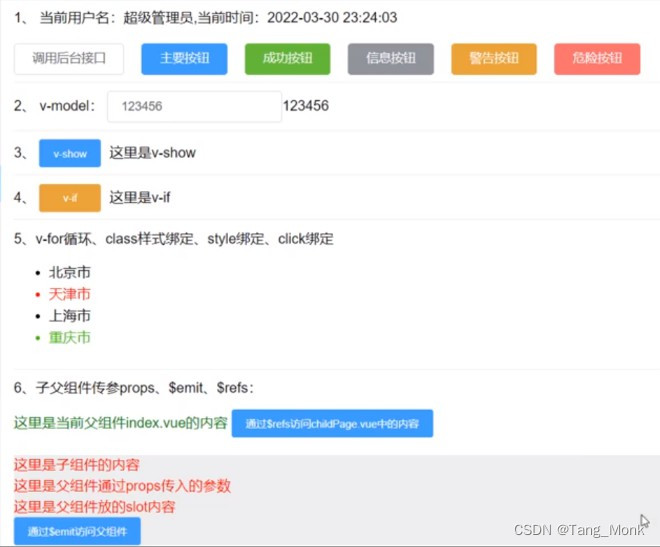
2.效果图