Uniapp小程序开发-底部tabbar的开发思路

文章目录
- 前言
- 一、uniapp 实现 tabbar
- 二、图标使用网络图片
- 后端返回tabbar信息
- uniapp方式中的setTabBarItem
- 总结
前言
记录uniapp 开发小程序的底部tabbar ,这里讨论的不是自定义tabbar的情况。而是使用wx.setTabBarItem(Object object) 这个api的情况。关于custom 小程序底部tabbar的可以跳过。
一、uniapp 实现 tabbar
实现 tabbar 的简单步骤如下:
- 在 uniapp 项目的
pages.json文件中,配置tabBar字段,来定义 tabbar 的样式和内容,例如:
{"tabBar": {"color": "#666","selectedColor": "#f00","backgroundColor": "#fff","borderStyle": "black","list": [{"pagePath": "pages/index/index","text": "首页","iconPath": "static/tabbar/home.png","selectedIconPath": "static/tabbar/home_active.png"},{"pagePath": "pages/cart/cart","text": "购物车","iconPath": "static/tabbar/cart.png","selectedIconPath": "static/tabbar/cart_active.png"},{"pagePath": "pages/user/user","text": "个人中心","iconPath": "static/tabbar/user.png","selectedIconPath": "static/tabbar/user_active.png"}]}
}
-
在
pages目录下创建对应的三个页面:index、cart和user。 -
在
pages/index目录下创建index.vue文件,编写首页的内容。 -
在
pages/cart目录下创建cart.vue文件,编写购物车页面的内容。 -
在
pages/user目录下创建user.vue文件,编写个人中心页面的内容。 -
在
App.vue文件中,将tabbar的内容放在<tabbar>标签内,例如:
<template><view><router-view></router-view><tabbar></tabbar></view>
</template>
- 在项目的根目录下,创建
components文件夹,再在该文件夹下创建tabbar.vue文件,编写 tabbar 的样式和逻辑,例如:
<template><view class="tabbar"><view v-for="(item, index) in tabBar.list" :key="index" class="tabbar-item" @click="switchTab(index)"><image :src="item.selected ? item.selectedIconPath : item.iconPath" class="tabbar-icon"></image><view class="tabbar-text">{{ item.text }}</view></view></view>
</template><script>
export default {data() {return {tabBar: getApp().globalData.tabBar  // 从全局数据中获取 tabBar 的配置}},methods: {switchTab(index) {uni.switchTab({url: '/' + this.tabBar.list[index].pagePath})}}
}
</script><style scoped>
.tabbar {display: flex;justify-content: space-between;align-items: center;height: 50px;background-color: #fff;border-top: 1px solid #000;
}.tabbar-item {flex: 1;display: flex;flex-direction: column;align-items: center;justify-content: center;font-size: 12px;color: #666;
}.tabbar-icon {width: 24px;height: 24px;
}.tabbar-text {margin-top: 2px;
}
</style>
- 在
main.js文件中全局配置 tabBar 的配置,例如:
App({globalData: {tabBar: require('./pages.json').tabBar}
})
这样,就完成了 tabbar 的简单实现过程。tabbar 的样式和逻辑可以根据项目的需求进行自定义修改,tabbar第一个path与pages的path 保持一致。也就是首页路径。
二、图标使用网络图片
那么如果是icon是后端返回网络图片,url的形式。
{"iconPath": "https://files/static/tabbar/home.png","selectedIconPath": "https://files/static/tabbar/home_active.png"
}
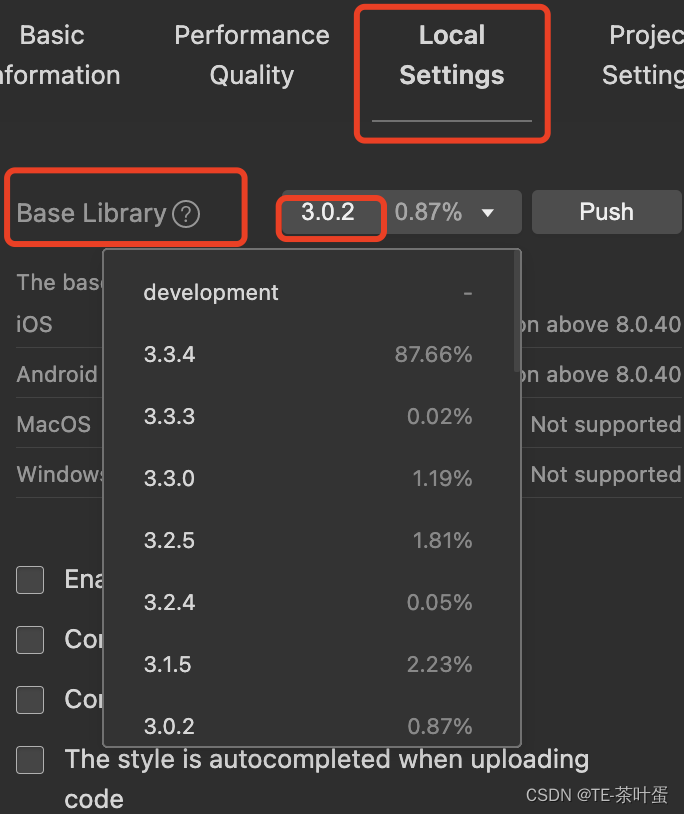
注意这个功能要小程序版本的基础库版本在 2.7.0以上。
后端返回tabbar信息
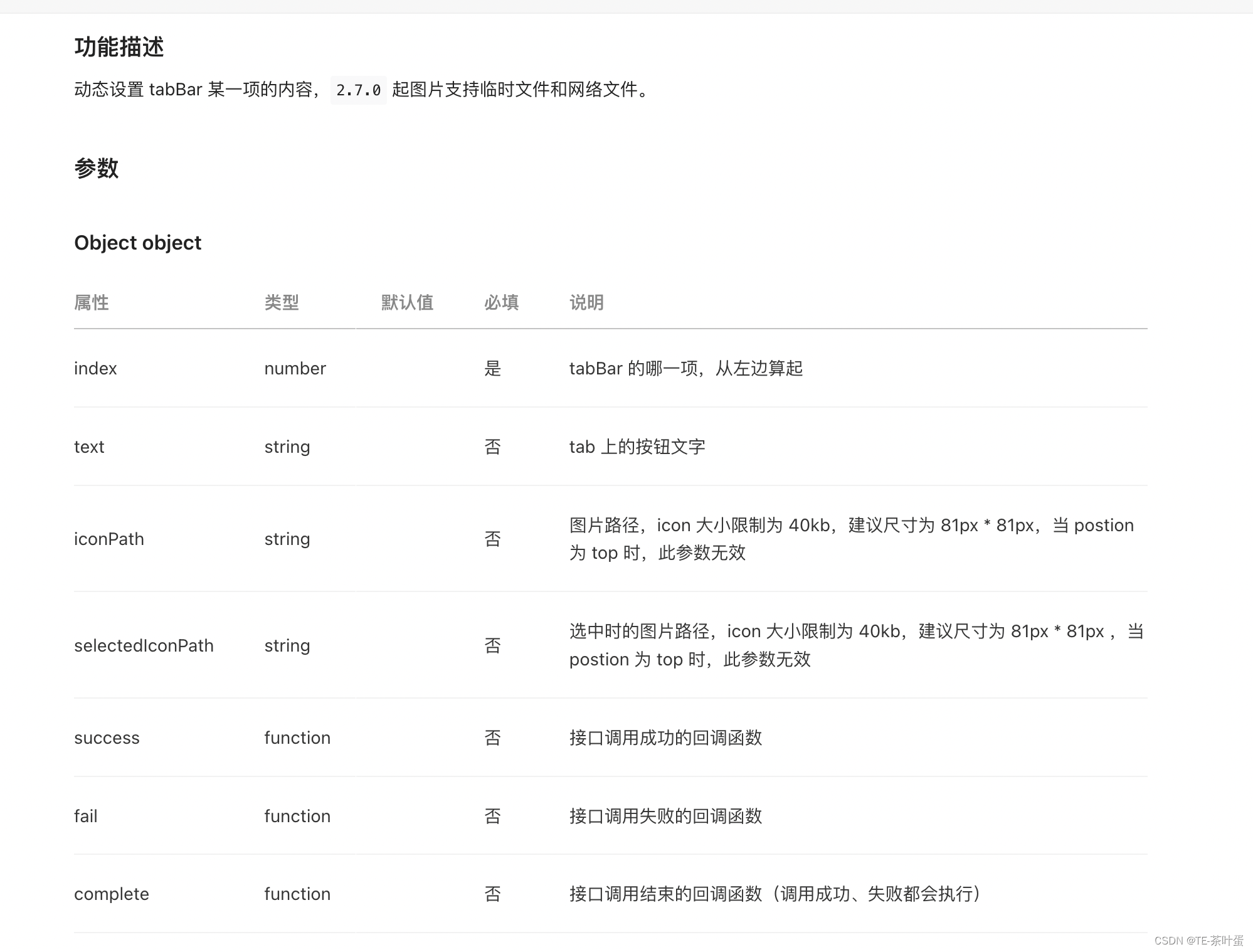
后端返回tabbar信息,已达到可以在后端管理tabbar的图标。即是iconPath,selectedIconPath 这些是支持重置。官方提供了这个apiwx.setTabBarItem(Object object)
uniapp方式中的setTabBarItem
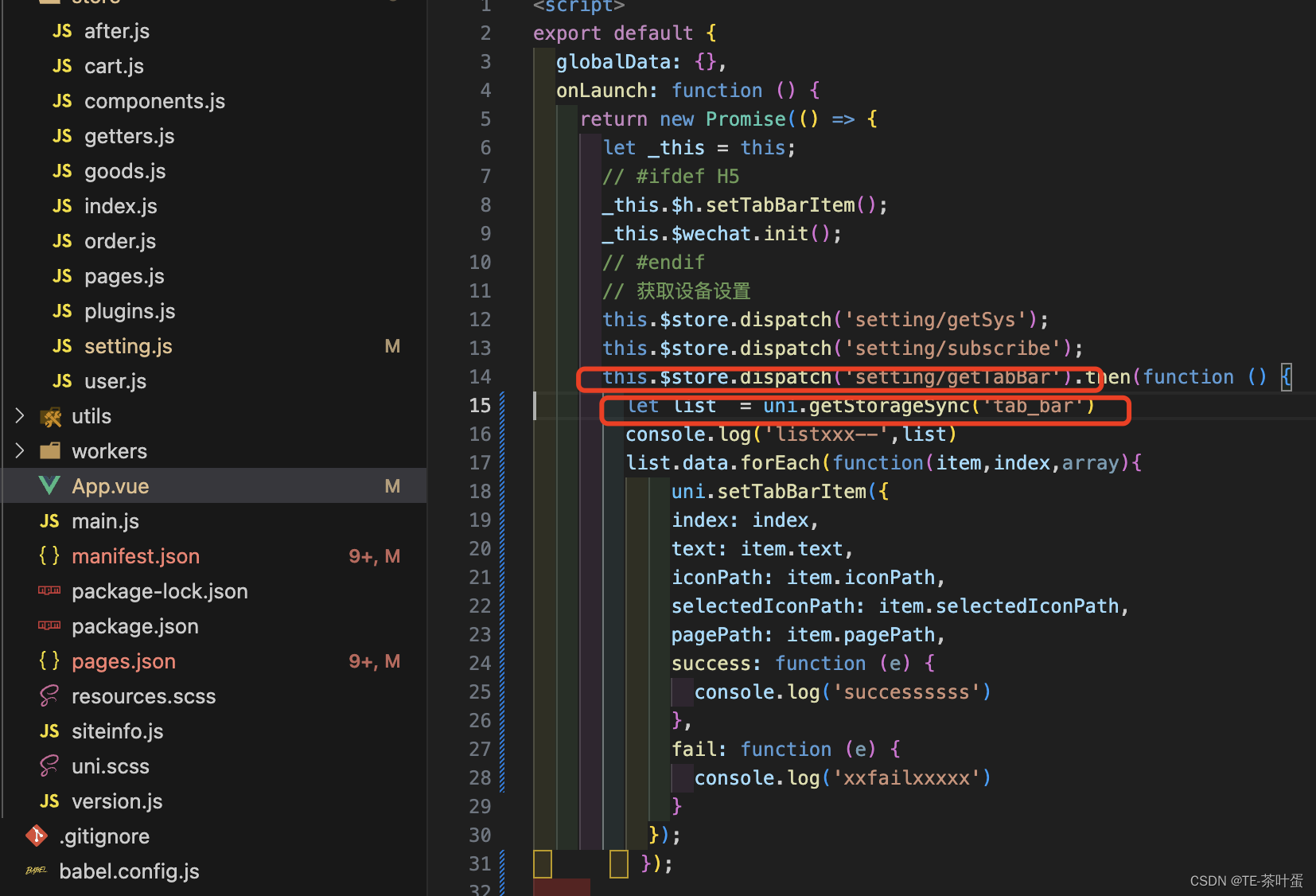
如图在onLauch中加入相关逻辑。获取tabbar信息后,uni.setTabBarItem。
总结
今天的内容就在这里了,本文讨论如何使用uniapp实现基本tabbar功能,接着给出动态设置icon的思路。依赖的api是uni.setTabBarItem。