TypeScript中的keyof、typeof、in

概览
TypeScript中的keyof、typeof、in在我们日常工作中经常用到,但也容易遗忘,现详细梳理其用法及使用场景
一. 抛出问题
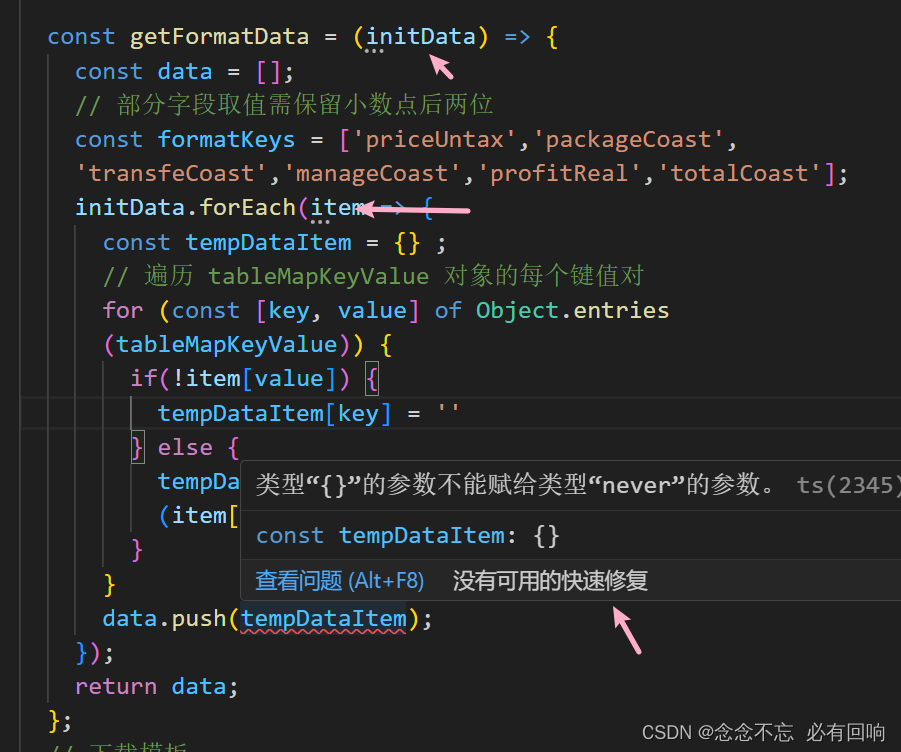
const getFormatData = (initData) => { const data = [];// 部分字段取值需保留小数点后两位const formatKeys = ['priceUntax','packageCoast','transfeCoast','manageCoast','profitReal','totalCoast']; initData.forEach(item => { const tempDataItem = {} ; // 遍历 tableMapKeyValue 对象的每个键值对 for (const [key, value] of Object.entries (tableMapKeyValue)) { if(!item[value]) {tempDataItem[key] = ''} else {tempDataItem[key] = formatKeys.includes(key)? Number(item[value]).toFixed(2): item[value]}} data.push(tempDataItem); }); return data; };
在vue项目中,这段代码有编译报错,代码可能看得不清楚,上图片
修复代码1
const getFormatData = <T extends { [K in keyof typeof tableMapKeyValue]: any }>(initData:any[]): T[] => { const data: T[] = [];// 部分字段取值需保留小数点后两位const formatKeys = ['priceUntax','packageCoast','transfeCoast','manageCoast','profitReal','totalCoast']; initData.forEach(item => { const tempDataItem: T = {} as T; // 遍历 tableMapKeyValue 对象的每个键值对 for (const [key, value] of Object.entries (tableMapKeyValue)) { if(!item[value]) {tempDataItem[key] = ''} else {tempDataItem[key] = formatKeys.includes(key)? Number(item[value]).toFixed(2): item[value]}} // 将 tempDataItem 添加到 data 数组中 data.push(tempDataItem); }); return data; };
修复代码2
const getFormatData = (initData:any[]) => { const data:ItableMapKeyValue[] = [];// 部分字段取值需保留小数点后两位const formatKeys = ['priceUntax','packageCoast','transfeCoast','manageCoast','profitReal','totalCoast']; initData.forEach(item => { const tempDataItem: ItableMapKeyValue = {} as ItableMapKeyValue; // 遍历 tableMapKeyValue 对象的每个键值对 for (const [key, value] of Object.entries (tableMapKeyValue)) { if(!item[value]) {tempDataItem[key] = ''} else {tempDataItem[key] = formatKeys.includes(key)? Number(item[value]).toFixed(2): item[value]}} data.push(tempDataItem); }); return data; };
相关调用代码如下:
const importExcel = (params:any[]) => {const formatData = getFormatData(params);data.value.details = formatData;}
相关引用代码
export interface ItableMapKeyValue {goodsNo: string,descr: string,number: string,unit: string,priceUntax: string,packageCoast: string,transfeCoast: string,manageCoast: string,profitReal: string,totalCoast: string,remarks: string
}export const tableMapKeyValue:ItableMapKeyValue = {goodsNo:'物料编号',descr:'描述',number:'数量',unit:'单位',priceUntax:'单价(未含税)',packageCoast:'包装费用(元)',transfeCoast:'运输费用(元)',manageCoast:'管理服务费用(元)',profitReal:'毛利率(%)',totalCoast:'总价(未含税)(元)',remarks:'备注'
}
二. keyof
keyof 可以获取一个类型所有键值,返回一个联合类型
type Person = {name:string;age:number;
}type PersonKey = keyof Person; // 'name'|'age'
三. typeof
typeof 可以获取一个对象/实例的类型
const person = {name:'xiaobai',age:3
}const p1:typeof person = {name:'xiaohong',age:2
}// typeof person 输出 {name:string, age:number}
三. in 操作符
遍历枚举的类型, 可以和keyof配合使用,作类型转换等
type Person = {name:string;age:number;
}type PersonToString<T> = {[k in keyof T]:string
}const p1:PersonToString<Person> = {name:'xiaobai',age:"10"
}
// {name:string, age:string}
四. 使用示例
1. 实现 Partial
Partial是一个ts内置工具类型,用于将传入的类型所有属性设置为可选的
type User = {id:number,phone:number,pwd:string,name:string
}const u1:Partial<User> = {id:1,name:'小白'
}
// 自己实现
type MyPartial<T> = {[k in keyof T]?: T[k]
}const u2:MyPartial<User> = {id:2,name:'小红'
}
2. 实现 Readonly
Readonly工具类型可以将传入的类型中所有属性转化为只读
type User = {id:number,name:string
}
// 自己实现
type MyReadonly<T> = {readonly [k in keyof T]: T[k]
}const u1:MyReadonly<User> = {id:3,name:'小黄'
}u1.name = '小黑'
//Cannot assign to 'name' because it is a read-only property.
3. 实现 Record
Record<Keys, Type>工具类型可以将某个类型的属性映射到另一个类型上,其构造的类型属性名的类型为K,属性值的类型为T
type Page = 'home' | 'about' | 'contact';
interface PageInfo {title: string;
}const x1: Record<Page, PageInfo> = {about: { title: 'about' },contact: { title: 'contact' },home: { title: 'home' },
};// 自己实现
type MyRecord<Keys extends keyof any, Type> =  {[k in Keys]: Type
}
const x2: MyRecord<Page, PageInfo> = {about: { title: 'about' },contact: { title: 'contact' },home: { title: 'home' },
};