Vue代理模式和Nginx反向代理(Vue代理部署不生效)
)
在使用axios时,经常会遇到跨域问题。为了解决跨域问题,可以在 vue.config.js 文件中配置代理:
const { defineConfig } = require('@vue/cli-service')
module.exports = defineConfig({transpileDependencies: true,devServer: {port: 7070,proxy: {'/api': {target: 'http://localhost:8080/admin',pathRewrite: {'^/api': ''}}}}
})
axios的post请求示例:
axios.post('/api/employee/login',{username:'admin',password: '123456'}).then(res => {console.log(res.data)}).catch(error => {console.log(error.response)})
前端发送:http://localhost:7070/api/employee/login
经过代理转换为:http://localhost:8080/admin/employee/login
axios的get请求示例:
axios.get('/api/shop/status',{headers: {token: ‘xxx.yyy.zzz’}})
前端发送:http://localhost:7070/api/shop/status
经过代理转换为:http://localhost:8080/admin/shop/status
打包部署vue
npm run build
打包结束后生成dist文件夹
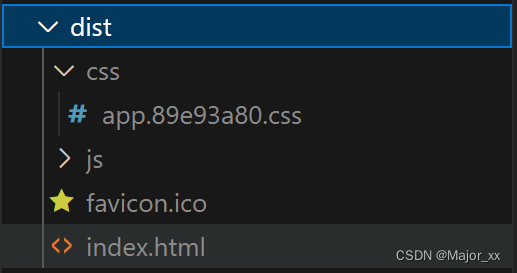
注意:打包时这个代理并不会跟着打包
假设我们将项目打包到的nginx地址是localhost地址,访问端口是80(80默认可省略)
那么这时候数据请求将请求的是http://localhost/api/employee/login地址,但是我们需要请求的接口是localhost:8080地址,这时候就需要用到nginx的反向代理了 。
首先进入配置文件
#user  nobody;
worker_processes  1;#error_log  logs/error.log;
#error_log  logs/error.log  notice;
#error_log  logs/error.log  info;#pid        logs/nginx.pid;events {worker_connections  1024;
}http {include       mime.types;default_type  application/octet-stream;#log_format  main  '$remote_addr - $remote_user [$time_local] "$request" '#                  '$status $body_bytes_sent "$http_referer" '#                  '"$http_user_agent" "$http_x_forwarded_for"';#access_log  logs/access.log  main;sendfile        on;#tcp_nopush     on;#keepalive_timeout  0;keepalive_timeout  65;#gzip  on;map $http_upgrade $connection_upgrade{default upgrade;'' close;}upstream webservers{server 127.0.0.1:8080 weight=90 ;#server 127.0.0.1:8088 weight=10 ;}server {listen       80;server_name  localhost;#charset koi8-r;#access_log  logs/host.access.log  main;location / {root   html/sky;index  index.html index.htm;}#error_page  404              /404.html;# redirect server error pages to the static page /50x.html#error_page   500 502 503 504  /50x.html;location = /50x.html {root   html;}# 反向代理,处理管理端发送的请求location /api/ {proxy_pass   http://localhost:8080/admin/;#proxy_pass   http://webservers/admin/;}# 反向代理,处理用户端发送的请求location /user/ {proxy_pass   http://webservers/user/;}# WebSocketlocation /ws/ {proxy_pass   http://webservers/ws/;proxy_http_version 1.1;proxy_read_timeout 3600s;proxy_set_header Upgrade $http_upgrade;proxy_set_header Connection "$connection_upgrade";}# pass the PHP scripts to FastCGI server listening on 127.0.0.1:9000##location ~ \.php$ {#    root           html;#    fastcgi_pass   127.0.0.1:9000;#    fastcgi_index  index.php;#    fastcgi_param  SCRIPT_FILENAME  /scripts$fastcgi_script_name;#    include        fastcgi_params;#}# deny access to .htaccess files, if Apache's document root# concurs with nginx's one##location ~ /\.ht {#    deny  all;#}}# another virtual host using mix of IP-, name-, and port-based configuration##server {#    listen       8000;#    listen       somename:8080;#    server_name  somename  alias  another.alias;#    location / {#        root   html;#        index  index.html index.htm;#    }#}# HTTPS server##server {#    listen       443 ssl;#    server_name  localhost;#    ssl_certificate      cert.pem;#    ssl_certificate_key  cert.key;#    ssl_session_cache    shared:SSL:1m;#    ssl_session_timeout  5m;#    ssl_ciphers  HIGH:!aNULL:!MD5;#    ssl_prefer_server_ciphers  on;#    location / {#        root   html;#        index  index.html index.htm;#    }#}}
配置好了代理之后就可以重启服务器了
nginx将http://localhost/api/employee/login 转为http://localhost:8080/admin/employee/login