uni-app 微信小程序之自定义navigationBar顶部导航栏

文章目录
- 1. 实现效果
- 2. App.vue
- 3. pages.json 配置自定义
- 4. 顶部导航栏 使用
微信小程序自定义
navigationBar顶部导航栏,兼容适配所有机型
1. 实现效果
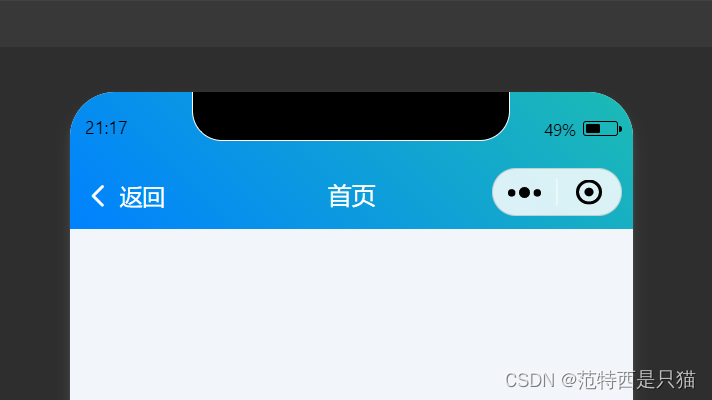
2. App.vue
- 在App.vue 中,设置获取的
StatusBar,CustomBar高度(实现适配高度写法) uni.getSystemInfo获取可视区域的高度wx.getMenuButtonBoundingClientRect()胶囊按钮位置信息
<script>import Vue from 'vue'export default {onLaunch: function() {uni.getSystemInfo({success: function(e) {// #ifndef MPVue.prototype.StatusBar = e.statusBarHeight;if (e.platform == 'android') {Vue.prototype.CustomBar = e.statusBarHeight + 50;} else {Vue.prototype.CustomBar = e.statusBarHeight + 45;};// #endif// #ifdef MP-WEIXINVue.prototype.StatusBar = e.statusBarHeight;let custom = wx.getMenuButtonBoundingClientRect();Vue.prototype.Custom = custom;Vue.prototype.CustomBar = custom.bottom + custom.top - e.statusBarHeight + 4;// #endif		// #ifdef MP-ALIPAYVue.prototype.StatusBar = e.statusBarHeight;Vue.prototype.CustomBar = e.statusBarHeight + e.titleBarHeight;// #endif}});},onShow: function() {console.log('App Show')},onHide: function() {console.log('App Hide')}}
</script><style lang="scss">
</style>
3. pages.json 配置自定义
"pages": [{"path": "home","style": {"navigationStyle": "custom"}
}]
4. 顶部导航栏 使用
- 组件完整代码(CSS 部分 我使用的是 colorUI ,不懂的可以看看写法)
<template><view><view class="cu-custom" :style="[{height:CustomBar + 'px'}]"><view class="cu-bar fixed" :style="style" :class="[bgImage!=''?'none-bg text-white bg-img':'',bgColor]"><view class="action" @tap="BackPage" v-if="isBack"><text class="cuIcon-back"></text><slot name="backText"></slot></view><view class="content" :style="[{top:StatusBar + 'px'}]"><slot name="content"></slot></view><slot name="right"></slot></view></view></view>
</template><script>export default {data() {return {StatusBar: this.StatusBar,CustomBar: this.CustomBar};},name: 'cu-custom',computed: {style() {var StatusBar = this.StatusBar;var CustomBar = this.CustomBar;var bgImage = this.bgImage;var style = `height:${CustomBar}px;padding-top:${StatusBar}px;`;if (this.bgImage) {style = `${style}background-image:url(${bgImage});`;}return style}},props: {bgColor: {type: String,default: ''},isBack: {type: [Boolean, String],default: false},bgImage: {type: String,default: ''},},methods: {BackPage() {uni.navigateBack({delta: 1});}}}
</script><style lang="scss" scoped>
</style>
- main.js 全局注册顶部导航栏组件
// 此处为引用自定义顶部
import cuCustom from './colorui/components/cu-custom.vue'
Vue.component('cu-custom',cuCustom);
- 页面使用导航栏组件
<cu-custom class="navBox" bgColor="bg-gradual-blue" :isBack="true"><block slot="backText">返回</block><block slot="content">首页</block>
</cu-custom>