鸿蒙(HarmonyOS)项目方舟框架(ArkUI)之Span组件
项目方舟框架(ArkUI)之Span组件)
鸿蒙(HarmonyOS)项目方舟框架(ArkUI)之Span组件
一、操作环境
操作系统: Windows 10 专业版、IDE:DevEco Studio 3.1、SDK:HarmonyOS 3.1+

二、Span组件
鸿蒙(HarmonyOS)作为Text组件的子组件,用于显示行内文本的组件。
子组件
无。
接口
Span(value: string | Resource)
从API version 9开始,该接口支持在ArkTS卡片中使用。
参数
| 参数名 | 参数类型 | 必填 | 参数描述 |
|---|---|---|---|
| value | string | Resource | 是 | 文本内容。 |
属性
通用属性方法仅支持通用文本样式。
| 名称 | 参数类型 | 描述 |
|---|---|---|
| decoration | { type: TextDecorationType, color?: ResourceColor } | 设置文本装饰线样式及其颜色。 默认值:{ type: TextDecorationType.None color:Color.Black } 从API version 9开始,该接口支持在ArkTS卡片中使用。 |
| letterSpacing | number | string | 设置文本字符间距。取值小于0,字符聚集重叠,取值大于0且随着数值变大,字符间距越来越大,稀疏分布。 从API version 9开始,该接口支持在ArkTS卡片中使用。 |
| textCase | TextCase | 设置文本大小写。 默认值:TextCase.Normal 从API version 9开始,该接口支持在ArkTS卡片中使用。 |
事件
通用事件仅支持点击事件。
说明
由于Span组件无尺寸信息,因此点击事件返回的ClickEvent对象的target属性无效。
示例
代码
// xxx.ets
@Entry
@Component
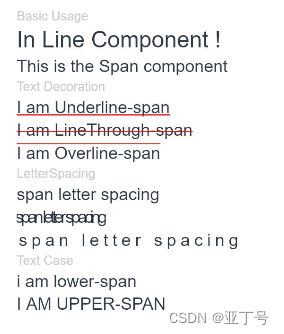
struct SpanExample {build() {Flex({ direction: FlexDirection.Column, alignItems: ItemAlign.Start, justifyContent: FlexAlign.SpaceBetween }) {Text('Basic Usage').fontSize(9).fontColor(0xCCCCCC)Text() {Span('In Line')Span(' Component')Span(' !')}Text() {Span('This is the Span component').fontSize(12).textCase(TextCase.Normal).decoration({ type: TextDecorationType.None, color: Color.Red })}// 文本横线添加Text('Text Decoration').fontSize(9).fontColor(0xCCCCCC)Text() {Span('I am Underline-span').decoration({ type: TextDecorationType.Underline, color: Color.Red }).fontSize(12)}Text() {Span('I am LineThrough-span').decoration({ type: TextDecorationType.LineThrough, color: Color.Red }).fontSize(12)}Text() {Span('I am Overline-span').decoration({ type: TextDecorationType.Overline, color: Color.Red }).fontSize(12)}// 文本字符间距Text('LetterSpacing').fontSize(9).fontColor(0xCCCCCC)Text() {Span('span letter spacing').letterSpacing(0).fontSize(12)}Text() {Span('span letter spacing').letterSpacing(-2).fontSize(12)}Text() {Span('span letter spacing').letterSpacing(3).fontSize(12)}// 文本大小写展示设置Text('Text Case').fontSize(9).fontColor(0xCCCCCC)Text() {Span('I am Lower-span').fontSize(12).textCase(TextCase.LowerCase).decoration({ type: TextDecorationType.None })}Text() {Span('I am Upper-span').fontSize(12).textCase(TextCase.UpperCase).decoration({ type: TextDecorationType.None })}}.width('100%').height(250).padding({ left: 35, right: 35, top: 35 })}
}
图例
你有时间常去我家看看我在这里谢谢你啦...
我家地址:亚丁号
最后送大家一首诗:
山高路远坑深,
大军纵横驰奔,
谁敢横刀立马?
惟有点赞加关注大军。