基于若依的ruoyi-nbcio流程管理系统基于form-generator的表单设计器增加子表单的一种简单方法(一)
)
更多ruoyi-nbcio功能请看演示系统
gitee源代码地址
前后端代码: https://gitee.com/nbacheng/ruoyi-nbcio
演示地址:RuoYi-Nbcio后台管理系统
更多nbcio-boot功能请看演示系统
gitee源代码地址
后端代码: https://gitee.com/nbacheng/nbcio-boot
前端代码:https://gitee.com/nbacheng/nbcio-vue.git
在线演示(包括H5) : http://122.227.135.243:9888
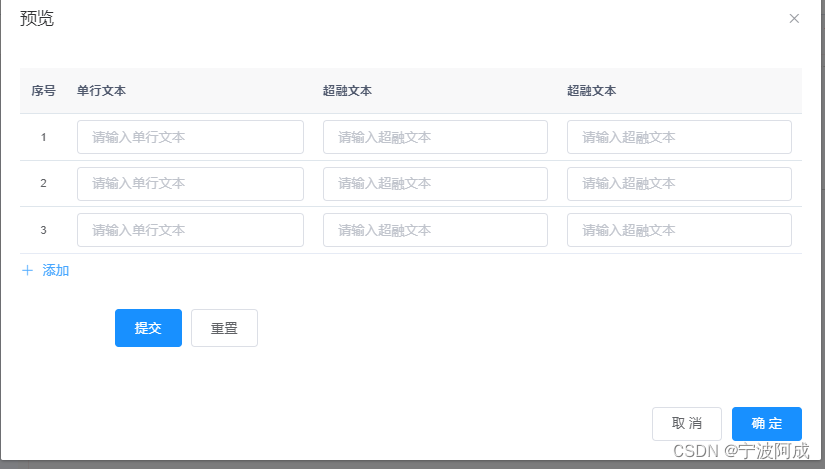
原先form-generator没有子表单的布局,所以考虑增加一个,当然后面还要支持子表。
1、config.js里增加下面的一个高级组件面板
// 高级型组件 【左面板】
export const seniorComponents = [{__config__: {tipLabel: "",showLabel: false,tagIcon: "table",label: '子表',tag: "sf-input-table",className: [],defaultValue: [],layout: "rowFormItem",dragDisabled: false,showTitle: true,type: "table",rowType: "table",children: [],tableName: "",},showAddBtn: true,showDeleteBtn: true,disabled: false,actionText: "添加",addType: 0,defaultValue: []}
]
2、在DraggableItem.vue里的rowFormItem增加下面代码
if (currentItem.__config__.tag === 'sf-input-table') {let tip = ''if (!currentItem.__config__.children.length) {tip = <div class="table-tip">请将组件拖到此区域(可拖多个组件)</div>}let toolTip = currentItem.__config__.labelif (currentItem.__config__.tipLabel && currentItem.__config__.label) {toolTip = <span slot="label">{currentItem.__config__.label}<el-tooltip placement="top" content={currentItem.__config__.tipLabel}><a class='el-icon-question tooltip-question content-name'></a></el-tooltip></span >}return (<el-col span={currentItem.__config__.span}><el-row gutter={currentItem.__config__.gutter} class={className + ' drawing-row-item-table'}nativeOnClick={event => { activeItem(currentItem); event.stopPropagation() }}><span class="component-name" >{toolTip} </span>{tip}<el-form label-position="top"><draggable list={currentItem.__config__.children} animation={340} group="componentsGroup" class="drag-wrapper table-wrapper" >{child}</draggable></el-form>{components.itemBtns.apply(this, arguments)}</el-row></el-col>)}3、RightPanel.vue里增加下面代码
<template v-if="activeData.__config__.tag==='sf-input-table'"><el-form-item label="提示"><el-input type="textarea" :rows="2" v-model="activeData.__config__.tipLabel"placeholder="请输入提示" /></el-form-item><el-form-item label="关联子表"><el-select v-model="activeData.__config__.tableName" placeholder="请选择数据库表"v-hasPermi="['tool:gen:list']" @change="tableChange" filterable clearable><el-option v-for="item in tableList" :key="item.tableName" :value="item.tableName":label="item.tableName?item.tableComment+'('+item.tableName+')':item.tableComment"><span >{{ item.tableName?item.tableComment+'('+item.tableName+')':item.tableComment}}</span><span>{{item.sub==false?'主表':'从表'}}</span></el-option></el-select></el-form-item><table-config :active-data="activeData"/></template>4、效果图如下: