mybatisplus-多数据源配置

1. 流程
- pom文件
- yml配置多数据源
- 具体服务添加注解@DS(“***”)
1.pom文件
<!--mybatis plus 起步依赖--><dependency><groupId>com.baomidou</groupId><artifactId>mybatis-plus-boot-starter</artifactId><version>3.4.0</version></dependency><!--多数据源--><dependency><groupId>com.baomidou</groupId><artifactId>dynamic-datasource-spring-boot-starter</artifactId><version>3.5.2</version></dependency>
2. yml配置
根据具体情况配置不同数据源…不同的数据库.不同sql源.都是可以的
官网链接
# datasource
spring:datasource:dynamic:primary: master #设置默认的数据源或者数据源组,默认值即为masterstrict: false #严格匹配数据源,默认false. true未匹配到指定数据源时抛异常,false使用默认数据源datasource:db_qa_wecom_datasync:   # 数据库1driver-class-name: org.postgresql.Driverurl: jdbc:postgresql://127.0.0.1:5433/db_qa_wecom_datasync?currentSchema=public&autoReconnect=true&failOverReadOnly=falseusername: postgrespassword: rootdb_qa_wecom:   # 数据库2driver-class-name: org.postgresql.Driverurl: jdbc:postgresql://127.0.0.1:5433/db_qa_wecom?currentSchema=public&autoReconnect=true&failOverReadOnly=falseusername: postgrespassword: root
3. 具体服务添加注解@DS(“***”)
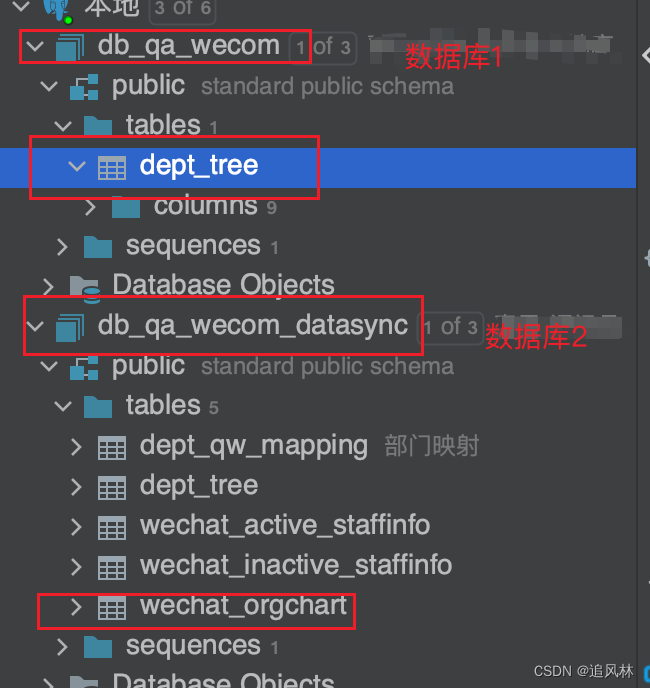
3.1库表信息
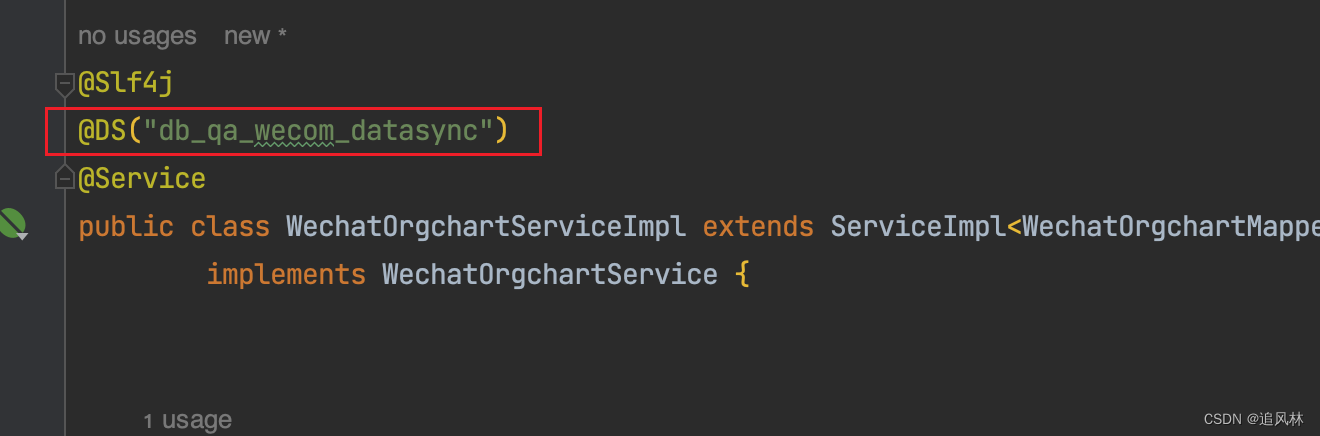
3.2具体服务对应具体

3.3从不同的数据库中查询的结果.
