CentOS 7中搭建NFS文件共享服务器的完整步骤

CentOS 7中搭建NFS文件共享服务器的完整步骤
要求:实现镜像文件共享,并基于挂载的共享目录配置yum源。
系统环境:
服务器:172.20.26.167-CentOS7.6
客户端:172.20.26.198-CentOS7.6
1、在服务器和客户端上,关闭防火墙以及selinux,安装nfs服务组件:
stop firewalld && systemctl disable firewalld
vi /etc/selinux/config
enforcring=disabled
yum -y intall nfs-utils rpcbind
在服务器上设置/mnt/cdrom 为共享文件
[root@localhost /]# vim /etc/exports 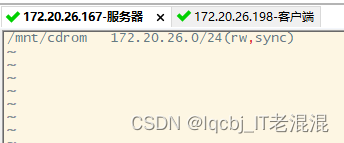
wq 保存退出并重启服务
[root@localhost /]# systemctl start rpcbind
[root@localhost /]# systemctl start nfs
[root@localhost /]# exportfs -r

2、在客户端172.20.26.198上
可用showmount搜索网络中可用的共享文件,创建挂载点,创建挂载:
[root@localhost ~]# showmount -e 172.20.26.167

[root@localhost ~]# mkdir /mnt/nfs
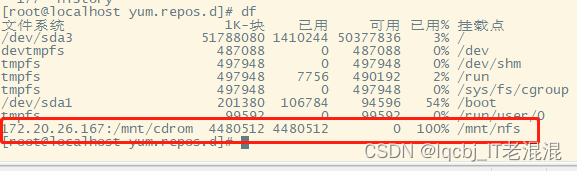
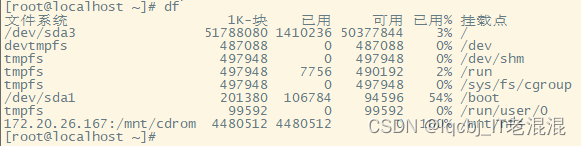
[root@localhost ~]# mount -t nfs -o soft,timeo=1 172.20.26.167:/mnt/cdrom /mnt/nfs
3、想要挂载永久生效,需要挂载信息写进fstab 文件里,否则机器重启挂载信息丢失
[root@localhost ~]# vim /etc/fstab
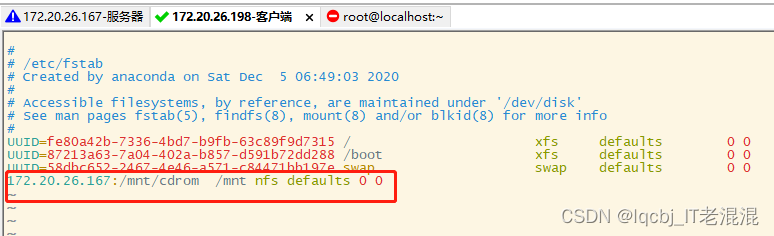
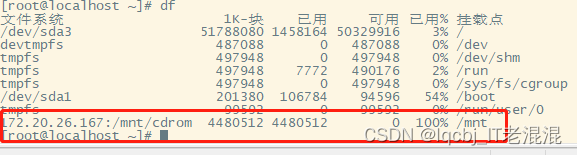
[root@localhost ~]# mount -a #表示读取fstab 里的信息进行挂载
[root@localhost ~]# df
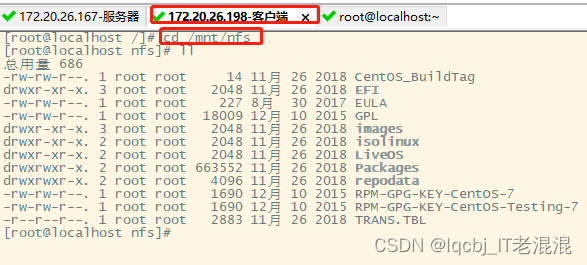
[root@localhost /]# cd /mnt/nfs
[root@localhost nfs]# ll
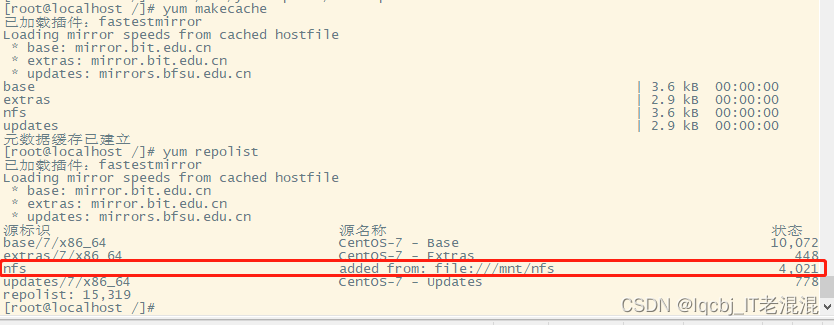
[root@localhost /]# vim /etc/yum.repos.d/nfs.repo

[root@localhost /]# yum makecache
[root@localhost /]# yum repolist