3.6 状态与转换

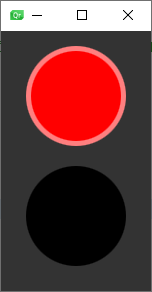
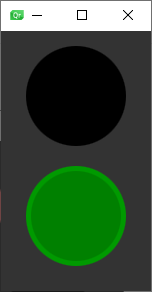
目标:这里我们做了一个红绿灯的案例,图1是默认状态,当我们点击界面后,红色会在0.6秒内切换成黑色,同时黑色会在0.6秒内切换成绿色,即图2所示,再次点击则回到图1效果。
main.qml
import QtQuickItem {id: rootwidth: 150; height: 260property color black: "black"property color red: "red"property color green: "green"Rectangle {anchors.fill: parentcolor: "#333333"}Rectangle {id: light1width: 100; height: 100radius: width /2color: root.blackx: 25; y: 15border.width: 5border.color: Qt.lighter(color, 1.5)}Rectangle {id: light2width: 100; height: 100radius: width /2color: root.blackx: 25; y: 135border.width: 5border.color: Qt.lighter(color, 1.2)}state: "stop" //默认状态是stopstates: [State {name: "stop"PropertyChanges {target: light1color: root.red}PropertyChanges {target: light2color: root.black}},State {name: "go"PropertyChanges {target: light1color: root.black}PropertyChanges {target: light2color: root.green}}]MouseArea {anchors.fill: parentonClicked: parent.state = (parent.state === "stop" ? "go" : "stop")}transitions: [Transition {from: "*"to: "*" // *号代表任意,这里用2个*号表示:只要存在状态改变就运行下面的动画ColorAnimation {target: light1properties: "color"duration: 600}ColorAnimation {target: light2properties: "color"duration: 600}}]
}