Linux下的进程操作

一、进程概念
ps -elf:查看操作系统的所有进程(Linux命令)
ctrl + z:把进程切换到后台
crtl + c:结束进程
fg:把进程切换到前台
二、获取进程进程号和父进程号
函数原型:
pid_t getpid(void); //pid_t,它是一个有符号整数类型。
pid_t getppid(void);
例子:
#include <stdio.h>
#include <sys/types.h>
#include <unistd.h>int main()
{pid_t pid = getpid();printf("当前进程的进程号为:%d\n", pid);pid_t ppid = getppid();printf("当前进程的父进程为:%d\n", ppid);while(1);return 0;
}
三、 fork
概念:fork() 是一个在操作系统编程中常用的函数,用于创建一个新的进程。它通过复制调用进程(称为父进程)来创建一个新的进程(称为子进程)。子进程是父进程的副本,它从 fork() 函数返回的地方开始执行。
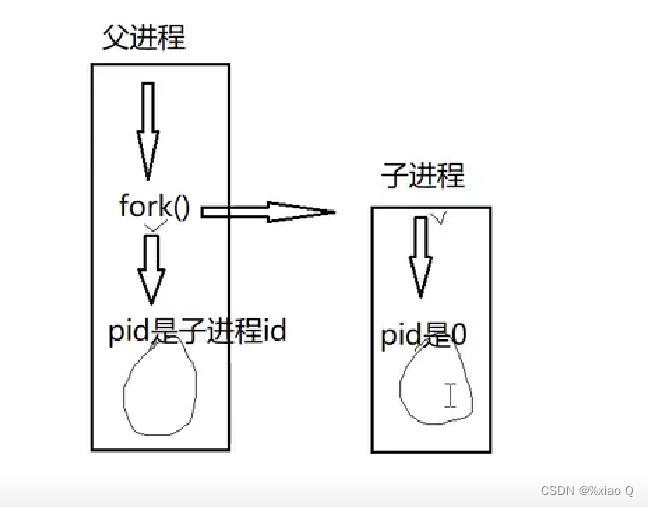
以下是 fork() 函数的原型:
#include <sys/types.h>
#include <unistd.h>
pid_t fork(void);
fork() 函数没有参数,它返回一个 pid_t 类型的值,表示进程的状态。返回值有以下几种情况:
- 如果返回值是负数(-1),则表示创建子进程失败。
- 如果返回值是零(0),则表示当前代码正在子进程中执行。
- 如果返回值是正数,则表示当前代码正在父进程中执行,返回值是新创建子进程的PID。
例子:
#include <stdio.h>
#include <sys/types.h>
#include <unistd.h>
#include <stdlib.h>int main()
{       pid_t pid = fork();if(pid == -1){perror("fork");exit(1);}else if(pid == 0){       printf("child pid=%d, getpid=%d, getppid=%d\n", pid, getpid(), getppid());
//      while(1)
//      {printf("child\n");sleep(1);
//      }}else    {       printf("parent pid=%d, getpid=%d, getppid=%d\n", pid, getpid(), getppid());
//      while(1)
//      {printf("parent\n");sleep(2);
//      }}printf("helloworld\n");//会输出两次return 0;
}
四、fork笔试题
详情看下述代码:
#include <stdio.h>
#include <sys/types.h>
#include <unistd.h>int main()
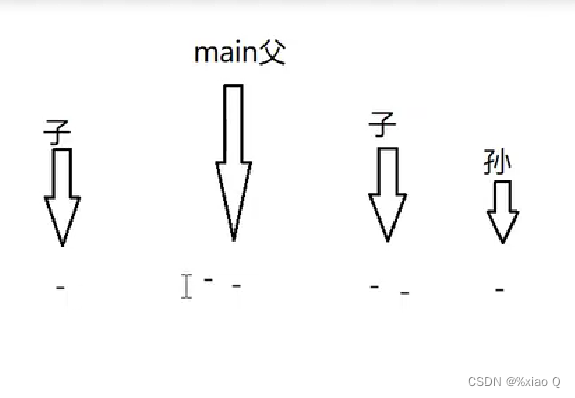
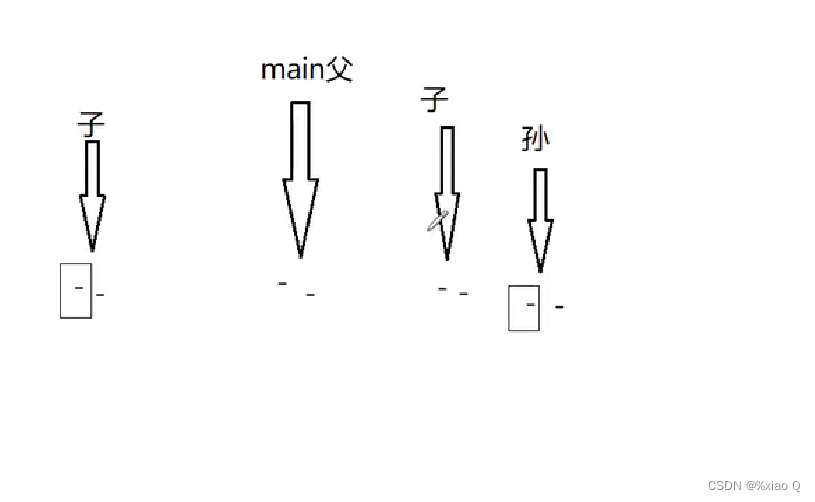
{for(int i = 0; i < 2; i++){   fork();//  printf("-\n"); //6个"-",换行符会输出缓冲区里的的数据printf("-"); // 8个"-",子进程会复制父进程输出缓冲区的数据}   return 0;
}
五、fork原理
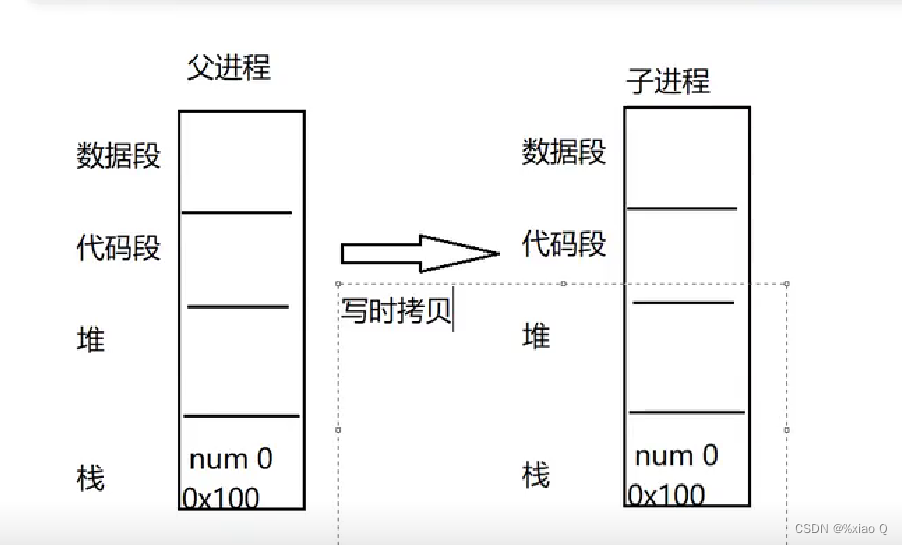
下面输出都为1的原因是,父子进程在不同的空间
#include <stdio.h>
#include <sys/types.h>
#include <unistd.h>int main()
{                                                                                                                                                   int num = 0;if(fork() == 0){   num++;printf("child %d\n", num);}   else{   num++;printf("parent %d\n", num);}/*输出为:child 1parent 1*/return 0;}
六、多进程读写
#include <stdio.h>
#include <sys/types.h>
#include <sys/stat.h>
#include <fcntl.h>
#include <stdlib.h>
#include <unistd.h>
#include <string.h>void child_write(int fd)
{char buf[128] = {0};while(1){scanf("%s", buf);if(write(fd, buf, strlen(buf)) == -1){perror("write");break;}lseek(fd, -1 * strlen(buf), SEEK_CUR);if(!strcmp(buf, "bye"))break;memset(buf, 0, 128);}//i lseek(fd, -1 * strlen(buf), _CUR);}void parent_read(int fd)
{char buf[128] = {0};while(1){int ret = read(fd, buf, sizeof(buf));if(ret == -1){perror("read");break;}else if(ret == 0)continue;if(!strcmp(buf, "bye"))break;printf("child get: %s\n", buf);memset(buf, 0, sizeof(buf));}
}int main()
{int fd = open("hello.txt", O_CREAT | O_RDWR, 00400 | 00200);if(-1 == fd){perror("open");exit(1);}if(fork() == 0){child_write(fd);}else{parent_read(fd);}close(fd);return 0;
}
七、vfork
vfork 是一个在某些操作系统中提供的系统调用函数,用于创建一个新的进程,并与父进程共享内存空间。与 fork 不同的是,vfork 在创建子进程时不会复制父进程的内存空间,而是与父进程共享同一份内存。这使得 vfork 函数比 fork 函数更高效,因为它不需要复制整个父进程的内存空间。
vfork 函数的语法如下:
#include <unistd.h>
pid_t vfork(void);
返回值:vfork 函数没有参数,返回一个进程ID(PID)。在父进程中,vfork 返回子进程的PID;在子进程中,vfork 返回0。如果 vfork 调用失败,返回-1。
注意事项:
- 子进程的执行:在调用 vfork 后,子进程会暂停父进程的执行,直到子进程调用 exec 函数族中的一个函数或者调用 _exit 函数来终止自己。子进程在执行期间与父进程共享同一份内存空间,因此需要谨慎处理共享资源的访问,以避免出现竞争条件和数据损坏等问题。
- 父进程的阻塞:在调用 vfork 后,父进程会阻塞,直到子进程调用 exec 函数族中的一个函数或者调用 _exit 函数,或者导致异常终止。
- 返回值的使用:根据 vfork 的返回值可以判断当前代码是在父进程还是子进程中执行。在父进程中,返回的是子进程的PID;在子进程中,返回的是0。可以根据这个返回值来区分父子进程的执行路径。
- vfork创建的子进程需要指定退出方式
例子:
#include <stdio.h>
#include <sys/types.h>
#include <unistd.h>
#include <stdlib.h>int main()
{pid_t pid = vfork();if(pid == -1){perror("vfork");exit(1);}else if(pid == 0) //子进程{printf("pid = %d, getpid = %d, getppid = %d\n", pid, getpid(), getppid());sleep(2);exit(0);}else //父进程{printf("pid = %d, getpid = %d, getppid = %d\n", pid, getpid(), getppid());}return 0;
}
八、exec系列函数
execl
execl 是一个系统调用函数,用于在当前进程中执行一个新的程序。它会取代当前进程的代码和数据,加载并执行指定的程序文件。
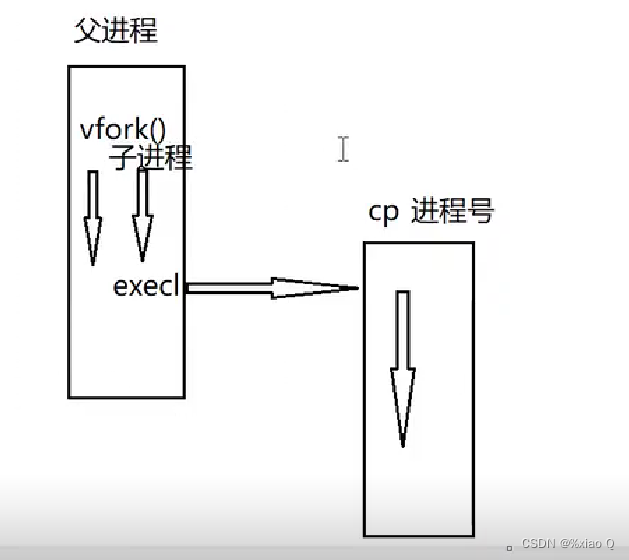
execl 函数的原型如下:
#include <unistd.h>
int execl(const char *path, const char *arg0, ..., (char *) NULL);
参数说明:
path:要执行的程序文件的路径。
arg0:新程序的第一个参数,通常是程序的名称。后续参数是新程序的命令行参数,以 NULL 结尾。
注意事项:当调用 execl 函数成功时,当前进程的代码和数据将被替换,之后的代码将不再执行。因此,如果在 execl 调用之后还有需要执行的代码,应该将其放在 execl 调用之前。
例子:
#include <stdio.h>
#include <sys/types.h>
#include <unistd.h>int main()
{if(vfork() == 0){   printf("child: pid=%d\n", getpid());//新的进程一旦启动,父进程就开始执行execl("/usr/bin/cp", "cp", "-r", "/usr/local", ".", NULL);printf("hello world!");//不会输出,因为执行了execl就不再执行下面的代码了}                                                                                                                                               else{printf("parent: pid=%d\n", getpid());}   return 0;
}
拓展:
另外,execl 函数还有一些变种,如 execlp、execle、execv 等,它们在参数传递和执行方式上有所不同。可以根据具体的需求选择合适的函数来执行新程序。
九、孤儿进程 & 僵尸进程
孤儿进程:孤儿进程(Orphan Process)是指在父进程结束或被终止后,其子进程仍然在运行但失去了父进程的监管和控制。
孤儿进程的状态和行为有以下特点:
- 孤儿进程的父进程 ID(PPID)被设置为 init 进程的进程 ID(通常是 1)。
- 孤儿进程继续在系统中运行,但其父进程已经不存在。
- 孤儿进程的资源(如打开的文件描述符、内存等)不会被释放,因为它没有被正常地回收。
- 孤儿进程的终止状态(退出状态码)将被保存,直到父进程通过调用 wait 或 waitpid 等系统调用来获取。
-
孤儿进程的存在是为了避免子进程在父进程终止后变成僵尸进程(Zombie Process)。当父进程没有及时处理子进程的终止状态时,子进程将变成僵尸进程,占用系统资源。而孤儿进程的终止状态会被保存,直到被新的父进程处理。
-
在编写程序时,可以通过一些方式避免产生孤儿进程,例如在父进程终止之前等待子进程的终止,或者使用适当的进程管理和通信机制来确保子进程的正确终止和资源回收。
僵尸进程:僵尸进程(Zombie Process)是指一个已经终止执行的子进程,但其父进程尚未对其进行完全的资源回收和终止状态获取的进程。
僵尸进程的状态和行为有以下特点:
- 僵尸进程的状态(进程状态码)为 “Z” 或 “Z+”,在进程列表中以 “” 或 “Z” 标识。
- 僵尸进程的父进程仍然存在,但尚未调用相应的系统调用(如 wait 或 waitpid)来获取子进程的终止状态。
- 僵尸进程的资源(如打开的文件描述符、内存等)几乎没有消耗,因为它已经停止执行。
- 僵尸进程的终止状态(退出状态码)仍然保存在系统中,等待父进程来获取。
- 僵尸进程的存在是因为在 Linux 系统中,子进程的终止状态需要被父进程显式地获取。父进程可以通过调用 wait、waitpid 或 waitid 等系统调用来获取子进程的终止状态,并进行相应的资源回收。如果父进程没有及时处理子进程的终止状态,子进程就会变成僵尸进程。
- 僵尸进程一般不会对系统的正常运行产生直接影响,但如果大量的僵尸进程积累,可能会占用系统的进程表资源。因此,及时处理僵尸进程是良好的编程实践。
在编写程序时,可以通过以下方式避免僵尸进程的产生:
- 在父进程中使用 wait、waitpid 或 waitid 等系统调用来获取子进程的终止状态。
- 使用信号处理机制,在父进程中捕获子进程的终止信号(如 SIGCHLD),并在信号处理函数中处理子进程的终止状态。
- 使用进程间通信机制(如管道、信号量、共享内存等)来实现父进程与子进程之间的同步和通信,确保子进程的正确终止和资源回收。
例子:
#include <stdio.h>
#include <sys/types.h>
#include <unistd.h>
#include <sys/wait.h>
#include <stdlib.h>int main()
{if(fork() == 0){   sleep(1);printf("child: pid = %d, ppid = %d\n", getpid(), getppid());exit(100);}   else{   printf("parent: pid = %d\n", getpid());int status;wait(&status);if(WIFEXITED(status)) //判断子进程是否正常结束{   printf("子进程正常结束\n");printf("子进程退出状态:%d\n", WEXITSTATUS(status));}   else{printf("子进程异常退出\n");}}return 0;
}
十、进程间通信
1.无名管道
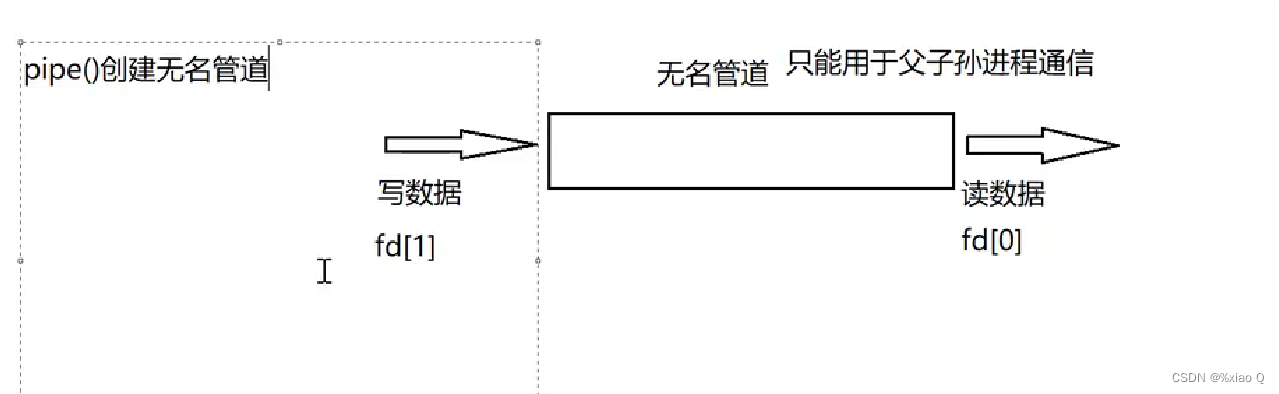
概念:无名管道(unnamed pipe)是一种在进程间进行单向通信的机制。它是一种特殊的文件,可以用于在同一台计算机上的父进程和子进程之间传递数据。
注意事项:
-
无名管道只能在具有亲缘关系的进程之间使用,例如父进程和子进程。创建无名管道时,操作系统会为其分配一个文件描述符,父进程和子进程可以使用该文件描述符进行读取和写入操作。
-
无名管道是一种半双工的通信机制,意味着数据只能在一个方向上流动。通常,父进程创建无名管道,并将其传递给子进程,然后父进程关闭管道的写入端,子进程关闭管道的读取端。这样,父进程就可以向子进程发送数据,而子进程可以从管道中读取数据。
pipe:
在C语言中,pipe() 函数用于创建一个无名管道,并返回两个文件描述符,一个用于读取数据,另一个用于写入数据。
函数原型如下:
#include <unistd.h>
int pipe(int pipefd[2]);
参数 pipefd 是一个整型数组,用于存储管道的读取端和写入端的文件描述符。pipefd[0] 表示管道的读取端,pipefd[1] 表示管道的写入端。
例子:
#include <stdio.h>
#include <unistd.h>
#include <stdlib.h>
#include <sys/wait.h>
int main()
{int fd[2] = {0};if(pipe(fd) == -1) {   perror("pipe");exit(1);}   int num = 0;if(fork() == 0) //子进程写数据{   num++;if(write(fd[1], &num, 4) == -1) {   perror("write");exit(1);}   printf("child: num = %d\n", num);}   else //父进程读数据{   if(read(fd[0], &num, 4) == -1) //阻塞,如果管道为空,则程序停在这,直到有数据才可读{perror("read");exit(1);}   num++;printf("parent: num = %d\n", num);int status;wait(&status);}return 0;
}
2.有名管道
概念:有名管道是一种特殊类型的文件,可以用于在不同的进程之间进行双向通信。它可以被多个进程同时打开,允许一个进程向管道写入数据,而另一个进程从管道中读取数据。
要创建一个有名管道,在Unix系统上可以使用mkfifo命令。
mkfifo
mkfifo()函数是在C语言中使用的一个系统调用,用于创建一个有名管道(FIFO)。以下是mkfifo()函数的原型:
#include <sys/types.h>
#include <sys/stat.h>
int mkfifo(const char *pathname, mode_t mode);
其中:
- pathname 是要创建的有名管道的路径名。
- mode 是要设置的权限模式。
返回值:
mkfifo()函数返回一个整数值,表示操作的成功与否。如果成功创建了有名管道,则返回0;如果出现错误,则返回-1,并设置errno变量来指示具体的错误原因。
例子:
进程读:
#include <stdio.h>
#include <sys/types.h>
#include <sys/stat.h>
#include <stdlib.h>
#include <unistd.h>
#include <fcntl.h>
#include <string.h>int main()
{//创建有名管道if(mkfifo("fifo.tmp", 00400 | 00200) == -1) {   perror("mkfifo");exit(1);}   int fd = open("fifo.tmp", O_RDONLY);if(-1 == fd) {   perror("open");exit(2);}   char buf[128] = {0};while(1){   if(read(fd, buf, 128) == -1) {perror("read");exit(3);}if(!strcmp(buf, "bye")){break;}printf("%s\n", buf);memset(buf, 0, 128);}close(fd);unlink("fifo.tmp"); //删除有名管道return 0;
}
进程写:
#include <stdio.h>
#include <sys/types.h>
#include <sys/stat.h>
#include <fcntl.h>
#include <unistd.h>
#include <string.h>
#include <stdlib.h>int main()
{int fd = open("fifo.tmp", O_WRONLY);if(-1 == fd) {   perror("open");exit(1);}   char buf[128] = {0};while(1){   scanf("%s", buf);if(write(fd, buf, strlen(buf)) == -1) {perror("write");exit(2);}if(!strcmp(buf, "bye"))break;memset(buf, 0, 128);}   close(fd);return 0;
}
3.信号
1.kill
#include <signal.h>
int kill(pid_t pid, int sig);
参数:
- pid 是要发送信号的进程的进程号,
- sig 是要发送的信号编号。
返回值:
- 如果成功发送信号,则返回 0。
- 如果发送信号失败,则返回 -1,并设置合适的错误码,可以通过 errno 变量获取具体的错误信息。
例子:
#include <stdio.h>
#include <sys/types.h>
#include <signal.h>
#include <unistd.h>
int main()
{//kill(getpid(), SIGINT); //给进程本身发送SIGINT信号raise(2); //只能给进程本身发信号while(1);
}
~
2. signal
signal() 函数用于设置信号处理程序,以定义在接收到特定信号时要执行的操作。它的语法如下:
#include <signal.h>
//最后的(int)代表了函数自己传参,不需要自己动手
void (*signal(int sig, void (*handler)(int)))(int);
参数:
- sig 是要设置处理程序的信号编号
- handler 是一个指向函数的指针,该函数用于处理接收到信号时要执行的操作。
例子:
#include <stdio.h>
#include <signal.h>
#include <unistd.h>void handler(int sig)
{printf("get %d\n", sig);
}void handler2(int sig)
{printf("get %d\n", sig);alarm(2);
}int main()
{signal(SIGINT, SIG_IGN); //忽略SIGINT信号,SIGKILL和SIGSTOP不能被忽略signal(SIGHUP, handler); //收到SIGHUP信号,调用handler函数alarm(2); //2秒后进程本身发送SIGALRM信号signal(SIGALRM, handler2);while(1);return 0;
}
拓展(handler函数sig的来源):
在 signal() 函数调用中,我们指定了要使用的信号处理函数,例如 signal(SIGHUP, handler),并将 handler 函数作为参数传递给 signal() 函数。当程序接收到 SIGHUP 信号时,操作系统会调用 handler 函数,并将接收到的信号编号作为参数传递给它。
因此,在 handler 函数中,你可以使用 sig 参数来访问接收到的信号编号,以便根据需要执行相应的操作。
4.消息队列
消息队列是一种进程间通信(IPC:IPC 是 Inter-Process Communication(进程间通信)的缩写)机制,用于在不同进程之间传递数据。它提供了一种异步、解耦的通信方式,允许发送方将消息放入队列,而接收方则从队列中获取消息。
消息队列通常由操作系统内核维护,它具有以下特点:
-
队列结构:消息队列是一个先进先出(FIFO)的队列结构,保证了消息的顺序性。
-
异步通信:发送方将消息放入队列后,可以立即继续执行其他任务,而不需要等待接收方的处理。接收方可以在合适的时机从队列中获取消息进行处理。
-
解耦性:消息队列实现了发送方和接收方的解耦,它们可以独立地进行操作,无需直接交互。这使得系统的各个组件可以更加灵活和独立地进行开发和维护。
-
缓冲能力:消息队列可以作为缓冲区,允许发送方在接收方暂时无法处理消息时将消息保存在队列中,避免数据丢失。
-
多对多通信:多个发送方可以同时向一个消息队列发送消息,多个接收方也可以从同一个消息队列接收消息,实现了多对多的通信模式。
在使用消息队列时,通常需要以下几个关键操作:
-
创建消息队列:使用系统调用(如 msgget)创建一个新的消息队列,并返回一个唯一的标识符。
-
发送消息:发送方使用系统调用(如 msgsnd)将消息放入队列中,需要指定目标队列的标识符、消息类型和消息数据。
-
接收消息:接收方使用系统调用(如 msgrcv)从队列中获取消息,可以指定要接收的消息类型和接收缓冲区。
-
删除消息队列:使用系统调用(如 msgctl)删除不再需要的消息队列。

1. msgget
msgget 是一个系统调用函数,用于创建或获取一个消息队列的标识符。它的原型如下:
#include <sys/types.h>
#include <sys/ipc.h>
#include <sys/msg.h>
int msgget(key_t key, int msgflg);
参数说明:
- key:用于标识消息队列的键值。可以使用 ftok 函数生成一个键值,也可以使用一个已存在的键值。不同的键值对应不同的消息队列。
- msgflg:用于指定创建或获取消息队列的标志位。可以使用不同的标志位来控制消息队列的创建、获取和权限等。
返回值:
- 成功时,返回一个非负整数,表示消息队列的标识符(也称为消息队列的描述符)。
- 失败时,返回 -1,并设置相应的错误码。
下面是 msgget 函数的常见用法:
- 创建新的消息队列:
key_t key = ftok("path_to_file", 'A');  // 生成键值
int msgid = msgget(key, IPC_CREAT | 0666);  // 创建消息队列
if (msgid == -1) {perror("msgget");exit(EXIT_FAILURE);
}
上述代码使用 ftok 函数生成一个键值,然后调用 msgget 函数创建一个新的消息队列。IPC_CREAT 标志位用于创建新的消息队列,0666 表示设置消息队列的权限为读写权限。
- 获取已存在的消息队列:
key_t key = ftok("path_to_file", 'A');  // 生成键值
int msgid = msgget(key, 0);  // 获取已存在的消息队列
if (msgid == -1) {perror("msgget");exit(EXIT_FAILURE);
}
上述代码使用 ftok 函数生成一个键值,然后调用 msgget 函数获取已存在的消息队列。传递参数为 0 表示不创建新的消息队列,只获取已存在的消息队列。
2.msgsnd
msgsnd 是一个系统调用函数,用于向消息队列发送消息。它的原型如下:
#include <sys/types.h>
#include <sys/ipc.h>
#include <sys/msg.h>int msgsnd(int msqid, const void *msgp, size_t msgsz, int msgflg);
参数说明:
- msqid:消息队列的标识符,即消息队列的描述符,通过 msgget 函数获取。
- msgp:指向要发送的消息的指针,通常是一个结构体指针,结构体中包含了消息的内容。
- msgsz:要发送的消息的大小(以字节为单位)。
- msgflg:用于指定发送消息的标志位,可以控制消息发送的行为和选项。
返回值:
- 成功时,返回 0。
- 失败时,返回 -1,并设置相应的错误码。
3. msgrcv
msgrcv 是一个系统调用函数,用于从消息队列接收消息。它的原型如下:
#include <sys/types.h>
#include <sys/ipc.h>
#include <sys/msg.h>ssize_t msgrcv(int msqid, void *msgp, size_t msgsz, long msgtyp, int msgflg);
参数说明:
- msqid:消息队列的标识符,即消息队列的描述符,通过 msgget 函数获取。
- msgp:指向接收消息的缓冲区的指针,通常是一个结构体指针,结构体中用于存储接收到的消息内容。
- msgsz:接收消息缓冲区的大小(以字节为单位)。
- msgtyp:指定要接收的消息类型。如果 msgtyp 大于 0,则接收第一个类型为 msgtyp 的消息;如果 msgtyp 等于 0,则接收第一个消息;如果 msgtyp 小于 0,则接收类型小于或等于 msgtyp 绝对值的最小消息。
- msgflg:用于指定接收消息的标志位,可以控制接收消息的行为和选项。
返回值:
- 成功时,返回接收到的消息的大小(以字节为单位)。
- 失败时,返回 -1,并设置相应的错误码。
4.msgctl
msgctl 是一个系统调用函数,用于对消息队列进行控制操作,如创建、删除、获取属性等。它的原型如下:
#include <sys/types.h>
#include <sys/ipc.h>
#include <sys/msg.h>int msgctl(int msqid, int cmd, struct msqid_ds *buf);
参数说明:
- msqid:消息队列的标识符,即消息队列的描述符,通过 msgget 函数获取。
- cmd:指定要执行的操作类型,可以是以下值之一:
- IPC_STAT:获取消息队列的属性,将属性信息存储在 buf 指向的 msqid_ds 结构体中。
- IPC_SET:设置消息队列的属性,将 buf 指向的 msqid_ds 结构体中的属性值应用到消息队列。
- IPC_RMID:删除消息队列。
- buf:指向 msqid_ds 结构体的指针,用于存储消息队列的属性信息或设置消息队列的属性。
返回值:
- 成功时,返回 0。
- 失败时,返回 -1,并设置相应的错误码。
5.综合练习
消息的发送:
#include <stdio.h>
#include <sys/types.h>
#include <sys/ipc.h>
#include <sys/msg.h>
#include <string.h>
#include <stdlib.h>#define MSGKEY 1000struct msgbuf {long mtype;       /* message type, must be > 0 */char mtext[128];    /* message data */
};int main()
{//创建消息队列,IPC_CREAT 标志用于创建新的消息队列,这里使用了 IPC_EXCL 标志,如果消息队列已存在,则返回错误。int msgid = msgget(MSGKEY, IPC_CREAT | IPC_EXCL);if(-1 == msgid){perror("msgget");exit(1);}struct msgbuf m;while(1){scanf("%s", m.mtext);m.mtype = 1; //消息类型if(msgsnd(msgid, &m, sizeof(m.mtext), 0) == -1){perror("msgsnd");break;}if(!strcmp(m.mtext, "bye"))break;memset(&m, 0, sizeof(m));}//删除消息队列msgctl(msgid, IPC_RMID, NULL);return 0;
}
消息的接收:
#include <stdio.h>
#include <sys/types.h>
#include <sys/ipc.h>
#include <sys/msg.h>
#include <string.h>
#include <stdlib.h>#define MSGKEY 1000struct msgbuf {long mtype;       /* message type, must be > 0 */char mtext[128];    /* message data */
};int main()
{//获取消息队列int msgid = msgget(MSGKEY, 0); if(-1 == msgid){   perror("msgget");exit(1);}   struct msgbuf m;while(1){   m.mtype = 1; //消息类型if(msgrcv(msgid, &m, sizeof(m.mtext), 1, 0) == -1) {perror("msgrcv");break;}if(!strcmp(m.mtext, "bye"))break;printf("%s\n", m.mtext);memset(&m, 0, sizeof(m));}return 0;
}