Vue中的指令修饰符计算属性和方法的区别

一、指令修饰符
1.什么是指令修饰符?
所谓指令修饰符就是通过“.”指明一些指令后缀 不同的后缀封装了不同的处理操作 —> 简化代码
2.按键修饰符
-
@keyup.enter —>当点击enter键的时候才触发
代码演示:
<!DOCTYPE html>
<html lang="en">
<head><meta charset="UTF-8"><meta http-equiv="X-UA-Compatible" content="IE=edge"><meta name="viewport" content="width=device-width, initial-scale=1.0"><title>Document</title>
</head>
<body><div id="app"><h3>@keyup.enter  →  监听键盘回车事件</h3><input @keyup.enter="fn" v-model="username" type="text"></div><script src="https://cdn.jsdelivr.net/npm/vue@2/dist/vue.js"></script><script>const app = new Vue({el: '#app',data: {username: ''},methods: {fn (e) {// if (e.key === 'Enter') {//   console.log('键盘回车的时候触发', this.username)// }console.log('键盘回车的时候触发', this.username)}}})</script>
</body>
</html>
3.v-model修饰符
-
v-model.trim —>去除首位空格
-
v-model.number —>转数字
4.事件修饰符
-
@事件名.stop —> 阻止冒泡
-
@事件名.prevent —>阻止默认行为
-
@事件名.stop.prevent —>可以连用 即阻止事件冒泡也阻止默认行为
<!DOCTYPE html>
<html lang="en">
<head><meta charset="UTF-8"><meta http-equiv="X-UA-Compatible" content="IE=edge"><meta name="viewport" content="width=device-width, initial-scale=1.0"><title>Document</title><style>.father {width: 200px;height: 200px;background-color: pink;margin-top: 20px;}.son {width: 100px;height: 100px;background-color: skyblue;}</style>
</head>
<body><div id="app"><h3>v-model修饰符 .trim .number</h3>姓名:<input v-model.trim="username" type="text"><br>年纪:<input v-model.number="age" type="text"><br><h3>@事件名.stop     →  阻止冒泡</h3><div @click="fatherFn" class="father"><div @click.stop="sonFn" class="son">儿子</div></div><h3>@事件名.prevent  →  阻止默认行为</h3><a @click.prevent href="http://www.baidu.com">阻止默认行为</a></div><script src="https://cdn.jsdelivr.net/npm/vue@2/dist/vue.js"></script><script>const app = new Vue({el: '#app',data: {username: '',age: '',},methods: {fatherFn () {alert('老父亲被点击了')},sonFn (e) {// e.stopPropagation()alert('儿子被点击了')}}})</script>
</body>
</html>
二、v-bind对样式控制的增强-操作class
为了方便开发者进行样式控制, Vue 扩展了 v-bind 的语法,可以针对 class 类名 和 style 行内样式 进行控制 。
1.语法:
<div> :class = "对象/数组">这是一个div</div>2.对象语法
当class动态绑定的是对象时,键就是类名,值就是布尔值,如果值是true,就有这个类,否则没有这个类
<div class="box" :class="{ 类名1: 布尔值, 类名2: 布尔值 }"></div>适用场景:一个类名,来回切换
3.数组语法
当class动态绑定的是数组时 → 数组中所有的类,都会添加到盒子上,本质就是一个 class 列表
<div class="box" :class="[ 类名1, 类名2, 类名3 ]"></div>使用场景:批量添加或删除类
三、京东秒杀-tab栏切换导航高亮
1.需求:
当我们点击哪个tab页签时,哪个tab页签就高亮
2.准备代码:
<style>* {margin: 0;padding: 0;}ul {display: flex;border-bottom: 2px solid #e01222;padding: 0 10px;}li {width: 100px;height: 50px;line-height: 50px;list-style: none;text-align: center;}li a {display: block;text-decoration: none;font-weight: bold;color: #333333;}li a.active {background-color: #e01222;color: #fff;}</style><div id="app"><ul><li><a class="active" href="#">京东秒杀</a></li><li><a href="#">每日特价</a></li><li><a href="#">品类秒杀</a></li></ul></div><script src="https://cdn.jsdelivr.net/npm/vue@2/dist/vue.js"></script><script>const app = new Vue({el: '#app',data: {list: [{ id: 1, name: '京东秒杀' },{ id: 2, name: '每日特价' },{ id: 3, name: '品类秒杀' }]}})</script>3.思路:
1.基于数据,动态渲染tab(v-for)
2.准备一个下标 记录高亮的是哪一个 tab
3.基于下标动态切换class的类名
4.具体实现:
<!DOCTYPE html>
<html lang="en">
<head><meta charset="UTF-8"><meta http-equiv="X-UA-Compatible" content="IE=edge"><meta name="viewport" content="width=device-width, initial-scale=1.0"><title>Document</title><style>* {margin: 0;padding: 0;}ul {display: flex;border-bottom: 2px solid #e01222;padding: 0 10px;}li {width: 100px;height: 50px;line-height: 50px;list-style: none;text-align: center;}li a {display: block;text-decoration: none;font-weight: bold;color: #333333;}li a.active {background-color: #e01222;color: #fff;}</style>
</head>
<body><div id="app"><ul><li v-for="(item, index) in list" :key="item.id" @click="fn(index)"><a :class="{ active: index === activeIndex }" href="#">{{ item.name }}</a></li></ul></div><script src="https://cdn.jsdelivr.net/npm/vue@2/dist/vue.js"></script><script>const app = new Vue({el: '#app',data: {activeIndex: 2, // 记录高亮list: [{ id: 1, name: '京东秒杀' },{ id: 2, name: '每日特价' },{ id: 3, name: '品类秒杀' }]},methods: {fn(index){this.activeIndex = index;}},})</script>
</body>
</html>
四、v-bind对有样式控制的增强-操作style
1.语法
<div class="box" :style="{ CSS属性名1: CSS属性值, CSS属性名2: CSS属性值 }"></div>2.进度条案例
<!DOCTYPE html>
<html lang="en">
<head><meta charset="UTF-8"><meta http-equiv="X-UA-Compatible" content="IE=edge"><meta name="viewport" content="width=device-width, initial-scale=1.0"><title>Document</title><style>.progress {height: 25px;width: 400px;border-radius: 15px;background-color: #272425;border: 3px solid #272425;box-sizing: border-box;margin-bottom: 30px;}.inner {width: 50%;height: 20px;border-radius: 10px;text-align: right;position: relative;background-color: #409eff;background-size: 20px 20px;box-sizing: border-box;transition: all 1s;}.inner span {position: absolute;right: -20px;bottom: -25px;}</style>
</head>
<body><div id="app"><!-- 外层盒子底色 (黑色) --><div class="progress"><!-- 内层盒子 - 进度(蓝色) --><div class="inner" :style="{ width: percent + '%' }"><span>{{ percent }}%</span></div></div><button @click="percent = 25">设置25%</button><button @click="percent = 50">设置50%</button><button @click="percent = 75">设置75%</button><button @click="percent = 100">设置100%</button></div><script src="https://cdn.jsdelivr.net/npm/vue@2/dist/vue.js"></script><script>const app = new Vue({el: '#app',data: {percent: 30}})</script>
</body>
</html>
五、v-model在其他表单元素的使用
1.讲解内容:
常见的表单元素都可以用 v-model 绑定关联 → 快速 获取 或 设置 表单元素的值
它会根据 控件类型 自动选取 正确的方法 来更新元素
输入框  input:text   ——> value
文本域  textarea	 ——> value
复选框  input:checkbox  ——> checked
单选框  input:radio   ——> checked
下拉菜单 select    ——> value
...
2.案例:
<!DOCTYPE html>
<html lang="en">
<head><meta charset="UTF-8"><meta http-equiv="X-UA-Compatible" content="IE=edge"><meta name="viewport" content="width=device-width, initial-scale=1.0"><title>Document</title><style>textarea {display: block;width: 240px;height: 100px;margin: 10px 0;}</style>
</head>
<body><div id="app"><h3>小黑学习网</h3>姓名:<input type="text" v-model="username"> <br><br>是否单身:<input type="checkbox" v-model="isSingle"> <br><br><!-- 前置理解:1. name:  给单选框加上 name 属性 可以分组 → 同一组互相会互斥2. value: 给单选框加上 value 属性,用于提交给后台的数据结合 Vue 使用 → v-model-->性别: <input v-model="gender" type="radio" name="gender" value="1">男<input v-model="gender" type="radio" name="gender" value="2">女<br><br><!-- 前置理解:1. option 需要设置 value 值,提交给后台2. select 的 value 值,关联了选中的 option 的 value 值结合 Vue 使用 → v-model-->所在城市:<select v-model="cityId"><option value="101">北京</option><option value="102">上海</option><option value="103">成都</option><option value="104">南京</option></select><br><br>自我描述:<textarea v-model="desc"></textarea> <button>立即注册</button></div><script src="https://cdn.jsdelivr.net/npm/vue@2/dist/vue.js"></script><script>const app = new Vue({el: '#app',data: {username: '',isSingle: false,gender: "2",cityId: '102',desc: ""}})</script>
</body>
</html>
六、computed计算属性
1.概念
基于现有的数据,计算出来的新属性。 依赖的数据变化,自动重新计算。
2.语法
-
声明在 computed 配置项中,一个计算属性对应一个函数
-
使用起来和普通属性一样使用 {{ 计算属性名}}
3.注意
-
computed配置项和data配置项是同级的
-
computed中的计算属性虽然是函数的写法,但他依然是个属性
-
computed中的计算属性不能和data中的属性同名
-
使用computed中的计算属性和使用data中的属性是一样的用法
-
computed中计算属性内部的this依然指向的是Vue实例
4.案例
比如我们可以使用计算属性实现下面这个业务场景
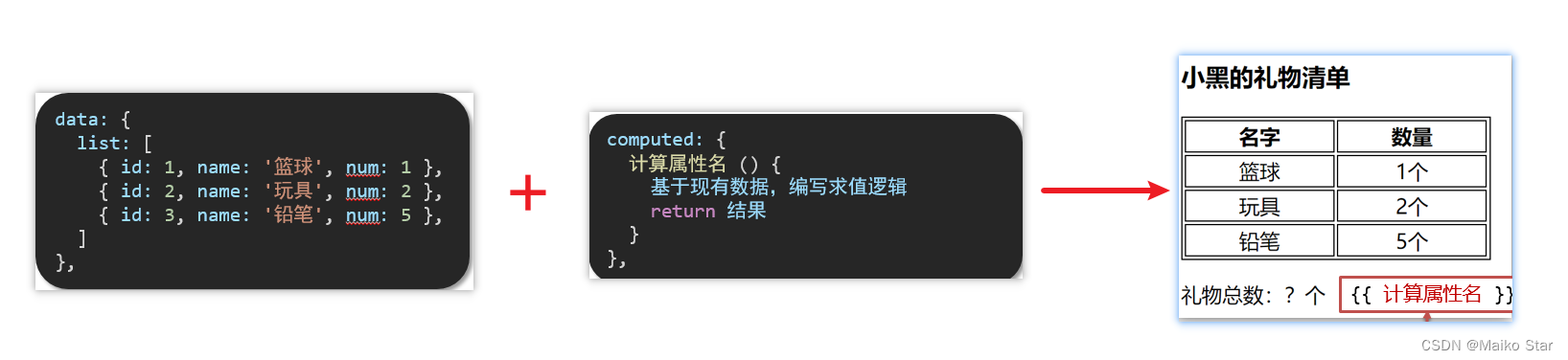
<!DOCTYPE html>
<html lang="en">
<head><meta charset="UTF-8"><meta http-equiv="X-UA-Compatible" content="IE=edge"><meta name="viewport" content="width=device-width, initial-scale=1.0"><title>Document</title><style>table {border: 1px solid #000;text-align: center;width: 240px;}th,td {border: 1px solid #000;}h3 {position: relative;}</style>
</head>
<body><div id="app"><h3>小黑的礼物清单</h3><table><tr><th>名字</th><th>数量</th></tr><tr v-for="(item, index) in list" :key="item.id"><td>{{ item.name }}</td><td>{{ item.num }}个</td></tr></table><!-- 目标:统计求和,求得礼物总数 --><p>礼物总数:{{ totalCount }} 个</p></div><script src="https://cdn.jsdelivr.net/npm/vue@2/dist/vue.js"></script><script>const app = new Vue({el: '#app',data: {// 现有的数据list: [{ id: 1, name: '篮球', num: 3 },{ id: 2, name: '玩具', num: 2 },{ id: 3, name: '铅笔', num: 5 },]},computed: {totalCount () {// 基于现有的数据,编写求值逻辑// 计算属性函数内部,可以直接通过 this 访问到 app 实例// console.log(this.list)// 需求:对 this.list 数组里面的 num 进行求和 → reducelet total = this.list.reduce((sum, item) => sum + item.num, 0)return total;}}})</script>
</body>
</html>
七、computed计算属性 VS methods方法
1.computed计算属性
作用:封装了一段对于数据的处理,求得一个结果
语法:
-
写在computed配置项中
-
作为属性,直接使用
-
js中使用计算属性: this.计算属性
-
模板中使用计算属性:{{计算属性}}
-
2.methods计算属性
作用:给Vue实例提供一个方法,调用以处理业务逻辑。
语法:
-
写在methods配置项中
-
作为方法调用
-
js中调用:this.方法名()
-
模板中调用 {{方法名()}} 或者 @事件名=“方法名”
-
3.计算属性的优势
-
缓存特性(提升性能)
计算属性会对计算出来的结果缓存,再次使用直接读取缓存,
依赖项变化了,会自动重新计算 → 并再次缓存
-
methods没有缓存特性
-
通过代码比较
<!DOCTYPE html>
<html lang="en">
<head><meta charset="UTF-8"><meta http-equiv="X-UA-Compatible" content="IE=edge"><meta name="viewport" content="width=device-width, initial-scale=1.0"><title>Document</title><style>table {border: 1px solid #000;text-align: center;width: 300px;}th,td {border: 1px solid #000;}h3 {position: relative;}span {position: absolute;left: 145px;top: -4px;width: 16px;height: 16px;color: white;font-size: 12px;text-align: center;border-radius: 50%;background-color: #e63f32;}</style>
</head>
<body><div id="app"><h3>小黑的礼物清单🛒<span>{{ totalCountFn() }}</span></h3><h3>小黑的礼物清单🛒<span>{{ totalCountFn() }}</span></h3><h3>小黑的礼物清单🛒<span>{{ totalCountFn() }}</span></h3><h3>小黑的礼物清单🛒<span>{{ totalCountFn() }}</span></h3><table><tr><th>名字</th><th>数量</th></tr><tr v-for="(item, index) in list" :key="item.id"><td>{{ item.name }}</td><td>{{ item.num }}个</td></tr></table><p>礼物总数:{{ totalCountFn() }} 个</p></div><script src="https://cdn.jsdelivr.net/npm/vue@2/dist/vue.js"></script><script>const app = new Vue({el: '#app',data: {// 现有的数据list: [{ id: 1, name: '篮球', num: 3 },{ id: 2, name: '玩具', num: 2 },{ id: 3, name: '铅笔', num: 5 },]},methods: {totalCountFn () {console.log('methods方法执行了')let total = this.list.reduce((sum, item) => sum + item.num, 0)return total}},computed: {// 计算属性:有缓存的,一旦计算出来结果,就会立刻缓存// 下一次读取 → 直接读缓存就行 → 性能特别高// totalCount () {//   console.log('计算属性执行了')//   let total = this.list.reduce((sum, item) => sum + item.num, 0)//   return total// }}})</script>
</body>
</html>
4.总结
1.computed有缓存特性,methods没有缓存
2.当一个结果依赖其他多个值时,推荐使用计算属性
3.当处理业务逻辑时,推荐使用methods方法,比如事件的处理函数
八、计算属性的完整写法
既然计算属性也是属性,能访问,应该也能修改了?
-
计算属性默认的简写,只能读取访问,不能 "修改"
-
如果要 "修改" → 需要写计算属性的完整写法

完整写法代码演示
<!DOCTYPE html>
<html lang="en">
<head><meta charset="UTF-8"><meta http-equiv="X-UA-Compatible" content="IE=edge"><meta name="viewport" content="width=device-width, initial-scale=1.0"><title>Document</title><style>input {width: 30px;}</style>
</head>
<body><div id="app">姓:<input type="text" v-model="firstName"> +名:<input type="text" v-model="lastName"> =<span>{{ fullName }}</span><br><br><button @click="changeName">改名卡</button></div><script src="https://cdn.jsdelivr.net/npm/vue@2/dist/vue.js"></script><script>const app = new Vue({el: '#app',data: {firstName: '刘',lastName: '备',},methods: {changeName () {this.fullName = '黄忠'}},computed: {// 简写 → 获取,没有配置设置的逻辑// fullName () {//   return this.firstName + this.lastName// }// 完整写法 → 获取 + 设置fullName: {// (1) 当fullName计算属性,被获取求值时,执行get(有缓存,优先读缓存)//     会将返回值作为,求值的结果get () {return this.firstName + this.lastName},// (2) 当fullName计算属性,被修改赋值时,执行set//     修改的值,传递给set方法的形参set (value) {// console.log(value.slice(0, 1))          // console.log(value.slice(1))         this.firstName = value.slice(0, 1)this.lastName = value.slice(1)}}}})</script>
</body>
</html>
九、综合案例-成绩案例
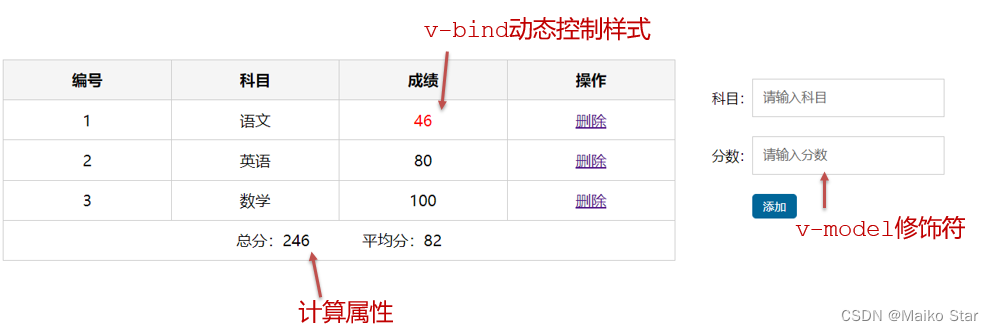
功能描述:
1.渲染功能
2.删除功能
3.添加功能
4.统计总分,求平均分
思路分析:
1.渲染功能 v-for :key v-bind:动态绑定class的样式
2.删除功能 v-on绑定事件, 阻止a标签的默认行为
3.v-model的修饰符 .trim、 .number、 判断数据是否为空后 再添加、添加后清空文本框的数据
4.使用计算属性computed 计算总分和平均分的值
<!DOCTYPE html>
<html lang="en"><head><meta charset="UTF-8" /><meta http-equiv="X-UA-Compatible" content="IE=edge" /><meta name="viewport" content="width=device-width, initial-scale=1.0" /><link rel="stylesheet" href="./styles/index.css" /><title>Document</title></head><body><div id="app" class="score-case"><div class="table"><table><thead><tr><th>编号</th><th>科目</th><th>成绩</th><th>操作</th></tr></thead><tbody v-if="list.length > 0"><tr v-for="(item, index) in list" :key="item.id"><td>{{ index + 1 }}</td><td>{{ item.subject }}</td><!-- 需求:不及格的标红, < 60 分, 加上 red 类 --><td :class="{ red: item.score < 60 }">{{ item.score }}</td><td><a @click.prevent="del(item.id)" href="http://www.baidu.com">删除</a></td></tr></tbody><tbody v-else><tr><td colspan="5"><span class="none">暂无数据</span></td></tr></tbody><tfoot><tr><td colspan="5"><span>总分:{{ totalScore }}</span><span style="margin-left: 50px">平均分:{{ averageScore }}</span></td></tr></tfoot></table></div><div class="form"><div class="form-item"><div class="label">科目:</div><div class="input"><inputtype="text"placeholder="请输入科目"v-model.trim="subject"/></div></div><div class="form-item"><div class="label">分数:</div><div class="input"><inputtype="text"placeholder="请输入分数"v-model.number="score"/></div></div><div class="form-item"><div class="label"></div><div class="input"><button @click="add" class="submit" >添加</button></div></div></div></div><script src="https://cdn.jsdelivr.net/npm/vue@2/dist/vue.js"></script><script>const app = new Vue({el: '#app',data: {list: [{ id: 1, subject: '语文', score: 62 },{ id: 7, subject: '数学', score: 89 },{ id: 12, subject: '英语', score: 70 },],subject: '',score: ''},computed: {totalScore() {return this.list.reduce((sum, item) => sum + item.score, 0)},averageScore () {if (this.list.length === 0) {return 0}return (this.totalScore / this.list.length).toFixed(2)}},methods: {del (id) {// console.log(id)this.list = this.list.filter(item => item.id !== id)},add () {if (!this.subject) {alert('请输入科目')return}if (typeof this.score !== 'number') {alert('请输入正确的成绩')return}this.list.unshift({id: +new Date(),subject: this.subject,score: this.score})this.subject = ''this.score = ''}}})</script></body>
</html>