dolphinscheduler节点二次开发需要改动的部分

dolphinscheduler节点二次开发需要改动的部分
前端
- 在
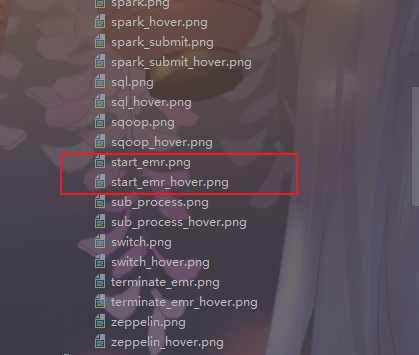
dolphinscheduler-ui/public/images/task-icons/目录下新增两个节点的logo图片,一个为激活状态的一个为非激活状态的,如下。
-
修改文件
dolphinscheduler-ui/src/views/projects/task/constants/task-type.ts- 给TaskType新增可取的类型,如下

-
给TASK_TYPES_MAP增加新节点的映射信息,如下

修改完成之后,新节点的名字就会在dolphin组件的侧边栏显示出来啦。
-
修改文件
dolphinscheduler-ui/src/views/projects/workflow/components/dag/dag.module.scss- 给
.draggable样式下的.sidebar-icon样式中分别添加图标激活和没激活的路径。取名规范必须为.icon-后面接先前在TASK_TYPES_MAP中新增的内容的小写。
修改完成之后,新节点的logo就会在dolphin组件的侧边栏显示出来啦。
- 给
-
在目录
dolphinscheduler-ui/src/views/projects/task/components/node/fields下新增节点字段的ts文件如下所示:期间需要新增国际化文件中的字段信息。
/** Licensed to the Apache Software Foundation (ASF) under one or more* contributor license agreements. See the NOTICE file distributed with* this work for additional information regarding copyright ownership.* The ASF licenses this file to You under the Apache License, Version 2.0* (the "License"); you may not use this file except in compliance with* the License. You may obtain a copy of the License at** http://www.apache.org/licenses/LICENSE-2.0** Unless required by applicable law or agreed to in writing, software* distributed under the License is distributed on an "AS IS" BASIS,* WITHOUT WARRANTIES OR CONDITIONS OF ANY KIND, either express or implied.* See the License for the specific language governing permissions and* limitations under the License.*/ import {useI18n} from 'vue-i18n' import {useCustomParams, useResources} from '.' import type {IJsonItem} from '../types' import { ref, onMounted, watch } from 'vue'export function useEmailSender(model: { [field: string]: any }): IJsonItem[] {const otherStatementSpan = ref(22)const {t} = useI18n()return [{type: 'input',field: 'subject',name: t('project.node.email_sender_subject')},{type: 'editor',field: 'messageTemplate',name: t('project.node.email_sender_message_template'),},{type: 'multi-input',field: 'emails',name: t('project.node.email_sender_emails'),span: otherStatementSpan,props: {placeholder: t('project.node.email_sender_emails'),type: 'textarea',autosize: { minRows: 1 }}},useResources(),...useCustomParams({model, field: 'localParams', isSimple: false})] } -
在目录
dolphinscheduler-ui/src/views/projects/task/components/node/tasks下新增节点字段的ts文件如下所示:
/** Licensed to the Apache Software Foundation (ASF) under one or more* contributor license agreements.  See the NOTICE file distributed with* this work for additional information regarding copyright ownership.* The ASF licenses this file to You under the Apache License, Version 2.0* (the "License"); you may not use this file except in compliance with* the License.  You may obtain a copy of the License at**    http://www.apache.org/licenses/LICENSE-2.0** Unless required by applicable law or agreed to in writing, software* distributed under the License is distributed on an "AS IS" BASIS,* WITHOUT WARRANTIES OR CONDITIONS OF ANY KIND, either express or implied.* See the License for the specific language governing permissions and* limitations under the License.*/import { reactive } from 'vue'
import * as Fields from '../fields/index'
import type { IJsonItem, INodeData } from '../types'
import { ITaskData } from '../types'export function useEmailSender({projectCode,from = 0,readonly,data
}: {projectCode: numberfrom?: numberreadonly?: booleandata?: ITaskData
}) {const model = reactive({name: '',taskType: 'EMAIL_SENDER',flag: 'YES',description: '',timeoutFlag: false,timeoutNotifyStrategy: ['WARN'],localParams: [],environmentCode: null,failRetryInterval: 1,failRetryTimes: 0,workerGroup: 'default',delayTime: 0,timeout: 30,messageTemplate: '',emails: [],subject: ''} as INodeData)return {json: [Fields.useName(from),...Fields.useTaskDefinition({ projectCode, from, readonly, data, model }),Fields.useRunFlag(),Fields.useDescription(),Fields.useTaskPriority(),Fields.useWorkerGroup(),Fields.useEnvironmentName(model, !data?.id),...Fields.useTaskGroup(model, projectCode),...Fields.useFailed(),Fields.useDelayTime(model),...Fields.useTimeoutAlarm(model),...Fields.useEmailSender(model),Fields.usePreTasks()] as IJsonItem[],model}
}
ps: 这里存在不容易察觉到的细节,尤其注意。
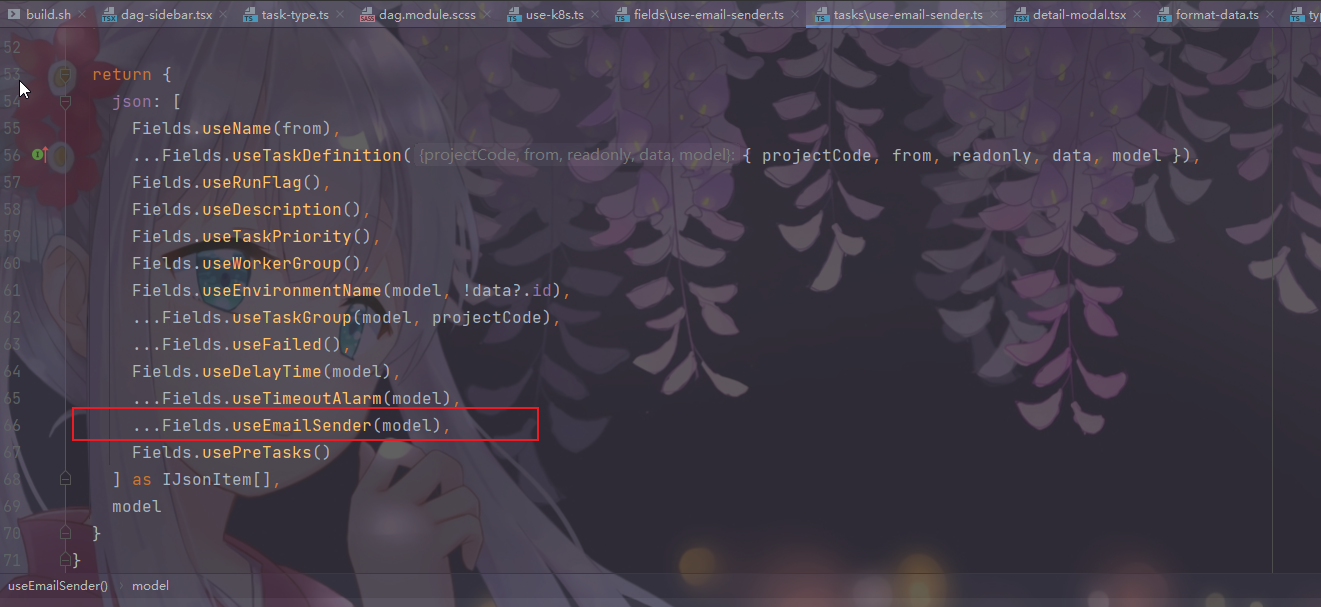
这个地方一定要跟着改,不然页面上显示的字段,还是之前复制的那个节点的字段。
-
修改文件
dolphinscheduler-ui/src/views/projects/task/components/node/fields/index.ts新增一个export导出就好了
-
修改文件
dolphinscheduler-ui/src/views/projects/task/components/node/tasks/index.ts新增一个映射关系,如下:

前面这个部分必须和第二步时候的
TASK_TYPES_MAP这个map中的alias一致。
-
修改文件
dolphinscheduler-ui/src/views/projects/task/components/node/format-data.ts在
formatParams方法中增加新增节点的表单赋值代码,不加的话,页面上填的值,提交执行的时候,后端是拿不到的。如下所示:

-
修改文件
dolphinscheduler-ui/src/views/projects/task/components/node/types.ts在这个文件中添加,我们在5步时候新增的字段在
interface ITaskParams这个实体里面添加就好了。
至此,前端基本上改的就差不多了,下面是后端。
后端
-
在目录
dolphinscheduler-task-plugin/dolphinscheduler-task-patsnap/src/main/java/org/apache/dolphinscheduler/plugin/task下新增节点对应的文件夹。 -
新增类XXXParameters继承
CustomBaseParameters注意点如下:
- 如果其中有字段的内容可能是占位符,运行时需要替换,可以标上
@ReplacePlaceholders这个注解,目前这个注解支持String类型和List类型的字段的占位符自动替换。 - 一定要重写
checkParameters这个方法,不然到时候填完表单信息保存的时候会报错,节点信息无效的。
- 如果其中有字段的内容可能是占位符,运行时需要替换,可以标上
-
新增类XXXChannel继承
CustomBaseChannel重写一下createTask和parseParameters方法。
-
新增类XXXChannelFactory,需要继承
CustomBaseChannelFactory重写
getName和create方法。getName的内容必须和前端第二步中改的
TASK_TYPES_MAP中的alias的名字一致。 -
新增类XXXTask继承
CustomBaseTask类需要重写方法
handlePatsnapTask,这个节点想做什么事情,都在这个方法里面实现。注意点如下:
- 节点正常运行完成之后一定要加
setExitStatusCode(TaskConstants.EXIT_CODE_SUCCESS);这行代码,告知节点运行success - 节点运行异常一定要执行
setExitStatusCode(TaskConstants.EXIT_CODE_FAILURE);这行代码。 - 运行完成之后需要调用
releaseResource();来释放资源。 - 如果想要实现取消逻辑,需要重写方法
cancel,前端点击取消的时候,会执行到这个方法里面。
- 节点正常运行完成之后一定要加