谷歌浏览器通过network模拟HTTP中的GET/POST请求获取response

1、F12打开network选中需要模拟的方法Copy->Copy as fetch
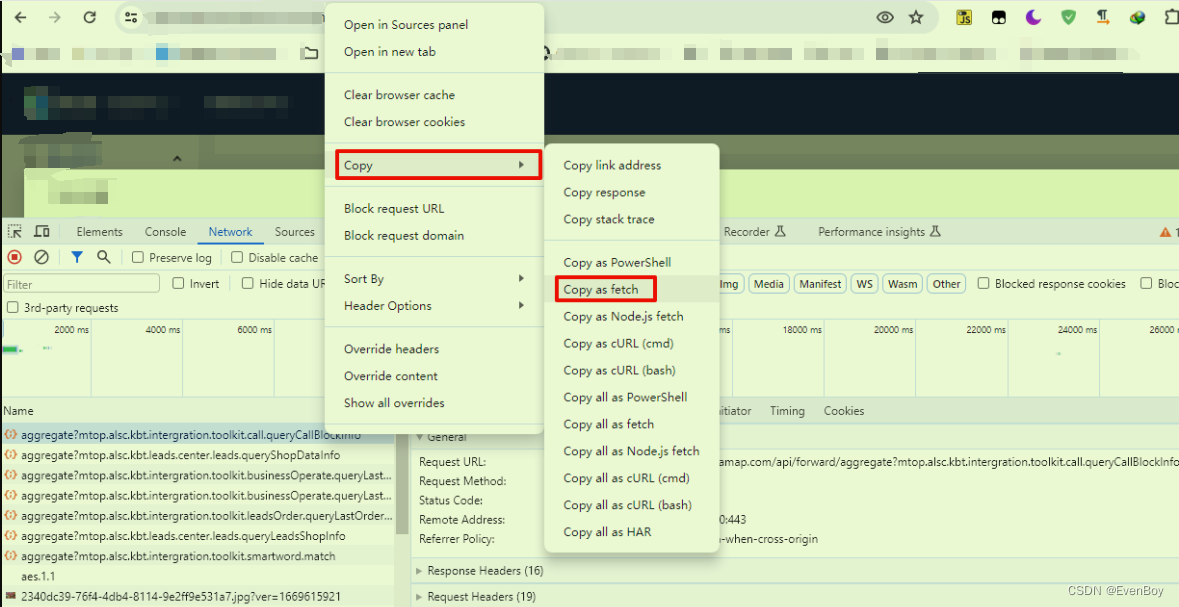
2、通过AI帮你进行转换一下调用格式
原代码
fetch("https://mp.amap.com/api/forward/aggregate?mtop.alsc.kbt.intergration.toolkit.call.queryCallBlockInfo", {"headers": {"accept": "application/json","accept-language": "zh-CN,zh;q=0.9","content-type": "application/json;charset=UTF-8","sec-ch-ua": "\"Not_A Brand\";v=\"8\", \"Chromium\";v=\"120\", \"Google Chrome\";v=\"120\"","sec-ch-ua-mobile": "?0","sec-ch-ua-platform": "\"Windows\"","sec-fetch-dest": "empty","sec-fetch-mode": "cors","sec-fetch-site": "same-origin"},"referrer": "https://mp.amap.com/biz/crm/exhibition/private","referrerPolicy": "strict-origin-when-cross-origin","body": "{\"requests\":[{\"action\":\"mtop.alsc.kbt.intergration.toolkit.call.queryCallBlockInfo\",\"param\":{\"targetId\":\"202203178800000011705304827Z1E80\",\"businessOperateType\":\"CREATE_ORDER\",\"targetType\":\"LEADS_ENTITY\",\"bizChannel\":\"CRM\"},\"requestType\":\"msePc\",\"extraHeader\":{}}]}","method": "POST","mode": "cors","credentials": "include"
});
通过文心一言转换(有条件的可以用ChatGPT)
问题:帮我转换为js
转换之后的代码
fetch("https://mp.amap.com/api/forward/aggregate?mtop.alsc.kbt.intergration.toolkit.call.queryCallBlockInfo", {  method: "POST",  headers: {  "Accept": "application/json",  "Accept-Language": "zh-CN,zh;q=0.9",  "Content-Type": "application/json;charset=UTF-8",  "Sec-Ch-UA": "\"Not_A Brand\";v=\"8\", \"Chromium\";v=\"120\", \"Google Chrome\";v=\"120\"",  "Sec-Ch-UA-Mobile": "?0",  "Sec-Ch-UA-Platform": "\"Windows\"",  "Sec-Fetch-Dest": "empty",  "Sec-Fetch-Mode": "cors",  "Sec-Fetch-Site": "same-origin"  },  referrer: "https://mp.amap.com/biz/crm/exhibition/private",  referrerPolicy: "strict-origin-when-cross-origin",  body: JSON.stringify({  requests: [  {  action: "mtop.alsc.kbt.intergration.toolkit.call.queryCallBlockInfo",  param: {  targetId: "202203178800000011705304827Z1E80",  businessOperateType: "CREATE_ORDER",  targetType: "LEADS_ENTITY",  bizChannel: "CRM"  },  requestType: "msePc",  extraHeader: {}  }  ]  }),  mode: "cors",  credentials: "include"
})
.then(response => response.json())
.then(data => console.log(data))
.catch((error) => console.error("Error:", error));
3、拿到response返回结果data值
{"success": true,"data": [{"result": true,"code": "00000","message": "调用成功","version": "1.0","timestamp": "1705564175452","success": true,"msgInfo": "调用成功","msgCode": "SUCCESS","traceId": "213370a117055641752194003ea27f","data": {"bdCallConfig": {"fromPhone": "19999999999"},"callTarget": {"targetName": "商丘苹果旗舰店","targetId": "202203178800000011705304827Z1E80","targetSubId": "B0FFFFZ1E8","toPhoneShield": "18888888888"},"channel": "RONG_LIAN_YUN"}}],"code": "00000"
}
比如我这边想获取到toPhoneShield的值
老规矩通过文心一言提问(有条件的可以用ChatGPT)
问题:帮我用js获取到toPhoneShield
结果如下:
const jsonString = `
{  "success": true,  "data": [{  "result": true,  "code": "00000",  "message": "调用成功",  "version": "1.0",  "timestamp": "1705564175452",  "success": true,  "msgInfo": "调用成功",  "msgCode": "SUCCESS",  "traceId": "213370a117055641752194003ea27f",  "data": {  "bdCallConfig": {  "fromPhone": "19999999999"  },  "callTarget": {  "targetName": "商丘苹果旗舰店",  "targetId": "202203178800000011705304827Z1E80",  "targetSubId": "B0FFFFZ1E8",  "toPhoneShield": "18888888888"  },  "channel": "RONG_LIAN_YUN"  }  }],  "code": "00000"
}
`;  const data = JSON.parse(jsonString);
const toPhoneShield = data.data[0].data.callTarget.toPhoneShield;
console.log(toPhoneShield); // 输出: 18888888888