k8s---配置资源管理

目录
配置资源管理的方式
secret
pod如何来引用secret???
陈述式创建:
声明式创建
Secret创建加密文件
使用token挂载
环境变量使用
docker-registry
ConfigMap
陈述式
热更新
总结:
配置资源管理的方式
Secret
Configmap(必问)1.2加入的新特征
secret
secret:保存密码,token,敏感的k8s资源
这类数据可以存放在镜像当中,但是放在secret当中可以更方便的控制,减少暴露的风险。
通俗来讲就是保存加密信息。
查看加密的token
kubectl get secrets| docker-registry | 存储docker仓库的认证信息,以及docker组件认证信息。(私有) |
| generic | 是secret的默认模式,Opaque base64加密编码的secret。用户自定义的密码、密钥等等。 |
| tls | TLS/SSL 用于存储证书和私钥。https |
| 系统自建的 | 用来访问系统的apiserver,pod会默认使用这个kubernetes.io/service-account-token创建的secret和apiserver通信。自动挂载到pod的/run/secret/kubernetes.io/serviceaccount. |
pod如何来引用secret???
3种方式
1、挂载的方式,secret挂载到pod当中的一个或者多个容器上的卷里面。
2、把secret作为容器的环境变量
3、docker-registry可以作为集群拉取镜像时使用。使用secret可以实现免密登录
主要用于 保存的是加密的内容,容器内部可以解密,可以直接引用。
陈述式创建:
默认类型(Opaque)---从指定文件提取信息
kubectl create secret generic mysecret --from-file=/opt/test/pod-controller/
username.txt --from-file=/opt/test/pod-controller/passwd.txt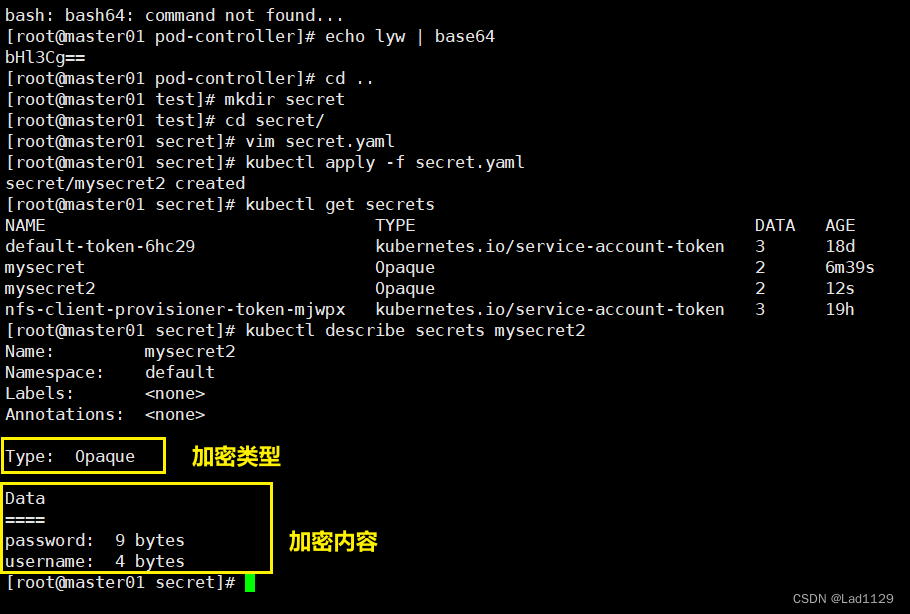
声明式创建
Secret创建加密文件
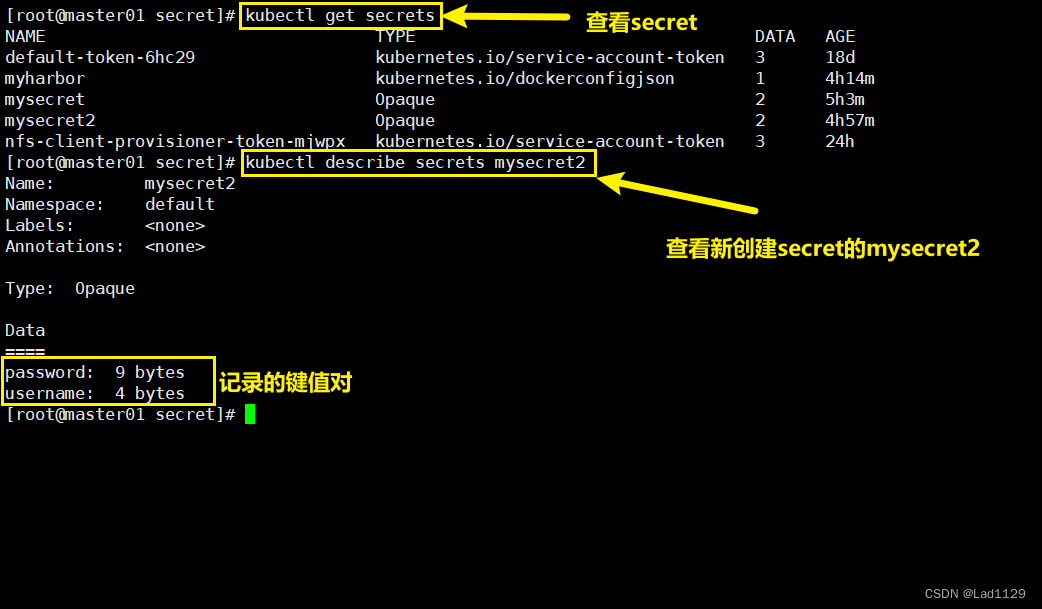
apiVersion: v1
kind: Secret
metadata:name: mysecret2
type:Opaque
data:username: bHl3Cg==password: bGl1eWF3ZWkK
使用token挂载
apiVersion: v1
kind: Pod
metadata:name: mypod
spec:containers:- name: nginximage: nginx:1.22volumeMounts:- name: secretsmountPath: "/etc/secrets"readOnly: falsevolumes:- name: secretssecret:secretName: mysecret2
执行
kubectl apply -f test.yaml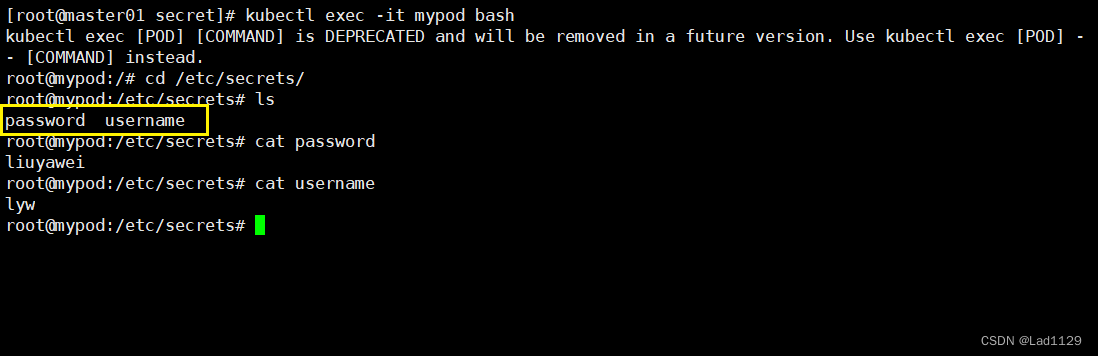

保存的是加密的内容,容器内部可以解密,可以直接引用。
环境变量使用
apiVersion: v1
kind: Pod
metadata:name: mypod1
spec:containers:- name: nginximage: nginx:1.22env:- name: USERvalueFrom:secretKeyRef:name: mysecret2key: username- name: USER1valueFrom:secretKeyRef:name: mysecret2key: password
#我给nginx1.22这个容器里面传了两个环境变量,这两个变量的值从secret来,分别是两条mysecret1的加密信息

docker-registry
kubectl create secret docker-registry myharbor --docker-server=192.168.10.40 --docker-username=admin --docker-password=123456apiVersion: v1
kind: Pod
metadata:name: mypod2
spec:containers:- name: nginx2image: hub.test.com/library/nginx:v1imagePullSecrets:- name: myharbornodeName: node01
ConfigMap
ConfigMap:保存的时不需要加密的信息。configmap时1.2引入的功能,应用程序会从配置文件,命令参数,以及环境变量中读取配置信息
configmap在创建容器中,给他注入我们需要的配置文件信息,既可以单个的属性也可以整个容器的配置文件。
陈述式
指定目录文件(定义两个文件1.txt 2.txt)
kubectl create configmap game --from-file=/opt/1.txt --from-file=/opt/2.txt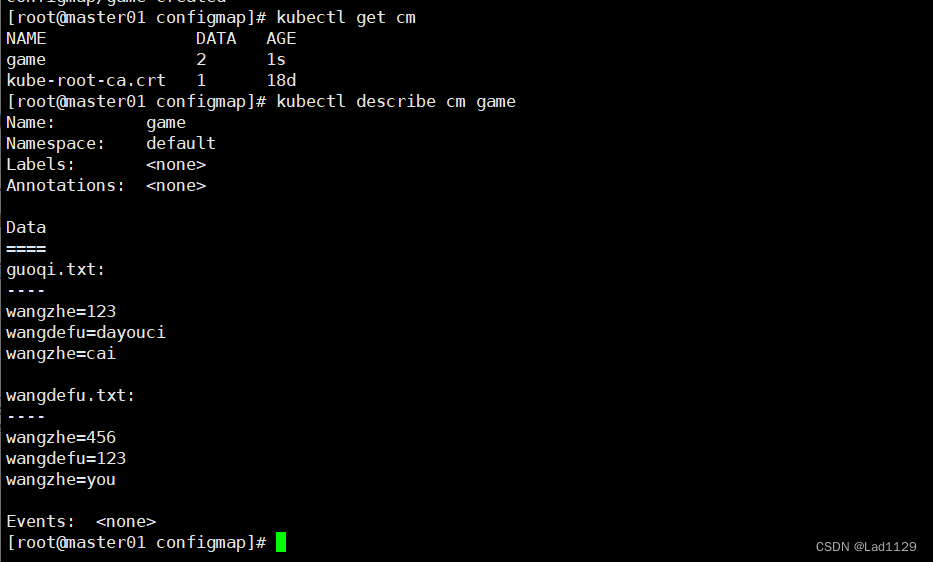
陈述式---直接定义内容
kubectl create configmap game1 --from-literal=guoqi=shuai --from-literal=wangdefu=sao
声明式
apiVersion: v1
kind: ConfigMap
metadata:name: game
data:guoqi: shuaiwangdefu: saolyw: Liu
#config是键值对形式保存,一个键值对对应一个值
应用:定义达到环境变量
apiVersion: v1
kind: Pod
metadata:name: mypod2
spec:containers:- name: nginx3image: nginx:1.22env:- name: USER1valueFrom:configMapKeyRef:name: gamekey: guoqi- name: USER2valueFrom:configMapKeyRef:name: gamekey: wangdefu- name: USER3valueFrom:configMapKeyRef:name: gamekey: lyw
进入pod
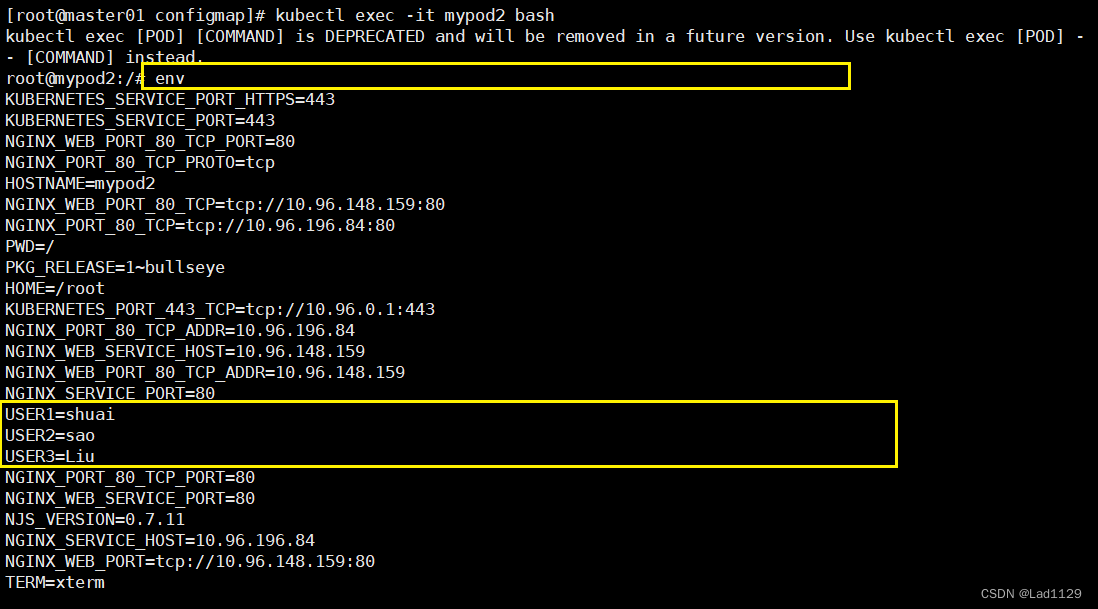
热更新
触发滚动跟新
kubectl patch deployments.apps nginx1 --patch '{"spec": {"template": {"metadata": {"annotations": {"version/confgi": "20240116"}}}}}'nginx.conf----1
worker_processes  1;
events {worker_connections  1024;
}
http {default_type  application/octet-stream;sendfile        on;keepalive_timeout  65;server {listen       8080;listen  [::]:8080;server_name  localhost;#access_log  /var/log/nginx/host.access.log  main;location / {root   html;index  index.html index.htm;}error_page   500 502 503 504  /50x.html;location = /50x.html {root   /usr/share/nginx/html;}
}
}
nginx.yaml
apiVersion: apps/v1
kind: Deployment
metadata:name: nginx1labels:app: nginx1
spec:replicas: 3selector:matchLabels:app: nginx1template:metadata:labels:app: nginx1spec:containers:- name: nginx1image: nginx:1.22ports:- containerPort: 8080volumeMounts:- name: nginx-configmountPath: /etc/nginx/- name: nginx-mountmountPath: /usr/share/nginx/htmlvolumes:- name: nginx-configconfigMap:name: nginx-conn- name: nginx-mounthostPath:path: /opt/htmltype: DirectoryOrCreate
nginx.conf-----2
worker_processes  1;
events {worker_connections  1024;
}
http {default_type  application/octet-stream;sendfile        on;keepalive_timeout  65;server {listen       8080;listen  [::]:8080;server_name  localhost;#access_log  /var/log/nginx/host.access.log  main;location / {root   html;index  index.html index.htm;}error_page   500 502 503 504  /50x.html;location = /50x.html {root   /usr/share/nginx/html;}
}
}
执行
kubectl create configmap nginx-con --from-file=/opt/test/secret/configmap/nginx/nginx.conf
#此处用nginx---1kubectl apply -f nginx.yaml
查看创建的podkubectl edit cm nginx-conn
#修改为nginx---2
#修改完成后,大约30s-1min nginx.conf文件会同步为修改后的,修改后的配置文件后要重启nginx服务,此处用滚动更新触发滚动更新:
kubectl patch deployments.apps nginx1 --patch '{"spec": {"template": {"metadata": {"annotations": {"version/confgi": "20240116"}}}}}'
数据卷使用configMap:
1、我们通过数据卷的形式,把配置文件传给了pod内部容器
2、config的热更新,在pod运行的情况下,对config的配置信息进行修改。直接生效 (反应到容器当中)。热更新---pod不会重启
3、configmap的热更新不会触发pod的滚动更新机制(deployment) version/config来触发滚动更新机制(deployment)
主要用于把配置文件传入pod,键值对形式保存的,非加密的信息
总结:
secret:保存加密文件,主要使用方式挂载方式。
configMap:把配置文件传给容器,主要方式也是挂载。
configMap的热更新: 热更新可以直接反应到容器的内部,也不会触发pod的更新机制。如果不是需要重启的配置,都可以直接生效。
version/config来触发滚动更新
需要重启的,可以重启pod。
更新:就是把配置信息重新传到容器内,重启也是一样。
configMap:就是把配置信息传给容器键值对形式保存的,非加密的信息。