cetos7搭建部署k8s 版本1.28

主机分配
内存最少是4G cpu个数最少两个
| IP | 内存 | CPU | 主机名 |
| 192.168.231.120 | 4 | 4 | K1 |
| 192.168.231.121 | 4 | 4 | K2 |
| 192.168.231.122 | 4 | 4 | K3 |
关闭防火墙
systemctl stop firewalled
关闭swap
vim /etc/fstab
设置主机名称
hostnameset
安装docker 三个主机
初始化集群
在master上面执行
kubeadm init
初始化成功后

在 K1上面执行

在master上安装 flanel 网络插件
github上面 k8s官网 flannel 网络通信组件 对于版本 kubenetes 1.17+
kubectl apply -f https://github.com/flannel-io/flannel/releases/latest/download/kube-flannel.yml
K1 成功
获取节点信息

加入node节点进入集群
即把 K2 K3主机加入到k8s集群中
生成 K1主节点的token
# 在K1 master上面生成
kubeadm token create --print-join-command# 创建一个永不过期的token
kubeadm token create --ttl 0 --print-join-command#  在k2 k3 wokenode上执行下面命令  加入k8s集群
生成的结果如下 不过期的token kubeadm join 192.168.241.131:6443 --token 5ajtxi.sx49u7jyygnmw0c4 --discovery-token-ca-cert-hash sha256:ada6bf229e93d346c4af69f953c96040c12c30b1f2b10eb2993052fbfaa48651
k8s集群搭建完成
kubectl get nodes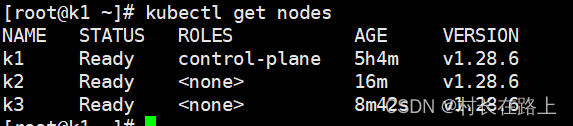
测试集群环境
K2节点加入报错
[preflight] Running pre-flight checks
error execution phase preflight: [preflight] Some fatal errors occurred:[ERROR CRI]: container runtime is not running: output: time="2024-01-18T10:41:00-05:00" level=fatal msg="validate service connection: validate CRI v1 runtime API for endpoint \"unix:///var/run/containerd/containerd.sock\": rpc error: code = Unimplemented desc = unknown service runtime.v1.RuntimeService"
, error: exit status 1
[preflight] If you know what you are doing, you can make a check non-fatal with `--ignore-preflight-errors=...`
To see the stack trace of this error execute with --v=5 or higher
解决办法:
在master端 重启 systemctl restart containerd
在node 端 删除 rm /etc/containerd/config.toml 重启 systemctl restart containerd
加入之后 如果没有 ready 在重启 master端的node