导入失败,报错:“too many filtered rows xxx, “ErrorURL“:“

一、问题:

注:前面能正常写入,突然就报错,导入失败,报错:“too many filtered rows xxx, "ErrorURL":"
{"TxnId":769494,"Label":"datax_doris_writer_bf176078-15d7-414f-8923-b0eb5f6d5da1","TwoPhaseCommit":"false","Status":"Fail","Message":"[INTERNAL_ERROR]too many filtered rows","NumberTotalRows":325476,"NumberLoadedRows":325473,"NumberFilteredRows":3,"NumberUnselectedRows":0,"LoadBytes":94697450,"LoadTimeMs":1498,"BeginTxnTimeMs":0,"StreamLoadPutTimeMs":2,"ReadDataTimeMs":117,"WriteDataTimeMs":1495,"CommitAndPublishTimeMs":0,"ErrorURL":"http://IP:8040/api/_load_error_log?file=__shard_8/error_log_insert_stmt_ce466641e5bad2af-99171040d6f76fb8_ce466641e5bad2af_99171040d6f76fb8"}
http://IP:8040/api/_load_error_log?file=__shard_8/error_log_insert_stmt_ce466641e5bad2af-99171040d6f76fb8_ce466641e5bad2af_99171040d6f76fb8"
内容如下:
Reason: actual column number in csv file is  less than  schema column number.actual number: 11, column separator: [	], line delimiter: [
], schema column number: 16; . src line [320746671400	6540dbac03e56b6315de10f8	279ca466-2047-42f5-9932-1730703644e4	10	沙河市中瑞玻璃制品有限公司玻璃深加工生产线扩建项...	2023-10-31 00:00:00	130582	10	1004	10	];
Reason: actual column number in csv file is  less than  schema column number.actual number: 1, column separator: [	], line delimiter: [
], schema column number: 16; . src line [2023-10-31];
Reason: actual column number in csv file is  less than  schema column number.actual number: 6, column separator: [	], line delimiter: [
], schema column number: 16; . src line [	\N	0	1698749356710	2023-10-31 18:49:16	2023-11-13 11:05:48];
二、解决办法
Datax 代码库编译
从datax 代码库拉取代码,执行编译
git clone https://github.com/alibaba/DataX.git
cd datax
mvn package assembly:assembly -Dmaven.test.skip=true
注:MYSQL版本改成你使用的版本;
more pom.xml
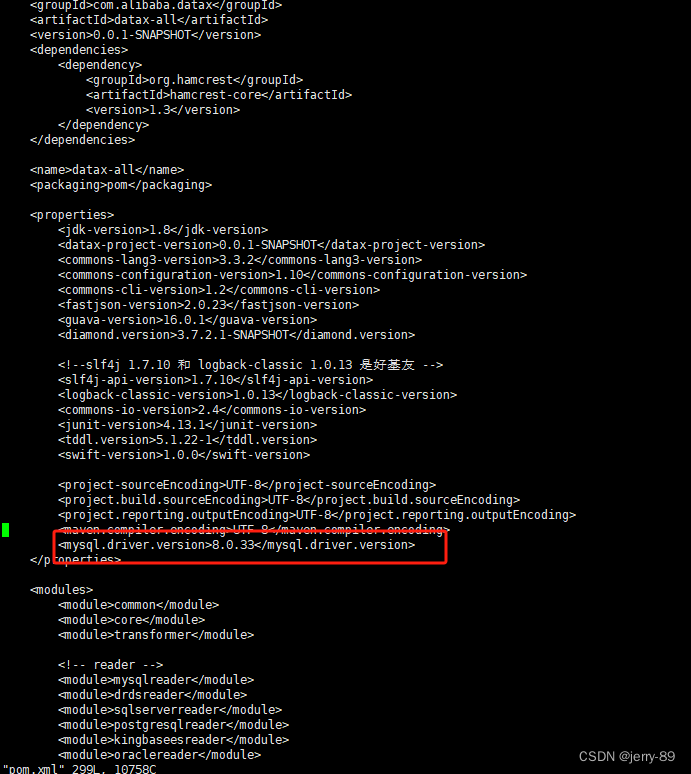
编译完成后可以在 datax/target/Datax 下看到datax.tar.gz 包
my_import.json
{"job": {"content": [{"reader": {"name": "mysqlreader","parameter": {"column": ["id","order_code","line_code","remark","unit_no","unit_name","price"],"connection": [{"jdbcUrl": ["jdbc:mysql://localhost:3306/demo"],"table": ["employees_1"]}],"username": "root","password": "xxxxx","where": ""}},"writer": {"name": "doriswriter","parameter": {"loadUrl": ["127.0.0.1:8030"],"loadProps": {},"column": ["id","order_code","line_code","remark","unit_no","unit_name","price"],"username": "root","password": "xxxxxx","postSql": ["select count(1) from all_employees_info"],"preSql": [],"flushInterval":30000,"connection": [{"jdbcUrl": "jdbc:mysql://127.0.0.1:9030/demo","selectedDatabase": "demo","table": ["all_employees_info"]}],"loadProps": {"format": "json","strip_outer_array":"true","line_delimiter": "\\x02"}}}}],"setting": {"speed": {"channel": "1"}}}
}
备注:
"loadProps": {"format": "json","strip_outer_array":"true","line_delimiter": "\\x02"
}
- 这里我们使用了 JSON 格式导入数据
line_delimiter默认是换行符,可能会和数据中的值冲突,我们可以使用一些特殊字符或者不可见字符,避免导入错误- strip_outer_array :在一批导入数据中表示多行数据,Doris 在解析时会将数组展开,然后依次解析其中的每一个 Object 作为一行数据
- 更多 Stream load 参数请参照 [Stream load文档](Stream load - Apache Doris)
- 如果是 CSV 格式我们可以这样使用
"loadProps": {"format": "csv","column_separator": "\\x01","line_delimiter": "\\x02"
}
CSV 格式要特别注意行列分隔符,避免和数据中的特殊字符冲突,这里建议使用隐藏字符,默认列分隔符是:\t,行分隔符:\n
4.执行datax任务,具体参考 datax官网,或者
DataX Doriswriter - Apache Doris