OpenGL ES2加载3D模型

1.简介
本文使用Qt,使用OpenGL ES来渲染。
运行环境:国产嵌入式操作系统kylin V10。
CPU:rk3588。
为什么要用OpenGL ES2:
- OpenGL ES 2.0(OpenGL for Embedded Systems 2.0)是一种用于嵌入式系统的图形渲染API,在嵌入式设备上,需要编译Qt库,在Qt生成Makefile的过程中,需要指定编译opengl es2,否则编译出来的Qt库不支持opengl es2,就没法加载3D模型。
- 再一个原因,本来是想使用opengl es3来加载模型的,我在Qt生成Makefile的时候,添加es3.0的编译选项,在编译过程中,报了很多错,网上找一圈,也没有找到合理的方法,结果放弃使用es3.0,最终选择2.0进行渲染。
查看Qt的编译选项,生成makefile。
./configure -help:在编译选项中添加opengl es2。
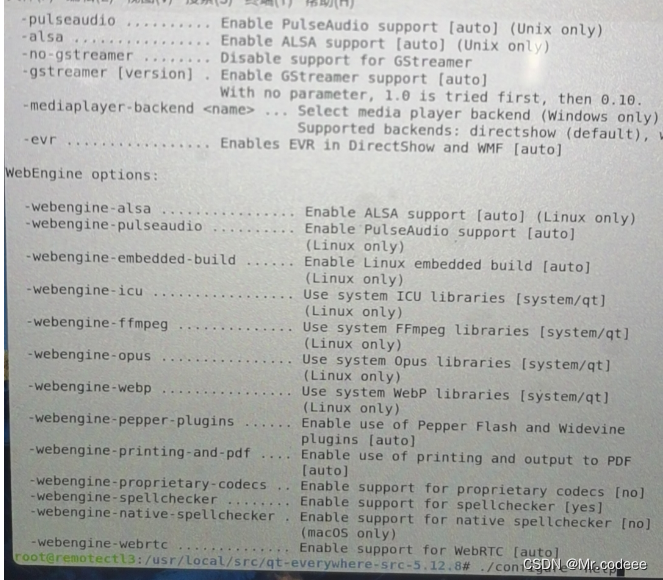
Qt不会编译的同学,请看这里:以下是交叉编译,如果可以在板子上进行编译,不需要指定编译器的路径。
https://sunnnnnn666.blog.csdn.net/article/details/134186602 https://sunnnnnn666.blog.csdn.net/article/details/134186602
2.OpenGL ES 2.0和3.0区别
这里就简单介绍一下区别,详细的内容请去官网查看。
OpenGL ES 3.0 是向下兼容 OpenGL ES 2.0 的。也就是说使用 2.0 编写的应用程序是可以在 3.0 中继续使用的。
着色器2.0:
//顶点着色器
attribute vec4 aPosition;                            // 应用程序传入顶点着色器的顶点位置
attribute vec2 aTextureCoord;                        // 应用程序传入顶点着色器的顶点纹理坐标varying vec2 vTextureCoord;                          // 用于传递给片元着色器的顶点纹理数据
void main()
{gl_Position = aPosition;                         // 此次绘制此顶点位置vTextureCoord = aTextureCoord;                   // 将接收的纹理坐标传递给片元着色器
}//片元着色器
precision mediump float;                           // 设置工作精度varying vec2 vTextureCoord;                        // 接收从顶点着色器过来的纹理坐标
uniform sampler2D sTexture;                        // 纹理采样器,代表一幅纹理
void main()
{gl_FragColor = texture2D(sTexture, vTextureCoord);// 进行纹理采样
}
着色器3.0:
//顶点着色器
#version es 300uniform mat4 u_matViewProj;
layout(location = 0) in vec4 a_position;
layout(location = 1) in vec3 a_color;
out vec3 v_color;void main() {gl_Position = u_matViewProj * a_position;v_color = a_color;
}//片元着色器
#version es 300
precision mediump float;in vec3 v_color; // input form vertex shader
layout(location = 0) out vec4 o_fragColor;void main() {o_fragColor = vec4(v_color, 1.0);
}
版本声明:
OpenGL ES 3.0 中,可以必须声明着色器版本:
#version es 300OpenGL ES 2.0中,可以不用声明着色器版本,默认为:
#version es 100备注: 以往 2.0 刚刚出来可编程的图形管线,所以版本声明为 #version 100 es ,后来为了使版本号相匹配,OpenGL ES 3.0 的 shader 版本直接从 1.0 跳到了 3.0。
默认精度修饰符 precision
在顶点语言中有如下预定义的全局默认精度语句:
precision highp float;
precision highp int;
precision lowp sampler2D;
precision lowp samplerCube;
在片元语言中有如下预定义的全局默认精度语句:
precision mediump int;
precision lowp sampler2D;
precision lowp samplerCube;
片元语言没有默认的浮点数精度修饰符。因此,对于浮点数,浮点数向量和矩阵变量声明,要么声明必须包含一个精度修饰符,要不默认的精度修饰符在之前已经被声明过了。
precision highp float;输入输出
OpenGL ES 3.0 中新增了** in,out,inout **关键字,用来取代 **attribute 和 varying **关键字。
同时 gl_FragColor 和 gl_FragData 也删除了,片段着色器可以使用out声明字段输出。
OpenGL 2.0 有 VBO,没有 VAO,VAO 是 OpenGL 3.0 才开始支持的,并且在 OpenGL 3.0 中,强制要求绑定一个 VAO 才能开始绘制。
3.代码示例
本示例采用Qt+opengl2.0来实现,看清楚再下载。
运行结果

以下是着色器:
//frag
#ifdef GL_ES
// Set default precision to medium
precision mediump int;
precision mediump float;
#endifstruct Material {sampler2D texture_diffuse1;sampler2D texture_specular1;float shininess;
};struct Light {vec3 direction;vec3 ambient;vec3 diffuse;vec3 specular;
};uniform Light light;
uniform Material material;
uniform vec3 viewPos;varying vec2 TexCoords;
varying vec3 Normal;
varying vec3 FragPos;void main() {vec3 diffuseTexColor=vec3(texture2D(material.texture_diffuse1,TexCoords));vec3 specularTexColor=vec3(texture2D(material.texture_specular1,TexCoords));// ambientvec3 ambient = diffuseTexColor*light.ambient;// diffusevec3 norm = normalize(Normal);vec3 lightDir = normalize(-light.direction);float diff = max(dot(norm, lightDir), 0.0);vec3 diffuse = diff *diffuseTexColor*light.diffuse;// specularvec3 viewDir = normalize(viewPos - FragPos);vec3 reflectDir = reflect(-lightDir, norm);float spec = pow(max(dot(viewDir, reflectDir), 0.0), material.shininess);vec3 specular =  spec*specularTexColor*light.specular;vec3 result = (ambient + diffuse + specular);gl_FragColor = vec4(result, 1.0);
}//vert
#ifdef GL_ES
precision mediump int;
precision mediump float;
#endif
attribute vec3 aPos;
attribute vec3 aNormal;
attribute vec2 aTexCoords;varying vec3 Normal;
varying vec3 FragPos;
varying vec2 TexCoords;uniform mat4 model;
uniform mat4 view;
uniform mat4 projection;void main()
{TexCoords=aTexCoords;Normal = aNormal;FragPos=vec3(model * vec4(aPos,1.0));gl_Position = projection * view * model * vec4(aPos, 1.0);
}
ModelShowWidget
#include "ModelShowWidget.h"
#include "vertices.h"
#include <QTouchEvent>const unsigned int timeOutmSec=50;
QVector3D viewInitPos(0.0f,5.0f,20.0f);
float _near=0.1f,_far=100.0f;
QMatrix4x4 model;
QMatrix4x4 view;
QMatrix4x4 projection;
QPoint lastPos;
Model *_model = nullptr;ModelShowWidget::ModelShowWidget(QWidget *parent): QOpenGLWidget(parent)
{QSurfaceFormat format;format.setDepthBufferSize(24);QSurfaceFormat::setDefaultFormat(format);connect(&m_timer,SIGNAL(timeout()),this,SLOT(on_timeout()));m_timer.start(timeOutmSec);m_time.start();m_camera.Position=viewInitPos;setFocusPolicy(Qt::StrongFocus);setMouseTracking(true);//this->setAttribute(Qt::WA_AcceptTouchEvents);
}ModelShowWidget::~ModelShowWidget()
{for(auto iter = m_Models.begin();iter!=m_Models.end();iter++){ModelInfo *modelInfo=&iter.value();delete modelInfo->model;}
}void ModelShowWidget::loadModel(string path)
{static int i=0;makeCurrent();m_Models.clear();if (_model){delete _model;_model = nullptr;}_model = new Model(this, path.c_str());//m_camera.Position=cameraPosInit(_model->m_maxY,_model->m_minY);m_Models["Julian" + QString::number(i++)] =ModelInfo{ _model,QVector3D(0, 0/*- _model->m_minY*/,0),0.0,0.0,0.0,false,QString::fromLocal8Bit("model") + QString::number(i++) };doneCurrent();
}void ModelShowWidget::setBrigh(const QString id)
{foreach(auto modelInfo, m_Models) {Model *model = modelInfo.model;if (model->getId(id) >= 0)m_curLightMesh = model->getId(id);}
}void ModelShowWidget::initializeGL()
{initializeOpenGLFunctions();//创建VBO和VAO对象,并赋予IDbool success;m_ShaderProgram.addShaderFromSourceFile(QOpenGLShader::Vertex,":/shaders/shaders/shapes.vert");m_ShaderProgram.addShaderFromSourceFile(QOpenGLShader::Fragment,":/shaders/shaders/shapes.frag");success=m_ShaderProgram.link();if(!success) qDebug()<<"ERR:"<<m_ShaderProgram.log();m_SingleColorShaderProgram.addShaderFromSourceFile(QOpenGLShader::Vertex, ":/shaders/shaders/shapes.vert");m_SingleColorShaderProgram.addShaderFromSourceFile(QOpenGLShader::Fragment, ":/shaders/shaders/singleColor.frag");success = m_SingleColorShaderProgram.link();if (!success) qDebug() << "ERR:" << m_SingleColorShaderProgram.log();//    m_BoxDiffuseTex=new
//            QOpenGLTexture(QImage(":/images/images/container2.png").mirrored());m_PlaneDiffuseTex=newQOpenGLTexture(QImage(":/images/images/wall.jpg").mirrored());m_PlaneMesh=processMesh(planeVertices,6,m_PlaneDiffuseTex->textureId());
}void ModelShowWidget::resizeGL(int w, int h)
{Q_UNUSED(w);Q_UNUSED(h);
}void ModelShowWidget::paintGL()
{model.setToIdentity();view.setToIdentity();projection.setToIdentity();// float time=m_time.elapsed()/50.0;projection.perspective(m_camera.Zoom,(float)width()/height(),_near,_far);view=m_camera.GetViewMatrix();glClearColor(0.1f, 0.1f, 0.1f, 0.5f);glEnable(GL_DEPTH_TEST);
glEnable(GL_STENCIL_TEST);  //开启模板测试
glStencilOp(GL_KEEP, GL_KEEP, GL_REPLACE);//设置如何更新缓冲
glClear(GL_COLOR_BUFFER_BIT | GL_DEPTH_BUFFER_BIT | GL_STENCIL_BUFFER_BIT);//清除模板缓冲
glStencilMask(0x00);//禁止写入m_ShaderProgram.bind();m_ShaderProgram.setUniformValue("projection", projection);m_ShaderProgram.setUniformValue("view", view);//model.rotate(time, 1.0f, 1.0f, 0.5f);m_ShaderProgram.setUniformValue("viewPos",m_camera.Position);// light properties, note that all light colors are set at full intensitym_ShaderProgram.setUniformValue("light.ambient", 0.7f, 0.7f, 0.7f);m_ShaderProgram.setUniformValue("light.diffuse", 0.9f, 0.9f, 0.9f);m_ShaderProgram.setUniformValue("light.specular", 1.0f, 1.0f, 1.0f);// material propertiesm_ShaderProgram.setUniformValue("material.shininess", 32.0f);m_ShaderProgram.setUniformValue("light.direction", -0.2f, -1.0f, -0.3f);m_ShaderProgram.setUniformValue("model", model);m_PlaneMesh->Draw(m_ShaderProgram);m_SingleColorShaderProgram.bind();m_SingleColorShaderProgram.setUniformValue("projection", projection);m_SingleColorShaderProgram.setUniformValue("view", view);m_SingleColorShaderProgram.release();foreach(auto modelInfo,m_Models){model.setToIdentity();model.translate(modelInfo.worldPos);model.rotate(modelInfo.pitch,QVector3D(1.0,0.0,0.0));model.rotate(modelInfo.yaw,QVector3D(0.0,1.0,0.0));model.rotate(modelInfo.roll,QVector3D(0.0,0.0,1.0));//第一次绘制,写入模板缓冲区,当物体的片段被渲染时,将模板缓冲更新为1
glStencilFunc(GL_ALWAYS, 1, 0xFF);
glStencilMask(0xFF);m_ShaderProgram.bind();m_ShaderProgram.setUniformValue("model", model);modelInfo.model->Draw(m_ShaderProgram);//渲染物体m_ShaderProgram.release();if (m_curLightMesh < 0)continue;
//第二次绘制的时候,只须绘制不等于1的部分,等于1的部分就不需要绘制,禁用模板写入
glStencilFunc(GL_NOTEQUAL, 1, 0xFF);
glStencilMask(0x00);float height = modelInfo.model->m_maxY - modelInfo.model->m_minY;float width = modelInfo.model->m_maxX - modelInfo.model->m_minX;if (modelInfo.model->m_minY >= 0)model.translate(0.0f, height / 2, 0.0f);model.scale(1.1f, 1.0 + 0.05*(width / height));//将物体放大一点点if (modelInfo.model->m_minY >= 0)model.translate(0.0f, -height / 2, 0.0f);m_SingleColorShaderProgram.bind();//使用一个不同的片段着色器,输出一个单独的(边框)颜色。m_SingleColorShaderProgram.setUniformValue("model", model);modelInfo.model->Draw(m_SingleColorShaderProgram, m_curLightMesh);//再次绘制物体,但只在它们片段的模板值不等于1时才绘制//m_SingleColorShaderProgram.release();
//再次启用模板写入和深度测试
glStencilMask(0xFF);
glStencilFunc(GL_ALWAYS, 1, 0xFF);}
}void ModelShowWidget::wheelEvent(QWheelEvent *event)
{m_camera.ProcessMouseScroll(event->angleDelta().y()/120);
}void ModelShowWidget::keyPressEvent(QKeyEvent *event)
{float deltaTime=timeOutmSec/1000.0f;switch (event->key()) {case Qt::Key_W: m_camera.ProcessKeyboard(FORWARD,deltaTime);break;case Qt::Key_S: m_camera.ProcessKeyboard(BACKWARD,deltaTime);break;case Qt::Key_D: m_camera.ProcessKeyboard(RIGHT,deltaTime);break;case Qt::Key_A: m_camera.ProcessKeyboard(LEFT,deltaTime);break;case Qt::Key_Q: m_camera.ProcessKeyboard(DOWN,deltaTime);break;case Qt::Key_E: m_camera.ProcessKeyboard(UP,deltaTime);break;case Qt::Key_Space: m_camera.Position=viewInitPos;break;default:break;}
}void ModelShowWidget::mouseMoveEvent(QMouseEvent *event)
{makeCurrent();if(m_modelMoving){for(auto iter=m_Models.begin();iter!=m_Models.end();iter++){ModelInfo *modelInfo=&iter.value();if(!modelInfo->isSelected)continue;
//            modelInfo->worldPos=
//                    QVector3D(worldPosFromViewPort(event->pos().x(),event->pos().y()));}}elseif (event->buttons() & Qt::RightButton|| event->buttons() & Qt::LeftButton|| event->buttons() & Qt::MiddleButton){auto currentPos=event->pos();QPoint deltaPos=currentPos-lastPos;lastPos=currentPos;if(event->buttons() & Qt::RightButton)m_camera.ProcessMouseMovement(deltaPos.x(),-deltaPos.y());elsefor(auto iter=m_Models.begin();iter!=m_Models.end();iter++){ModelInfo *modelInfo=&iter.value();if(!modelInfo->isSelected) continue;if(event->buttons() & Qt::MiddleButton){modelInfo->roll+=deltaPos.x();}else if(event->buttons() & Qt::LeftButton){modelInfo->yaw+=deltaPos.x();modelInfo->pitch+=deltaPos.y();}}}doneCurrent();
}void ModelShowWidget::mousePressEvent(QMouseEvent *event)
{bool hasSelected=false;makeCurrent();lastPos=event->pos();if(event->buttons()&Qt::LeftButton){QVector4D wolrdPostion=worldPosFromViewPort(event->pos().x(),event->pos().y());
//        qDebug()<<"("<<event->pos().x()<<","<<event->pos().y()<<")"
//               <<"("<<wolrdPostion.x()<<","<<wolrdPostion.y()<<","<<wolrdPostion.z()<<")";mousePickingPos(QVector3D(wolrdPostion));for(QMap<QString, ModelInfo>::iterator iter=m_Models.begin();iter!=m_Models.end();iter++){ModelInfo *modelInfo=&iter.value();//float r = (modelInfo->model->m_maxY-modelInfo->model->m_minY);//float dis = modelInfo->worldPos.distanceToPoint(QVector3D(wolrdPostion));//qDebug() << "r = " << r << " dis = " << dis;if(!hasSelected){modelInfo->isSelected=true;hasSelected=true;}elsemodelInfo->isSelected=false;//            qDebug()<<modelInfo->worldPos.distanceToPoint(QVector3D(wolrdPostion))//             <<"<"<<r<<"="<<modelInfo->isSelected;}}doneCurrent();
}void ModelShowWidget::mouseDoubleClickEvent(QMouseEvent *event)
{Q_UNUSED(event);if(m_modelMoving){//再次双击取消移动m_modelMoving=false;}elseforeach(auto modelInfo,m_Models){//双击启动移动//if(modelInfo.isSelected==true)//m_modelMoving=true;//qDebug()<<modelInfo.name<<modelInfo.isSelected;}
}void ModelShowWidget::on_timeout()
{update();
}QVector3D ModelShowWidget::cameraPosInit(float maxY, float minY)
{QVector3D temp={0,0,0};float height=maxY-minY;temp.setZ(1.5*height);if(minY>=0)temp.setY(height/2.0);viewInitPos=temp;return temp;
}Mesh* ModelShowWidget::processMesh(float *vertices, int size, unsigned int textureId)
{vector<Vertex> _vertices;vector<unsigned int> _indices;vector<Texture> _textures;//memcpy(&_vertices[0],vertices,8*size*sizeof(float));for(int i=0;i<size;i++){Vertex vert;vert.Position[0]=vertices[i*5+0];vert.Position[1]=vertices[i*5+1];vert.Position[2]=vertices[i*5+2];vert.TexCoords[0]=vertices[i*5+3];vert.TexCoords[1]=vertices[i*5+4];_vertices.push_back(vert);_indices.push_back(i);}Texture tex;tex.id=textureId;tex.type="texture_diffuse";tex.texture = m_PlaneDiffuseTex;_textures.push_back(tex);return new Mesh(this, _vertices, _indices, _textures, "");
}QVector4D ModelShowWidget::worldPosFromViewPort(int posX, int posY)
{float winZ;glReadPixels(posX,this->height()-posY,1,1,GL_DEPTH_COMPONENT,GL_FLOAT,&winZ);float x=(2.0f*posX)/this->width()-1.0f;float y=1.0f-(2.0f*posY)/this->height();float z=winZ*2.0-1.0f;//float w = (2.0 * _near * _far) / (_far + _near - z * (_far - _near));float w= _near*_far/(_near*winZ-_far*winZ+_far);QVector4D wolrdPostion(x,y,z,1);wolrdPostion=w*wolrdPostion;return view.inverted()*projection.inverted()*wolrdPostion;
}
4.完整工程
https://download.csdn.net/download/wzz953200463/88751177https://download.csdn.net/download/wzz953200463/88751177