m1 + swoole(hyperf) + yasd + phpstorm 安装和debug
 + yasd + phpstorm 安装和debug)
参考文档 Mac M1安装报错 checking for boost... configure: error: lib boost not found. Try: install boost library · Issue #89 · swoole/yasd · GitHub
1.安装boost库
brew install boostbrew link boost2.下载yasd
git clone https://github.com/swoole/yasd.git
3.编译安装
phpize --clean && \phpize && \./configure && \make clean && \make && \make install安装遇到问题
说明你的环境变量中没有引用到boost的库 需要按照你的路径添加环境变量
并且加到相应env下 加env
报错 ld: library not found for -lboost_filesystem
export CPLUS_INCLUDE_PATH=/opt/homebrew/Cellar/boost/1.78.0_1/includeexport LD_LIBRARY_PATH=/opt/homebrew/Cellar/boost/1.78.0_1/libexport LIBRARY_PATH="$LIBRARY_PATH:/opt/homebrew/Cellar/boost/1.78.0_1/lib"软连接
报错 checking for boost... configure: error: lib boost not found. Try: install boost library
ln -s /opt/homebrew/Cellar/boost/1.78.0_1/lib/libboost_filesystem.dylib /usr/local/libln -s /opt/homebrew/Cellar/boost/1.78.0_1/include/boost /usr/local/include/boost继续设置 php.ini 文件:
我的目录在 /opt/homebrew/etc/php/7.4/php.ini
zend_extension=yasdyasd.debug_mode=remoteyasd.remote_host=127.0.0.1yasd.remote_port=9000查看拓展是否安装正确 php --ri yasd 输出以下信息位正确
yasdYasd => enabled
Author => codinghuang <codinghuang@qq.com>
Version => 0.3.9-alpha
Built => Jan 10 2024 13:41:49Directive => Local Value => Master Value
yasd.breakpoints_file => no value => no value
yasd.debug_mode => remote => remote
yasd.remote_host => 127.0.0.1 => 127.0.0.1
yasd.remote_port => 9000 => 9000
yasd.depth => 1 => 1
yasd.log_level => -1 => -1
yasd.max_executed_opline_num => 0 => 0
yasd.init_file => no value => no value
yasd.open_extended_info => 0 => 0
xdebug.coverage_enable => 1 => 1
xdebug.profiler_enable => 1 => 1
xdebug.remote_autostart => 1 => 1
xdebug.remote_connect_back => 0 => 0
xdebug.remote_mode => req => req
xdebug.idekey => hantaohuang => hantaohuang
最后运行的时候 看看9000端口是不是被占用了。我调试了半天 提示
[yasd] recv command error, connection closedlsof -i:9000
如果被占用更换一个端口就可以
php --ini |grep "ini" 可以查看php配置文件路径。切记不要xdebug 和yasd同时打开。会起不来
Configuration File (php.ini) Path: /opt/homebrew/etc/php/7.4
Loaded Configuration File:         /opt/homebrew/etc/php/7.4/php.ini
Scan for additional .ini files in: /opt/homebrew/etc/php/7.4/conf.d
Additional .ini files parsed:      /opt/homebrew/etc/php/7.4/conf.d/99-xdebug.ini,
phpstorm
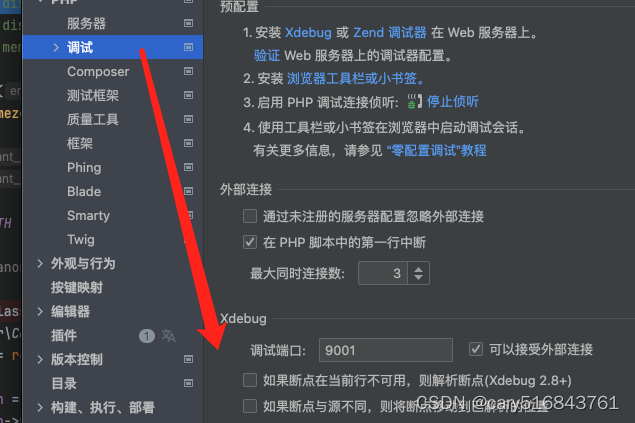
只需要配置调试端口就可以
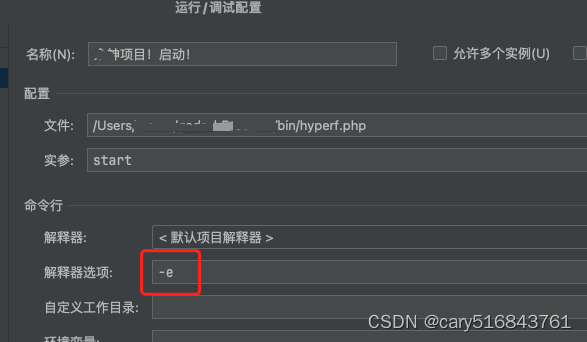
启动的时候要带-e参数
参考文档
Hyperf+PhpStorm+Yasd 实现Hyperf项目的debug调试与[yasd] recv command error, connection closed问题解决_[yasd] connect ide failed (connection refused), pl-CSDN博客