Java--业务场景:SpringBoot 通过Redis进行IP封禁实现接口防刷

文章目录
- 前言
- 具体实现步骤
- 1. 定义自定义注解
- 2. 编写拦截器类IpUrlLimitInterceptor
- 3. 在WebConfig类中添加IpUrlLimitInterceptor
- 4. 添加注解到接口上
- 测试效果
- 参考文章
前言
- 在实际项目中,有些攻击者会使用自动化工具来频繁刷新接口,造成系统的瞬时吞吐量提高,给系统带来很大的压力。要保障服务的安全性,需要防止重要的接口被恶意刷新,接口防刷的方式可以通过设置验证码,IP封禁,安全参数校验等方法。
- 本文主要采用Redis将同一时间内频繁访问同一接口的IP封禁一段时间的方式来防止接口被恶意刷新。
具体实现步骤
1. 定义自定义注解
- 添加了该注解的接口,将开启接口防刷功能。
/**
* 防刷注解
*/
@Target(ElementType.METHOD)
@Documented
@Retention(RetentionPolicy.RUNTIME)
public @interface AccessLimit {/*** 表示规定的时间范围*/int seconds();/*** 表示在规定的时间范围内最多可被访问的次数*/int maxCount();/*** 表示该接口是否需要登录,默认为true*/boolean needLogin() default true;
}
2. 编写拦截器类IpUrlLimitInterceptor
- 核心拦截器IpUrlLimitInterceptor的代码如下:
@Slf4jpublic class IpUrlLimitInterceptor implements HandlerInterceptor {@AutowiredRedisUtil redisUtil; //redis工具类@Autowiredprivate TokenManager tokenManager; //登录时的token检验管理器private static final String LOCK_IP_URL_KEY = "lock_ip_";private static final String IP_URL_REQ_TIME = "ip_url_times_";private static final int IP_LOCK_TIME = 60; //IP被禁用的时间 此处为了方便测试,设置为一分钟 实际情况应该在配置文件里设置@Overridepublic boolean preHandle(HttpServletRequest httpServletRequest, HttpServletResponse httpServletResponse, Object o) throws Exception {if (o instanceof HandlerMethod) {HandlerMethod hm = (HandlerMethod) o;// 获取AccessLimit注解AccessLimit accessLimit = hm.getMethodAnnotation(AccessLimit.class);if(Objects.isNull(accessLimit)){return true;}log.info("request请求地址uri={},ip={}", httpServletRequest.getRequestURI(), IpUtil.getIp(httpServletRequest));//判断IP是否被锁定,若被锁定则访问异常提示信息if (ipIsLock(IpUtil.getIp(httpServletRequest))) {log.info("ip访问被禁止={}", IpUtil.getIp(httpServletRequest));Result result = Result.exception().code(ResultCode.LOCK_IP).message("该IP已被锁定,请等候解锁");returnJson(httpServletResponse, JSON.toJSONString(result));return false;}//接口若需要登录,则校验token//获取请求头里的token信息判断是否正确,若token不正确,则return falseif(accessLimit.needLogin()&&!tokenManager.checkToken(httpServletRequest.getHeader("Authorization"))){ return false;}//记录请求次数,记录后若大于规定时间内的规定次数则返回异常提示信息if (!addRequestTime(IpUtil.getIp(httpServletRequest), httpServletRequest.getRequestURI(), accessLimit.seconds(),accessLimit.maxCount())) {Result result = Result.exception().code(ResultCode.LOCK_IP).message("该IP已被锁定,请等候解锁");returnJson(httpServletResponse, JSON.toJSONString(result));return false;}}return true;}@Overridepublic void postHandle(HttpServletRequest httpServletRequest, HttpServletResponse httpServletResponse, Object o, ModelAndView modelAndView) throws Exception {}@Overridepublic void afterCompletion(HttpServletRequest httpServletRequest, HttpServletResponse httpServletResponse, Object o, Exception e) throws Exception {}/*** @param ip* @return java.lang.Boolean* @Description: 判断ip是否被禁用*/private Boolean ipIsLock(String ip) {if (redisUtil.hasKey(LOCK_IP_URL_KEY + ip)) {return true;}return false;}/*** @param ip* @param uri* @return java.lang.Boolean* @Description: 记录请求次数*/private Boolean addRequestTime(String ip, String uri,int seconds,int maxCount) {String key = IP_URL_REQ_TIME + ip + uri;if (redisUtil.hasKey(key)) {//访问次数加1long time = redisUtil.incrBy(key, 1);if (time >= maxCount) {redisUtil.getLock(LOCK_IP_URL_KEY + ip, ip, IP_LOCK_TIME);return false;}} else {//seconds秒内访问maxCount次就锁柱redisUtil.getLock(key, 1, seconds);}return true;}private void returnJson(HttpServletResponse response, String json) throws Exception {PrintWriter writer = null;response.setCharacterEncoding("UTF-8");response.setContentType("text/json; charset=utf-8");try {writer = response.getWriter();writer.print(json);} catch (IOException e) {log.error("LoginInterceptor response error ---> {}", e.getMessage(), e);} finally {if (writer != null) {writer.close();}}}} - 上述代码中的RedisUtil具体方法如下,完整的RedisUtil类获取方式:Java - Redis操作的工具类RedisUtil
@Component @Slf4j public class RedisUtil {private static final Long SUCCESS = 1L;@Autowiredprivate RedisTemplate<String, Object> redisTemplate;/*** 获取锁* 代码中redis的使用的是分布式锁的形式,这样可以最大程度保证线程安全和功能的实现效果。* @param lockKey* @param value* @param expireTime:单位-秒* @return*/public boolean getLock(String lockKey, Object value, int expireTime) {try {log.info("添加分布式锁key={},expireTime={}", lockKey, expireTime);String script = "if redis.call('setnx',KEYS[1],ARGV[1]) then if redis.call('get',KEYS[1])==ARGV[1] then return redis.call('expire',KEYS[1],ARGV[2]) else return 0 end end";RedisScript<Long> redisScript = new DefaultRedisScript<>(script, Long.class);Object result = redisTemplate.execute(redisScript, Collections.singletonList(lockKey), value, expireTime);if (SUCCESS.equals(result)) {return true;}} catch (Exception e) {e.printStackTrace();}return false;}//其他方法.... } - 拦截器中的IpUtil工具类获取方式:Java-IpUtil通过请求获取IP信息的工具类
3. 在WebConfig类中添加IpUrlLimitInterceptor
  @Configurationpublic class WebConfig extends WebMvcConfigurerAdapter  {@BeanIpUrlLimitInterceptor getIpUrlLimitInterceptor() {return new IpUrlLimitInterceptor();}/*** 注册登录ip防刷拦截器* @return*/@Overridepublic void addInterceptors(InterceptorRegistry registry) {registry.addInterceptor(getIpUrlLimitInterceptor()).addPathPatterns("/**");super.addInterceptors(registry);}
}
4. 添加注解到接口上
- 编写一个接口,将刚刚的防刷注解添加上去
@RestController@RequestMapping("/part/util")public class UtilController {/*** 防刷注解测试* @return*/@GetMapping("/ipLimitTest")@AccessLimit(seconds = 1,maxCount = 5,needLogin = false)//表示一秒内该接口只能访问五次,防止恶意刷流量,这里接口无需登录public Result ipLimitTest(){return Result.ok().data("访问成功");} }
测试效果
-
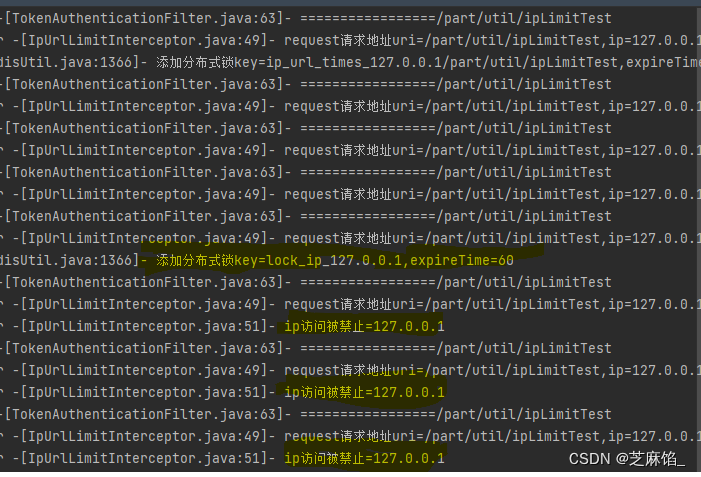
手写一个for循环请求10次ipLimitTest()接口,观察日志情况如下:
-
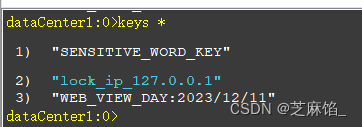
超过五次之后,该ip就被锁定1分钟。一分钟内的访问被禁止。此时查询redis的key,可以发现该ip锁住。
参考文章
如何解决SpringBoot 接口恶意刷新和暴力请求?(荣耀典藏版)