Javaweb之Mybatis的基础操作之查询操作的详细解析

1.6 查询
1.6.1 根据ID查询
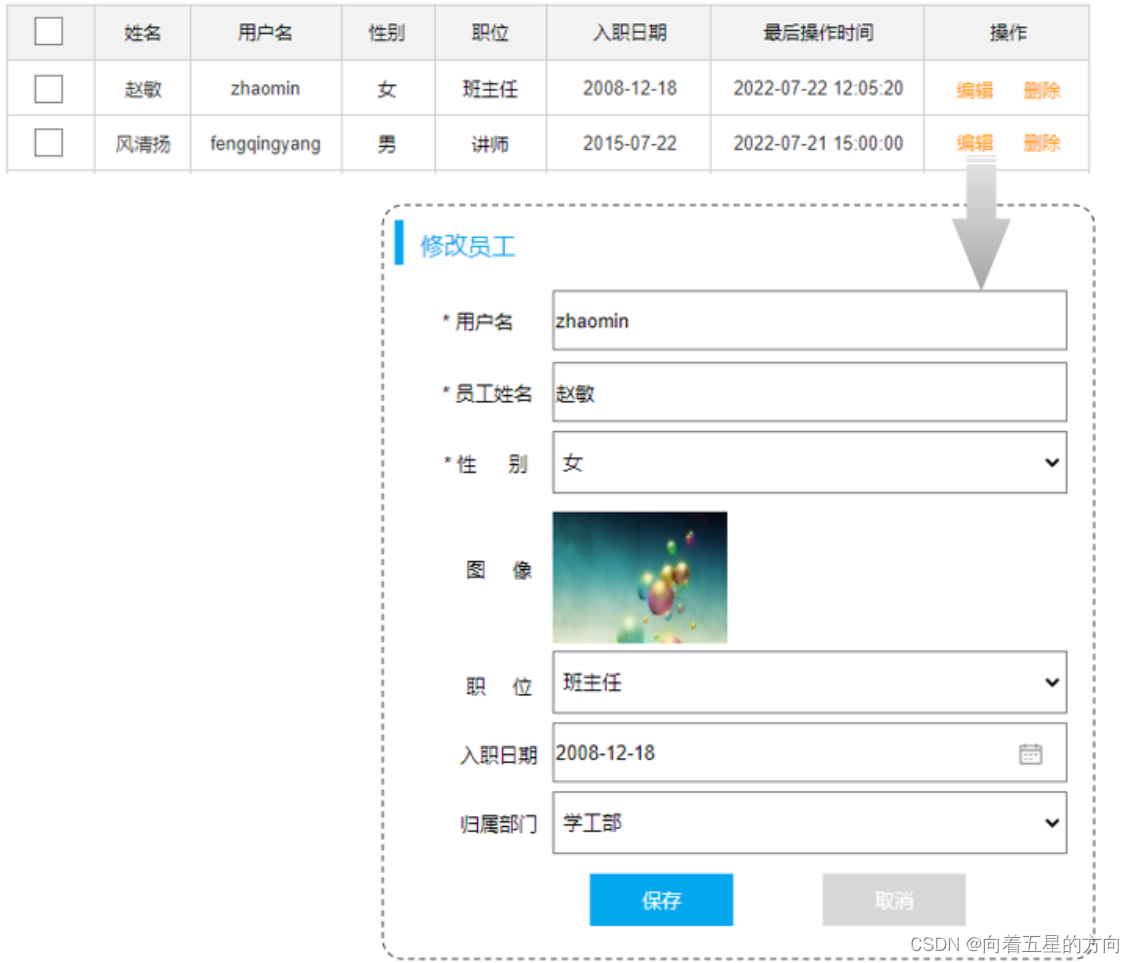
在员工管理的页面中,当我们进行更新数据时,会点击 “编辑” 按钮,然后此时会发送一个请求到服务端,会根据Id查询该员工信息,并将员工数据回显在页面上。
SQL语句:
select id, username, password, name, gender, image, job, entrydate, dept_id, create_time, update_time from emp;接口方法:
@Mapper
public interface EmpMapper {@Select("select id, username, password, name, gender, image, job, entrydate, dept_id, create_time, update_time from emp where id=#{id}")public Emp getById(Integer id);
}
测试类:
@SpringBootTest
class SpringbootMybatisCrudApplicationTests {@Autowiredprivate EmpMapper empMapper;
@Testpublic void testGetById(){Emp emp = empMapper.getById(1);System.out.println(emp);}
}执行结果:
而在测试的过程中,我们会发现有几个字段(deptId、createTime、updateTime)是没有数据值的

1.6.2 数据封装
我们看到查询返回的结果中大部分字段是有值的,但是deptId,createTime,updateTime这几个字段是没有值的,而数据库中是有对应的字段值的,这是为什么呢?

原因如下:
-
实体类属性名和数据库表查询返回的字段名一致,mybatis会自动封装。
-
如果实体类属性名和数据库表查询返回的字段名不一致,不能自动封装。
解决方案:
-
起别名
-
结果映射
-
开启驼峰命名
起别名:在SQL语句中,对不一样的列名起别名,别名和实体类属性名一样
@Select("select id, username, password, name, gender, image, job, entrydate, " +"dept_id AS deptId, create_time AS createTime, update_time AS updateTime " +"from emp " +"where id=#{id}")
public Emp getById(Integer id);
再次执行测试类:

手动结果映射:通过 @Results及@Result 进行手动结果映射
@Results({@Result(column = "dept_id", property = "deptId"),@Result(column = "create_time", property = "createTime"),@Result(column = "update_time", property = "updateTime")})
@Select("select id, username, password, name, gender, image, job, entrydate, dept_id, create_time, update_time from emp where id=#{id}")
public Emp getById(Integer id);
@Results源代码:@Documented @Retention(RetentionPolicy.RUNTIME) @Target({ElementType.METHOD}) public @interface Results { String id() default ""; Result[] value() default {}; //Result类型的数组 } @Result源代码:@Documented @Retention(RetentionPolicy.RUNTIME) @Target({ElementType.METHOD}) @Repeatable(Results.class) public @interface Result { boolean id() default false;//表示当前列是否为主键(true:是主键) String column() default "";//指定表中字段名 String property() default "";//指定类中属性名 Class<?> javaType() default void.class; JdbcType jdbcType() default JdbcType.UNDEFINED; Class<? extends TypeHandler> typeHandler() default UnknownTypeHandler.class; One one() default @One; Many many() default @Many; }
开启驼峰命名(推荐):如果字段名与属性名符合驼峰命名规则,mybatis会自动通过驼峰命名规则映射
驼峰命名规则: abc_xyz => abcXyz
表中字段名:abc_xyz
类中属性名:abcXyz
# 在application.properties中添加:
mybatis.configuration.map-underscore-to-camel-case=true
要使用驼峰命名前提是 实体类的属性 与 数据库表中的字段名严格遵守驼峰命名。
1.6.3 条件查询
在员工管理的列表页面中,我们需要根据条件查询员工信息,查询条件包括:姓名、性别、入职时间。
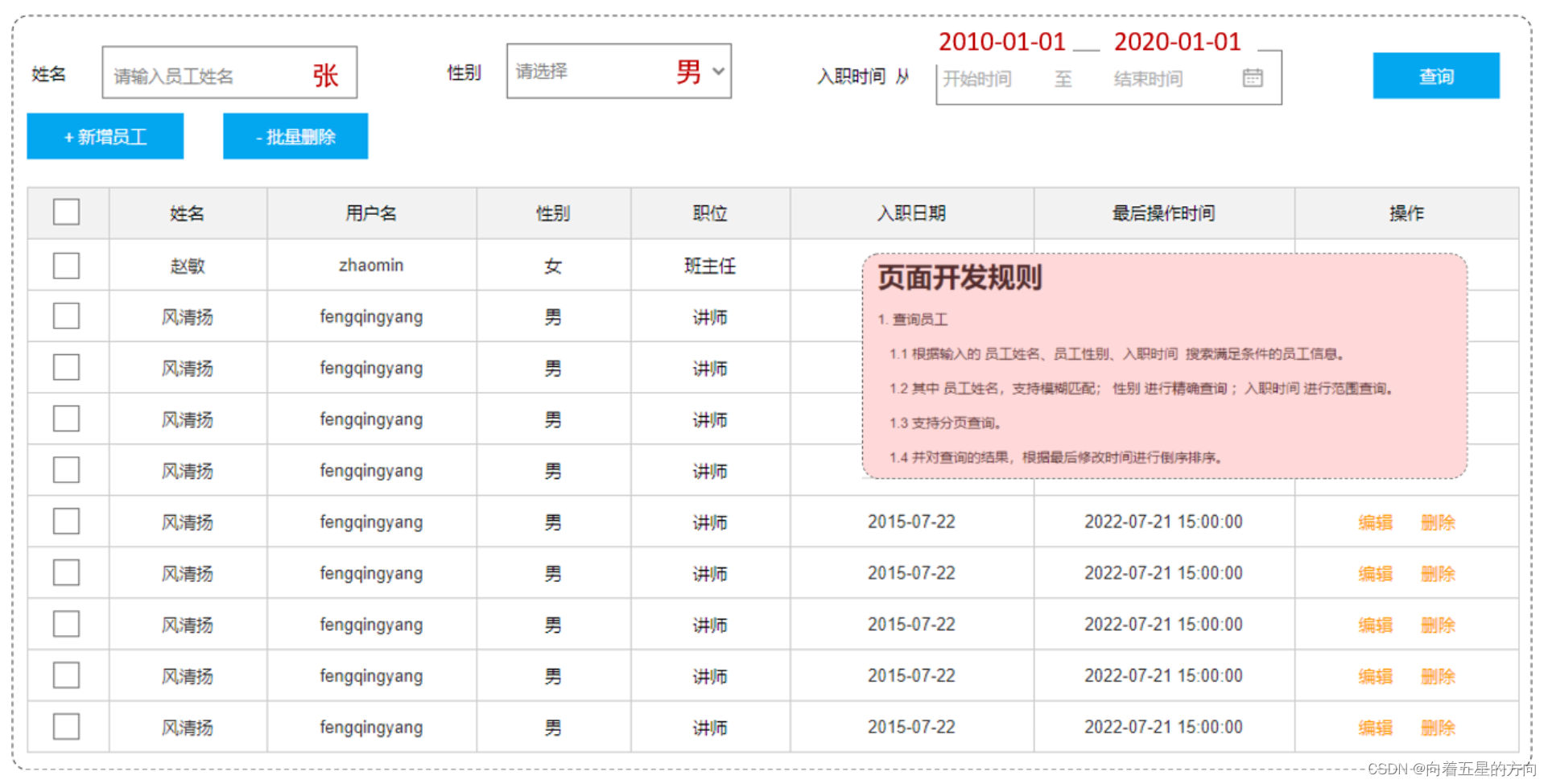
通过页面原型以及需求描述我们要实现的查询:
-
姓名:要求支持模糊匹配
-
性别:要求精确匹配
-
入职时间:要求进行范围查询
-
根据最后修改时间进行降序排序
SQL语句:
select id, username, password, name, gender, image, job, entrydate, dept_id, create_time, update_time
from emp
where name like '%张%' and gender = 1 and entrydate between '2010-01-01' and '2020-01-01 '
order by update_time desc;
接口方法:
-
方式一
@Mapper
public interface EmpMapper {@Select("select * from emp " +"where name like '%${name}%' " +"and gender = #{gender} " +"and entrydate between #{begin} and #{end} " +"order by update_time desc")public List<Emp> list(String name, Short gender, LocalDate begin, LocalDate end);
}
以上方式注意事项:
方法中的形参名和SQL语句中的参数占位符名保持一致
模糊查询使用${...}进行字符串拼接,这种方式呢,由于是字符串拼接,并不是预编译的形式,所以效率不高、且存在sql注入风险。

-
方式二(解决SQL注入风险)
-
使用MySQL提供的字符串拼接函数:concat('%' , '关键字' , '%')
-
@Mapper
public interface EmpMapper {
@Select("select * from emp " +"where name like concat('%',#{name},'%') " +"and gender = #{gender} " +"and entrydate between #{begin} and #{end} " +"order by update_time desc")public List<Emp> list(String name, Short gender, LocalDate begin, LocalDate end);
}
执行结果:生成的SQL都是预编译的SQL语句(性能高、安全)

1.6.4 参数名说明
在上面我们所编写的条件查询功能中,我们需要保证接口中方法的形参名和SQL语句中的参数占位符名相同。
当方法中的形参名和SQL语句中的占位符参数名不相同时,就会出现以下问题:
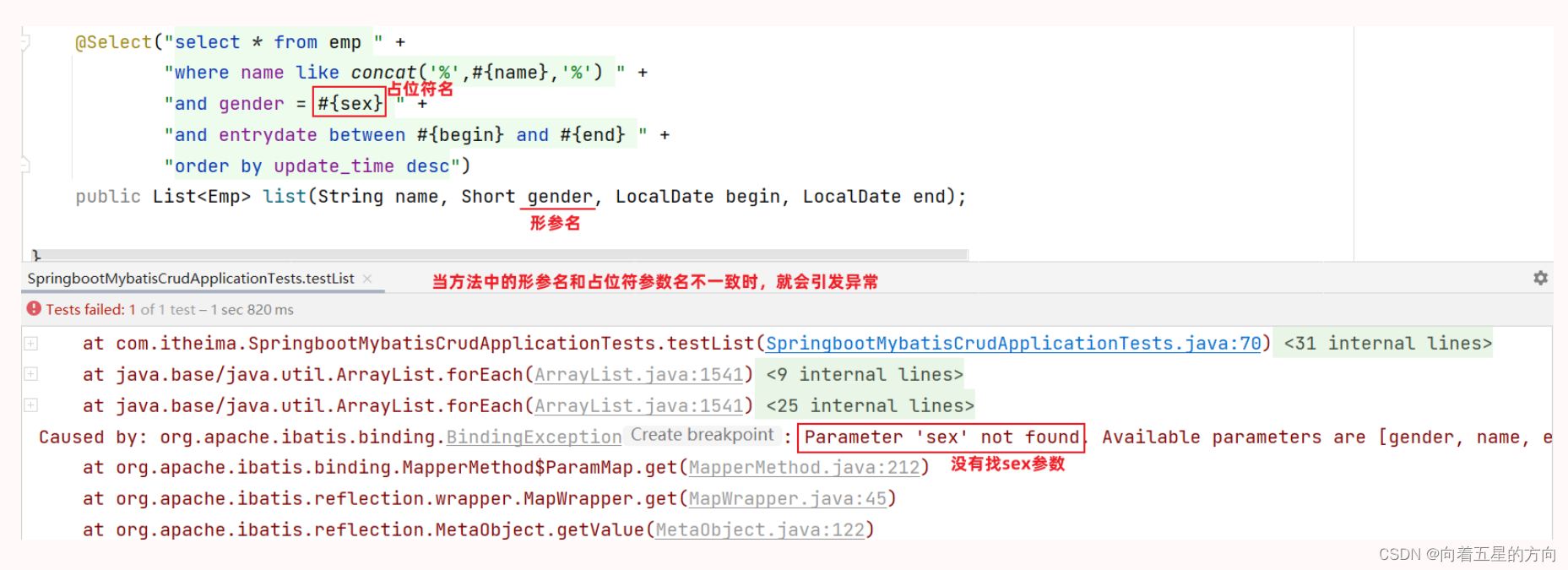
参数名在不同的SpringBoot版本中,处理方案还不同:
-
在springBoot的2.x版本(保证参数名一致)
-

springBoot的父工程对compiler编译插件进行了默认的参数parameters配置,使得在编译时,会在生成的字节码文件中保留原方法形参的名称,所以#{…}里面可以直接通过形参名获取对应的值

-
在springBoot的1.x版本/单独使用mybatis(使用@Param注解来指定SQL语句中的参数名)
-

在编译时,生成的字节码文件当中,不会保留Mapper接口中方法的形参名称,而是使用var1、var2、...这样的形参名字,此时要获取参数值时,就要通过@Param注解来指定SQL语句中的参数名
