Ubuntu 虚拟机挂接 Windows 目录

Windows 共享目录
首先 Windows 下共享目录
我这里偷懒直接直接 Everyone ,也可以指定用户啥的
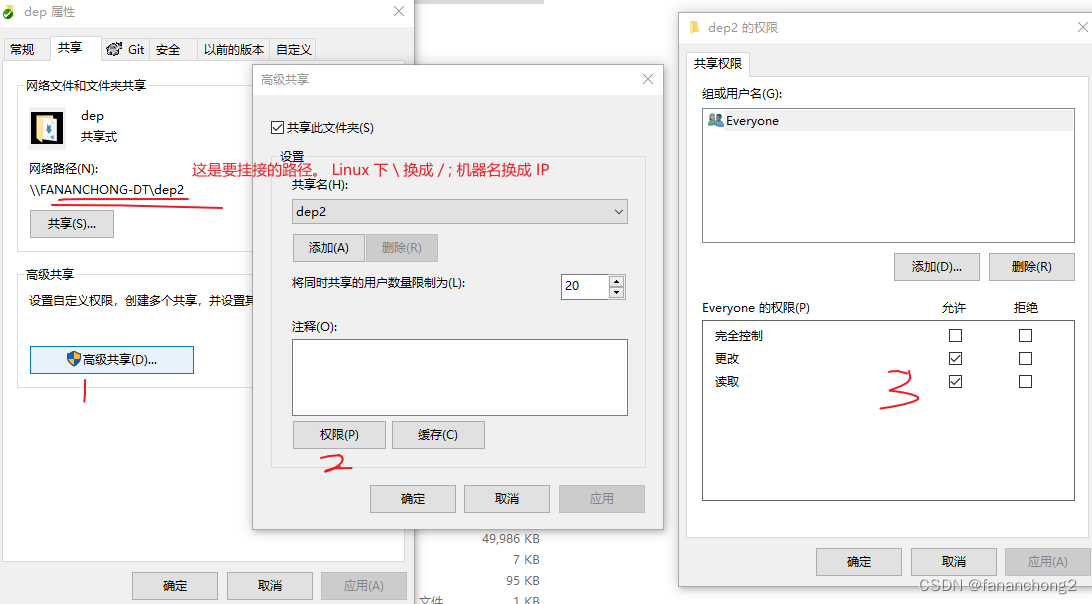
Ubuntu 挂接
挂接命令,类似如下:
sudo mount -o 'username=fananchong,password=xxxx,uid=1000,gid=1000,file_mode=0644,dir_mode=0755,dynperm' //xx.xx.xx.xx/dep2 /home/fananchong/xxxx/gameserver/dep
对上面命令做下说明:
| 内容 | 说明 |
|---|---|
| username | Windows 系统的登录账号 |
| password | Windows 系统的登录密码 |
| uid | Ubuntu 系统账号的 uid 。执行 id -u 可以获得 |
| gid | Ubuntu 系统账号的 gid 。执行 id -g 可以获得 |
| file_mode | 创建文件时,设置文件权限是什么 |
| dir_mode | 创建目录时,设置目录权限是什么 |
| dynperm | Ubuntu 下可以更改文件、目录权限 |
| //xx.xx.xx.xx/dep2 | Windows 要共享的目录 |
| /home/fananchong/xxxx/gameserver/dep | Ubuntu 下挂接到哪个目录 |
这里重点说下dynperm
如果没有这个参数,Ubuntu 下会无法更改文件目录的权限,导致 chmod 命令执行无效
这对于 git 库下的文件会导致都有 diff 差异
设置开机启动
这里使用在/etc/rc.local里配置挂接命令
Ubuntu 默认没开启 /etc/rc.local 的功能
步骤1:查看服务是否开启
>systemctl status rc-local.service
● rc-local.service - /etc/rc.local CompatibilityLoaded: loaded (/lib/systemd/system/rc-local.service; enabled; vendor preset: enabled)Drop-In: /usr/lib/systemd/system/rc-local.service.d└─debian.confActive: active (exited) since Sat 2024-01-06 02:32:46 UTC; 5h 2min agoDocs: man:systemd-rc-local-generator(8)Process: 739 ExecStart=/etc/rc.local start (code=exited, status=0/SUCCESS)CPU: 11ms
这里打印的是已开启的
步骤2:开启服务
如果没有开启,修改/lib/systemd/system/rc-local.service
在该文件内添加Install的内容。修改后,完整文件内容如下:
cat /lib/systemd/system/rc-local.service ✔ took 1m 12s with fananchong@myubuntu at 07:36:33
# SPDX-License-Identifier: LGPL-2.1-or-later
#
# This file is part of systemd.
#
# systemd is free software; you can redistribute it and/or modify it
# under the terms of the GNU Lesser General Public License as published by
# the Free Software Foundation; either version 2.1 of the License, or
# (at your option) any later version.# This unit gets pulled automatically into multi-user.target by
# systemd-rc-local-generator if /etc/rc.local is executable.
[Unit]
Description=/etc/rc.local Compatibility
Documentation=man:systemd-rc-local-generator(8)
ConditionFileIsExecutable=/etc/rc.local
After=network.target[Service]
Type=forking
ExecStart=/etc/rc.local start
TimeoutSec=0
RemainAfterExit=yes
GuessMainPID=no[Install]
WantedBy=multi-user.target
Alias=rc-local.service
然后设置开机启动:
sudo systemctl enable rc-local.service
步骤3:创建/etc/rc.local
sudo touch /etc/rc.local
sudo chmod +x /etc/rc.local
步骤4:设置开机启动内容
然后把刚才的 mount 命令写到/etc/rc.local里
步骤5:启动服务
sudo systemctl start rc-local.service