vue3 的内置组件汇总

官方给出的说明:
Fragment: Vue 3 组件不再要求有一个唯一的根节点,清除了很多无用的占位 div。Teleport: 允许组件渲染在别的元素内,主要开发弹窗组件的时候特别有用。Suspense: 异步组件,更方便开发有异步请求的组件。
一、fragment 片断组件(了解)
- 在 Vue2 中:组件必须有一个根标签。
- 在 Vue3 中:组件可以没有根标签,内部会将多个标签包含在一个 fragment 的虚拟元素中。
这样的好处是:减少标签层级,减小内存占用。
二、teleport 瞬移组件
Teleport 是一种能够将 “我们的组件 html 结构” 移动到指定位置的技术。
使用 teleport 组件时,需要指定 “移动位置”:
<teleport to="移动位置"></teleport>
例如:用 suspense 实现全屏弹窗
父组件A:
<template><div class="tel_a"><h3>父组件A</h3><son /></div>
</template>
<script setup>import { defineAsyncComponent } from 'vue'const Son = defineAsyncComponent(() => import('./components/son.vue'))
</script>
<style lang="less" scoped>.tel_a {width: 30%;background: #aaa;padding: 10px 30px;}
</style>
子组件B:
<template><div class="tel_b"><div>子组件B</div><button @click="modalOpen = true"> 打开全屏弹窗(teleport) </button><teleport to="body"><div v-if="modalOpen" class="modal"><div class="content">我是一个teleport弹窗<br />(我的父组件是“body”)<button @click="modalOpen = false"> 关闭 </button></div></div></teleport></div>
</template>
<script setup>import { ref } from 'vue'const modalOpen = ref(false)
</script>
<style lang="less" scoped>.flex-center () {display: flex;align-items: center;justify-content: center;}.tel_b {padding: 10px;background: rgba(242, 177, 57);}.modal {.flex-center;position: absolute;top: 0;right: 0;bottom: 0;left: 0;background-color: rgba(0, 0, 0, 0.5);.content {.flex-center;flex-direction: column;text-align: center;width: 260px;height: 160px;padding: 10px;background-color: #fff;button {display: block;margin-top: 30px;}}}
</style>
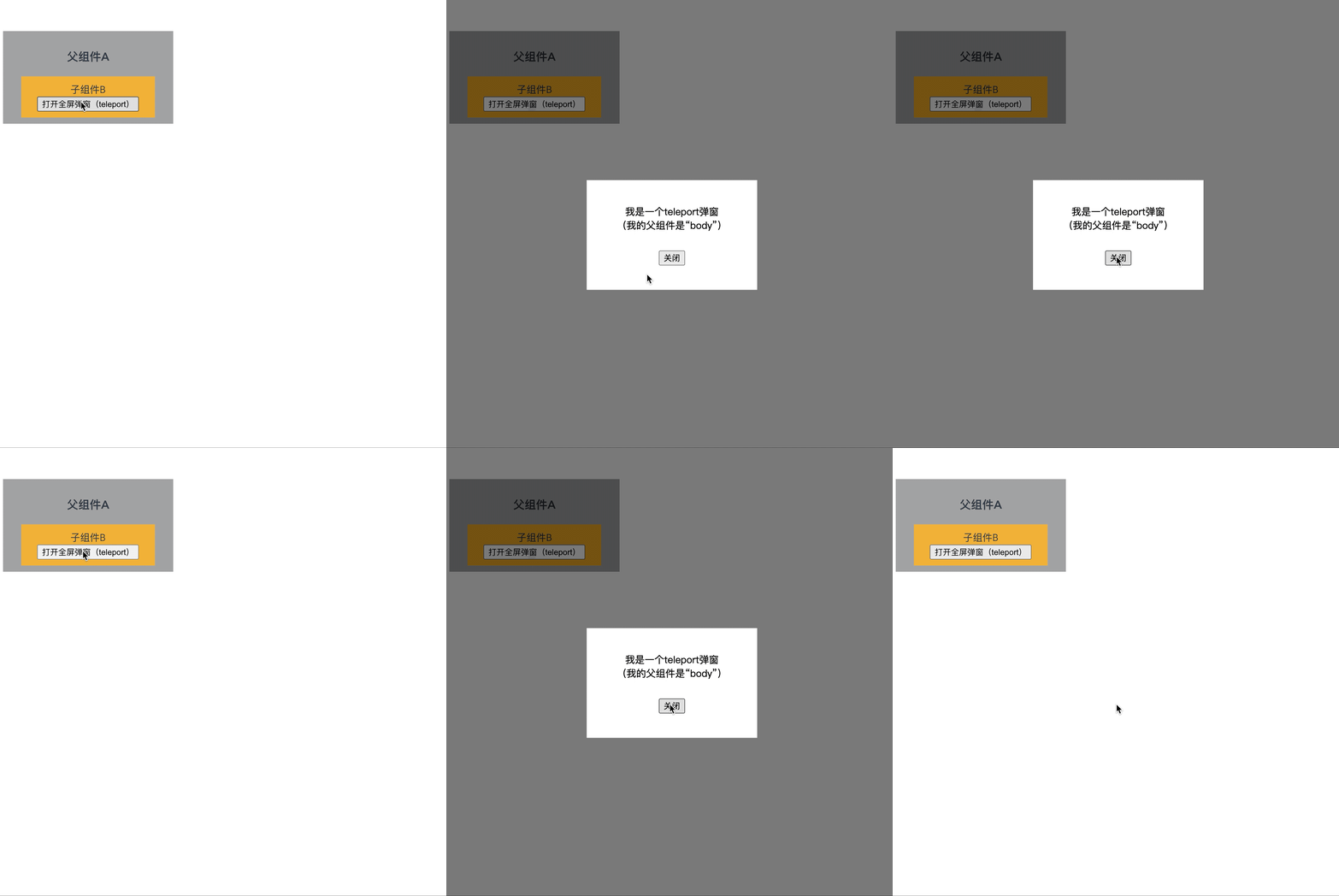
效果如下:
三、suspense 组件
suspense 组件支持:在等待异步组件加载时,渲染一些额外内容。不必非得等异步组件加载完毕再渲染,避免了因异步加载带来的白屏和闪屏问题的出现,提高了用户的体验。
suspense 的使用步骤:
- 先异步引入组件——
defineAsyncComponent。 - 然后用 suspense 包裹组件,并配置好
default和fallback。
先异步引入组件:
import { defineAsyncComponent } from 'vue'
const Child = defineAsyncComponent(()=>import('./components/Child.vue'))
然后用 Suspense 包裹组件:
<template><div class="app"><h3>我是App组件</h3><Suspense><template #default><Child/></template><template #fallback><h3>加载中.....</h3></template></Suspense></div>
</template>