RabbitMQ消息模型之Routing-Direct

Routing Direct
在Fanout模式中,一条消息,会被所有订阅的队列都消费。但是在某些场景下,我们希望不同的消息被不同的队列消费。这时就要用到Direct类型的Exchange。
在Direct模型下:
- 队列与交换机的绑定,不能是任意绑定了,而是要指定一个
RoutingKey(路由key) - 消息的发送方在向 Exchange发送消息时,也必须指定消息的
RoutingKey。 - Exchange不再把消息交给每一个绑定的队列,而是根据消息的
Routing Key进行判断,只有队列的Routingkey与消息的Routing key完全一致,才会接收到消息

- P:生产者,向Exchange发送消息,发送消息时,会指定一个routing key。
- X:Exchange(交换机),接收生产者的消息,然后把消息递交给与routing key完全匹配的队列。
- C1:消费者,其所在队列指定了需要routing key 为 error 的消息。
- C2:消费者,其所在队列指定了需要routing key 为 info、error、warning 的消息。
创建生产者
public class MyProducer {@Testpublic void test() throws Exception {// 交换机String exchange = "logs_direct";// 创建工厂ConnectionFactory factory = new ConnectionFactory();factory.setVirtualHost("/");factory.setHost("xuewei.world");factory.setUsername("xuewei");factory.setPassword("123456");factory.setPort(5672);// 创建连接和通道Connection connection = factory.newConnection();Channel channel = connection.createChannel();// 声明交换机channel.exchangeDeclare(exchange, "direct");for (int i = 0; i < 3; i++) {// 发布消息channel.basicPublish(exchange, "DEBUG", null, ("DEBUG LOG -> " + i).getBytes());channel.basicPublish(exchange, "INFO", null, ("INFO LOG -> " + i).getBytes());channel.basicPublish(exchange, "WARN", null, ("WARN LOG -> " + i).getBytes());channel.basicPublish(exchange, "ERROR", null, ("ERROR LOG -> " + i).getBytes());}}
}
创建消费者1
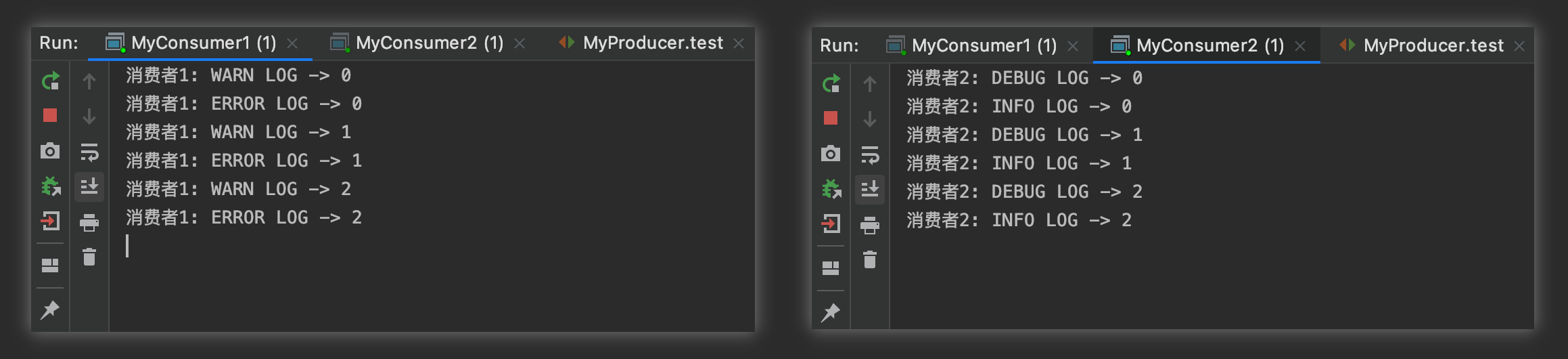
public class MyConsumer1 {public static void main(String[] args) throws Exception {// 指定交换机String exchange = "logs_direct";// 创建工厂ConnectionFactory factory = new ConnectionFactory();factory.setVirtualHost("/");factory.setHost("xuewei.world");factory.setUsername("xuewei");factory.setPassword("123456");factory.setPort(5672);// 创建连接和通道Connection connection = factory.newConnection();Channel channel = connection.createChannel();// 绑定交换机channel.exchangeDeclare(exchange, "direct");// 创建临时队列String queue = channel.queueDeclare().getQueue();// 将临时队列绑定exchangechannel.queueBind(queue, exchange, "WARN");channel.queueBind(queue, exchange, "ERROR");// 处理消息channel.basicConsume(queue, true, new DefaultConsumer(channel) {@Overridepublic void handleDelivery(String consumerTag, Envelope envelope, AMQP.BasicProperties properties, byte[] body) throws IOException {System.out.println("消费者1: " + new String(body));// TODO 业务处理}});}
}
创建消费者2
public class MyConsumer2 {public static void main(String[] args) throws Exception {// 指定交换机String exchange = "logs_direct";// 创建工厂ConnectionFactory factory = new ConnectionFactory();factory.setVirtualHost("/");factory.setHost("xuewei.world");factory.setUsername("xuewei");factory.setPassword("123456");factory.setPort(5672);// 创建连接和通道Connection connection = factory.newConnection();Channel channel = connection.createChannel();// 绑定交换机channel.exchangeDeclare(exchange, "direct");// 创建临时队列String queue = channel.queueDeclare().getQueue();// 将临时队列绑定exchangechannel.queueBind(queue, exchange, "DEBUG");channel.queueBind(queue, exchange, "INFO");// 处理消息channel.basicConsume(queue, true, new DefaultConsumer(channel) {@Overridepublic void handleDelivery(String consumerTag, Envelope envelope, AMQP.BasicProperties properties, byte[] body) throws IOException {System.out.println("消费者2: " + new String(body));// TODO 业务处理}});}
}