C#中汉字转区位码

目录
一、关于区位码
1.区位码定义
2.算法
二、实例
三、生成效果
四、程序中的知识点
1.byte[] GetBytes(string s)
2.字节数组转short类型
一、关于区位码
1.区位码定义
区位码是一个4位的十进制数,每个区位码都对应着一个唯一的汉字,区位码的前两位叫做区码,后两位叫做位码。
2.算法
首先通过Encoding对象的GetBytes方法得到汉字的字节数组,将字节数组的第一位和第二位分别转换为整型数值,然后将得到的两个整型数值分别减160后转换为字符串,连接两个字符串就组成了汉字区位码。
string P_Chinese ="科";
byte[] P_bt_array =Encoding.Default.GetBytes(Chinese);
short front =(short)(P_bt_array[0]-’\0’); //将字节数组的第一位转换成short类型
short back =(short)(P_bt_array[1]-’\0’);  //将字节数组的第二位转换成short类型
string P_Result =(front -160).ToString()+(back-160).ToString();
Encoding对象的GetBytes方法提供了多个重载,可以接收字符串、字符数组等对象。
可以使用FileStream对象将字节数组写入文件。
使用Encoding对象的GetBytes方法可以得到字符串对象的字节数组,现在可以创建一个FileStream对象,方便地将字节数组写入文件中。同样地,可以从文件中读取字节数组,然后调用Encoding对象的GetString方法将字符数组转换为字符串。
二、实例
//汉字与区位码的转换
using System.Text;namespace _037
{public partial class Form1 : Form{private GroupBox? groupBox1;private TextBox? textBox2;private Button? button1;private TextBox? textBox1;private Label? label1;public Form1(){InitializeComponent();Load += Form1_Load;}private void Form1_Load(object? sender, EventArgs e){// // textBox2// textBox2 = new TextBox{Location = new Point(102, 57),Name = "textBox2",Size = new Size(100, 23),TabIndex = 3};// // button1// button1 = new Button{Location = new Point(21, 57),Name = "button1",Size = new Size(75, 23),TabIndex = 2,Text = "转区位码",UseVisualStyleBackColor = true};button1.Click += Button1_Click;// // textBox1//             textBox1 = new TextBox{Location = new Point(102, 28),Name = "textBox1",Size = new Size(100, 23),TabIndex = 1};// // label1// label1 = new Label{AutoSize = true,Location = new Point(21, 34),Name = "label1",Size = new Size(68, 17),TabIndex = 0,Text = "输入汉字:"};// // groupBox1// groupBox1 = new GroupBox{Location = new Point(12, 12),Name = "groupBox1",Size = new Size(220, 102),TabIndex = 0,TabStop = false,Text = "汉字转区位码"};groupBox1.SuspendLayout();groupBox1.Controls.Add(textBox2);groupBox1.Controls.Add(button1);groupBox1.Controls.Add(textBox1);groupBox1.Controls.Add(label1);// // Form1// AutoScaleDimensions = new SizeF(7F, 17F);AutoScaleMode = AutoScaleMode.Font;ClientSize = new Size(244, 126);Controls.Add(groupBox1);Name = "Form1";StartPosition = FormStartPosition.CenterScreen;Text = "汉字转区位码";          groupBox1.ResumeLayout(false);groupBox1.PerformLayout();}private void Button1_Click(object? sender, EventArgs e){if (textBox1!.Text != string.Empty) //判断输入是否为空{try{textBox2!.Text =            //得到汉字区位码信息GetCode(textBox1.Text);}catch (IndexOutOfRangeException ex){MessageBox.Show(            //使用消息对话框提示异常信息ex.Message + "请输入正确的汉字", "出错!");}}else{MessageBox.Show("请输入正确的汉字", "提醒!");}}/// <summary>/// 得到汉字区位码方法/// </summary>/// <param name="strChinese">汉字字符</param>/// <returns>返回汉字区位码</returns>public static string GetCode(string Chinese){byte[] byte_array = Encoding.Default.GetBytes(Chinese); //字符串转Byte数组int front = (short)(byte_array[0] - '\0');              //将字节数组的第一位转换成short类型int back = (short)(byte_array[1] - '\0');               //将字节数组的第二位转换成short类型return (front - 160).ToString() + (back - 160).ToString();//计算并返回区位码}}
}
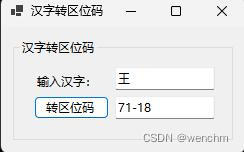
三、生成效果
四、程序中的知识点
1.byte[] GetBytes(string s)
用途:字符串转Byte数组
public virtual byte[] GetBytes(string s){if (s == null){throw new ArgumentNullException("s", Environment.GetResourceString("ArgumentNull_String"));}int byteCount = GetByteCount(s);byte[] array = new byte[byteCount];int bytes = GetBytes(s, 0, s.Length, array, 0);return array;}//使用UTF-8的字符集,将字符串转换为字节数组
byte[]utf8 =Encoding.UTF8.GetBytes(str);