【kettle】pdi/data-integration 集成kerberos认证连接hive或spark thriftserver

一、背景
kerberos认证是比较底层的认证,掌握好了用起来比较简单。
kettle当前任务的jvm任务完成kerberos认证后会存储认证信息,之后直接连接hive就可以了无需提供额外的用户信息。
spark thriftserver本质就是通过hive jdbc协议连接并运行spark sql任务。
二、思路
kettle中可以使用js调用java类的方法。编写一个jar放到kettle的lib目录下并。在启动kettle后会自动加载此jar中的类。编写一个javascript转换完成kerbero即可。
二、kerberos认证模块开发
准备使用scala语言完成此项目。
2.1 生成kerberos工具jar包
2.1.1 创建maven项目并编写pom
创建maven项目,这里依赖比较多觉得没用的删掉即可:
注意:这里为了便于管理很多包都是provided,最后不会打到包内,自己测试可以都改为 compile,避免缺少包再一个一个排查!!!
  <properties><maven.compiler.source>8</maven.compiler.source><maven.compiler.target>8</maven.compiler.target><project.build.sourceEncoding>UTF-8</project.build.sourceEncoding><scala.version>2.11.12</scala.version><scala.major.version>2.11</scala.major.version><target.java.version>1.8</target.java.version><spark.version>2.4.0</spark.version><hive.version>2.1.1</hive.version><hadoop.version>3.0.0-cdh6.2.0</hadoop.version><zookeeper.version>3.4.5-cdh6.2.0</zookeeper.version><jackson.version>2.14.2</jackson.version><httpclient5.version>5.2.1</httpclient5.version></properties><dependencies><dependency><groupId>org.scala-lang</groupId><artifactId>scala-library</artifactId><version>${scala.version}</version><scope>provided</scope></dependency><dependency><groupId>org.scala-lang</groupId><artifactId>scala-reflect</artifactId><version>${scala.version}</version><scope>provided</scope></dependency><dependency><groupId>org.scala-lang</groupId><artifactId>scala-compiler</artifactId><version>${scala.version}</version><scope>provided</scope></dependency><dependency><groupId>org.slf4j</groupId><artifactId>slf4j-api</artifactId><version>1.7.28</version><scope>provided</scope></dependency><dependency><groupId>org.apache.logging.log4j</groupId><artifactId>log4j-slf4j-impl</artifactId><version>2.9.1</version><scope>provided</scope></dependency><dependency><groupId>org.apache.logging.log4j</groupId><artifactId>log4j-api</artifactId><version>2.11.1</version><scope>provided</scope></dependency><dependency><groupId>org.apache.logging.log4j</groupId><artifactId>log4j-core</artifactId><version>2.11.1</version><scope>provided</scope></dependency><dependency><groupId>org.apache.hadoop</groupId><artifactId>hadoop-common</artifactId><version>${hadoop.version}</version><scope>provided</scope></dependency><dependency><groupId>org.apache.hadoop</groupId><artifactId>hadoop-client</artifactId><version>${hadoop.version}</version><scope>provided</scope></dependency><dependency><groupId>org.apache.hive</groupId><artifactId>hive-jdbc</artifactId><version>${hive.version}</version><scope>provided</scope></dependency><dependency><groupId>org.apache.hive</groupId><artifactId>hive-exec</artifactId><version>${hive.version}</version><scope>provided</scope></dependency><dependency><groupId>org.apache.hive.shims</groupId><artifactId>hive-shims-0.23</artifactId><version>${hive.version}</version><scope>provided</scope></dependency><dependency><groupId>org.apache.hive.shims</groupId><artifactId>hive-shims-common</artifactId><version>${hive.version}</version><scope>provided</scope></dependency><dependency><groupId>org.apache.spark</groupId><artifactId>spark-hive-thriftserver_${scala.major.version}</artifactId><version>${spark.version}</version><scope>provided</scope></dependency><dependency><groupId>org.apache.zookeeper</groupId><artifactId>zookeeper</artifactId><version>${zookeeper.version}</version><scope>provided</scope></dependency><!-- https://mvnrepository.com/artifact/org.junit.jupiter/junit-jupiter-api --><dependency><groupId>org.junit.jupiter</groupId><artifactId>junit-jupiter-api</artifactId><version>5.6.2</version><scope>test</scope></dependency><dependency><groupId>org.scalatest</groupId><artifactId>scalatest_2.11</artifactId><version>3.2.8</version><scope>test</scope></dependency><dependency><groupId>org.scalactic</groupId><artifactId>scalactic_2.12</artifactId><version>3.2.8</version><scope>test</scope></dependency><dependency><groupId>org.projectlombok</groupId><artifactId>lombok</artifactId><version>1.18.14</version><scope>provided</scope></dependency></dependencies><build><plugins><plugin><groupId>net.alchim31.maven</groupId><artifactId>scala-maven-plugin</artifactId><version>4.5.6</version><configuration></configuration><executions><execution><id>scala-compiler</id><phase>process-resources</phase><goals><goal>add-source</goal><goal>compile</goal></goals></execution><execution><id>scala-test-compiler</id><phase>process-test-resources</phase><goals><goal>add-source</goal><goal>testCompile</goal></goals></execution></executions></plugin><!-- disable surefire --><plugin><groupId>org.apache.maven.plugins</groupId><artifactId>maven-surefire-plugin</artifactId><version>2.7</version><configuration><skipTests>true</skipTests></configuration></plugin><!-- enable scalatest --><plugin><groupId>org.scalatest</groupId><artifactId>scalatest-maven-plugin</artifactId><version>2.2.0</version><configuration><reportsDirectory>${project.build.directory}/surefire-reports</reportsDirectory><junitxml>.</junitxml><filereports>WDF TestSuite.txt</filereports></configuration><executions><execution></execution></executions></plugin><plugin><groupId>org.apache.maven.plugins</groupId><artifactId>maven-assembly-plugin</artifactId><version>3.0.0</version><configuration><appendAssemblyId>false</appendAssemblyId><descriptorRefs><descriptorRef>jar-with-dependencies</descriptorRef></descriptorRefs><archive></archive></configuration><executions><execution><id>make-assembly</id><phase>package</phase><goals><goal>single</goal></goals></execution></executions></plugin></plugins></build><repositories><repository><id>cloudera</id><name>cloudera</name><url>https://repository.cloudera.com/artifactory/cloudera-repos/</url></repository></repositories>
</project>
2.1.2 编写类
KerberosConf 暂时没啥用。
case class KerberosConf(principal: String, keyTabPath: String, conf: String="/etc/krb5.conf")ConfigUtils 类用于生成hadoop 的Configuration,kerberos认证的时候会用到。
import org.apache.hadoop.conf.Configuration
import java.io.FileInputStream
import java.nio.file.{Files, Paths}object ConfigUtils {val LOGGER = org.slf4j.LoggerFactory.getLogger(KerberosUtils.getClass)var hadoopConfiguration: Configuration = nullvar hiveConfiguration: Configuration = nullprivate var hadoopConfDir: String = nullprivate var hiveConfDir: String = nulldef setHadoopConfDir(dir: String): Configuration = {hadoopConfDir = dirrefreshHadoopConfig}def getHadoopConfDir: String = {if (hadoopConfDir.isEmpty) {val tmpConfDir = System.getenv("HADOOP_CONF_DIR")if (tmpConfDir.nonEmpty && Files.exists(Paths.get(tmpConfDir))) {hadoopConfDir = tmpConfDir} else {val tmpHomeDir = System.getenv("HADOOP_HOME")if (tmpHomeDir.nonEmpty && Files.exists(Paths.get(tmpHomeDir))) {val tmpConfDirLong = s"${tmpHomeDir}/etc/hadoop"val tmpConfDirShort = s"${tmpHomeDir}/conf"if (Files.exists((Paths.get(tmpConfDirLong)))) {hadoopConfDir = tmpConfDirLong} else if (Files.exists(Paths.get(tmpConfDirShort))) {hadoopConfDir = tmpConfDirShort}}}}LOGGER.info(s"discover hadoop conf from : ${hadoopConfDir}")hadoopConfDir}def getHadoopConfig: Configuration = {if (hadoopConfiguration == null) {hadoopConfiguration = new Configuration()configHadoop()}hadoopConfiguration}def refreshHadoopConfig: Configuration = {hadoopConfiguration = new Configuration()configHadoop()}def configHadoop(): Configuration = {var coreXml = ""var hdfsXml = ""val hadoopConfDir = getHadoopConfDirif (hadoopConfDir.nonEmpty) {val coreXmlTmp = s"${hadoopConfDir}/core-site.xml"val hdfsXmlTmp = s"${hadoopConfDir}/hdfs-site.xml"val coreExists = Files.exists(Paths.get(coreXmlTmp))val hdfsExists = Files.exists(Paths.get(hdfsXmlTmp))if (coreExists && hdfsExists) {LOGGER.info(s"discover hadoop conf from hadoop conf dir: ${hadoopConfDir}")coreXml = coreXmlTmphdfsXml = hdfsXmlTmphadoopAddSource(coreXml, hadoopConfiguration)hadoopAddSource(hdfsXml, hadoopConfiguration)}}LOGGER.info(s"core-site path : ${coreXml}, hdfs-site path : ${hdfsXml}")hadoopConfiguration}def getHiveConfDir: String = {if (hiveConfDir.isEmpty) {val tmpConfDir = System.getenv("HIVE_CONF_DIR")if (tmpConfDir.nonEmpty && Files.exists(Paths.get(tmpConfDir))) {hiveConfDir = tmpConfDir} else {val tmpHomeDir = System.getenv("HIVE_HOME")if (tmpHomeDir.nonEmpty && Files.exists(Paths.get(tmpHomeDir))) {val tmpConfDirShort = s"${tmpHomeDir}/conf}"if (Files.exists(Paths.get(tmpConfDir))) {hiveConfDir = tmpConfDirShort}}}}LOGGER.info(s"discover hive conf from : ${hiveConfDir}")hiveConfDir}def configHive(): Configuration = {if (hiveConfiguration != null) {return hiveConfiguration} else {hiveConfiguration = new Configuration()}var hiveXml = ""val hiveConfDir = getHiveConfDirif (hiveConfDir.nonEmpty) {val hiveXmlTmp = s"${hiveConfDir}/hive-site.xml"val hiveExist = Files.exists(Paths.get(hiveXml))if (hiveExist) {LOGGER.info(s"discover hive conf from : ${hiveConfDir}")hiveXml = hiveXmlTmphadoopAddSource(hiveXml, hiveConfiguration)}}LOGGER.info(s"hive-site path : ${hiveXml}")hiveConfiguration}def getHiveConfig: Configuration = {if (hiveConfiguration == null) {hiveConfiguration = new Configuration()configHive()}hiveConfiguration}def refreshHiveConfig: Configuration = {hiveConfiguration = new Configuration()configHive()}def hadoopAddSource(confPath: String, conf: Configuration): Unit = {val exists = Files.exists(Paths.get(confPath))if (exists) {LOGGER.warn(s"add [${confPath} to hadoop conf]")var fi: FileInputStream = nulltry {fi = new FileInputStream(confPath)conf.addResource(fi)conf.get("$$")} finally {if (fi != null) fi.close()}} else {LOGGER.error(s"[${confPath}] file does not exists!")}}def toUnixStyleSeparator(path: String): String = {path.replaceAll("\\\\", "/")}def fileOrDirExists(path: String): Boolean = {Files.exists(Paths.get(path))}
}
KerberosUtils 就是用于认证的类。
import org.apache.hadoop.conf.Configuration
import org.apache.hadoop.security.UserGroupInformation
import org.apache.kerby.kerberos.kerb.keytab.Keytab
import org.slf4j.Logger
import java.io.{File}
import java.net.URL
import java.nio.file.{Files, Paths}
import scala.collection.JavaConversions._
import scala.collection.JavaConverters._object KerberosUtils {val LOGGER: Logger = org.slf4j.LoggerFactory.getLogger(KerberosUtils.getClass)def loginKerberos(krb5Principal: String, krb5KeytabPath: String, krb5ConfPath: String, hadoopConf: Configuration): Boolean = {val authType = hadoopConf.get("hadoop.security.authentication")if (!"kerberos".equalsIgnoreCase(authType)) {LOGGER.error(s"kerberos utils get hadoop authentication type [${authType}] ,not kerberos!")} else {LOGGER.info(s"kerberos utils get hadoop authentication type [${authType}]!")}UserGroupInformation.setConfiguration(hadoopConf)System.setProperty("java.security.krb5.conf", krb5ConfPath)System.setProperty("javax.security.auth.useSubjectCredsOnly", "false")UserGroupInformation.loginUserFromKeytab(krb5Principal, krb5KeytabPath)val user = UserGroupInformation.getLoginUserif (user.getAuthenticationMethod == UserGroupInformation.AuthenticationMethod.KERBEROS) {val usnm: String = user.getShortUserNameLOGGER.info(s"kerberos utils login success, curr user: ${usnm}")true} else {LOGGER.info("kerberos utils login failed")false}}def loginKerberos(krb5Principal: String, krb5KeytabPath: String, krb5ConfPath: String): Boolean = {val hadoopConf = ConfigUtils.getHadoopConfigloginKerberos(krb5Principal, krb5KeytabPath, krb5ConfPath, hadoopConf)}def loginKerberos(kerberosConf: KerberosConf): Boolean = {loginKerberos(kerberosConf.principal, kerberosConf.keyTabPath, kerberosConf.conf)}def loginKerberos(krb5Principal: String, krb5KeytabPath: String, krb5ConfPath: String,hadoopConfDir:String):Boolean={ConfigUtils.setHadoopConfDir(hadoopConfDir)loginKerberos(krb5Principal,krb5KeytabPath,krb5ConfPath)}def loginKerberos(): Boolean = {var principal: String = nullvar keytabPath: String = nullvar krb5ConfPath: String = nullval classPath: URL = this.getClass.getResource("/")val classPathObj = Paths.get(classPath.toURI)var keytabPathList = Files.list(classPathObj).iterator().asScala.toListkeytabPathList = keytabPathList.filter(p => p.toString.toLowerCase().endsWith(".keytab")).toListval krb5ConfPathList = keytabPathList.filter(p => p.toString.toLowerCase().endsWith("krb5.conf")).toListif (keytabPathList.nonEmpty) {val ktPath = keytabPathList.get(0)val absPath = ktPath.toAbsolutePathval keytab = Keytab.loadKeytab(new File(absPath.toString))val pri = keytab.getPrincipals.get(0).getNameif (pri.nonEmpty) {principal = prikeytabPath = ktPath.toString}}if (krb5ConfPathList.nonEmpty) {val confPath = krb5ConfPathList.get(0)krb5ConfPath = confPath.toAbsolutePath.toString}if (principal.nonEmpty && keytabPath.nonEmpty && krb5ConfPath.nonEmpty) {ConfigUtils.configHadoop()// ConfigUtils.configHive()val hadoopConf = ConfigUtils.hadoopConfigurationloginKerberos(principal, keytabPath, krb5ConfPath, hadoopConf)} else {false}}
}
2.1.3 编译打包
mvn package 并将打包好的jar包放到 kettle 的lib目录下。
核心的依赖包如下:
hadoop-auth-3.0.0-cdh6.2.0.jar
hadoop-client-3.0.0-cdh6.2.0.jar
hadoop-common-3.0.0-cdh6.2.0.jarscala-compiler-2.11.12.jar
scala-library-2.11.12.jar
zookeeper-3.4.5.jar
2.2 启动kettle和类加载说明
debug模式启动:SpoonDebug.bat
 如果还想看类加载路径可以在
Spoon.bat中的set OPT= 行尾添加jvm选项 "-verbose:class" 。
如果cmd黑窗口中文乱码可以把SpoonDebug.bat中的 "-Dfile.encoding=UTF-8" 删除即可。
kettle会把所有jar包都缓存,都存储在kettle-home\system\karaf\caches目录下。
日志里打印的所有 bundle数字目录下得jar包都是在缓存目录下。
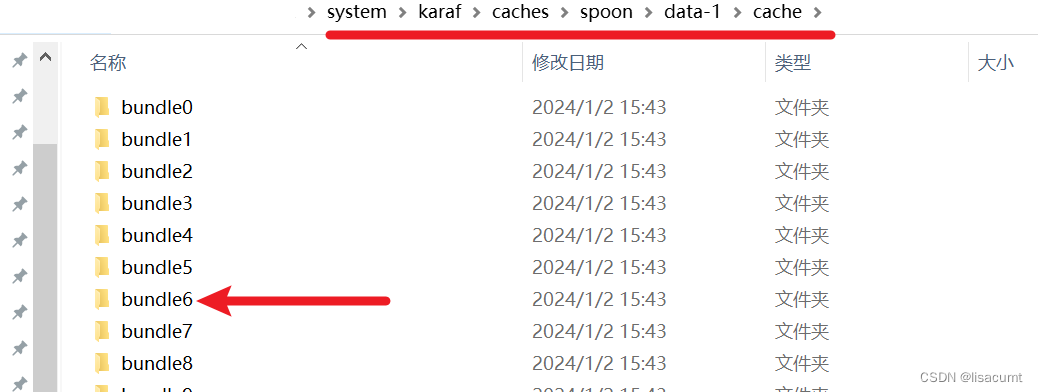 如果kettle在运行过程中卡掉了,不反应了,八成是因为操作过程中点击了cmd黑窗口,此时在cmd黑窗口内敲击回车,cmd日志就会继续打印,窗口也会恢复响应。
2.3 编写js通过kerberos认证
 配置信息就是填写kerberos的配置。
javascript代码完成kerberos认证。

配置信息内填写如下:

javascript代码内容如下:

// 给类起个别名
var utils = Packages.全类路径.KerberosUtils;
// 使用 HADOOP_CONF_DIR 或 HADOOP_HOME 环境变量,配置登录Kerberos
var loginRes = utils.loginKerberos(krb5_principal,krb5_keytab,krb5_conf);// 使用用户提供的 hadoop_conf_dir 登录kerberos
// var loginRes = utils.loginKerberos(krb5_principal,krb5_keytab,krb5_conf,hadoop_conf_dir);
添加一个写结果的模块!

好了,执行启动!

如果报如下错误,说明kettle没有找到java类,检查类路径和包是否错误!
TypeError: Cannot call property loginKerberos in object [JavaPackage utils]. It is not a function, it is "object". (script#6)
如果打印如下内容,说明执行认证成功了。

2024/01/02 18:18:04 - 写日志.0 -
2024/01/02 18:18:04 - 写日志.0 - ------------> 行号 1------------------------------
2024/01/02 18:18:04 - 写日志.0 - loginRes = Y
三、包装模块开发
keberos认证会在jvm存储信息,这些信息如果想使用必须前于hive或hadoop任务一个job
结构如下:

kerberos-login 就是刚刚写的转换。
必须如上包装,层数少了,认证不过去!!!
四、连接hive或者spark thriftserver
连接hive和spark thriftserver是一样的。以下以spark举例说明。

4.1 zookeeper的ha方式连接

# 主机名称:
# 注意这里主机名会后少写一个:2181
zk-01.com:2181,zk-02.com:2181,zk-03.com# 数据库名称:
# 后边把kerberos连接参数也加上。zooKeeperNamespace 参数从SPARK_HOME/conf/hive-site.xml文件获取即可。而serviceDiscoveryMode=zooKeeper是固定写法。
default;serviceDiscoveryMode=zooKeeper;zooKeeperNamespace=spark2_server# 端口号:
# 主机名故意少写一个,就在这里补上了。
2181
最终的连接url如下:
jdbc:hive2://zk-01.com:2181,zk-01.com:2181,zk-01.com:2181/default;serviceDiscoveryMode=zooKeeper;zooKeeperNamespace=spark2_server
点击下边的
 先手动运行下kerberos认证模块,再测试连接下:

4.2 单点连接方式


# 主机名称
# 就是hive server2 的主机 host,不要写IP# 数据库名称:
# SPARK_HOME/conf/hive-site.xml中找到配置 hive.server2.authentication.kerberos.principal
# 比如spark/_HOST@XXXXX.COM
# 本质也是在default数据库后边拼接连接字符串
default;principal=spark/_HOST@XXXXX.COM# 端口号也在SPARK_HOME/conf/hive-site.xml中找到配置hive.server2.thrift.port有
10016

参考文章:
hive 高可用详解: Hive MetaStore HA、hive server HA原理详解;hive高可用实现
kettle开发篇-JavaScript脚本-Day31
kettle组件javaScript脚本案例1