详细讲解MybatisPlus中的BaseMapper类中的CRUD功能(全)
)
目录
- 前言
- 1. 基本概念
- 2. CRUD
- 2.1 插入
- 2.2 删除
- 2.3 修改
- 2.4 查询
前言
大部分CRUD都来源这个类,对此有意义剖析,方便之后的功能开发
1. 基本概念
MyBatis-Plus(简称MP)是基于 MyBatis 的增强工具,在 MyBatis 的基础上提供了更多的功能和便捷的操作。
| 基本概念 | 作用 | 功能 |
|---|---|---|
| 一个泛型接口,可以通过泛型指定操作的实体类型 | 1.提供了一组基础的数据库操作方法,包括增、删、改、查等。 2.简化了数据访问层的开发,通过继承 BaseMapper,开发者可以省去很多 CRUD 操作的重复代码。 3.通过 MyBatis-Plus 提供的通用方法,不需要手动编写 XML 映射文件,减少了配置的复杂性。 4.支持 Lambda 表达式查询,提供了更加灵活和强大的查询方式。 | 1.通用的 CRUD 操作: 提供了基本的增、删、改、查方法,包括插入数据、根据主键查询、根据条件查询、更新数据和删除数据等。 2.分页查询: 支持分页查询,方便处理大量数据时的分页显示。 3.条件构造器: 提供了 QueryWrapper、UpdateWrapper 等条件构造器,方便构建复杂的查询条件。 4.Lambda 表达式查询: 支持使用 Lambda 表达式进行查询,使得查询条件更加类型安全、直观。 5.逻辑删除: 支持逻辑删除,通过标记删除而不是物理删除,提高了数据安全性。 6.乐观锁: 支持乐观锁机制,用于处理并发更新时的数据一致性。 7.自动填充: 支持自动填充功能,自动填充创建时间、更新时间等字段。 8.序列主键生成: 支持序列主键的生成,方便处理主键自增的数据库。 |
基本的示例代码如下:
import com.baomidou.mybatisplus.core.mapper.BaseMapper;
import com.baomidou.mybatisplus.extension.plugins.pagination.Page;public interface UserMapper extends BaseMapper<User> {// 无需手动编写 SQL,通过继承 BaseMapper 即可使用通用的 CRUD 方法// 可以直接使用 Lambda 表达式进行查询,例如:selectList(lambdaQueryWrapper);// 分页查询Page<User> selectPage(Page<User> page);
}
通过继承 BaseMapper 接口,开发者可以直接使用其中定义的通用方法,而无需手动编写大量的重复代码,从而提高开发效率。
对应的源码如下:
/*** Mapper 继承该接口后,无需编写 mapper.xml 文件,即可获得CRUD功能* <p>这个 Mapper 支持 id 泛型</p>** @author hubin* @since 2016-01-23*/
public interface BaseMapper<T> extends Mapper<T> {/*** 插入一条记录** @param entity 实体对象*/int insert(T entity);/*** 根据 ID 删除** @param id 主键ID*/int deleteById(Serializable id);/*** 根据 columnMap 条件,删除记录** @param columnMap 表字段 map 对象*/int deleteByMap(@Param(Constants.COLUMN_MAP) Map<String, Object> columnMap);/*** 根据 entity 条件,删除记录** @param wrapper 实体对象封装操作类(可以为 null)*/int delete(@Param(Constants.WRAPPER) Wrapper<T> wrapper);/*** 删除(根据ID 批量删除)** @param idList 主键ID列表(不能为 null 以及 empty)*/int deleteBatchIds(@Param(Constants.COLLECTION) Collection<? extends Serializable> idList);/*** 根据 ID 修改** @param entity 实体对象*/int updateById(@Param(Constants.ENTITY) T entity);/*** 根据 whereEntity 条件,更新记录** @param entity        实体对象 (set 条件值,可以为 null)* @param updateWrapper 实体对象封装操作类(可以为 null,里面的 entity 用于生成 where 语句)*/int update(@Param(Constants.ENTITY) T entity, @Param(Constants.WRAPPER) Wrapper<T> updateWrapper);/*** 根据 ID 查询** @param id 主键ID*/T selectById(Serializable id);/*** 查询(根据ID 批量查询)** @param idList 主键ID列表(不能为 null 以及 empty)*/List<T> selectBatchIds(@Param(Constants.COLLECTION) Collection<? extends Serializable> idList);/*** 查询(根据 columnMap 条件)** @param columnMap 表字段 map 对象*/List<T> selectByMap(@Param(Constants.COLUMN_MAP) Map<String, Object> columnMap);/*** 根据 entity 条件,查询一条记录** @param queryWrapper 实体对象封装操作类(可以为 null)*/T selectOne(@Param(Constants.WRAPPER) Wrapper<T> queryWrapper);/*** 根据 Wrapper 条件,查询总记录数** @param queryWrapper 实体对象封装操作类(可以为 null)*/Integer selectCount(@Param(Constants.WRAPPER) Wrapper<T> queryWrapper);/*** 根据 entity 条件,查询全部记录** @param queryWrapper 实体对象封装操作类(可以为 null)*/List<T> selectList(@Param(Constants.WRAPPER) Wrapper<T> queryWrapper);/*** 根据 Wrapper 条件,查询全部记录** @param queryWrapper 实体对象封装操作类(可以为 null)*/List<Map<String, Object>> selectMaps(@Param(Constants.WRAPPER) Wrapper<T> queryWrapper);/*** 根据 Wrapper 条件,查询全部记录* <p>注意: 只返回第一个字段的值</p>** @param queryWrapper 实体对象封装操作类(可以为 null)*/List<Object> selectObjs(@Param(Constants.WRAPPER) Wrapper<T> queryWrapper);/*** 根据 entity 条件,查询全部记录(并翻页)** @param page         分页查询条件(可以为 RowBounds.DEFAULT)* @param queryWrapper 实体对象封装操作类(可以为 null)*/<E extends IPage<T>> E selectPage(E page, @Param(Constants.WRAPPER) Wrapper<T> queryWrapper);/*** 根据 Wrapper 条件,查询全部记录(并翻页)** @param page         分页查询条件* @param queryWrapper 实体对象封装操作类*/<E extends IPage<Map<String, Object>>> E selectMapsPage(E page, @Param(Constants.WRAPPER) Wrapper<T> queryWrapper);
}
2. CRUD
初始的搭建项目可看这篇文章:Springboot整合MybatisPlus的基本CRUD
2.1 插入
新增功能函数整体如下:
| 函数 | 大致描述 |
|---|---|
int insert(T entity) | 插入一条记录 |
补充一条根据ID主键查询:T selectById(Serializable id)
代码示例如下:
@Testpublic void test1(){User user = new User();user.setUsername("ceshi");user.setPassword("test");int insert = userMapper.insert(user);// 此行输出的是 受影响的行数System.out.println(insert);int id = user.getId();user = userMapper.selectById(id);System.out.println(user);}
截图如下:

2.2 删除
删除功能函数如下:
| 函数 | 大致描述 |
|---|---|
int deleteById(Serializable id) | 根据 ID 删除 |
int deleteByMap(@Param(Constants.COLUMN_MAP) Map<String, Object> columnMap); | 根据 columnMap 条件,删除记录 |
int delete(@Param(Constants.WRAPPER) Wrapper<T> wrapper) | 根据 entity 条件,删除记录。@param wrapper 实体对象封装操作类(可以为 null) |
int deleteBatchIds(@Param(Constants.COLLECTION) Collection<? extends Serializable> idList) | 删除(根据ID 批量删除),idList 主键ID列表(不能为 null 以及 empty) |
为了更好的演示功能函数,对应的数据库表格如下:
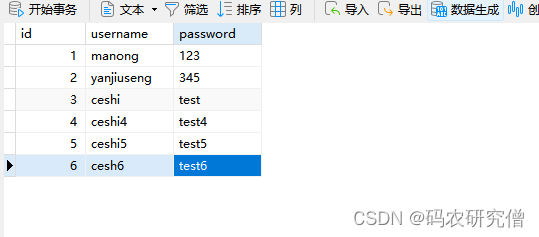
常用的代码如下:
@Testpublic void test2(){/** 删除单行,* */int delete1 = userMapper.deleteById(6);// 删除了多少行System.out.println(delete1);/** 批量删除,删除第4和第5行* */List <Integer> idlist = Arrays.asList(4,5);int delete2 = userMapper.deleteBatchIds(idlist);// 删除了多少行System.out.println(delete2);/** 删除map字段值,注意此处的Map类型是<String,Object>,而不是自身两个属性的值* */Map<String,Object> map =new HashMap<>();map.put("username","map_username");map.put("password","map_password");int delete3 = userMapper.deleteByMap(map);// 删除了多少行System.out.println(delete3);QueryWrapper<User> wrapper = new QueryWrapper<User>();wrapper.eq("username","ceshi");int delete4 = userMapper.delete(wrapper);// 删除了多少行System.out.println(delete4);}
对于以上代码,其中的QueryWrapper类,可看我之前的文章:Mybatis-plus动态条件查询QueryWrapper的函数用法
截图如下所示:

对应的数据库最后只剩下:
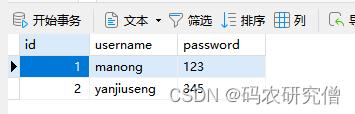
2.3 修改
修改功能函数如下:
| 函数 | 大致描述 |
|---|---|
int updateById(@Param(Constants.ENTITY) T entity) | 根据 ID 修改 |
int update(@Param(Constants.ENTITY) T entity, @Param(Constants.WRAPPER) Wrapper<T> updateWrapper) | 根据 whereEntity 条件,更新记录。entity 实体对象 (set 条件值,可以为 null),updateWrapper 实体对象封装操作类(可以为 null,里面的 entity 用于生成 where 语句) |
原本的表如下:
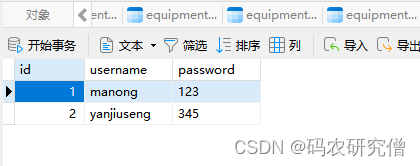
示例代码如下:
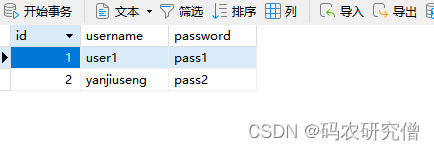
@Testpublic void test3(){// 原本第一行是manongUser user = userMapper.selectById(1);System.out.println(user);//对user进行修改user.setUsername("user1");user.setPassword("pass1");int update1 = userMapper.updateById(user);System.out.println(update1);user = userMapper.selectById(2);user.setPassword("pass2");QueryWrapper wrapper = new QueryWrapper();// 此处可以通过like,对搜出来的大部分进行批量修改!wrapper.eq("username","yanjiuseng");int update2 = userMapper.update(user,wrapper);System.out.println(update2);}
最后的表如下:
2.4 查询
查询功能函数如下:
| 函数 | 大致描述 |
|---|---|
T selectById(Serializable id) | 根据 ID 查询。id 主键ID |
List<T> selectBatchIds(@Param(Constants.COLLECTION) Collection<? extends Serializable> idList) | 查询(根据ID 批量查询)。idList 主键ID列表(不能为 null 以及 empty) |
List<T> selectByMap(@Param(Constants.COLUMN_MAP) Map<String, Object> columnMap) | 查询(根据 columnMap 条件) |
T selectOne(@Param(Constants.WRAPPER) Wrapper<T> queryWrapper) | 根据 entity 条件,查询一条记录。queryWrapper 实体对象封装操作类(可以为 null) |
Integer selectCount(@Param(Constants.WRAPPER) Wrapper<T> queryWrapper) | 根据 Wrapper 条件,查询总记录数。queryWrapper 实体对象封装操作类(可以为 null) |
List<T> selectList(@Param(Constants.WRAPPER) Wrapper<T> queryWrapper) | 根据 entity 条件,查询全部记录。queryWrapper 实体对象封装操作类(可以为 null) |
List<Map<String, Object>> selectMaps(@Param(Constants.WRAPPER) Wrapper<T> queryWrapper) | 根据 Wrapper 条件,查询全部记录。queryWrapper 实体对象封装操作类(可以为 null) |
List<Object> selectObjs(@Param(Constants.WRAPPER) Wrapper<T> queryWrapper) | 根据 Wrapper 条件,查询全部记录。只返回第一个字段的值 |
<E extends IPage<T>> E selectPage(E page, @Param(Constants.WRAPPER) Wrapper<T> queryWrapper) | 根据 entity 条件,查询全部记录(并翻页)。queryWrapper 实体对象封装操作类(可以为 null) |
<E extends IPage<Map<String, Object>>> E selectMapsPage(E page, @Param(Constants.WRAPPER) Wrapper<T> queryWrapper) | 根据 Wrapper 条件,查询全部记录(并翻页) |
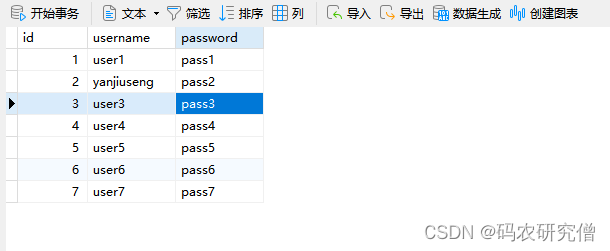
为了更好的凸显上述函数的使用,将表中的数据改为如下:
示例代码如下:
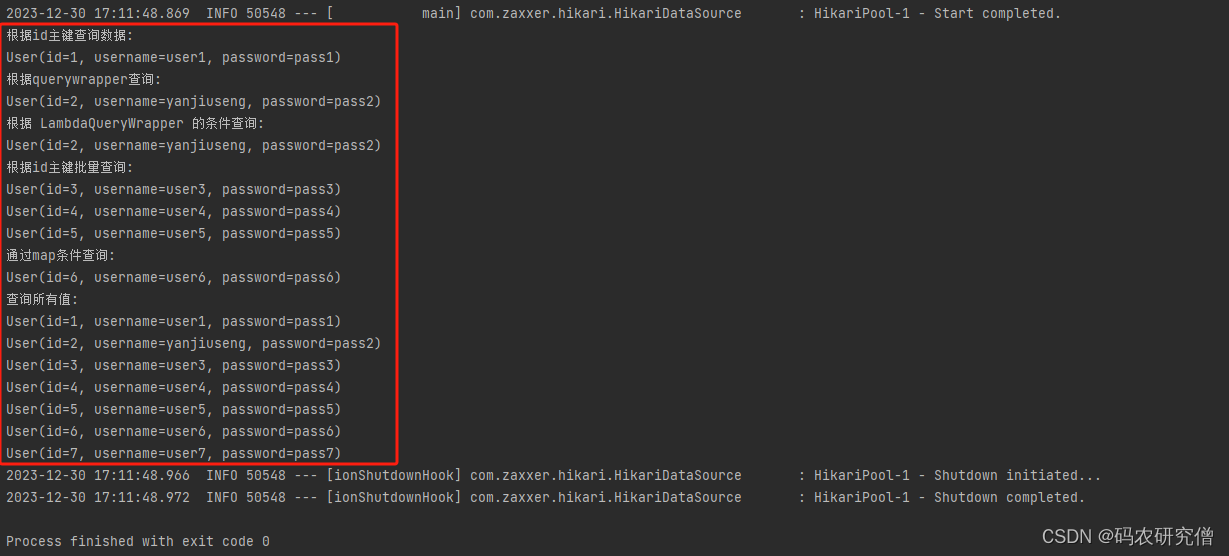
@Testpublic void test4(){//根据id主键查询数据User user = userMapper.selectById(1);System.out.println("根据id主键查询数据:");System.out.println(user);//根据querywrapper查询user = userMapper.selectOne(new QueryWrapper<User>().eq("username","yanjiuseng"));System.out.println("根据querywrapper查询:");System.out.println(user);//另外一种方式,根据 LambdaQueryWrapper 的条件查询user = userMapper.selectOne(new LambdaQueryWrapper<User>().like(User::getUsername,"yanjiuseng"));System.out.println("根据 LambdaQueryWrapper 的条件查询:");System.out.println(user);//根据id主键批量查询List<Integer> list = Arrays.asList(3,4,5);List<User> users = userMapper.selectBatchIds(list);System.out.println("根据id主键批量查询:");users.forEach(System.out::println);//通过map条件查询Map<String,Object> map = new HashMap<>();map.put("username","user6");users = userMapper.selectByMap(map);System.out.println("通过map条件查询:");users.forEach(System.out::println);//查询所有值users = userMapper.selectList(null);System.out.println("查询所有值:");users.forEach(System.out::println);}
终端输出如下所示: