Android集成OpenSSL实现加解密-集成

-
导入so
将编译生成的 OpenSSL 动态库文件(.so 文件)复制到你的 Android 项目的 libs 目录中
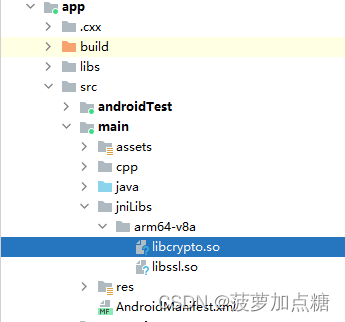
-
导入头文件
将编译生成的include文件夹导入到项目中
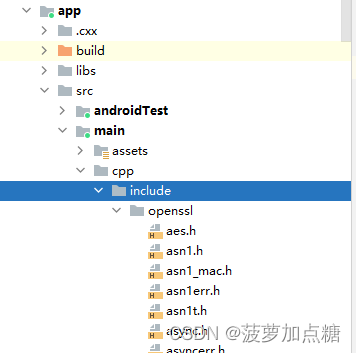
-
build.gradle添加配置
defaultConfig {……testInstrumentationRunner "androidx.test.runner.AndroidJUnitRunner"externalNativeBuild {cmake {cppFlags "-std=c++11 -frtti -fexceptions"//目标平台,若需要更多平台的请自行配置abiFilters 'arm64-v8a'}}}……sourceSets {main {jniLibs.srcDirs = ['src/main/jniLibs']}}externalNativeBuild {cmake {path file('src/main/cpp/CMakeLists.txt')version '3.22.1'}} -
修改CMakeLists.txt
cmake_minimum_required(VERSION 3.22.1)project("jnitest")set(JNI_LIBS_DIR ${CMAKE_SOURCES_DIR}/src/main/jniLibs)add_library( # Sets the name of the library.jnitest# Sets the library as a shared library.SHARED# Provides a relative path to your source file(s).native-lib.cpp)# 1、添加导入库,类似给每个库起个名字
add_library(openssl # 模块名称,随意SHARED # 表示共享库IMPORTED # 表示当前是导入库
)
add_library(ssl # 模块名称,随意SHARED # 表示共享库IMPORTED # 表示当前是导入库
)
# 2、将上一步声明的库名字,和具体的库(so文件)关联到一起
se t_target_properties(openssl # 库的名称PROPERTIES IMPORTED_LOCATION # 表示当前库是导入的方式${CMAKE_SOURCE_DIR}/../jniLibs/${ANDROID_ABI}/libcrypto.so # so 动态库的具体路径
)
set _target_properties(ssl # 库的名称PROPERTIES IMPORTED_LOCATION # 表示当前库是导入的方式${CMAKE_SOURCE_DIR}/../jniLibs/${ANDROID_ABI}/libssl.so # so 动态库的具体路径
) # 3 、如果第三方库有头文件的,为了在编码的时候可以有提示,使用下面的指令进行指定
# 指定头文件目录,指定后编译器会扫描这个目录,编码时可以进行提示
include_directories( ${CMAKE_SOURCE_DIR}/include)find_library( # Sets the name of the path variable.log-lib# Specifies the name of the NDK library that# you want CMake to locate.log)target_link_libraries(jnitest openssl ssl  ${log-lib})