[Angular] 笔记 6:ngStyle
![[Angular] 笔记 6:ngStyle](http://pic.xiahunao.cn/yaotu/[Angular] 笔记 6:ngStyle)
ngStyle 指令:
用于更新 HTML 元素的样式。设置一个或多个样式属性,用以冒号分隔的键值对指定。键是样式名称,带有可选的 .<unit> 后缀(如 ‘top.px’、‘font-style.em’),值为待求值的表达式,得到的非空值以给定的单位表示,并赋给指定的样式属性。如果求值结果为 null,则相应的样式将被移除。
( An attribute directive that updates styles for the containing HTML element. Sets one or more style properties, specified as colon-separated key-value pairs. The key is a style name, with an optional . suffix (such as ‘top.px’, ‘font-style.em’). The value is an expression to be evaluated. The resulting non-null value, expressed in the given unit, is assigned to the given style property. If the result of evaluation is null, the corresponding style is removed. )
chatgpt 回答:
在 Angular 中,ngStyle 是一个内置的指令,用于动态设置 HTML 元素的样式。它允许你根据组件中的条件或变量值动态地修改元素的样式。ngStyle 指令接受一个对象作为输入,其中键是 CSS 样式属性,值是对应的样式值。这使得你可以根据组件中的变量值来动态地添加或移除样式。
例如,你可以这样使用 ngStyle 指令:
<div [ngStyle]="{'color': textColor, 'font-size.px': fontSize, 'font-style': isItalic ? 'italic' : 'normal'}">This text has dynamic styles applied.
</div>
在这个例子中,textColor、fontSize 和 isItalic 是组件中的变量,它们根据不同的值来动态地修改文本的颜色、字体大小和字体样式。
Stackoverflow 例子:
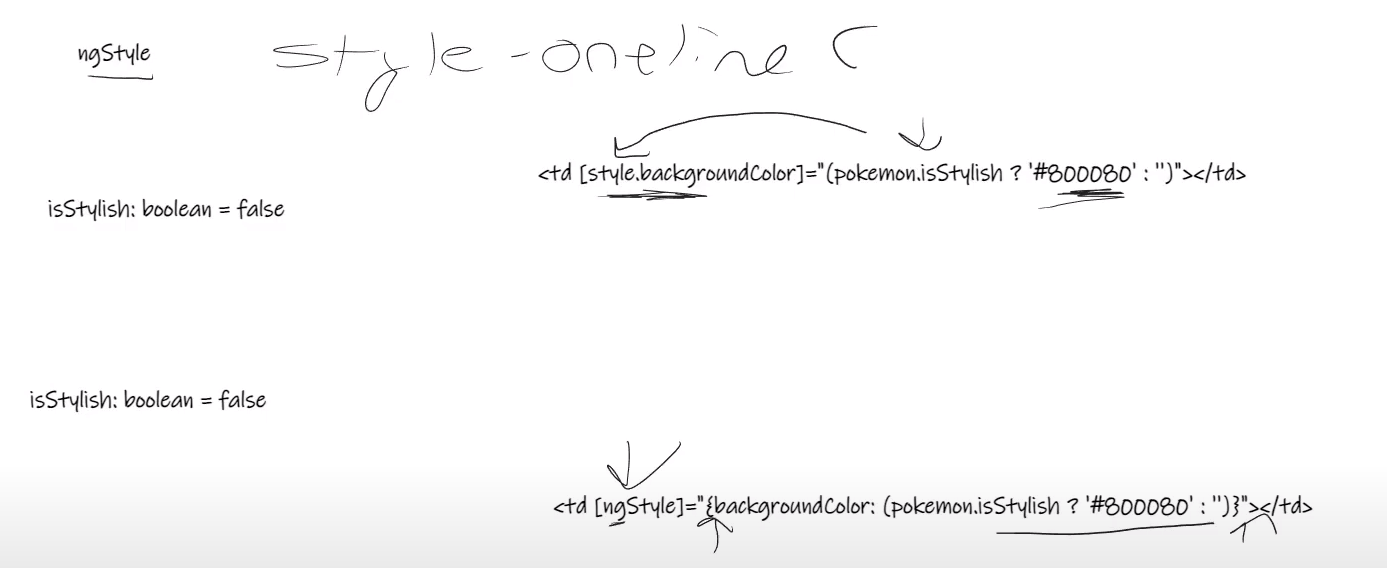
<div [style.background-color]="style1 ? 'red' : (style2 ? 'blue' : null)">
等价于:
<div [ngStyle]="{'background-color': style1 ? 'red' : (style2 ? 'blue' : null) }">
Youtube tutorial:
ngStyle 作用与 ngClass 类似,用于设置 HTML 元素样式,但不是使用自定义 css文件或者bootstrap,而是直接在行内引入样式:
app.component.ts:
import { Component } from '@angular/core';// 使用类型检查
interface Pokemon {id: number;name: string;type: string;isCool: boolean;isStylish: boolean;
}@Component({selector: 'app-root',templateUrl: './app.component.html',styleUrls: ['./app.component.css'],
})
export class AppComponent {pokemons: Pokemon[] = [{id: 1,name: 'pikachu',type: 'electric',isCool: false,isStylish: true,},{id: 2,name: 'squirtle',type: 'water',isCool: true,isStylish: true,},{id: 3,name: 'charmander',type: 'fire',isCool: true,isStylish: false,},];constructor() {}
}app.component.html,其中 ngClass 和 ngStyle 两种指令都有使用:
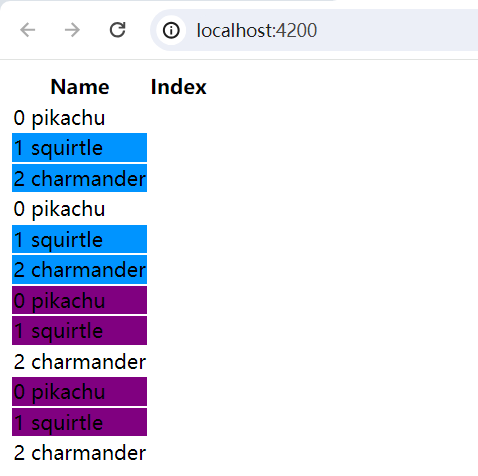
<table><thead><th>Name</th><th>Index</th></thead><tbody><tr *ngFor="let pokemon of pokemons; let i = index"><td class="pokemon-td" [class.cool-bool]="pokemon.isCool">{{ i }} {{ pokemon.name }}</td></tr><tr *ngFor="let pokemon of pokemons; let i = index"><td class="pokemon-td" [ngClass]="{ 'cool-bool': pokemon.isCool }">{{ i }} {{ pokemon.name }}</td></tr><tr *ngFor="let pokemon of pokemons; let i = index"><tdclass="pokemon-td"[style.backgroundColor]="pokemon.isStylish ? '#800080' : ''">{{ i }} {{ pokemon.name }}</td></tr><tr *ngFor="let pokemon of pokemons; let i = index"><tdclass="pokemon-td"[ngStyle]="{ 'backgroundColor': (pokemon.isStylish ? '#800080' : '') }">{{ i }} {{ pokemon.name }}</td></tr></tbody>
</table>
Web 页面: