【小白专用】Apache下禁止显示网站目录结构的方法 更新23.12.25

给我一个网站地址,我点开后显示的是目录格式,把网站的目录结构全部显示出来了
这个显示结果不正确,不应该让用户看到我们的目录结构
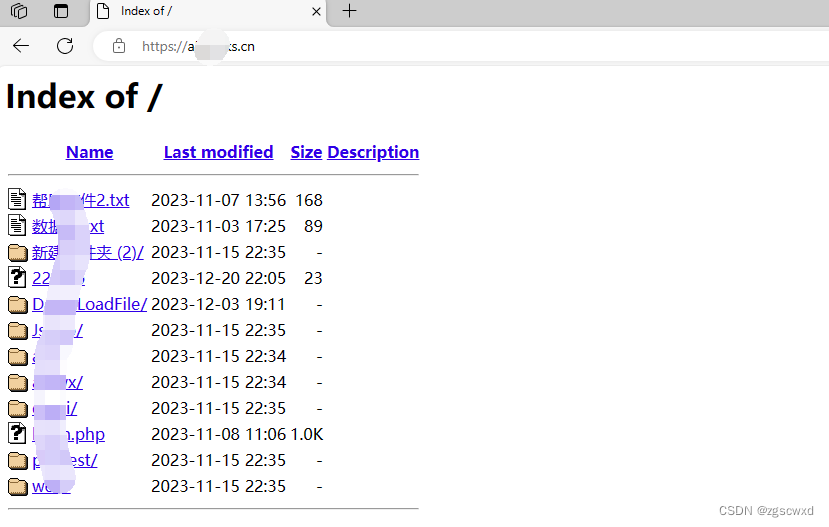
配置文件的问题,apache配置文件里有一项可以禁止显示网站目录的配置项,禁止掉就好了
在apache的主配置文件中对于网站根目录的配置中有一项:

上述蓝色背景字体即表示允许以目录的形式列出网站目录下的子文件以及子目录,只要将配置中的Indexes删掉就可以禁止列出目录了。删完一看果然成功了
<Directory "I:\site\supports\www">## Possible values for the Options directive are "None", "All",# or any combination of:#   Indexes Includes FollowSymLinks SymLinksifOwnerMatch ExecCGI MultiViews## Note that "MultiViews" must be named *explicitly* --- "Options All"# doesn't give it to you.## The Options directive is both complicated and important.  Please see# http://httpd.apache.org/docs/2.4/mod/core.html#options# for more information.#Options Indexes FollowSymLinks## AllowOverride controls what directives may be placed in .htaccess files.# It can be "All", "None", or any combination of the keywords:#   AllowOverride FileInfo AuthConfig Limit#AllowOverride None## Controls who can get stuff from this server.#Require all granted
</Directory>
Options Indexes FollowSymLinks (就是这一行配置)