Docker安装MinIO

文章目录
- 一、什么是MinIO?
- 为什么选择MinIO?
- 什么是纠删码?
- 二、Docker安装MinIO
- 三、SpringBoot集成MinIO
- 1. MinIO前期准备
- 1. 创建MinIO用户
- 2. 创建组
- 3. 创建accessKey和secretKey
- 4. 创建Bucket
- 2. springBoot整合MinIO
- 1. 导入maven坐标
- 2. 配置 application.yml
- 3. MinioConfig配置类
- 4. MinioController控制类
- 5. 测试
- 6. 验证
一、什么是MinIO?
为什么选择MinIO?
1、MinIO 是在 Apache License v2.0 下发布的对象存储服务器。 它与 Amazon S3 云存储服务兼容。 它最适合存储非结构化数据,如照片,视频,日志文件,备份和容器/ VM 映像。 对象的大小可以从几 KB 到最大 5TB。
2、MinIO 服务器足够轻,可以与应用程序堆栈捆绑在一起,类似于 NodeJS,Redis 和 MySQL
3 一种高性能的分布式对象存储服务器,用于大型数据基础设施。它是机器学习和其他大数据工作负载下Hadoop HDFS 的理想 s3 兼容替代品
MinIO特点
1、Minio 有良好的存储机制
2、Minio 有很好纠删码的算法与擦除编码算法
3、拥有RS code 编码数据恢复原理
4、公司做强做大时,数据的拥有重要性,对数据治理与大数据分析做准备。
5、搭建自己的一套文件系统服务,对文件数据进行安全保护。
6、拥有自己的平台,不限于其他方限制。
什么是纠删码?
Minio使用纠删码技术来保护数据,它是一种恢复丢失和损坏数据的数学算法,它将数据分块冗余的分散存储在各各节点的磁盘上,所有的可用磁盘组成一个集合,上图由8块硬盘组成一个集合,
当上传一个文件时会通过纠删码算法计算对文件进行分块存储,除了将文件本身分成4个数据块,还会生成4个校验块,数据块和校验块会分散的存储在这8块硬盘上。使用纠删码的好处是即便丢失一半数量(N/2)的硬盘,仍然可以恢复数据。 比如上边集合中有4个以内的硬盘损害仍可保证数据恢复,不影响上传和下载,如果多于一半的硬盘坏了则无法恢复。
二、Docker安装MinIO
1. 拉取镜像
docker pull minio/minio
2. 查看镜像
docker images
3. 创建MinIO的挂载目录
【/home/soft/minio/config】配置文件目录
【/home/soft/minio/data】存储文件的目录
mkdir -p /home/soft/minio/config
mkdir -p /home/soft/minio/data
4. 启动MinIO容器
docker run -d -p 9000:9000 -p 9090:9090 --name minio -v /home/soft/minio/data:/data -v /home/soft/minio/config:/root/.minio -e "MINIO_ACCESS_KEY=minio" -e "MINIO_SECRET_KEY=minio123" minio/minio server /data --console-address ":9090" -address ":9000"
-v /home/soft/minio/data:/data:表示将宿主机的/soft/minio/data目录挂载到容器的/data目录-e "MINIO_ACCESS_KEY=minio":密钥也是登录的用户名,自己设置-e "MINIO_SECRET_KEY=minio123":秘密密钥也是登录的密码,自己设置--console-address ":9090":客户端端口为9090-address ":9000":服务端口为9000
5. 登陆测试

三、SpringBoot集成MinIO
1. MinIO前期准备
1. 创建MinIO用户
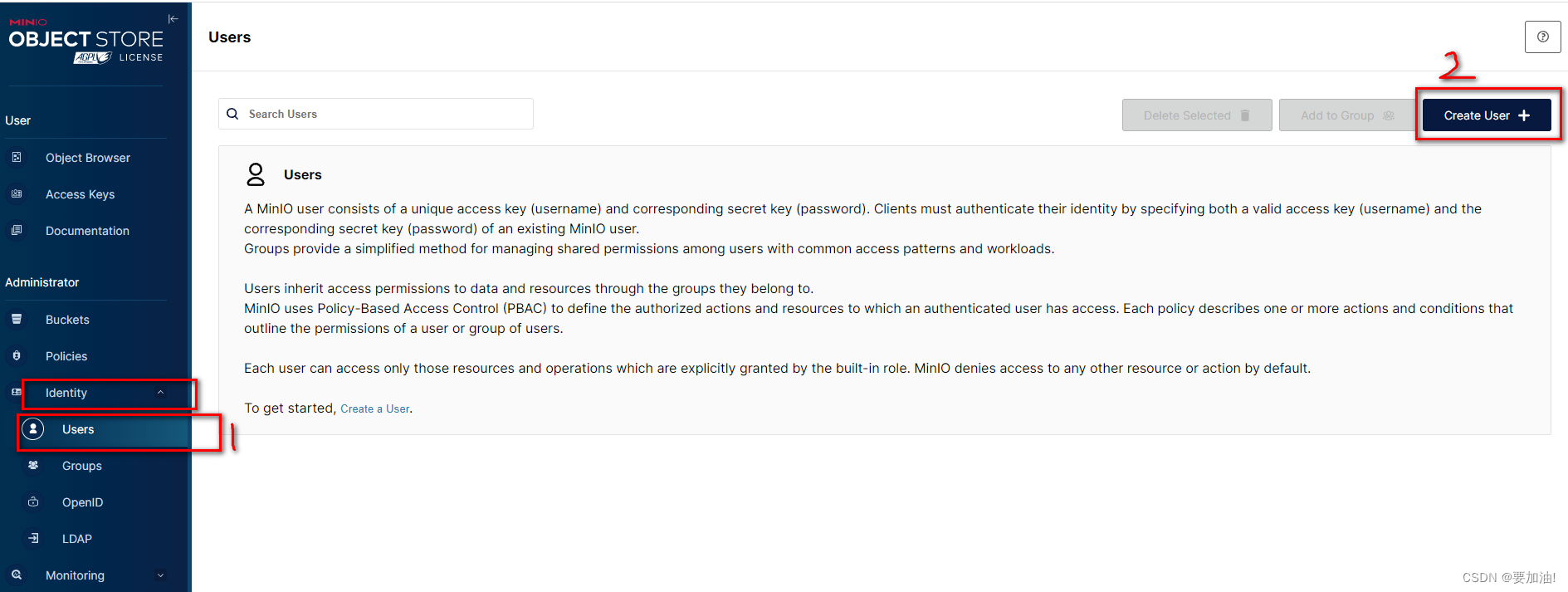


2. 创建组

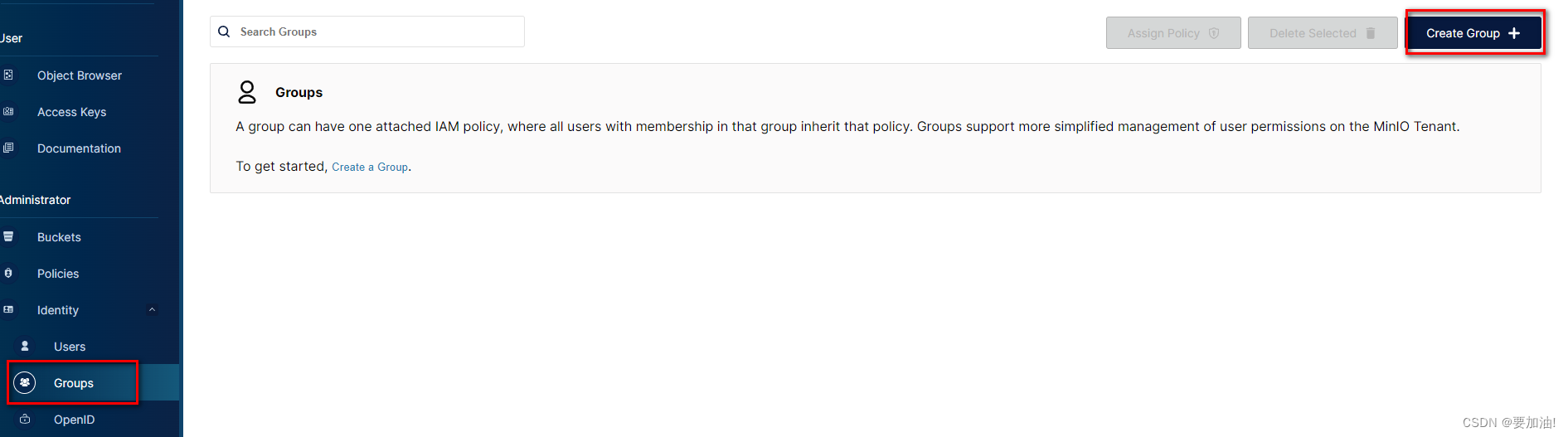
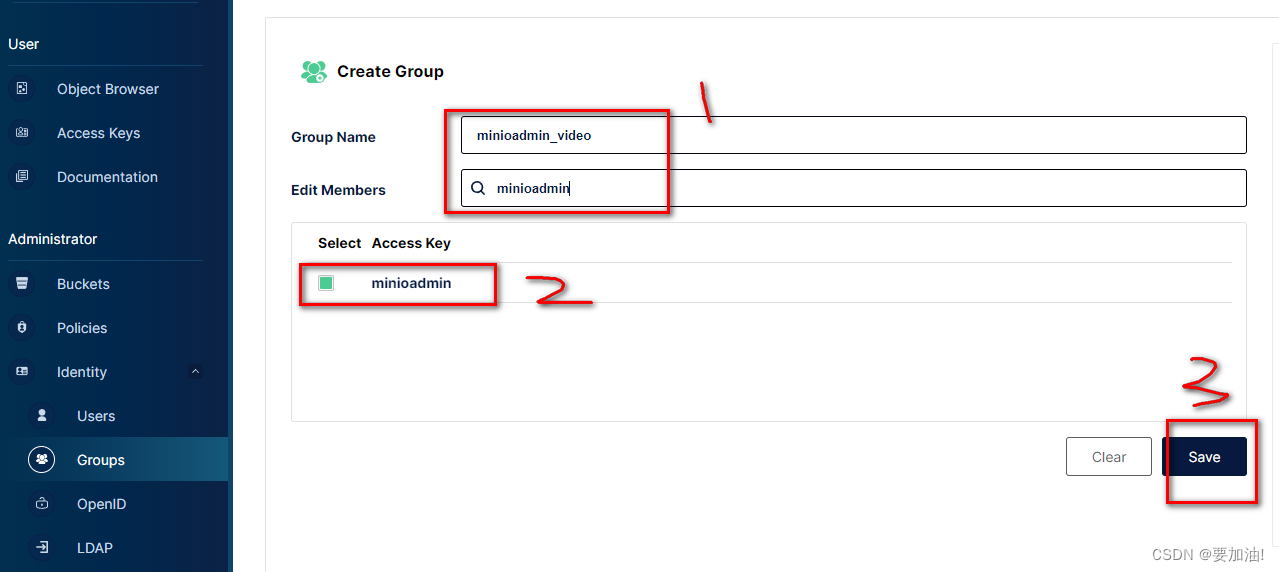
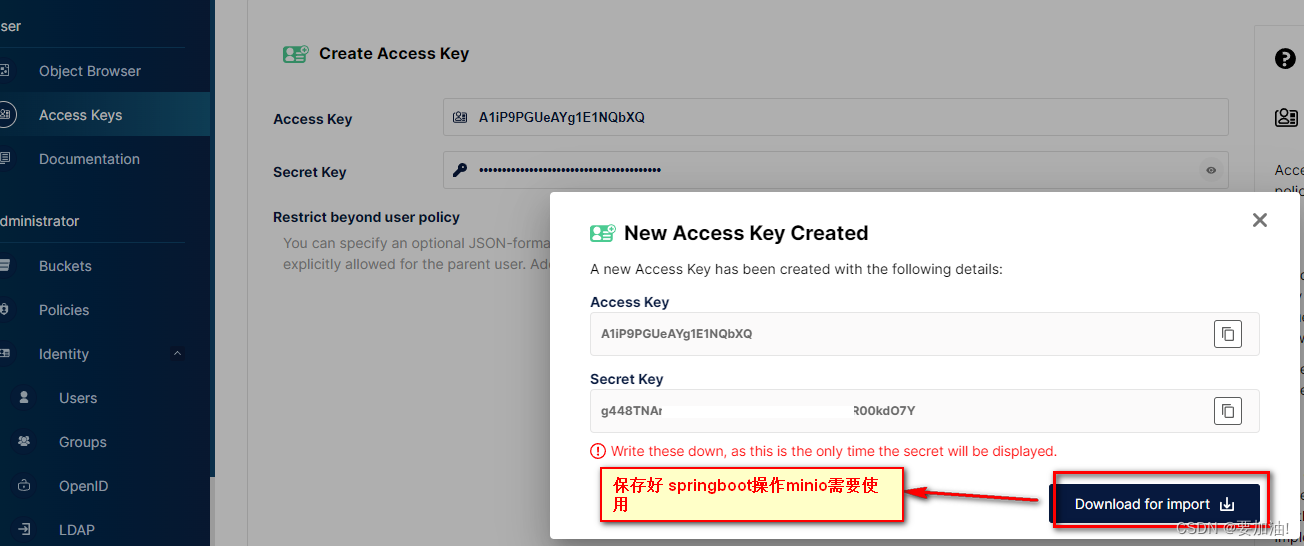
3. 创建accessKey和secretKey

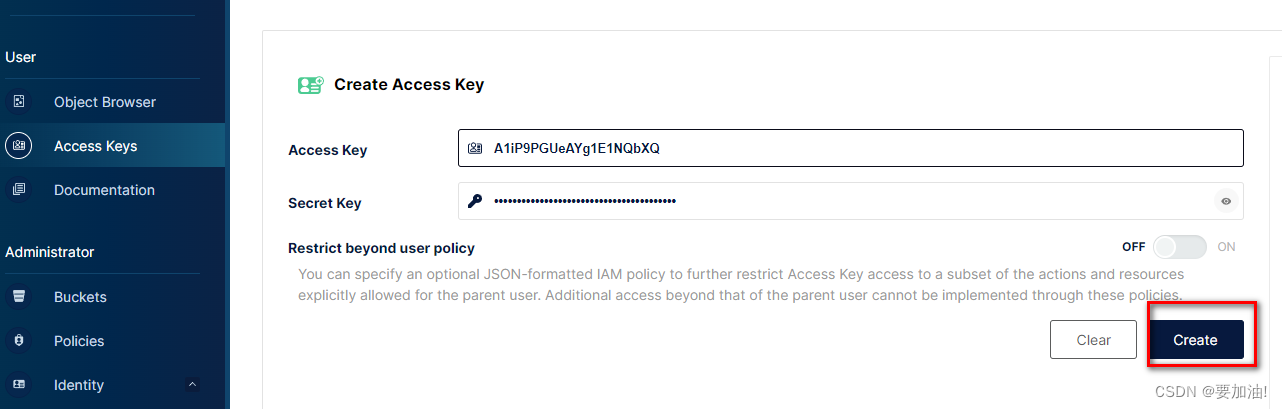
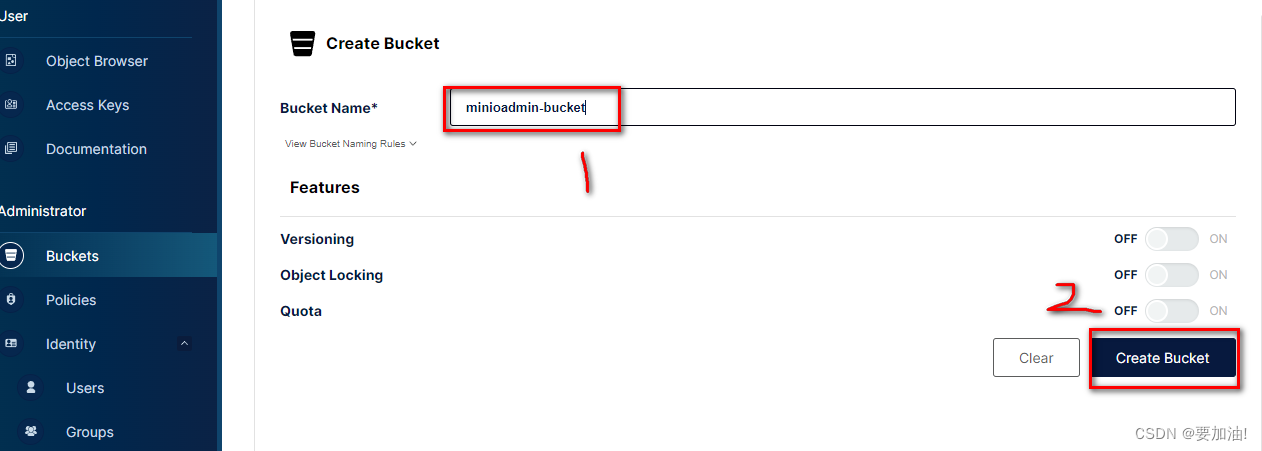
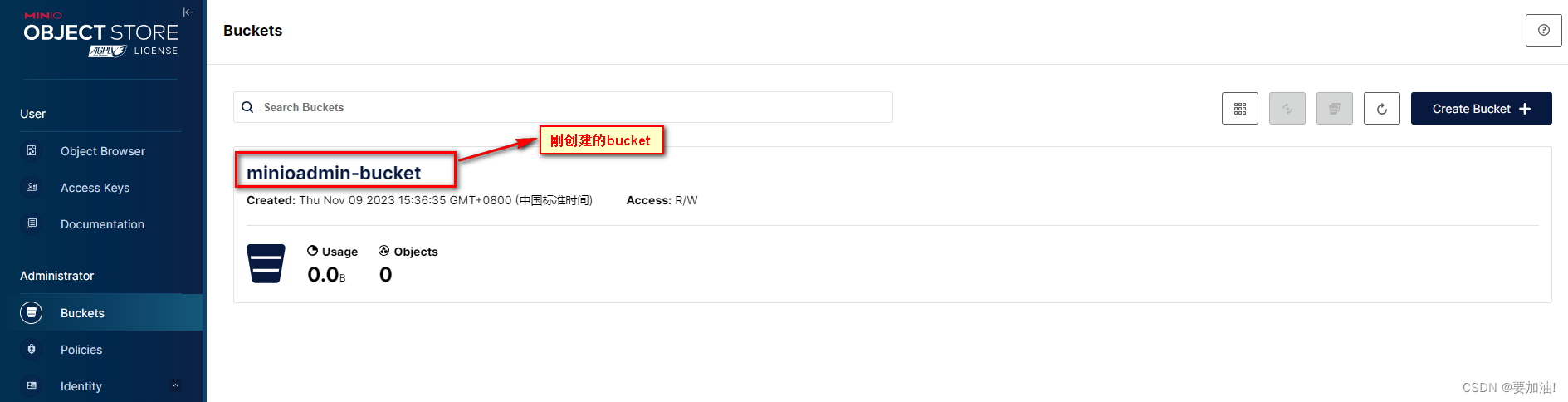
4. 创建Bucket

2. springBoot整合MinIO
整合内容参考:https://blog.csdn.net/yueyue763184/article/details/131147025
1. 导入maven坐标
<dependency><groupId>io.minio</groupId><artifactId>minio</artifactId><version>7.0.2</version>
</dependency>
2. 配置 application.yml
server:port: 8080
spring:# 配置文件上传大小限制servlet:multipart:max-file-size: 200MBmax-request-size: 200MB
minio:host: http://yourIp:9000url: ${minio.host}/${minio.bucket}/access-key: minioadminsecret-key: minioadminbucket: public
3. MinioConfig配置类
import io.minio.MinioClient;
import io.minio.ObjectStat;
import io.minio.PutObjectOptions;
import io.minio.Result;
import io.minio.messages.Bucket;
import io.minio.messages.Item;
import org.apache.tomcat.util.http.fileupload.IOUtils;
import org.springframework.beans.factory.InitializingBean;
import org.springframework.beans.factory.annotation.Value;
import org.springframework.stereotype.Component;
import org.springframework.util.Assert;
import org.springframework.web.multipart.MultipartFile;
import org.springframework.web.util.UriUtils;import javax.servlet.http.HttpServletResponse;
import java.io.IOException;
import java.io.InputStream;
import java.net.URLEncoder;
import java.nio.charset.StandardCharsets;
import java.util.ArrayList;
import java.util.List;@Component
public class MinioConfig implements InitializingBean {@Value(value = "${minio.bucket}")private String bucket;@Value(value = "${minio.host}")private String host;@Value(value = "${minio.url}")private String url;@Value(value = "${minio.access-key}")private String accessKey;@Value(value = "${minio.secret-key}")private String secretKey;private MinioClient minioClient;@Overridepublic void afterPropertiesSet() throws Exception {Assert.hasText(url, "Minio url 为空");Assert.hasText(accessKey, "Minio accessKey为空");Assert.hasText(secretKey, "Minio secretKey为空");this.minioClient = new MinioClient(this.host, this.accessKey, this.secretKey);}/*** 上传*/public String putObject(MultipartFile multipartFile) throws Exception {// bucket 不存在,创建if (!minioClient.bucketExists(this.bucket)) {minioClient.makeBucket(this.bucket);}try (InputStream inputStream = multipartFile.getInputStream()) {// 上传文件的名称String fileName = multipartFile.getOriginalFilename();// PutObjectOptions,上传配置(文件大小,内存中文件分片大小)PutObjectOptions putObjectOptions = new PutObjectOptions(multipartFile.getSize(), PutObjectOptions.MIN_MULTIPART_SIZE);// 文件的ContentTypeputObjectOptions.setContentType(multipartFile.getContentType());minioClient.putObject(this.bucket, fileName, inputStream, putObjectOptions);// 返回访问路径return this.url + UriUtils.encode(fileName, StandardCharsets.UTF_8);}}/*** 文件下载*/public void download(String fileName, HttpServletResponse response){// 从链接中得到文件名InputStream inputStream;try {MinioClient minioClient = new MinioClient(host, accessKey, secretKey);ObjectStat stat = minioClient.statObject(bucket, fileName);inputStream = minioClient.getObject(bucket, fileName);response.setContentType(stat.contentType());response.setCharacterEncoding("UTF-8");response.setHeader("Content-Disposition", "attachment;filename=" + URLEncoder.encode(fileName, "UTF-8"));IOUtils.copy(inputStream, response.getOutputStream());inputStream.close();} catch (Exception e){e.printStackTrace();System.out.println("有异常:" + e);}}/*** 列出所有存储桶名称** @return* @throws Exception*/public List<String> listBucketNames()throws Exception {List<Bucket> bucketList = listBuckets();List<String> bucketListName = new ArrayList<>();for (Bucket bucket : bucketList) {bucketListName.add(bucket.name());}return bucketListName;}/*** 查看所有桶** @return* @throws Exception*/public List<Bucket> listBuckets()throws Exception {return minioClient.listBuckets();}/*** 检查存储桶是否存在** @param bucketName* @return* @throws Exception*/public boolean bucketExists(String bucketName) throws Exception {boolean flag = minioClient.bucketExists(bucketName);if (flag) {return true;}return false;}/*** 创建存储桶** @param bucketName* @return* @throws Exception*/public boolean makeBucket(String bucketName)throws Exception {boolean flag = bucketExists(bucketName);if (!flag) {minioClient.makeBucket(bucketName);return true;} else {return false;}}/*** 删除桶** @param bucketName* @return* @throws Exception*/public boolean removeBucket(String bucketName)throws Exception {boolean flag = bucketExists(bucketName);if (flag) {Iterable<Result<Item>> myObjects = listObjects(bucketName);for (Result<Item> result : myObjects) {Item item = result.get();// 有对象文件,则删除失败if (item.size() > 0) {return false;}}// 删除存储桶,注意,只有存储桶为空时才能删除成功。minioClient.removeBucket(bucketName);flag = bucketExists(bucketName);if (!flag) {return true;}}return false;}/*** 列出存储桶中的所有对象** @param bucketName 存储桶名称* @return* @throws Exception*/public Iterable<Result<Item>> listObjects(String bucketName) throws Exception {boolean flag = bucketExists(bucketName);if (flag) {return minioClient.listObjects(bucketName);}return null;}/*** 列出存储桶中的所有对象名称** @param bucketName 存储桶名称* @return* @throws Exception*/public List<String> listObjectNames(String bucketName) throws Exception {List<String> listObjectNames = new ArrayList<>();boolean flag = bucketExists(bucketName);if (flag) {Iterable<Result<Item>> myObjects = listObjects(bucketName);for (Result<Item> result : myObjects) {Item item = result.get();listObjectNames.add(item.objectName());}}return listObjectNames;}/*** 删除一个对象** @param bucketName 存储桶名称* @param objectName 存储桶里的对象名称* @throws Exception*/public boolean removeObject(String bucketName, String objectName) throws Exception {boolean flag = bucketExists(bucketName);if (flag) {List<String> objectList = listObjectNames(bucketName);for (String s : objectList) {if(s.equals(objectName)){minioClient.removeObject(bucketName, objectName);return true;}}}return false;}/*** 文件访问路径** @param bucketName 存储桶名称* @param objectName 存储桶里的对象名称* @return* @throws Exception*/public String getObjectUrl(String bucketName, String objectName) throws Exception {boolean flag = bucketExists(bucketName);String url = "";if (flag) {url = minioClient.getObjectUrl(bucketName, objectName);}return url;}}
4. MinioController控制类
import com.minio.demo.config.MinioConfig;
import org.springframework.beans.factory.annotation.Autowired;
import org.springframework.web.bind.annotation.*;
import org.springframework.web.multipart.MultipartFile;import javax.servlet.http.HttpServletResponse;
import java.util.List;@RestController
@CrossOrigin
@RequestMapping("/minio")
public class MinioController {@AutowiredMinioConfig minioConfig;// 上传@PostMapping("/upload")public Object upload(@RequestParam("file") MultipartFile multipartFile) throws Exception {return this.minioConfig.putObject(multipartFile);}// 下载文件@GetMapping("/download")public void download(@RequestParam("fileName")String fileName, HttpServletResponse response) {this.minioConfig.download(fileName,response);}// 列出所有存储桶名称@PostMapping("/list")public List<String> list() throws Exception {return this.minioConfig.listBucketNames();}// 创建存储桶@PostMapping("/createBucket")public boolean createBucket(String bucketName) throws Exception {return this.minioConfig.makeBucket(bucketName);}// 删除存储桶@PostMapping("/deleteBucket")public boolean deleteBucket(String bucketName) throws Exception {return this.minioConfig.removeBucket(bucketName);}// 列出存储桶中的所有对象名称@PostMapping("/listObjectNames")public List<String> listObjectNames(String bucketName) throws Exception {return this.minioConfig.listObjectNames(bucketName);}// 删除一个对象@PostMapping("/removeObject")public boolean removeObject(String bucketName, String objectName) throws Exception {return this.minioConfig.removeObject(bucketName, objectName);}// 文件访问路径@PostMapping("/getObjectUrl")public String getObjectUrl(String bucketName, String objectName) throws Exception {return this.minioConfig.getObjectUrl(bucketName, objectName);}
}
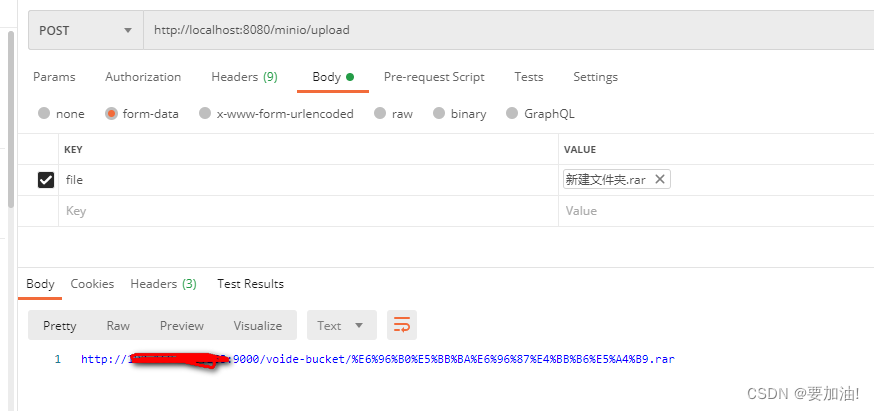
5. 测试
6. 验证
