nbcio-boot的flowable流程流程模型查询时间长,el-table开始显示无数据的问题解决

更多nbcio-boot功能请看演示系统
gitee源代码地址
后端代码: https://gitee.com/nbacheng/nbcio-boot
前端代码:https://gitee.com/nbacheng/nbcio-vue.git
在线演示(包括H5) : http://122.227.135.243:9888
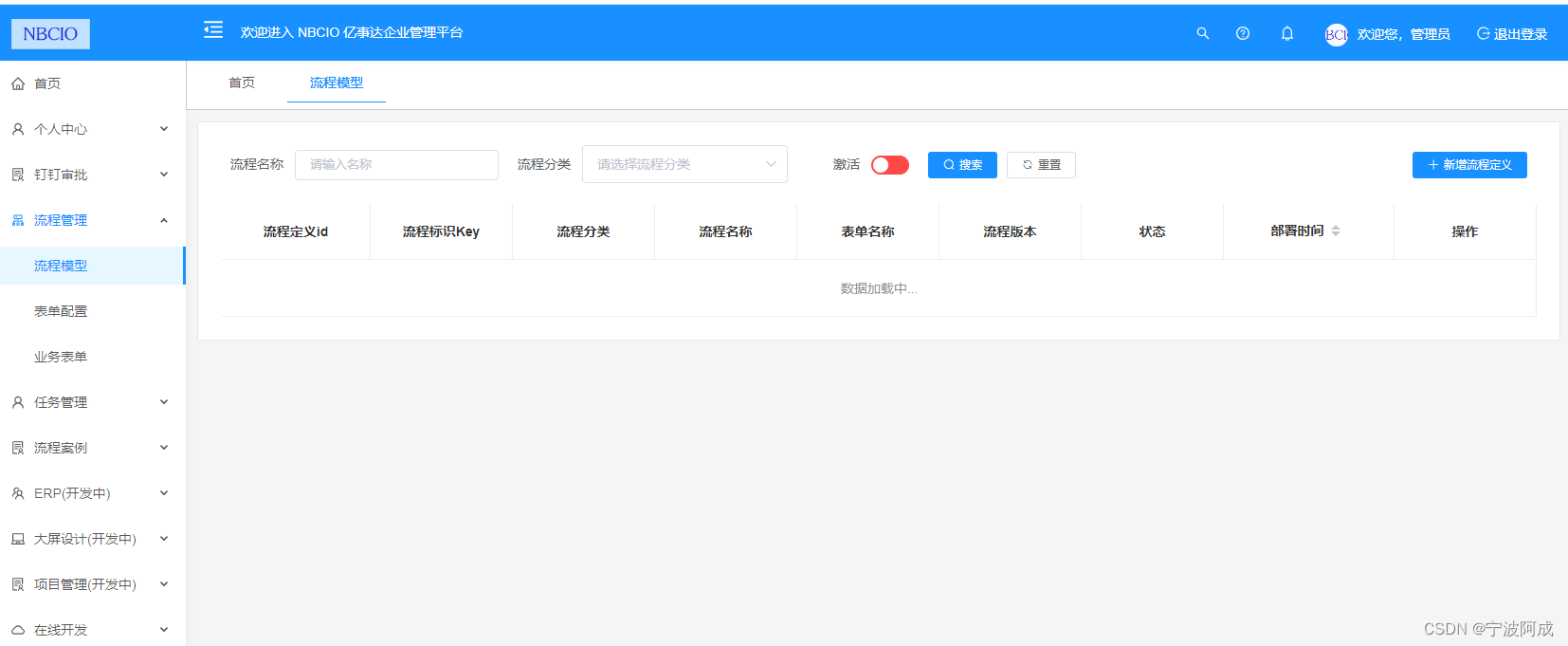
之前流程模型查询经过时间调整后,查询的时间更长了,但e-table在发布平台上显示无数据,但本地好像是会显示加载图标的,不知道为什么发布了反而不行了。
但不修正这个,用户以为是空的呢?那只能想其它办法了。
如下: 增加:empty-text="loadInfo" 和这个变量
<el-table v-loading="flowLoading" :data="definitionList" :empty-text="loadInfo" border><el-table-column label="流程定义id" align="center" prop="id" /><el-table-column label="流程标识Key" align="center" prop="key" /><el-table-column label="流程分类" align="center"><template slot-scope="scope"><span>{{ getCategoryName(scope.row.category) }}</span></template></el-table-column><el-table-column label="流程名称" align="center" :show-overflow-tooltip="true"><template slot-scope="scope"><el-button type="text" @click="handleProcessView(scope.row.deploymentId)"><span>{{ scope.row.name }}</span></el-button></template></el-table-column><el-table-column label="表单名称" align="center" :show-overflow-tooltip="true"><template slot-scope="scope"><el-button v-if="(scope.row.formId) && (scope.row.category == 'zdyyw')" type="text" @click="handleCustomForm(scope.row.formId)"><span>{{ scope.row.formName }}</span></el-button><el-button v-if="(scope.row.formId) && (scope.row.category == 'online')" type="text" @click="handleOnlineForm(scope.row.formId,scope.row.formName)"><span>{{ scope.row.formName }}</span></el-button><el-button v-else-if="scope.row.formId" type="text" @click="handleForm(scope.row.formId)"><span>{{ scope.row.formName }}</span></el-button><label v-else>暂无表单</label></template></el-table-column><el-table-column label="流程版本" align="center"><template slot-scope="scope"><el-tag size="medium">v{{ scope.row.version }}</el-tag></template></el-table-column><el-table-column label="状态" align="center"><template slot-scope="scope"><el-tag type="success" v-if="scope.row.suspensionState === 1">激活</el-tag><el-tag type="warning" v-if="scope.row.suspensionState === 2">挂起</el-tag></template></el-table-column><el-table-column label="部署时间" sortable align="center" prop="deploymentTime" width="180" /><el-table-column label="操作" align="center" class-name="small-padding fixed-width"><template slot-scope="scope"><el-dropdown><span class="el-dropdown-link">更多操作<i class="el-icon-arrow-down el-icon--right"></i></span><el-dropdown-menu slot="dropdown"><el-dropdown-item icon="el-icon-edit-outline" @click.native="handleLoadXml(scope.row)">编辑</el-dropdown-item><el-dropdown-item icon="el-icon-connection" @click.native="handleAddForm(scope.row)" v-if="scope.row.formId == null && (scope.row.category == 'oa' || scope.row.category == 'cw')">配置表单</el-dropdown-item><!--<el-dropdown-item icon="el-icon-connection" @click.native="handleAddCustomForm(scope.row)"v-if="scope.row.formId == null && (scope.row.category == 'zdyyw')">配置自定义业务表单</el-dropdown-item> --><el-dropdown-item icon="el-icon-connection" @click.native="handleAddOnlineForm(scope.row)"v-if="scope.row.formId == null && (scope.row.category == 'online')">配置online表单</el-dropdown-item><el-dropdown-item icon="el-icon-connection" @click.native="SubmitApplication(scope.row)" v-if="(scope.row.formId != null && (scope.row.category == 'oa' || scope.row.category == 'cw' )) || (scope.row.formId != null && (scope.row.category == 'online'))|| (scope.row.formId == null && (scope.row.category == 'ddxz' || scope.row.category == 'ddcw'))">发起申请</el-dropdown-item><el-dropdown-item icon="el-icon-video-pause" @click.native="handleUpdateSuspensionState(scope.row)"v-if="scope.row.suspensionState === 1">挂起</el-dropdown-item><el-dropdown-item icon="el-icon-video-play" @click.native="handleUpdateSuspensionState(scope.row)"v-if="scope.row.suspensionState === 2">激活</el-dropdown-item><el-dropdown-item icon="el-icon-delete" @click.native="handleDelete(scope.row)">删除</el-dropdown-item></el-dropdown-menu></el-dropdown></template></el-table-column></el-table>在取数据的时候进行更新
/** 查询流程定义列表 */getList() {this.flowLoading = true;this.loadInfo = "数据加载中..."listDefinition(this.queryParams).then(response => {console.log("getList response=",response);if(response.code == 200) {this.loadInfo = "";this.definitionList = response.result.records;this.total = response.result.total;this.flowLoading = false;}});},效果图: