生成二维码案例
1.引入依赖
<!-- zxing生成二维码 -->
<dependency><groupId>com.google.zxing</groupId><artifactId>core</artifactId><version>3.3.3</version>
</dependency><dependency><groupId>com.google.zxing</groupId><artifactId>javase</artifactId><version>3.3.3</version>
</dependency>
2.生成二维码工具包
public class QRCodeUtil {private static final Logger log= LoggerFactory.getLogger(QRCodeUtil.class);private static final int CODE_WIDTH = 400;private static final int CODE_HEIGHT = 400;private static final int FRONT_COLOR = 0x000000;private static final int BACKGROUND_COLOR = 0xFFFFFF;public static void createCodeToFile(String content, File codeImgFileSaveDir, String fileName) {try {if (StringUtils.isBlank(content) || StringUtils.isBlank(fileName)) {return;}content = content.trim();if (codeImgFileSaveDir==null || codeImgFileSaveDir.isFile()) {codeImgFileSaveDir = FileSystemView.getFileSystemView().getHomeDirectory();}if (!codeImgFileSaveDir.exists()) {codeImgFileSaveDir.mkdirs();}BufferedImage bufferedImage = getBufferedImage(content);File codeImgFile = new File(codeImgFileSaveDir, fileName);ImageIO.write(bufferedImage, "png", codeImgFile);log.info("二维码图片生成成功:" + codeImgFile.getPath());} catch (Exception e) {e.printStackTrace();}}public static void createCodeToOutputStream(String content, OutputStream outputStream) {try {if (StringUtils.isBlank(content)) {return;}content = content.trim();BufferedImage bufferedImage = getBufferedImage(content);addQrCodeLogo(bufferedImage,new File("E://shFiles//QRCode//20231213151849.png"));ImageIO.write(bufferedImage, "png", outputStream);log.info("二维码图片生成到输出流成功...");} catch (Exception e) {e.printStackTrace();}}private static BufferedImage getBufferedImage(String content) throws WriterException {Map<EncodeHintType, Object> hints = new HashMap();hints.put(EncodeHintType.CHARACTER_SET, "UTF-8");hints.put(EncodeHintType.ERROR_CORRECTION, ErrorCorrectionLevel.M);hints.put(EncodeHintType.MARGIN, 1);MultiFormatWriter multiFormatWriter = new MultiFormatWriter();BitMatrix bitMatrix = multiFormatWriter.encode(content, BarcodeFormat.QR_CODE, CODE_WIDTH, CODE_HEIGHT, hints);BufferedImage bufferedImage = new BufferedImage(CODE_WIDTH, CODE_HEIGHT, BufferedImage.TYPE_INT_BGR);for (int x = 0; x < CODE_WIDTH; x++) {for (int y = 0; y < CODE_HEIGHT; y++) {bufferedImage.setRGB(x, y, bitMatrix.get(x, y) ? FRONT_COLOR : BACKGROUND_COLOR);}}return bufferedImage;}public static void downFile(String url, String fileName, HttpServletRequest request, HttpServletResponse response) {try {response.setContentType("multipart/form-data");response.setHeader("Content-Disposition", "attachment;filename=" + new String(fileName.getBytes("UTF-8"), "ISO-8859-1"));File file = new File(url+fileName);FileInputStream in = new FileInputStream(file);OutputStream out = new BufferedOutputStream(response.getOutputStream());int b = 0;byte[] buffer = new byte[2048];while ((b=in.read(buffer)) != -1){out.write(buffer,0,b);}in.close();out.flush();out.close();} catch (IOException e) {e.printStackTrace();}}public static BufferedImage addQrCodeLogo(BufferedImage bufferedImage, File logoFile) throws IOException {Graphics2D graphics = bufferedImage.createGraphics();int matrixWidth = bufferedImage.getWidth();int matrixHeigh = bufferedImage.getHeight();BufferedImage logo = ImageIO.read(logoFile);int logoWidth = logo.getWidth();int logoHeight = logo.getHeight();int x = bufferedImage.getWidth() / 5*2;int y = bufferedImage.getHeight() / 5*2;int width = matrixWidth / 5;int height = matrixHeigh / 5;graphics.drawImage(logo, x, y, width, height, null);graphics.drawRoundRect(x, y, logoWidth, logoHeight, 15, 15);graphics.setStroke(new BasicStroke(5.0F, 1, 1));graphics.setColor(Color.white);graphics.drawRect(x, y, logoWidth, logoHeight);graphics.dispose();bufferedImage.flush();return bufferedImage;}}
3.Controller 中调用生成二维码工具包
@RestController
@RequestMapping("/qrCode")
public class QrCodeController {private static final String RootPath="H:\\shFiles\\QRCode";private static final String FileFormat=".png";private static final ThreadLocal<SimpleDateFormat> LOCALDATEFORMAT=ThreadLocal.withInitial(() -> new SimpleDateFormat("yyyyMMddHHmmss"));@PostMapping("generate/file")public AjaxResult generateV1(String content){try {final String fileName=LOCALDATEFORMAT.get().format(new Date());File file = null;QRCodeUtil.createCodeToFile(content,file,fileName+FileFormat);}catch (Exception e){return AjaxResult.error(e.getMessage());}return AjaxResult.success();}@PostMapping("generate/img")public AjaxResult generateV2(String content,HttpServletResponse servletResponse){try {QRCodeUtil.createCodeToOutputStream(content,servletResponse.getOutputStream());}catch (Exception e){return AjaxResult.error(e.getMessage());}return AjaxResult.success();}}
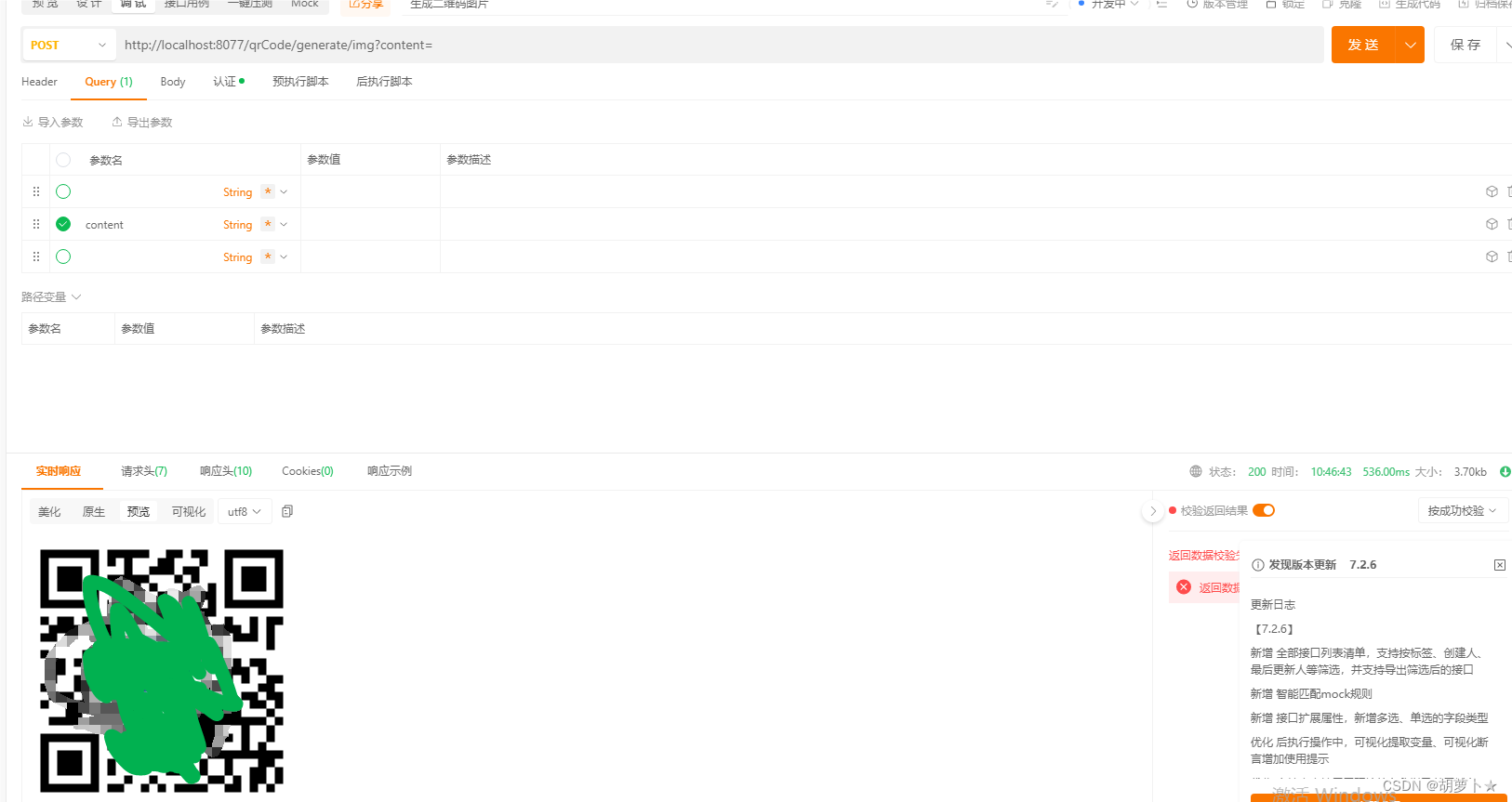
4.在postman测试