vue2传值方式总结 (十一种方法)
)
目录
一.父传子传递
二.子传父传递
三.兄弟组件通信(bus总线)
四.ref/refs(父子组件通信)
五.Vuex通信
六.$parent
七.sessionStorage传值
八.路由传值
九.祖传孙 $attrs
十.孙传祖使用$listeners
十一.promise传参

一.父传子传递
(1)在父组件的子组件标签上绑定一个属性,挂载要传输的变量
(2)在子组件中通过props来接受数据,props可以是数组也可以是对象,接受的数据可以直接使用 props: [“属性 名”] props:{属性名:数据类型}
代码示例
//父组件
<template><div><i>父组件</i><!--页面使用--><son :data='name'></son> </div>
</template><script>
import son from "./son.vue";//导入父组件
export default {components: { son },//注册组件name: "父组件",data() {return {name: "Frazier", //父组件定义变量};},
};
</script>
//子组件
<template><div>{{data}}</div>
</template><script>
export default {
components: { },name: '子组件',props:["data"],
};
</script>二.子传父传递
(1)在父组件的子组件标签上自定义一个事件,然后调用需要的方法
(2)在子组件的方法中通过 this.$emit(“事件”)来触发在父组件中定义的事件,数据是以参数的形式进行传递的
代码示例:
//父组件
<template><div><i>父组件</i><!--页面使用--><son @lcclick="lcclick"></son>//自定义一个事件</div>
</template><script>
import son from "./son.vue"; //导入父组件
export default {components: { son }, //注册组件name: "父组件",data() {return {};},methods: {lcclick(){alert('子传父')}},
};
</script>
//子组件
<template><div><button @click="lcalter">点我</button></div>
</template><script>
export default {
components: { },name: '子组件',methods: {lcalter(){this.$emit('lcclick')//通过emit来触发事件}},
};
</script>三.兄弟组件通信(bus总线)
(1)在src中新建一个Bus.js的文件,然后导出一个空的vue实例
(2)在传输数据的一方引入Bus.js 然后通过Bus.e m i t ( “事件名” , " 参数 " ) 来来派发事件,数据是以 emit(“事件名”,"参数")来来派发事件,数据是以emit(“事件名”,"参数")来来派发事件,数据是以emit()的参 数形式来传递
(3)在接受的数据的一方 引入 Bus.js 然后通过 Bus.$on(“事件名”,(data)=>{data是接受的数据})
图片示例: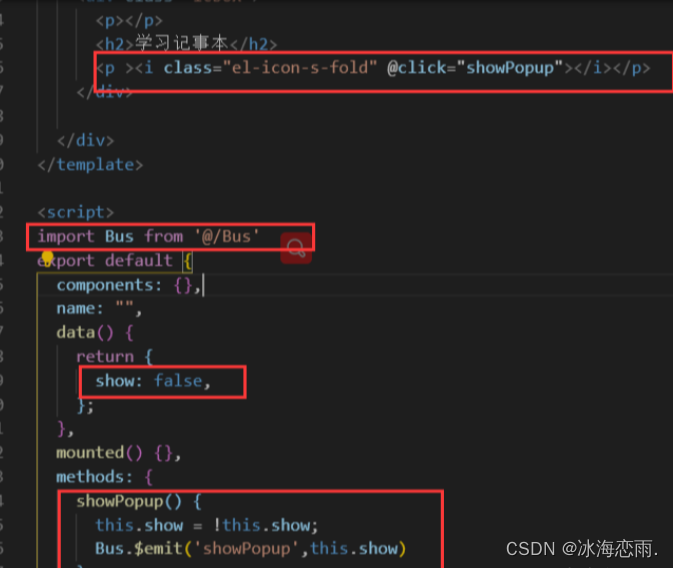


四.ref/refs(父子组件通信)
(1)ref 如果在普通的 DOM 元素上使用,引用指向的就是 DOM 元素;如果用在子组件上,引用就指向组件实例,
(2)可以通过实例直接调用组件的方法或访问数据。也算是子组件向父组件传值的一种
代码示例:
//父组件
<template><div><button @click="sayHello">sayHello</button><child ref="childForRef"></child></div>
</template>
<script>
import child from './child.vue'export default {components: { child },data () {return {childForRef: null,}},mounted() {this.childForRef = this.$refs.childForRef;console.log(this.childForRef.name);},methods: {sayHello() {this.childForRef.sayHello()}}}
</script>
//子组件
<template><div>child 的内容</div>
</template>
<script>
export default {data () {return {name: '我是 child',}},methods: {sayHello () {console.log('hello');alert('hello');}}
}
</script>五.Vuex通信
组件通过 dispatch 到 actions,actions 是异步操作,再 actions中通过 commit 到 mutations,mutations 再通过逻辑操作改变 state,从而同步到组件,更新其数据状态
代码示例:
//父组件
template><div id="app"><ChildA/><ChildB/></div>
</template>
<script>import ChildA from './ChildA' // 导入A组件import ChildB from './ChildB' // 导入B组件export default {components: {ChildA, ChildB} // 注册组件}
</script>
//子组件A
<template><div id="childA"><h1>我是A组件</h1><button @click="transform">点我让B组件接收到数据</button><p>因为点了B,所以信息发生了变化:{{BMessage}}</p></div>
</template>
<script>export default {data() {return {AMessage: 'Hello,B组件,我是A组件'}},computed: {BMessage() {// 这里存储从store里获取的B组件的数据return this.$store.state.BMsg}},methods: {transform() {// 触发receiveAMsg,将A组件的数据存放到store里去this.$store.commit('receiveAMsg', {AMsg: this.AMessage})}}}
</script>//子组件B
<template><div id="childB"><h1>我是B组件</h1><button @click="transform">点我让A组件接收到数据</button><p>点了A,我的信息发生了变化:{{AMessage}}</p></div>
</template><script>export default {data() {return {BMessage: 'Hello,A组件,我是B组件'}},computed: {AMessage() {// 这里存储从store里获取的A组件的数据return this.$store.state.AMsg}},methods: {transform() {// 触发receiveBMsg,将B组件的数据存放到store里去this.$store.commit('receiveBMsg', {BMsg: this.BMessage})}}}
</script>//vuex
import Vue from 'vue'import Vuex from 'vuex'Vue.use(Vuex)const state = {AMsg: '',BMsg: ''}const mutations = {receiveAMsg(state, payload) {// 将A组件的数据存放于statestate.AMsg = payload.AMsg},receiveBMsg(state, payload) {// 将B组件的数据存放于statestate.BMsg = payload.BMsg}}export default new Vuex.Store({state,mutations})六.$parent
通过parent可以获父组件实例 ,然 后通过这个实例就可以访问父组件的属 性和方法 ,它还有一个兄弟parent可以获父组件实例,然后通过这个实例就可以访问父组件的属性和方法,它还有一个兄弟parent可以获父组件实例,然后通过这个实例就可以访问父组件的属性和方法,它还有一个兄弟root,可以获取根组件实例。
代码示例:
// 获父组件的数据
this.$parent.foo// 写入父组件的数据
this.$parent.foo = 2// 访问父组件的计算属性
this.$parent.bar// 调用父组件的方法
this.$parent.baz()//在子组件传给父组件例子中,可以使用this.$parent.getNum(100)传值给父组件。
七.sessionStorage传值
sessionStorage 是浏览器的全局对象,存在它里面的数据会在页面关闭时清除 。运用这个特性,我们可以在所有页面共享一份数据。
代码示例:
// 保存数据到 sessionStorage
sessionStorage.setItem('key', 'value');// 从 sessionStorage 获取数据
let data = sessionStorage.getItem('key');// 从 sessionStorage 删除保存的数据
sessionStorage.removeItem('key');// 从 sessionStorage 删除所有保存的数据
sessionStorage.clear();
注意:里面存的是键值对,只能是字符串类型,如果要存对象的话,需要使用 let objStr = JSON.stringify(obj) 转成字符串然后再存储(使用的时候 let obj = JSON.parse(objStr) 解析为对象)。
推荐一个库 good-storage ,它封装了sessionStorage ,可以直接用它的API存对象
//localStoragestorage.set(key,val) storage.get(key, def)
//sessionStoragestorage.session.set(key, val)storage.session.get(key, val)
八.路由传值
使用问号传值
A页面跳转B页面时使用 this.r o u t e r . p u s h ( ’ / B ? n a m e = d a n s e e k ’ ) B 页面可以使用 t h i s . router.push(’/B?name=danseek’) B页面可以使用 this.router.push(’/B?name=danseek’)B页面可以使用this.route.query.name 来获取A页面传过来的值
上面要注意router和route的区别
使用冒号传值
配置如下路由:
{path: '/b/:name',name: 'b',component: () => import( '../views/B.vue')},在B页面可以通过 this.$route.params.name 来获取路由传入的name的值
使用父子组件传值
由于router-view本身也是一个组件,所以我们也可以使用父子组件传值方式传值,然后在对应的子页面里加上props,因为type更新后没有刷新路由,所以不能直接在子页面的mounted钩子里直接获取最新type的值,而要使用watch
<router-view :type="type"></router-view>// 子页面
props: ['type']
watch: {type(){// console.log("在这个方法可以时刻获取最新的数据:type=",this.type)},
},
九.祖传孙 $attrs
正常情况下需要借助父亲的props作为中间过渡,但是这样在父亲组件就会多了一些跟父组件业务无关的属性,耦合度高,借助$attrs可以简化些,而且祖跟孙都无需做修改
祖组件:
<template><section><parent name="grandParent" sex="男" age="88" hobby="code" @sayKnow="sayKnow"></parent></section>
</template><script>import Parent from './Parent'export default {name: "GrandParent",components: {Parent},data() {return {}},methods: {sayKnow(val){console.log(val)}},mounted() {}}
</script>
父组件
template><section><p>父组件收到</p><p>祖父的名字:{{name}}</p><children v-bind="$attrs" v-on="$listeners"></children></section>
</template><script>import Children from './Children'export default {name: "Parent",components: {Children},// 父组件接收了name,所以name值是不会传到子组件的props:['name'],data() {return {}},methods: {},mounted() {}}
</script>
子组件
<template><section><p>子组件收到</p><p>祖父的名字:{{name}}</p><p>祖父的性别:{{sex}}</p><p>祖父的年龄:{{age}}</p><p>祖父的爱好:{{hobby}}</p><button @click="sayKnow">我知道啦</button></section>
</template><script>export default {name: "Children",components: {},// 由于父组件已经接收了name属性,所以name不会传到子组件了props:['sex','age','hobby','name'],data() {return {}},methods: {sayKnow(){this.$emit('sayKnow','我知道啦')}},mounted() {}}
</script>
十.孙传祖使用$listeners
文字内容同第九个
祖组件
<template><div id="app"><children-one @eventOne="eventOne"></children-one>{{ msg }}</div>
</template>
<script>
import ChildrenOne from '../src/components/children.vue'
export default {name: 'App',components: {ChildrenOne,},data() {return {msg: ''}},methods: {eventOne(value) {this.msg = value}}
}
</script>
父组件
<template><div><children-two v-on="$listeners"></children-two></div>
</template><script>
import ChildrenTwo from './childrenTwo.vue'export default {name: 'childrenOne',components: {ChildrenTwo}
}
</script>
子组件
<template><div><button @click="setMsg">点击传给祖父</button></div>
</template><script>
export default {name: 'children',methods: {setMsg() {this.$emit('eventOne', '123')}}
}
</script>
十一.promise传参
promise 中 resolve 如何传递多个参数
//类似与这样使用,但实际上后面两个参数无法获取
promise = new Promise((resolve,reject)=>{let a = 1let b = 2let c = 3resolve(a,b,c)
})
promise.then((a,b,c)=>{console.log(a,b,c)
})
resolve() 只能接受并处理一个参数,多余的参数会被忽略掉。
如果想多个用数组,或者对象方式。。
数组
promise = new Promise((resolve,reject)=>{resolve([1,2,3])
})
promise.then((arr)=>{console.log(arr[0],arr[1],arr[2])
})
对象
promise = new Promise((resolve,reject)=>{resolve({a:1,b:2,c:3})
})
promise.then(obj=>{console.log(obj.a,obj.b,obj.c)
})