springboot——定时任务、异步任务

springboot——定时任务、异步任务
- 一、定时任务
- 1、创建一个定时任务、时间配置文件
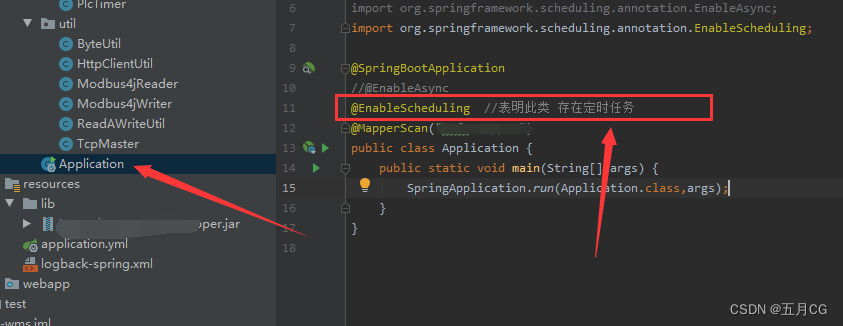
- 2、springboot主程序开启定时任务 @EnableScheduling
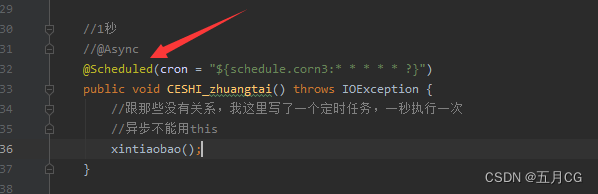
- 3、使用 @Scheduled 注解
- 二、定时任务、异步执行。
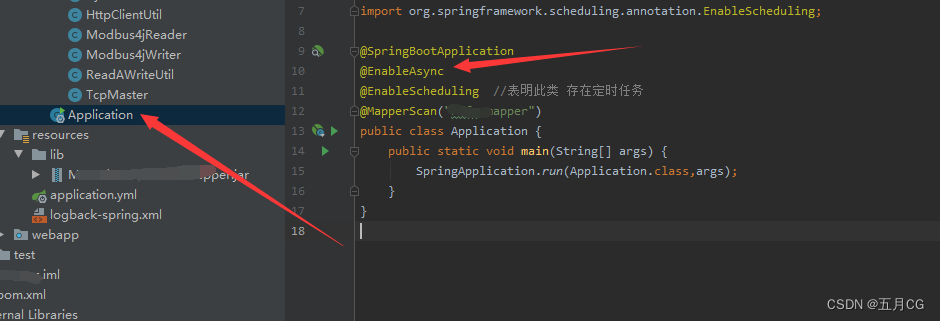
- 1、springboot主程序开启异步任务 @EnableAsync
- 2、方法上增加 @Async 注解,标识为一个异步任务
- ————————
- 如觉不错,随手点赞,关注,收藏(* ̄︶ ̄),谢谢~~
一、定时任务
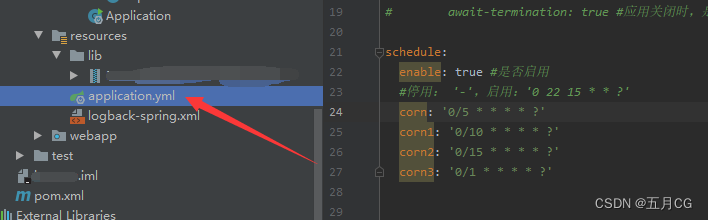
1、创建一个定时任务、时间配置文件
一个是1秒、5秒、10秒、15秒
schedule:enable: true #是否启用#停用: '-',启用:'0 22 15 * * ?'corn: '0/5 * * * * ?'corn1: '0/10 * * * * ?'corn2: '0/15 * * * * ?'corn3: '0/1 * * * * ?'
2、springboot主程序开启定时任务 @EnableScheduling
3、使用 @Scheduled 注解
二、定时任务、异步执行。
1、springboot主程序开启异步任务 @EnableAsync
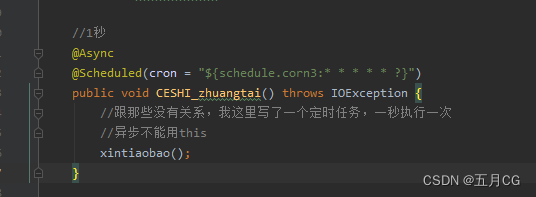
2、方法上增加 @Async 注解,标识为一个异步任务
这里需要注意的是,这个异步方法如果在本类中使用 this 调用,则不能达到异步的目的
参考:
https://blog.csdn.net/qq_38796327/article/details/90599867
http://www.manongjc.com/article/71368.html