)
Thymeleaf 是⽬前较为流⾏的视图层技术,Spring Boot 官⽅推荐使⽤ Thymeleaf。
什么是 Thymeleaf
Thymeleaf 是⼀个⽀持原⽣ THML ⽂件的 Java 模版,可以实现前后端分离的交互⽅式,即视图与业务数据分开响应,它可以直接将服务端返回的数据⽣成 HTML ⽂件,同时也可以处理 XML、JavaScript、CSS 等格式。
Thymeleaf 最⼤的特点是既可以直接在浏览器打开(静态⽅式),也可以结合服务端将业务数据填充到HTML 之后动态⽣成的⻚⾯(动态⽅法),Spring Boot ⽀持 Thymeleaf,使⽤起来⾮常⽅便。
1、创建 Maven ⼯程,不需要创建 Web ⼯程,pom.xml
4.0.0 com.southwind springbootthymeleaf 1.0-SNAPSHOT org.springframework.boot spring-boot-starter-parent 2.2.4.RELEASE org.springframework.boot spring-boot-starter-web org.springframework.boot spring-boot-starter-thymeleaf 2、application.yml
spring:thymeleaf:prefix: classpath:/templates/ #模版路径suffix: .html #模版后缀servlet:content-type: text/html #设置 Content-typeencoding: UTF-8 #编码⽅式mode: HTML5 #校验 H5 格式cache: false #关闭缓存,在开发过程中可以⽴即看到⻚⾯修改的结果3、创建 Handler
package com.southwind.controller;
import org.springframework.stereotype.Controller;
import org.springframework.web.bind.annotation.GetMapping;
import org.springframework.web.bind.annotation.RequestMapping;
import org.springframework.web.servlet.ModelAndView;
@Controller
@RequestMapping("/hello")
public class HelloHandler {@GetMapping("/index")public ModelAndView index() {ModelAndView modelAndView = new ModelAndView();modelAndView.setViewName("index");modelAndView.addObject("name", "张三");return modelAndView;}
}4、启动类
package com.southwind;
import org.springframework.boot.SpringApplication;
import org.springframework.boot.autoconfigure.SpringBootApplication;
@SpringBootApplication
public class Application {public static void main(String[] args) {SpringApplication.run(Application.class, args);}
}5、HTML
Title Index
Hello World
如果需要加载后台返回的业务数据,则需要在 HTML ⻚⾯中使⽤ Thymeleaf 模版标签来完成。
1、需要引⼊模版标签。
2、通过特定的标签完成操作。
Hello World
Thymeleaf 模版标签不同于 JSTL,Thymeleaf 模版标签是直接嵌⼊到 HTML 原⽣标签内部。
Thymeleaf 常⽤标签
(1)th:text
th:text ⽤于⽂本的显示,将业务数据的值填充到 HTML 标签中。
(2)th:if
th:if ⽤于条件判断,对业务数据的值进⾏判断,如果条件成⽴,则显示内容,否则不显示,具体的使⽤如下所示。
@GetMapping("/if")
public ModelAndView ifTest() {ModelAndView modelAndView = new ModelAndView();modelAndView.setViewName("test");modelAndView.addObject("score", 90);return modelAndView;
}
优秀
良好
(3)th:unless
th:unless 也⽤作条件判断,逻辑与 th:if 恰好相反,如果条件不成⽴则显示,否则不显示。
@GetMapping("/unless")
public ModelAndView unlessTest() {ModelAndView modelAndView = new ModelAndView();modelAndView.setViewName("test");modelAndView.addObject("score", 90);return modelAndView;
}
优秀
良好
(3)th:switch th:case
th:switch th:case 两个结合起来使⽤,⽤作多条件等值判断,逻辑与 Java 中的 switch-case ⼀致,当 switch 中的业务数据等于某个 case 时,就显示该 case 对应的内容。
@GetMapping("/switch")
public ModelAndView switchTest() {ModelAndView modelAndView = new ModelAndView();modelAndView.setViewName("test");modelAndView.addObject("studentId", 1);return modelAndView;
}
张三
李四
王五
(4)th:action
⽤来指定请求的 URL,相当于 form 表单中的 action 属性
@GetMapping("/redirect/{url}")
public String redirect(@PathVariable("url") String url, Model model) {model.addAttribute("url", "/hello/login");return url;
}
如果 action 的值直接写在 HTML 中,则需要使⽤ @{},如果是从后台传来的数据,则使⽤${}。
(5)th:each
⽤来遍历集合
org.projectlombok lombok
package com.southwind.entity;
import lombok.AllArgsConstructor;
import lombok.Data;
@Data
@AllArgsConstructor
public class User {private Integer id;private String name;
}
@GetMapping("/each")
public ModelAndView each() {List list = Arrays.asList(new User(1, "张三"),new User(2, "李四"),new User(3, "王五"));ModelAndView modelAndView = new ModelAndView();modelAndView.setViewName("test");modelAndView.addObject("list", list);return modelAndView;
} 编号 姓名
(6)th:value
@GetMapping("/value")
public ModelAndView value() {ModelAndView modelAndView = new ModelAndView();modelAndView.setViewName("test");modelAndView.addObject("value", "Spring Boot");return modelAndView;
}
(7)th:src
⽤来引⼊静态资源,相当于 HTML 原⽣标签 img、script 的 src 属性。
图⽚,css,js,静态加载的 html 都需要放置在 resources/static ⽂件中
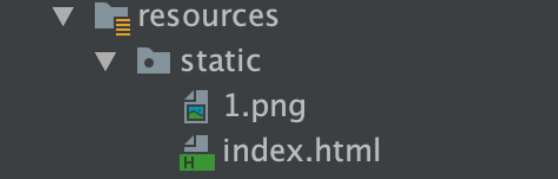
@GetMapping("/src")
public ModelAndView src() {ModelAndView modelAndView = new ModelAndView();modelAndView.setViewName("test");modelAndView.addObject("src", "/1.png");return modelAndView;
}![]()
如果 src 的值直接写在 HTML 中
![]()
(8)th:href
⽤作设置超链接的 href
@GetMapping("/href")
public ModelAndView href() {ModelAndView modelAndView = new ModelAndView();modelAndView.setViewName("test");modelAndView.addObject("href", "https://www.baidu.com");return modelAndView;
}百度(9)th:selected
⽤作给 HTML 元素设置选中,条件成⽴则选中,否则不选中。
@GetMapping("/select")
public ModelAndView select() {List list = Arrays.asList(new User(1, "张三"),new User(2, "李四"),new User(3, "王五"));ModelAndView modelAndView = new ModelAndView();modelAndView.setViewName("test");modelAndView.addObject("list", list);modelAndView.addObject("name", "李四");return modelAndView;
}
结合 th:each 来使⽤,⾸先遍历 list 集合动态创建 option 元素,根据每次遍历出的 user.name 与业务 数据中的 name 是否相等来决定是否要选择。
(10)th:attr
给 HTML 标签的任意属性赋值
@GetMapping("/attr")
public ModelAndView attr() {ModelAndView modelAndView = new ModelAndView();modelAndView.setViewName("test");modelAndView.addObject("attr", "Spring Boot");return modelAndView;
}
Thymeleaf 对象
Thymeleaf ⽀持直接访问 Servlet Web 原⽣资源,HttpServletRequest、HttpServletResponse、
HttpSession、ServletContext。
#request: 获取 HttpServletRequest 对象
#response: 获取 HttpServletResponse 对象
#session: 获取 HttpSession 对象
#servletContext: 获取 ServletContext 对象
@GetMapping("/servlet")
public String servlet(HttpServletRequest request) {request.setAttribute("value", "request");request.getSession().setAttribute("value", "session");request.getServletContext().setAttribute("value", "servletContext");return "test";
}
Thymeleaf ⽀持直接访问 session, ${#request.getAttribute('name')} 也可以简化 ${name}
@GetMapping("/servlet2")
public ModelAndView servlet2(HttpSession session) {session.setAttribute("name", "李四");ModelAndView modelAndView = new ModelAndView();modelAndView.setViewName("test");modelAndView.addObject("name", "张三");return modelAndView;
}
Thymeleaf 内置对象
(1)dates:⽇期格式化
(2)calendars:⽇期操作
(3)numbers:数字格式化
(4)strings:字符串格式化
(5)bools:boolean
(6)arrays:数组内置对象
(7)lists:List 集合内置对象
(8)sets:Set 集合内置对象
(9)maps:Map 集合内置对象
(2)calendars:⽇期操作
(3)numbers:数字格式化
(4)strings:字符串格式化
(5)bools:boolean
(6)arrays:数组内置对象
(7)lists:List 集合内置对象
(8)sets:Set 集合内置对象
(9)maps:Map 集合内置对象
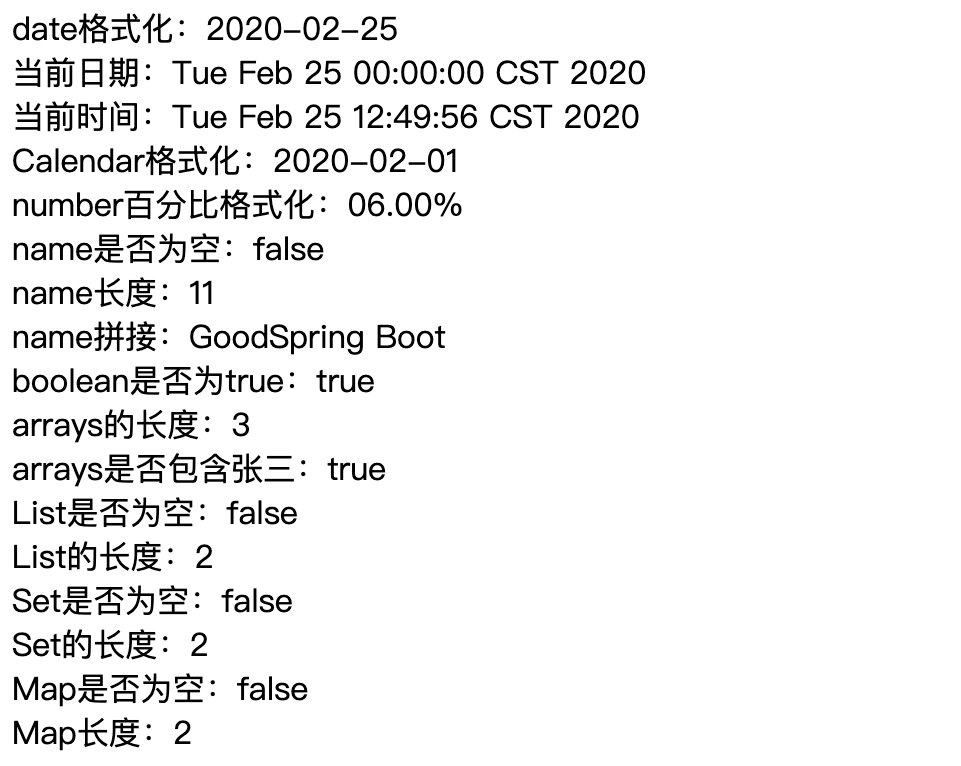
@GetMapping("/utility")
public ModelAndView utility() {ModelAndView modelAndView = new ModelAndView();modelAndView.setViewName("test");modelAndView.addObject("date", new Date());Calendar calendar = Calendar.getInstance();calendar.set(2020, 1, 1);modelAndView.addObject("calendar", calendar);modelAndView.addObject("number", 0.06);modelAndView.addObject("string", "Spring Boot");modelAndView.addObject("boolean", true);modelAndView.addObject("array", Arrays.asList("张三", "李四", "王五"));List list = new ArrayList<>();list.add(new User(1, "张三"));list.add(new User(2, "李四"));modelAndView.addObject("list", list);Set set = new HashSet<>();set.add(new User(1, "张三"));set.add(new User(2, "李四"));modelAndView.addObject("set", set);Map map = new HashMap<>();map.put(1, new User(1, "张三"));map.put(2, new User(2, "李四"));modelAndView.addObject("map", map);return modelAndView;
}
date 格式化:


当前日期:


当前时间:

Calendar 格式化:

number 百分比格式化:

name 是否为空:


name 长度:


name 拼接:

boolean 是否为 true:

arrays 的长度:


arrays 是否包含张三:

List 是否为空:


List 的长度:

Set 是否为空:


Set 的长度:

Map 是否为空:


Map 长度: