Arduino中以太网Udp通信

目录
1、测试硬件
2、程序
(0)头文件添加
(1)变量定义
(2)初始化程序
(3)循环执行程序
3、程序下载
(1)开发板控制器和端口号选择
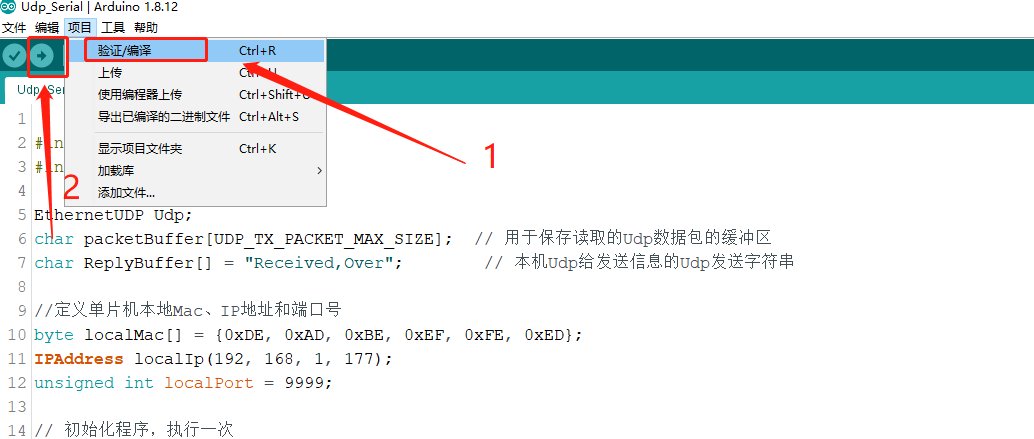
(2)程序编译和下载
4、测试
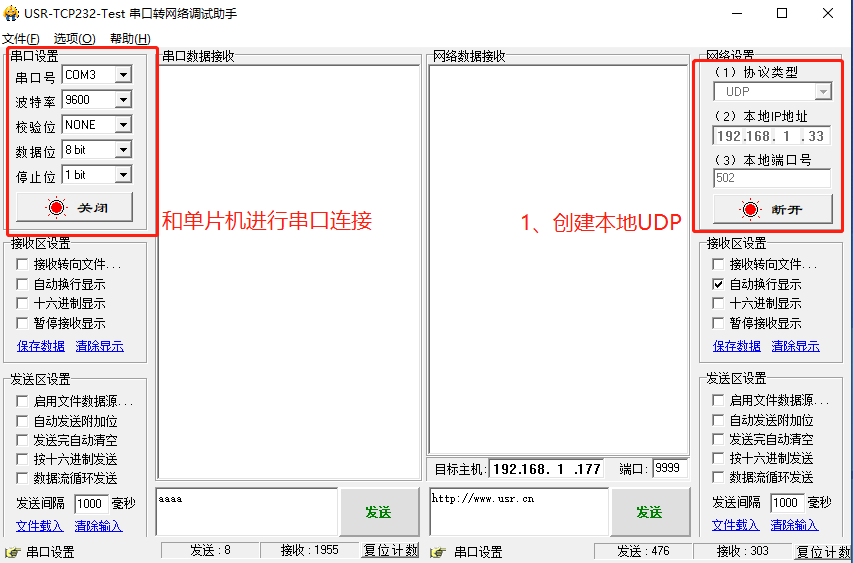
(1)打开测试软件
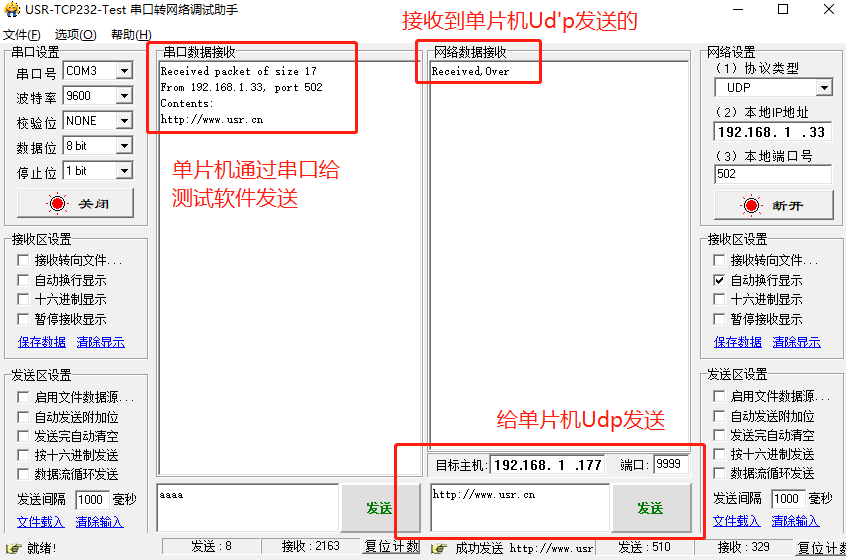
(2)网络测试助手给单片机Udp发送字符串
5、程序和测试软件下载连接
1、测试硬件
Arduino开发板,Mega系列。
W5500网口模块

2、程序
(0)头文件添加
#include <Ethernet.h>
#include <EthernetUdp.h>
(1)变量定义
EthernetUDP Udp;
char packetBuffer[UDP_TX_PACKET_MAX_SIZE];  // 用于保存读取的Udp数据包的缓冲区
char ReplyBuffer[] = "Received,Over";        // 本机Udp给发送信息的Udp发送字符串//定义单片机本地Mac、IP地址和端口号
byte localMac[] = {0xDE, 0xAD, 0xBE, 0xEF, 0xFE, 0xED};
IPAddress localIp(192, 168, 1, 177);
unsigned int localPort = 9999;
(2)初始化程序
// 初始化程序,执行一次
void setup()
{    Ethernet.begin(localMac, localIp);// 打开串口Serial.begin(9600);while (!Serial) {; //等待串口连接。仅本机USB口使用。}// 检查以太网硬件情况if (Ethernet.hardwareStatus() == EthernetNoHardware)  //检查W5500模块是否存在{Serial.println("Ethernet shield was not found.  Sorry, can't run without hardware. :(");while (true) {delay(1); // do nothing, no point running without Ethernet hardware}}    if (Ethernet.linkStatus() == LinkOFF)                 //检查网口是否连接{Serial.println("Ethernet cable is not connected.");}  // 启动UDPUdp.begin(localPort);}
(3)循环执行程序
//循环运行程序
void loop()
{int packetSize = Udp.parsePacket();   //Udp接收到的数据长度if(packetSize>0){Serial.print("Received packet of size ");       Serial.println(packetSize);                     //串口打印,Udp接收到的数据长度Serial.print("From ");IPAddress remote = Udp.remoteIP();              //串口打印,发送消息Udp的ip地址、端口号for (int i=0; i < 4; i++)                       //ip地址{Serial.print(remote[i], DEC);if (i < 3) {Serial.print(".");}}Serial.print(", port ");      Serial.println(Udp.remotePort());               //端口号// 将Udp接收到的消息,通过串口打印出来Udp.read(packetBuffer, UDP_TX_PACKET_MAX_SIZE); //Udp接收到的字符串消息Serial.println("Contents:");Serial.println(packetBuffer);//本机给发送消息的Udp机器发送消息Udp.beginPacket(Udp.remoteIP(), Udp.remotePort());Udp.write(ReplyBuffer);Udp.endPacket();       }delay(10);
}
3、程序下载
(1)开发板控制器和端口号选择

(2)程序编译和下载
4、测试
使用串口和网络调试助手软件测试。
(1)打开测试软件
创建计算机本地Udp,测试软件串口连接单片机
(2)网络测试助手给单片机Udp发送字符串
根据单片机中设置的ip地址和端口号,进行udp发送测试。
5、程序和测试软件下载连接
https://download.csdn.net/download/panjinliang066333/88622368