配置802.1x认证

实验目的:
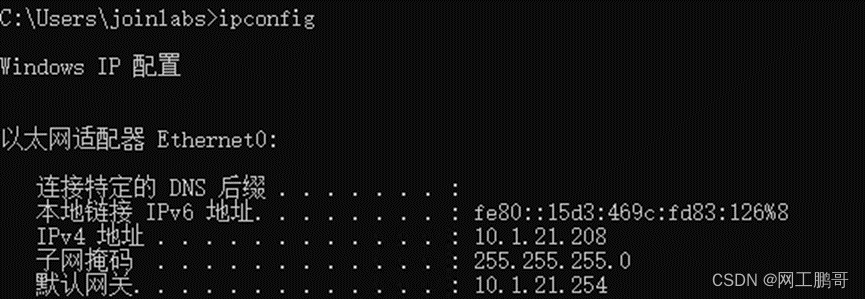
某公司拥有两个部门,市场部和人事部门,市场部和人事部的IP地址分别为10.1.11.0/24、10.1.21.0/24两个IP网段。市场部属于vlan11,人事部属于vlan21。现在需要在SW2上配置802.1x认证,实现终端用于只有认证成功后,才能访问网络中的资源。
(本实验使用真实设备,其中radius服务器需要自行搭建)
实验拓扑:
实验步骤:
步骤1:配置交换机的链路聚合
SW1的配置:
[SW1]interface Eth-Trunk 1[SW1-Eth-Trunk1]mode lacp[SW1-Eth-Trunk1]trunkport g0/0/13[SW1-Eth-Trunk1]trunkport g0/0/14
SW2的配置:
[SW2]interface Eth-Trunk 1[SW2-Eth-Trunk1]mode lacp[SW2-Eth-Trunk1]trunkport g0/0/13[SW2-Eth-Trunk1]trunkport g0/0/14[SW2]interface Eth-Trunk 2[SW2-Eth-Trunk2]mode lacp[SW2-Eth-Trunk2]trunkport g0/0/12[SW2-Eth-Trunk2]trunkport g0/0/22SW3的配置:
[SW3]interface Eth-Trunk 1[SW3-Eth-Trunk1]mode lacp[SW3-Eth-Trunk1]trunkport g0/0/23[SW3-Eth-Trunk1]trunkport g0/0/24步骤2:创建vlan,配置SW1和SW2的互联IP以及终端的网关IP地址。
SW1的配置:
[SW1]vlan batch 60 101[SW1]interface Vlanif 60[SW1-Vlanif60]ip address 10.1.60.254 24[SW1]interface Vlanif 101[SW1-Vlanif101]ip address 10.1.200.29 30SW2的配置:
[SW2]vlan batch 11 21 101[SW2]interface Vlanif 11[SW2-Vlanif10]ip address 10.1.11.254 24[SW2-Vlanif10]q[SW2]interface Vlanif 21[SW2-Vlanif20]ip address 10.2.21.254 24[SW2]interface Vlanif 101[SW2-Vlanif101]ip address 10.1.200.30 30步骤3:配置交换机的链路类型
SW1的配置:
[SW1]interface g0/0/6[SW1-GigabitEthernet0/0/6]port link-type access[SW1-GigabitEthernet0/0/6]port default vlan 60[SW1-GigabitEthernet0/0/6]q[SW1]interface Eth-Trunk 1[SW1-Eth-Trunk1]port link-type trunk[SW1-Eth-Trunk1]port trunk allow-pass vlan 101SW2的配置:
[SW2]interface Eth-Trunk 1[SW2-Eth-Trunk1]port link-type trunk[SW2-Eth-Trunk1]port trunk allow-pass vlan 101[SW2-Eth-Trunk1]q[SW2]interface Eth-Trunk 2[SW2-Eth-Trunk2]port link-type hybrid[SW2-Eth-Trunk2]port hybrid tagged vlan 11 21步骤4:配置路由并开启SW2的dhcp服务。
SW1的配置:
[SW1]ospf[SW1-ospf-1]area 0[SW1-ospf-1-area-0.0.0.0]network 10.1.60.254 0.0.0.0[SW1-ospf-1-area-0.0.0.0]network 10.1.200.29 0.0.0.0SW2的配置:
[SW2]ospf[SW2-ospf-1]area 0[SW2-ospf-1-area-0.0.0.0]network 10.1.11.254 0.0.0.0[SW2-ospf-1-area-0.0.0.0]network 10.1.21.254 0.0.0.0[SW2-ospf-1-area-0.0.0.0]network 10.1.200.30 0.0.0.0[SW2]dhcp enableInfo: The operation may take a few seconds. Please wait for a moment. done.[SW2]interface Vlanif 11[SW2-Vlanif10]dhcp select interface[SW2-Vlanif10]q[SW2]interface Vlanif 21[SW2-Vlanif20]dhcp select interface[SW2-Vlanif20]q步骤5:配置radius模板
[SW2]radius-server template radius[SW2-radius-radius]radius-server authentication 10.1.60.2 1812 //指定radius认证IP和端口号[SW2-radius-radius]radius-server accounting 10.1.60.2 1813 //指定radius计费IP和端口号[SW2-radius-radius]radius-server shared-key cipher Huawei@123//配置与radius之间的密码[SW2-radius-radius]qSW2]radius-server authorization 10.1.60.2 shared-key cipher Huawei@123 //指定radius授权服务器IP步骤6:创建认证、计费方法为radius认证
[SW2]aaa[SW2-aaa]authentication-scheme radius //创建认证模板[SW2-aaa-authen-radius]authentication-mode radius //认证模式为radius[SW2-aaa-authen-radius]q[SW2-aaa]accounting-scheme radius //创建计费模板[SW2-aaa-accounting-radius]accounting-mode radius //计费模式为radius[SW2-aaa-accounting-radius]q[SW2-aaa]domain huawei //创建认证域[SW2-aaa-domain-huawei]authentication-scheme radius //调用认证模板[SW2-aaa-domain-huawei]accounting-scheme radius//调用计费模板[SW2-aaa-domain-huawei]radius-server radius[SW2-aaa-domain-huawei]q步骤7:配置认证模板
[SW2]dot1x-access-profile name dot1x //创建802.1x认证模板[SW2-dot1x-access-profile-dot1x]q[SW2]mac-access-profile name mac//创建mac认证模板[SW2-mac-access-profile-mac]q[SW2]authentication-profile name huawei//创建认证模板[SW2-authen-profile-huawei]dot1x-access-profile dot1x//调用802.1x认证模板[SW2-authen-profile-huawei]mac-access-profile mac//调用mac认证模板[SW2-authen-profile-huawei]access-domain huawei force//配置强制使用认证域huawei[SW2-authen-profile-huawei]authentication dot1x-mac-bypass//配置旁路认证[SW2-authen-profile-huawei]q步骤8:配置地址池
[SW2]vlan pool market//创建市场部vlan池[SW2-vlan-pool-market]vlan 11[SW2-vlan-pool-market]q[SW2]vlan pool hr//创建人事部vlan池[SW2-vlan-pool-hr]vlan 21[SW2-vlan-pool-hr]q[SW2]interface Eth-Trunk 2[SW2-Eth-Trunk2]authentication-profile huawei//接口调用认证模板步骤9:配置EAP报文透传功能
[SW3]l2protocol-tunnel user-defined-protocol dot1x protocol-mac 0180-c200-0003 group-mac 0100-0000-0002[SW3]interface Eth-Trunk 1[SW3-Eth-Trunk1]l2protocol-tunnel user-defined-protocol dot1x enable[SW3]interface g0/0/1[SW3-GigabitEthernet0/0/1]l2protocol-tunnel user-defined-protocol dot1x enable验证:
在PC1上进行802.1x认证

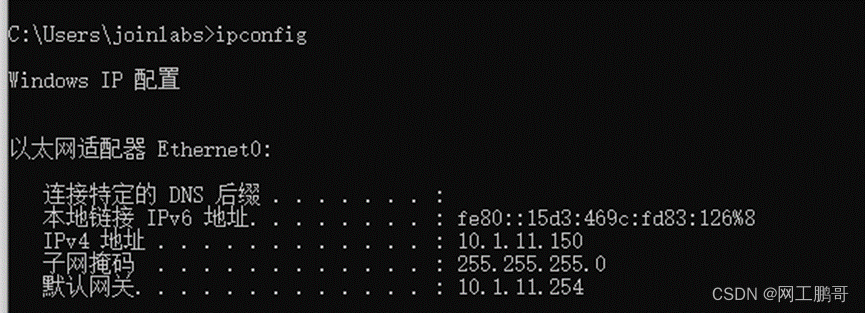
认证成功后PC能获取到vlan11的IP地址。
在PC2上进行802.1认证