Node CLI 之 Yargs (2)
)
什么是 yargs?
yargs 是一个用于处理命令行参数的 Node.js 库
安装 yargs
npm install yargs
简单例子
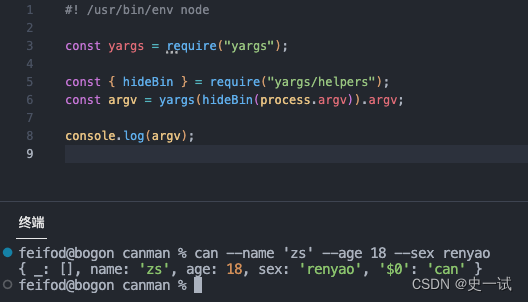
不定义任何选项,直接便可以使用
定义命令
const yargs = require('yargs')yargs.command('hello', 'Prints hello world', (yargs) => {}, (argv) => {}).argv;
- 第一个参数 命令名称
- 第二个参数 命令描述
- 第三个参数 配置参数、别名、类型、默认值等
- 第四个参数 处理命令逻辑
举个例子
const yargs = require('yargs')yargs.command('get','make a get HTTP request',function (yargs) {return yargs.option('u', {alias: 'url',describe: 'the URL to make an HTTP request to'})},function (argv) {console.log(argv.url)}).help().argv
定义 option
1. 定义选项
#! /usr/bin/env nodeconst yargs = require("yargs");yargs.option("name", {alias: "n",description: "Your name",type: "string",demandOption: true,
}).argv;console.log(`Hello ${yargs.argv.name}!`);
- 第一个参数 定义选项名称
- 第二个参数 配置选项
- alias 选项简写
- description 选项描述
- type 选项值类型
- demandOption 选项是否必填
获取选项值
const argv = yargs.argv;console.log(argv.name)
选项扩展
默认值 使用 default 实现
.option('age', {description: 'Your age',type: 'number',default: 18
})别名 使用 alias 实现
.option('gender', {alias: 'g',description: 'Your gender',type: 'string'
})参数校验
.option('gender', {alias: 'g',description: 'Your gender',type: 'string'
})
.check((argv) => {if (argv.age < 0) {throw new Error('Age cannot be negative');}return true;
})
官网文档:https://github.com/yargs/yargs/blob/main/docs/advanced.md#commands